


Home Networking ASUS Malaysia Networking User & Technical Support, Managed by ASUS Malaysia Representative
Home Networking ASUS Malaysia Networking User & Technical Support, Managed by ASUS Malaysia Representative
|
|
 Jan 4 2020, 02:11 PM Jan 4 2020, 02:11 PM
Return to original view | IPv6 | Post
#1
|
 
Senior Member
2,955 posts Joined: Sep 2009  
|
Hi guys so I just bought an ASU’s Rt Ac68u router and followed the instructions to set it up. However after setting it up, I am able to connect my Mac and other devices to the router but can’t seem to surf the net as it comes out as my internet status is disconnect as seen in the picture above. Could anyone pls help me ?
|
|
|
|
|
|
Jan 4 2020, 03:55 PM
Return to original view | IPv6 | Post
#2
|
|
Senior Member
2,955 posts Joined: Sep 2009
|
QUOTE(SilentVampire @ Jan 4 2020, 02:49 PM) VLAN tagged correctly? See #6 on this link here: https://www.blacktubi.com/guide/setup-asus-router-for-unifi/ Sadly I’m stuck at step 4 of the second link Or see this link here: https://www.asus.com/us/support/FAQ/1034366/ Either will work.  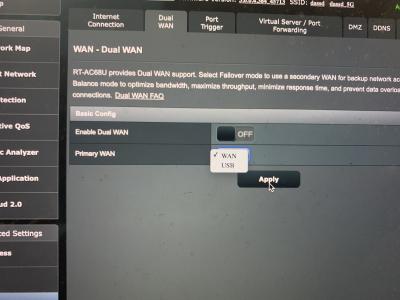
|
|
|
Jan 4 2020, 06:21 PM
Return to original view | Post
#3
|
|
Senior Member
2,955 posts Joined: Sep 2009
|
QUOTE(SilentVampire @ Jan 4 2020, 04:18 PM) Yours won’t be dual WAN. You can continue. You are a life saver man. It works perfectly fine now! |
|
|
Jun 3 2021, 10:04 PM
Return to original view | IPv6 | Post
#4
|
|
Senior Member
2,955 posts Joined: Sep 2009
|
QUOTE(shankar_dass93 @ Jan 4 2020, 02:11 PM) Hi guys so I just bought an ASU’s Rt Ac68u router and followed the instructions to set it up. However after setting it up, I am able to connect my Mac and other devices to the router but can’t seem to surf the net as it comes out as my internet status is disconnect as seen in the picture above. Could anyone pls help me ?
QUOTE(SilentVampire @ Jan 4 2020, 02:49 PM) VLAN tagged correctly? See #6 on this link here: https://www.blacktubi.com/guide/setup-asus-router-for-unifi/ Or see this link here: https://www.asus.com/us/support/FAQ/1034366/ Either will work. QUOTE(shankar_dass93 @ Jan 4 2020, 03:55 PM) Sadly I’m stuck at step 4 of the second link
QUOTE(SilentVampire @ Jan 4 2020, 04:18 PM) Yours won’t be dual WAN. You can continue. Guys long story short, I really need everyone’s help as I’m working from home and need my internet urgently.So this is what happened, in 2020, I bought an Asus router as seen in the messages that I quoted and the router worked well! My nephew played with my router and messed up the settings hence I restarted the doubters settings as we forgot our router’s password and unifi’s password. Upon calling unifi, they provided me with my username which is my email address and thereafter texted me my 13character PPOE password. Upon following the steps above to reconfigure my router, my network status on the GUI interface displays my internet status as “disconnect” as per picture l. Can anyone help me out, please ? Been WFH and I need my internet access. |
|
|
Jun 3 2021, 10:12 PM
Return to original view | IPv6 | Post
#5
|
|
Senior Member
2,955 posts Joined: Sep 2009
|
QUOTE(JohnLai @ Jun 3 2021, 10:09 PM) So....have you set the correct VLAN tagging? Or select correct ISP profile in a layman term? I am clearly going wrong somewhere in the settings and can’t figure it out. Bro, are you fine if I call you ? |
|
|
Jun 3 2021, 10:59 PM
Return to original view | Post
#6
|
|
Senior Member
2,955 posts Joined: Sep 2009
|
QUOTE(JohnLai @ Jun 3 2021, 10:32 PM) Advanced Settings ----> LAN ----> IPTV ----> Select ISP Profile : TM Unifi Bro, you saved my life man. Advanced Settings---->WAN--->Internet Connection----> WAN Connection Type ---> PPPoE Username : xxxxx@unifi There is no .com Enter your password and you are done. I kept adding .com behind my username!!!!!! Now I have to rush to get my work done, thanks man. Shooting you a pm tomorrow morning |
|
|
Oct 21 2021, 04:14 PM
Return to original view | Post
#7
|
|
Senior Member
2,955 posts Joined: Sep 2009
|
Hi guys,
I am currently using a ASUS RT-AC8U router and am keen in upgrading my Unifi package to 300mbps. There wouldn't be any issues with the router right ? |
| Change to: |  0.0494sec 0.0494sec
 0.77 0.77
 7 queries 7 queries
 GZIP Disabled GZIP Disabled
Time is now: 11th December 2025 - 07:10 PM |
 Quote
Quote