Welcome Guest ( Log In | Register )

826 Pages « < 694 695 696 697 698 > » Bottom

Outline · [ Standard ] · Linear+

Home Networking ASUS Malaysia Networking User & Technical Support, Managed by ASUS Malaysia Representative

views
     
blacktubi
post Sep 26 2021, 02:55 PM

-
Group Icon
Elite
8,415 posts

Joined: Jul 2008

QUOTE(kho51 @ Sep 26 2021, 02:25 PM)
Hi I'm using AX82u mesh with AC68u. My ram using indicate 95% usage, is it normal? Sometimes I'm experience ac68u mesh node offline which I need to manually restart it. Its occurred only recently which I had used these mesh configuration for about 2 months.
*
95% is too high to be comfortable. Are you running the latest firmware update?

High RAM usage could happen if you are a heavy user or you use all ASUSWRT features.

You can also use the scheduled reboot function to restart every night if you are facing high RAM usage.
kho51
post Sep 26 2021, 03:42 PM

New Member
*
Junior Member
23 posts

Joined: Jan 2008
QUOTE(blacktubi @ Sep 26 2021, 02:55 PM)
95% is too high to be comfortable. Are you running the latest firmware update?

High RAM usage could happen if you are a heavy user or you use all ASUSWRT features.

You can also use the scheduled reboot function to restart every night if you are facing high RAM usage.
*
Hi, Thanks for advice. I used some of the features like QOS, traffic monitor, VPN, and connect to one mesh router. If I didn't connect USB drive for aicloud, ram usage is around 78 to 81%, after connected aicloud, its goes all the way up to 95%. I schedule a reboot three times a week but still the ram usage is high, that's why a bit confuse what's going on or shall I upgrade to AX86u as its 1GB ram.
kho51
post Sep 26 2021, 03:43 PM

New Member
*
Junior Member
23 posts

Joined: Jan 2008
QUOTE(kho51 @ Sep 26 2021, 03:42 PM)
Hi, Thanks for advice. I used some of the features like QOS, traffic monitor, VPN, and connect to one mesh router. If I didn't connect USB drive for aicloud, ram usage is around 78 to 81%, after connected aicloud, its goes all the way up to 95%. I schedule a reboot three times a week but still the ram usage is high,  that's why a bit confuse what's going on or shall I upgrade to AX86u as its 1GB ram.
*
BTW, I'm using latest stock firmware for both nodes.
blacktubi
post Sep 26 2021, 05:18 PM

-
Group Icon
Elite
8,415 posts

Joined: Jul 2008

QUOTE(kho51 @ Sep 26 2021, 03:42 PM)
Hi, Thanks for advice. I used some of the features like QOS, traffic monitor, VPN, and connect to one mesh router. If I didn't connect USB drive for aicloud, ram usage is around 78 to 81%, after connected aicloud, its goes all the way up to 95%. I schedule a reboot three times a week but still the ram usage is high,  that's why a bit confuse what's going on or shall I upgrade to AX86u as its 1GB ram.
*
No surprise for the high RAM usage since you used most of the RAM intensive feature especially AiCloud.

Perhaps you can consider upgrade to the RT-AX86U with 1GB RAM and reuse the RT-AX82U as the mesh node.

Retire the aging RT-AC68U and use it as a backup / spare.
kho51
post Sep 26 2021, 09:13 PM

New Member
*
Junior Member
23 posts

Joined: Jan 2008
QUOTE(blacktubi @ Sep 26 2021, 05:18 PM)
No surprise for the high RAM usage since you used most of the RAM intensive feature especially AiCloud.

Perhaps you can consider upgrade to the RT-AX86U with 1GB RAM and reuse the RT-AX82U as the mesh node.

Retire the aging RT-AC68U and use it as a backup / spare.
*
Noted, thanks for advice
wailing81
post Sep 27 2021, 10:40 AM

Enthusiast
*****
Junior Member
711 posts

Joined: Mar 2008


hi @asus, if i bought a new asus router, can the new asus router read and use back the old setting.CFG from my old asus router? or i need to reset everything again one bye one?
TSASUSmy
post Sep 28 2021, 02:08 PM

Look at all my stars!!
*******
Senior Member
2,319 posts

Joined: Mar 2010
QUOTE(wailing81 @ Sep 27 2021, 10:40 AM)
hi @asus, if i bought a new asus router, can the new asus router read and use back the old setting.CFG from my old asus router? or i need to reset everything again one bye one?
*
Hi wailing81,

If it is same model then you can use it, but if the model is different, then I normally reconfigure the whole router.

This is to make sure everything is done right from the beginning.

Thank you
otnuus
post Sep 29 2021, 02:54 PM

Casual
***
Junior Member
382 posts

Joined: Nov 2010
Is asus DDNS down now?
https://issitedownrightnow.com/status/asuscomm.com

Edit: forget it. It can connect now.

This post has been edited by otnuus: Sep 29 2021, 03:14 PM
mpyw
post Sep 30 2021, 12:33 PM

Look at all my stars!!
*******
Senior Member
3,603 posts

Joined: Feb 2007


Hi, my AC86U 2.4G wifi signal keep dropping, many times cannot detect the signal nor the SSID name at all from all devices, however 5Ghz signal no problem at all

any recommended solution to that?

Read from other forum AC86U might have hardware problem for the 2.4Ghz, does the new AX series have these problems too?

Lineage
post Oct 1 2021, 01:37 PM

the Chaotic Throne
*******
Senior Member
4,524 posts

Joined: Oct 2007
From: ~Still finding the place~


Hi ASUSmy,

I'm using my RT-AX82U as main router, Aimesh 1unit of Lyra Trio with ethernet in bedroom. Noticed that quite frequent that i'm unable to connect to Lyra Trio wifi. At first I thought Lyra Trio hang need to restart, but after restart unable to connect to main router.

I use Asus Router App to access main router to restart it. After press restart, seems like the main router wont restart and Lyra Trio remained disconnected. I need to go main router there, hard reboot it using the power switch at the back only back to normal.

At at time of the incident, wifi and LAN using the main router has no issue.

RT-AX82U
Current Version : 3.0.0.4.386_45375-ge5f218b

Lyra Trio
Current Version : 3.0.0.4.384_46630-g3e43ad7


hmm.gif hmm.gif
TSASUSmy
post Oct 1 2021, 02:10 PM

Look at all my stars!!
*******
Senior Member
2,319 posts

Joined: Mar 2010
QUOTE(mpyw @ Sep 30 2021, 12:33 PM)
Hi, my AC86U 2.4G wifi signal keep dropping, many times cannot detect the signal nor the SSID name at all from all devices, however 5Ghz signal no problem at all

any recommended solution to that?

Read from other forum AC86U might have hardware problem for the 2.4Ghz, does the new AX series have these problems too?
*
Hi mpyw,

Is the 2.4GHz LED light on the router still on when the problem happen?

Make sure the firmware is the latest on the router. Do a factory reset and redo the setup if the problem still persist.

You can also check the log at System Log->Wireless Log-> whether the 2.4GHz has channel number shown there.

Thank you


TSASUSmy
post Oct 1 2021, 02:14 PM

Look at all my stars!!
*******
Senior Member
2,319 posts

Joined: Mar 2010
QUOTE(Lineage @ Oct 1 2021, 01:37 PM)
Hi ASUSmy,

I'm using my RT-AX82U as main router, Aimesh 1unit of Lyra Trio with ethernet in bedroom. Noticed that quite frequent that i'm unable to connect to Lyra Trio wifi. At first I thought Lyra Trio hang need to restart, but after restart unable to connect to main router.

I use Asus Router App to access main router to restart it. After press restart, seems like the main router wont restart and Lyra Trio remained disconnected. I need to go main router there, hard reboot it using the power switch at the back only back to normal.

At at time of the incident, wifi and LAN using the main router has no issue.

RT-AX82U
Current Version : 3.0.0.4.386_45375-ge5f218b

Lyra Trio
Current Version : 3.0.0.4.384_46630-g3e43ad7
hmm.gif  hmm.gif
*
Hi Lineage,

Have you try to remove the node and add again to see the problem still persist or not.

If the problem still occur, try send a feedback using the router GUI at Administration->Feedback.

PM me your email address and the time the problem occur.

Thank you
Lineage
post Oct 2 2021, 08:13 AM

the Chaotic Throne
*******
Senior Member
4,524 posts

Joined: Oct 2007
From: ~Still finding the place~


QUOTE(ASUSmy @ Oct 1 2021, 02:14 PM)
Hi Lineage,

Have you try to remove the node and add again to see the problem still persist or not.

If the problem still occur, try send a feedback using the router GUI at Administration->Feedback.

PM me your email address and the time the problem occur.

Thank you
*
Ok, will try to resetup the node again or i use another lyra trio..I got 1 unit unused unit.

Will send feedback in GUI if happen again.. nod.gif


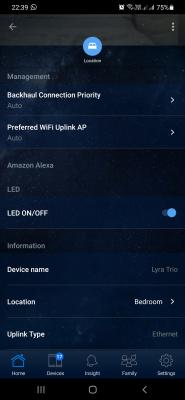
ASUSmy One more issue would like to report, I would like to turn off the LED of my Lyra Trio due to I placed it in my bedroom. Previously when using old phone, because that time haven't got my RT-AX82U as main router, I'm able to control using Asus Lyra App. Then I got RT-AX82U as main router, I still able to control it somehow but when i change to new phone, start from zero, I'm not able to control the Lyra Trio using Asus Lyra App. Tried using Asus Router App, it got the option to turn off, but it wont apply the setting, LED still on, and I renagivate back to the page, the LED is on back.

I tried to find GUI is there any option, but unfortunately, no such option.

Kindly advise.

This post has been edited by Lineage: Oct 2 2021, 09:33 AM

cablesguy
post Oct 2 2021, 02:36 PM

Regular
******
Senior Member
1,597 posts

Joined: Nov 2005


joeyrm

QUOTE(joeyrm @ Sep 24 2021, 07:19 PM)
I doubt AX3000 is the way to go if you want to get high Wifi speed, unless you use ethernet backhaul.  i ended up switching to  GT-AX11000 + XT8 setup recently to utilize dedicated 5GHz band for backhaul setup.  So far, i  manage to get above 400Mbps on the mesh node.
*
WTA, do you use any cooling for the router?
blacktubi
post Oct 2 2021, 04:59 PM

-
Group Icon
Elite
8,415 posts

Joined: Jul 2008

QUOTE(Lineage @ Oct 2 2021, 08:13 AM)
Ok, will try to resetup the node again or i use another lyra trio..I got 1 unit unused unit.

Will send feedback in GUI if happen again.. nod.gif
ASUSmy One more issue would like to report, I would like to turn off the LED of my Lyra Trio due to I placed it in my bedroom. Previously when using old phone, because that time haven't got my RT-AX82U as main router, I'm able to control using Asus Lyra App. Then I got RT-AX82U as main router, I still able to control it somehow but when i change to new phone, start from zero, I'm not able to control the Lyra Trio using Asus Lyra App. Tried using Asus Router App, it got the option to turn off, but it wont apply the setting, LED still on, and I renagivate back to the page, the LED is on back.

I tried to find GUI is there any option, but unfortunately, no such option.

Kindly advise.
*
There's actually a AiMesh 2.0 beta firmware for the Lyra Trio that's supposed to improve compatibility with other AiMesh 2.0 product.

Try at your own risk. It is a beta firmware.

https://drive.google.com/file/d/1TlLW9OBzfV...iew?usp=sharing
dustyoasis P
post Oct 2 2021, 09:14 PM

New Member
*
Probation
6 posts

Joined: Oct 2021
I'm using rt-ac67u twin pack, in a full wireless setup, on a 5000 sqft bungalow house with unifi 500mbps. I want to upgrade to a new router and keep these 2 units as nodes, still in a wireless setup. I don't know is AX92U , AX3000 or AX82U a better choice? Especially, considering the compatibility issue of Wi-Fi 6 router pairing with WiFi 5 node.

Can someone help explain the pro and con of these 3 models as the router?
Lineage
post Oct 2 2021, 10:40 PM

the Chaotic Throne
*******
Senior Member
4,524 posts

Joined: Oct 2007
From: ~Still finding the place~


QUOTE(blacktubi @ Oct 2 2021, 04:59 PM)
There's actually a AiMesh 2.0 beta firmware for the Lyra Trio that's supposed to improve compatibility with other AiMesh 2.0 product.

Try at your own risk. It is a beta firmware.

https://drive.google.com/file/d/1TlLW9OBzfV...iew?usp=sharing
*
No harm to try as I got 2 units Lyra, so i just updated 1 unit. No luck, still unable to control the LED.
More option available.

Attached Image

Attached Image
dustyoasis P
post Oct 3 2021, 11:34 AM

New Member
*
Probation
6 posts

Joined: Oct 2021
Let me clarify.. .

I'm using rt-ac67u twin pack, in a full wireless setup, on a 5000 sqft bungalow house with unifi 500mbps. I want to upgrade to a new router and keep these 2 units as nodes, still in a wireless setup.I placed router on ground floor, connected to TV box via Ethernet. On same floor, I have the node in a bedroom 10m away, it is connect to the box via Ethernet as well.

Intending to keep one ac67u as node on second floor, I don't know which WiFi 6 model to choose? Is AX56U, AX92U , AX3000 or AX82U a better choice? Especially, considering the compatibility issue of Wi-Fi 6 router pairing with WiFi 5 node.

Can someone help explain the pro and con of these 4 models as the router?

QUOTE(dustyoasis @ Oct 2 2021, 09:14 PM)
I'm using rt-ac67u twin pack, in a full wireless setup, on a 5000 sqft bungalow house with unifi 500mbps. I want to upgrade to
a new router and keep these 2 units as nodes, still in a wireless setup. I don't know is AX92U , AX3000 or AX82U a better choice? Especially, considering the compatibility issue of Wi-Fi 6 router pairing with WiFi 5 node.

Can someone help explain the pro and con of these 3 models as the router?
*
Eithanius
post Oct 3 2021, 11:39 AM

::+::KukuNius(tm)::+::
*******
Senior Member
3,952 posts

Joined: Apr 2005
From: Sector 1921B, Delta Quadrant


So tu ZenWifi ET8 bila masuk...? brows.gif
blacktubi
post Oct 3 2021, 11:49 AM

-
Group Icon
Elite
8,415 posts

Joined: Jul 2008

QUOTE(Eithanius @ Oct 3 2021, 11:39 AM)
So tu ZenWifi ET8 bila masuk...? brows.gif
*
Not until MCMC approved 6Ghz band I guess tongue.gif

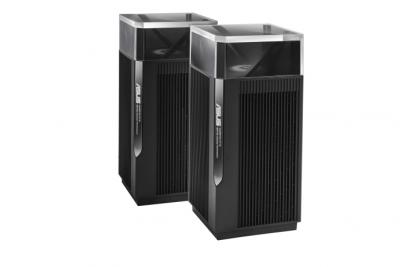
I am more interested in the ZenWiFi Pro though

Already can get 500Mbps on every corner with XT8. Doubt the ET8 gonna be a lot faster.

https://edgeup.asus.com/2021/zenwifi-pro-et...nwifi-pro-xt12/

This post has been edited by blacktubi: Oct 3 2021, 11:49 AM


Attached thumbnail(s)
Attached Image

826 Pages « < 694 695 696 697 698 > » Top
 

Change to:
| Lo-Fi Version
0.0493sec    0.35    6 queries    GZIP Disabled
Time is now: 13th December 2025 - 03:55 AM