Outline ·
[ Standard ] ·
Linear+
Home Networking ASUS Malaysia Networking User & Technical Support, Managed by ASUS Malaysia Representative
|
zen89
|
 Sep 20 2021, 11:53 AM Sep 20 2021, 11:53 AM
|
New Member


|
QUOTE(ASUSmy @ Sep 20 2021, 10:58 AM) Hi zen89, We only provide support for the stock firmware, do flash back the stock firmware and test again. Thank you Hi AsusMY support, Do i need to perform the firmware restoration using the rescue software by Asus? Or just perform the common firmware upgrade steps back to it stock firmware? |
|
|
|
|
TSASUSmy
|
Sep 20 2021, 01:34 PM
|
|
|
QUOTE(zen89 @ Sep 20 2021, 11:53 AM) Hi AsusMY support, Do i need to perform the firmware restoration using the rescue software by Asus? Or just perform the common firmware upgrade steps back to it stock firmware? Hi zen89, Use the firmware restoration method. factory reset it then redo the setup. Thank you |
|
|
|
|
|
mohd_ikh1
|
Sep 20 2021, 04:04 PM
|
New Member
|
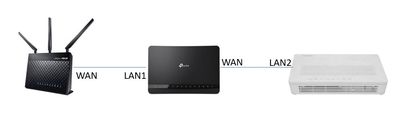
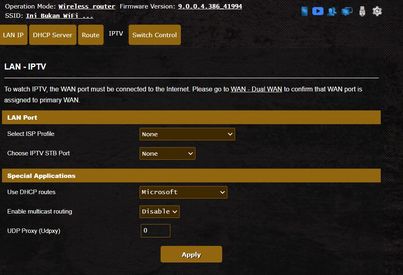
QUOTE(ASUSmy @ Sep 20 2021, 10:53 AM) Hi mohd_ikh1, May I know what devices that connect to the 2 LAN ports? Is the device support gigabit ethernet? If you have gigabit ethernet LAN port on your PC or laptop then you can connect it to the router to check the LAN port is ok or not. If you don't use the VOIP phone, you can set manual VLAN at the LAN->IPTV->ISP Profile->select manual setting and key in the VLAN as shown on the image below. Is your Astro decoder working properly with ASUS router? Thank you The 2 devices that connected like in the photo was my smart tv & astro decoder for video streaming. I have contacted ASUS hotline earlier today, case# A2109050015-0001. Confusion rectified, the 2 devices's network card only capable up to 100mbps..So I tried using a laptop that has ethernet port, then only the 'Ethernet Ports' status change to 1Gbps. So that case is considered solved I guess.. For the 2nd issue, you suggest that I change the ISP profile to manual settings and then set the VID to 621 like in your photo? Then after that LAN3 ports can be use for internet? Thanks. |
|
|
|
|
|
TSASUSmy
|
Sep 20 2021, 04:26 PM
|
|
|
QUOTE(mohd_ikh1 @ Sep 20 2021, 04:04 PM) The 2 devices that connected like in the photo was my smart tv & astro decoder for video streaming. I have contacted ASUS hotline earlier today, case# A2109050015-0001. Confusion rectified, the 2 devices's network card only capable up to 100mbps..So I tried using a laptop that has ethernet port, then only the 'Ethernet Ports' status change to 1Gbps. So that case is considered solved I guess.. For the 2nd issue, you suggest that I change the ISP profile to manual settings and then set the VID to 621 like in your photo? Then after that LAN3 ports can be use for internet? Thanks. Hi mohd_ikh1, Yes, the LAN port 3 can be use as normal LAN port after manually set the VLAN. Thank you |
|
|
|
|
|
QuantumEdge
|
Sep 20 2021, 05:00 PM
|
|
|
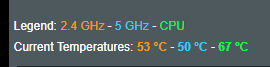 Hi, is my AX58u running a little hot? Ambient temperature around 30c |
|
|
|
|
|
DeqHifni P
|
Sep 21 2021, 12:25 PM
|
New Member
|
Hi..
Anyone here can repair asus RT AC88u?
The WAN port cannot be connect also my LAN port 1-4.
|
|
|
|
|
|
ideaplus
|
Sep 22 2021, 11:07 AM
|
|
|
QUOTE(ASUSmy @ Sep 20 2021, 11:05 AM) Hi ideaplus, The same problem that you mean is the client list is empty? Can you send Feedback using router GUI and PM me your email address used? Thank you Yes, the client list is empty happened after 2 days reset. Moreover, I can't access AX56U either it's default IP or app, but I can ping it and all internet connection is ok. The only way I can connect is to switch off and switch on to make it "live". Please suggest what I should do. Thanks. Remark: All these problems happened after updated to the latest firmware. No such issues on the previous beta firmware. This post has been edited by ideaplus: Sep 22 2021, 11:08 AM |
|
|
|
|
|
TSASUSmy
|
Sep 22 2021, 11:29 AM
|
|
|
QUOTE(ideaplus @ Sep 22 2021, 11:07 AM) Yes, the client list is empty happened after 2 days reset. Moreover, I can't access AX56U either it's default IP or app, but I can ping it and all internet connection is ok. The only way I can connect is to switch off and switch on to make it "live". Please suggest what I should do. Thanks. Remark: All these problems happened after updated to the latest firmware. No such issues on the previous beta firmware. Hi ideaplus, 1) Are you able to access the router using LAN cable? 2) Can you try fix an IP, subnet and the gateway on your WiFi or ethernet adapter and try again? 3) If both also fail, can you send a feedback after you reboot? We will check the available log first. Thank you |
|
|
|
|
|
zen89
|
Sep 22 2021, 02:25 PM
|
New Member
|
Hi AsusMY Support,
My AIMesh node RT-AX86U 2.4ghz and 5ghz lights went off today, 2 days after I have perform firmware restoration, running the latest stock firmware.
WAN light was still on. Check on the app and web GUI, the device is disconnected.
I turned off and on RT-AX86U, lights are on but still shows disconnected.
I press the reset button the restore to factory default settings, tried to add rt-ax86u back as aimesh node, it will fail to add and cause the router to reboot to try again. I am not sure why am i having so much issue with this. Not sure is this a faulty unit or not.
|
|
|
|
|
|
TSASUSmy
|
Sep 22 2021, 04:19 PM
|
|
|
QUOTE(zen89 @ Sep 22 2021, 02:25 PM) Hi AsusMY Support, My AIMesh node RT-AX86U 2.4ghz and 5ghz lights went off today, 2 days after I have perform firmware restoration, running the latest stock firmware. WAN light was still on. Check on the app and web GUI, the device is disconnected. I turned off and on RT-AX86U, lights are on but still shows disconnected. I press the reset button the restore to factory default settings, tried to add rt-ax86u back as aimesh node, it will fail to add and cause the router to reboot to try again. I am not sure why am i having so much issue with this. Not sure is this a faulty unit or not. Hi zen89, Try to restore the firmware again and perform a factory reset using the below method, if still cannot then send to service center for checking. https://www.asus.com/support/FAQ/1039078Thank you This post has been edited by ASUSmy: Sep 22 2021, 04:24 PM |
|
|
|
|
|
ideaplus
|
Sep 23 2021, 12:30 AM
|
|
|
QUOTE(ASUSmy @ Sep 22 2021, 11:29 AM) Hi ideaplus, 1) Are you able to access the router using LAN cable? 2) Can you try fix an IP, subnet and the gateway on your WiFi or ethernet adapter and try again? 3) If both also fail, can you send a feedback after you reboot? We will check the available log first. Thank you 1) Negative if without reboot the router 2) Negative if without reboot the router 3) Is the page as attached below? Please advise where can i find, if no. 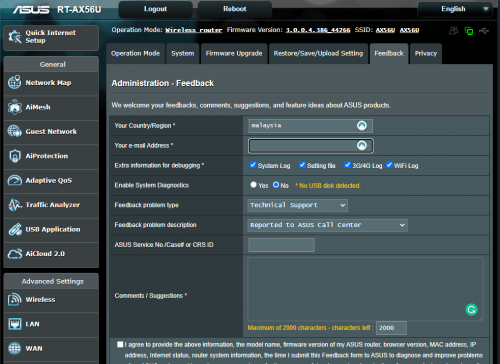 |
|
|
|
|
|
buqiuren
|
Sep 23 2021, 09:36 AM
|
New Member
|
QUOTE(QuantumEdge @ Sep 20 2021, 05:00 PM) Hi, is my AX58u running a little hot? Ambient temperature around 30c  It is normal, using it for more than 2 years no restart, 24/7 |
|
|
|
|
|
TSASUSmy
|
Sep 23 2021, 01:00 PM
|
|
|
QUOTE(ideaplus @ Sep 23 2021, 12:30 AM) 1) Negative if without reboot the router 2) Negative if without reboot the router 3) Is the page as attached below? Please advise where can i find, if no. Hi ideaplus, 3) Yes, this is the page. Can you try updating the below beta firmware and feedback if still got problem. https://www.dropbox.com/s/nsyvg0cz1mmly1e/R..._pureubi.w?dl=0 Thank you This post has been edited by ASUSmy: Sep 23 2021, 01:29 PM |
|
|
|
|
|
RJdio
|
Sep 24 2021, 01:38 PM
|
Getting Started
|
QUOTE(joeyrm @ Sep 10 2021, 03:06 PM) Thanks for sharing. I ended up getting the RT-AX86u and connected WAN from TMrouter to it and configured it using ppoe. The archer c5v is connected to one of the lan port of the asus router so the dect phone works like normal. So far so good. I’m on maxis 300Mb plan and get 305 on speed tests. I now want to get another Aimesh router for upstairs- is AX3000 still way to go ? (make use of 5ghz 160hz) |
|
|
|
|
|
joeyrm
|
Sep 24 2021, 07:19 PM
|
Getting Started
|
QUOTE(RJdio @ Sep 24 2021, 01:38 PM) Thanks for sharing. I ended up getting the RT-AX86u and connected WAN from TMrouter to it and configured it using ppoe. The archer c5v is connected to one of the lan port of the asus router so the dect phone works like normal. So far so good. I’m on maxis 300Mb plan and get 305 on speed tests. I now want to get another Aimesh router for upstairs- is AX3000 still way to go ? (make use of 5ghz 160hz) I doubt AX3000 is the way to go if you want to get high Wifi speed, unless you use ethernet backhaul. i ended up switching to GT-AX11000 + XT8 setup recently to utilize dedicated 5GHz band for backhaul setup. So far, i manage to get above 400Mbps on the mesh node. |
|
|
|
|
|
kkm
|
Sep 24 2021, 07:42 PM
|
|
|
QUOTE(joeyrm @ Sep 24 2021, 07:19 PM) I doubt AX3000 is the way to go if you want to get high Wifi speed, unless you use ethernet backhaul. i ended up switching to GT-AX11000 + XT8 setup recently to utilize dedicated 5GHz band for backhaul setup. So far, i manage to get above 400Mbps on the mesh node. Big bucks setup... |
|
|
|
|
|
lemon5969
|
Sep 25 2021, 12:54 PM
|
|
|
QUOTE(ASUSmy @ Sep 20 2021, 01:34 PM) Hi zen89, Use the firmware restoration method. factory reset it then redo the setup. Thank you Hi ASUSmy. Could i request any firmware that have wireguard function for ax56u. I just buy premium lifetime wireguard than i check ax56u dont have wireguard fuction... huhu |
|
|
|
|
|
blacktubi
|
Sep 25 2021, 02:18 PM
|
-

|
QUOTE(lemon5969 @ Sep 25 2021, 12:54 PM) Hi ASUSmy. Could i request any firmware that have wireguard function for ax56u. I just buy premium lifetime wireguard than i check ax56u dont have wireguard fuction... huhu Wait for official release. Still beta testing. |
|
|
|
|
|
joeyrm
|
Sep 26 2021, 02:07 PM
|
Getting Started
|
QUOTE(kkm @ Sep 24 2021, 07:42 PM) Yes.. too big  , but so far so good and enough to cover my double-storey semi-D house with high speed wifi. This post has been edited by joeyrm: Sep 27 2021, 01:56 PM |
|
|
|
|
|
kho51
|
Sep 26 2021, 02:25 PM
|
New Member
|
Hi I'm using AX82u mesh with AC68u. My ram using indicate 95% usage, is it normal? Sometimes I'm experience ac68u mesh node offline which I need to manually restart it. Its occurred only recently which I had used these mesh configuration for about 2 months.
|
|
|
|
|



 Quote
Quote





 0.0370sec
 0.87
0.87
 6 queries
 GZIP Disabled