Welcome Guest ( Log In | Register )

826 Pages « < 605 606 607 608 609 > » Bottom

Outline · [ Standard ] · Linear+

Home Networking ASUS Malaysia Networking User & Technical Support, Managed by ASUS Malaysia Representative

views
     
ideaplus
post Sep 21 2020, 05:08 PM

Enthusiast
*****
Junior Member
914 posts

Joined: Nov 2014
QUOTE(ASUSmy @ Sep 21 2020, 04:33 PM)
Hi ideaplus,

It is stable for normal use and with the fix trying to solve the problem you face.

Different environment may have different result. That's why we share the beta firmware for user to test.

Thank you
*
Thanks for the reply
Will try and feedback later on
hongli.11.hongli
post Sep 22 2020, 09:15 AM

Getting Started
**
Junior Member
54 posts

Joined: Sep 2017
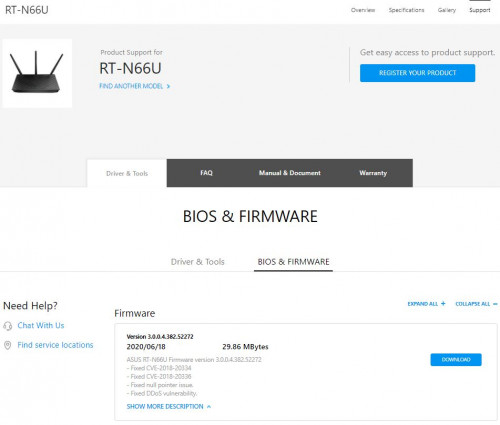
Was talking to a friend who using RT-N66U for the past 7 years, this is impressed and surprised, ASUS still maintaining EOL model firmware, while most of us already in AX or at least AC router.

Salute to ASUS team! notworthy.gif notworthy.gif

user posted image
shaktiv8
post Sep 22 2020, 02:12 PM

Casual
***
Junior Member
363 posts

Joined: Sep 2014


*solved*

This post has been edited by shaktiv8: Sep 24 2020, 11:34 AM
ideaplus
post Sep 22 2020, 07:45 PM

Enthusiast
*****
Junior Member
914 posts

Joined: Nov 2014
QUOTE(ASUSmy @ Sep 21 2020, 04:33 PM)
Hi ideaplus,

It is stable for normal use and with the fix trying to solve the problem you face.

Different environment may have different result. That's why we share the beta firmware for user to test.

Thank you
*
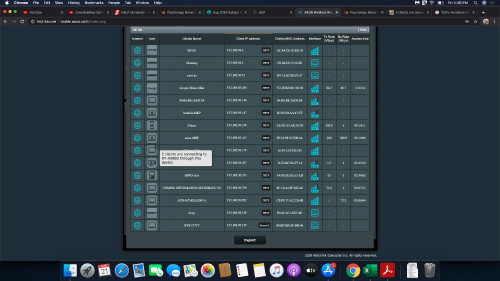
Hi i had updated with provided firmware. Anyhow, it looked like lost some functions after the update. Please check the below picture.

Attached Image

This post has been edited by ideaplus: Sep 22 2020, 07:49 PM
ideaplus
post Sep 22 2020, 07:51 PM

Enthusiast
*****
Junior Member
914 posts

Joined: Nov 2014
QUOTE(ideaplus @ Sep 22 2020, 07:45 PM)
Hi i had updated with provided firmware. Anyhow, it looked like lost some functions after the update. Please check the below picture.

Attached Image
*
And this is the screen shot before update
Attached Image
blacktubi
post Sep 22 2020, 09:07 PM

-
Group Icon
Elite
8,407 posts

Joined: Jul 2008

QUOTE(ideaplus @ Sep 22 2020, 07:45 PM)
Hi i had updated with provided firmware. Anyhow, it looked like lost some functions after the update. Please check the below picture.

Attached Image
*
The firmware given by ASUS rep is a beta firmware.

Beta firmware don't have auto update function.
tharmaraj
post Sep 23 2020, 07:54 AM

Casual
***
Junior Member
312 posts

Joined: Apr 2015


QUOTE(ASUSmy @ Sep 21 2020, 04:06 PM)
Hi tharmaraj,

Can you try update the beta firmware from the link below and monitor the WiFi connection. Do send us another feedback if the problem still persist.

https://drive.google.com/file/d/1BlAehhTnXO...rqd09p2iDw/view

Thank you
*
Thanks for your feedback. Is this beta firmware stable? I don't want to mess-up my current setup because I only depend on this router since I'm working from home.

Appreciate if you can confirm on this.
ideaplus
post Sep 23 2020, 08:13 AM

Enthusiast
*****
Junior Member
914 posts

Joined: Nov 2014
QUOTE(blacktubi @ Sep 22 2020, 09:07 PM)
The firmware given by ASUS rep is a beta firmware.

Beta firmware don't have auto update function.
*
Thanks for your fast reply. Hope it can solve my problems. Let's see how biggrin.gif

This post has been edited by ideaplus: Sep 23 2020, 08:13 AM
kenlui
post Sep 23 2020, 08:20 AM

Look at all my stars!!
*******
Senior Member
2,380 posts

Joined: Mar 2005


Hi guys,

I'm intending to get a AX86U as a mesh node for my exisiting AC5300U, I do understand that they are of different generation of wifi 5/6.

Hence my question as follow :

1. Would a AC68U be better suited in this situation?
2. Would I be able to fully utilize the wifi 6 coverage if I use the AC5300U as the main router instead of the AX68u?

I do understand if I choose to use the AX68U as main router, I'll loose the triband feature of the AC5300U which makes me reluctant.

Looking forward to any of your opinions!
TSASUSmy
post Sep 23 2020, 02:58 PM

Look at all my stars!!
*******
Senior Member
2,319 posts

Joined: Mar 2010
QUOTE(shaktiv8 @ Sep 22 2020, 02:12 PM)
Hello guys I just want to rant a bit, i've been using ax88u and ac86u aimesh combo for about a year now.

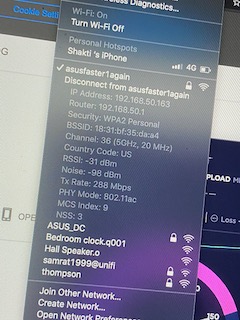
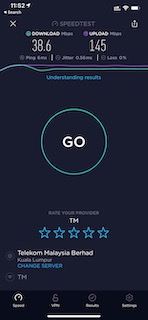
From the start the wifi was really slow on 5ghz, but unusable for my apple devices on 2.4ghz (about 1-2mbps) and needs constant restarting to regain internet speed. I thought this was an apple issue as all of my mobile devices are apple.

anyway in addition to the sudden and irritatingly slow wifi on a router i paid almost 2k for, whenever i need it the most ie downloading important files on i am on a zoom meeting, it always seems to crash. it drops the wan connection and i am unable to access the web ui from my laptop and have to manually go down and disconnect the power to reset. I thought this was a TM and their modem issue for so long, as in the asus logs it says something about pado packets timing out and wan connection disconnected unexpectedly

There was a time at the starting of the month where it disconnected about once a day, requiring a manual reset. I sent many log files and reports to asus through my router but did not get a single reply.

The final straw was when the internet cut off during a graded online presentation, causing me to get 0 for presentation and participation marks.
I drove to low yat on the same day, went to viewpoint and got myself a TP-Link Deco X20 for RM549 as i didn't believe the issue was with the asus router but with tm, so i wanted to test out a different router.
But to my amazement, i have had no issues with anything internet related for the past 2 weeks, wifi speeds across all devices were exceptional, even with the single small deco unit, wifi coverage is better than the single 2k ax88u. i was so shocked hahah, i really thought asus would be the best when it comes to routers, but this mesh unit is so much more stable, gives faster wifi at a distance and has a usable 2.4ghz wifi band unlike the asus
below is the screenshot from the asus router after so many resets and channel changes, after a while it still gets stuck to below 300mbps, I really want to sell them and invent fully in more deco systems for why house, dont know who to sell this useless asus router to, still got 2 year 6 months warranty
user posted image
user posted image
user posted image
user posted image
*
Hi shaktiv8,

Have you try to update the firmware to the latest? If yes, can you PM me your email address used to send the feedback and I will request RD to check.

Thank you
TSASUSmy
post Sep 23 2020, 03:03 PM

Look at all my stars!!
*******
Senior Member
2,319 posts

Joined: Mar 2010
QUOTE(tharmaraj @ Sep 23 2020, 07:54 AM)
Thanks for your feedback. Is this beta firmware stable? I don't want to mess-up my current setup because I only depend on this router since I'm working from home.

Appreciate if you can confirm on this.
*
Hi tharmaraj,

Some features are disabled to test the stability of the router. I will update again once we have an official firmware for the RT-AX56U.

Thank you
tharmaraj
post Sep 23 2020, 03:19 PM

Casual
***
Junior Member
312 posts

Joined: Apr 2015


QUOTE(ASUSmy @ Sep 23 2020, 03:03 PM)
Hi tharmaraj,

Some features are disabled to test the stability of the router. I will update again once we have an official firmware for the RT-AX56U.

Thank you
*
Noted and I have installed beta firmware as per your suggestion because I cannot tolerate anymore with the 5ghz connection dropping. Let's see how it goes and I'll feedback.
TSASUSmy
post Sep 23 2020, 04:40 PM

Look at all my stars!!
*******
Senior Member
2,319 posts

Joined: Mar 2010
QUOTE(kenlui @ Sep 23 2020, 08:20 AM)
Hi guys,

I'm intending to get a AX86U as a mesh node for my exisiting AC5300U, I do understand that they are of different generation of wifi 5/6.

Hence my question as follow :

1. Would a AC68U be better suited in this situation?
2. Would I be able to fully utilize the wifi 6 coverage if I use the AC5300U as the main router instead of the AX68u?

I do understand if I choose to use the AX68U as main router, I'll loose the triband feature of the AC5300U which makes me reluctant.

Looking forward to any of your opinions!
*
Hi kenlui,

You still can get the AX connectivity from the RT-AX86U if you set it as node.

Thank you
Kuddo Sachi P
post Sep 23 2020, 06:52 PM

New Member
*
Probation
21 posts

Joined: Sep 2020
QUOTE(tharmaraj @ Sep 23 2020, 03:19 PM)
Noted and I have installed beta firmware as per your suggestion because I cannot tolerate anymore with the 5ghz connection dropping. Let's see how it goes and I'll feedback.
*
Hi, may i ask so far is it good after you update the beta ? thank you
kenlui
post Sep 23 2020, 07:26 PM

Look at all my stars!!
*******
Senior Member
2,380 posts

Joined: Mar 2005


QUOTE(ASUSmy @ Sep 23 2020, 04:40 PM)
Hi kenlui,

You still can get the AX connectivity from the RT-AX86U if you set it as node.

Thank you
*
Thank you for your reply.

So in this situation, the AC5300U is better suited to be the main router due to it's triband feature right?
tharmaraj
post Sep 23 2020, 09:37 PM

Casual
***
Junior Member
312 posts

Joined: Apr 2015


QUOTE(Kuddo Sachi @ Sep 23 2020, 06:52 PM)
Hi, may i ask so far is it good after you update the beta ? thank you
*
hello, so far I don't see any connection drops but still I want to monitor for sometime. I detected this issue after a month using this router.

This post has been edited by tharmaraj: Sep 23 2020, 09:38 PM
MarekWRO P
post Sep 23 2020, 11:58 PM

New Member
*
Probation
9 posts

Joined: Sep 2020
QUOTE(ASUSmy @ Sep 21 2020, 04:13 PM)
Hi MarekWRO,

Can you try go to WAN->Internet Connection->Special Requirement from ISP->MAC Address->Click on the MAC Clone and apply the setting.

Do send a feedback to us if the problem still persist.

Thank you
*
ISM already have MAC address of device... if i clone mac i will get my PC mac instead of rooter mac this will not work.
Or maybe i should put there rooter mac ? ... but this seems not to have sense.
MarekWRO P
post Sep 23 2020, 11:58 PM

New Member
*
Probation
9 posts

Joined: Sep 2020
QUOTE(ASUSmy @ Sep 21 2020, 04:13 PM)
Hi MarekWRO,

Can you try go to WAN->Internet Connection->Special Requirement from ISP->MAC Address->Click on the MAC Clone and apply the setting.

Do send a feedback to us if the problem still persist.

Thank you
*
ISP already have MAC address of device... if i clone mac i will get my PC mac instead of rooter mac this will not work.
Or maybe i should put there rooter mac ? ... but this seems not to have sense.
Kuddo Sachi P
post Sep 24 2020, 07:18 AM

New Member
*
Probation
21 posts

Joined: Sep 2020
QUOTE(tharmaraj @ Sep 23 2020, 09:37 PM)
hello, so far I don't see any connection drops but still I want to monitor for sometime. I detected this issue after a month using this router.
*
Thank you for information, may i ask to keep update in this topic if anything happen like connection drop or anything?
ideaplus
post Sep 24 2020, 08:57 AM

Enthusiast
*****
Junior Member
914 posts

Joined: Nov 2014
QUOTE(blacktubi @ Sep 22 2020, 09:07 PM)
The firmware given by ASUS rep is a beta firmware.

Beta firmware don't have auto update function.
*
Understood. So far the connection is ok. Will monitor and see how.

826 Pages « < 605 606 607 608 609 > » Top
 

Change to:
| Lo-Fi Version
0.0278sec    0.31    6 queries    GZIP Disabled
Time is now: 5th December 2025 - 01:54 PM