Welcome Guest ( Log In | Register )

826 Pages « < 606 607 608 609 610 > » Bottom

Outline · [ Standard ] · Linear+

Home Networking ASUS Malaysia Networking User & Technical Support, Managed by ASUS Malaysia Representative

views
     
TSASUSmy
post Sep 24 2020, 10:05 AM

Look at all my stars!!
*******
Senior Member
2,319 posts

Joined: Mar 2010
QUOTE(ryansxs @ Sep 17 2020, 02:00 PM)
Direct connect (via wifi 5G) to TUF-3000 will give me close to 450Mbps.
*
Hi ryansxs,

Can you try do the speedtest at the node location and the laptop location without powering the node? This is to compare the different in speed with and without the node.

Thank you
TSASUSmy
post Sep 24 2020, 11:08 AM

Look at all my stars!!
*******
Senior Member
2,319 posts

Joined: Mar 2010
QUOTE(MarekWRO @ Sep 23 2020, 11:58 PM)
ISP already have MAC address of device... if i clone mac i will get my PC mac instead of rooter mac this will not work.
Or maybe i should put there rooter mac ? ... but this seems not to have sense.
*
Hi MarekWRO ,

You may try the MAC Clone first, if the problem still persist, do send a feedback and PM me your email address. I will request RD to check the feedback.

Thank you
TSASUSmy
post Sep 24 2020, 11:21 AM

Look at all my stars!!
*******
Senior Member
2,319 posts

Joined: Mar 2010
QUOTE(Ching Aik @ Sep 17 2020, 10:27 AM)
Hi AsusMY,

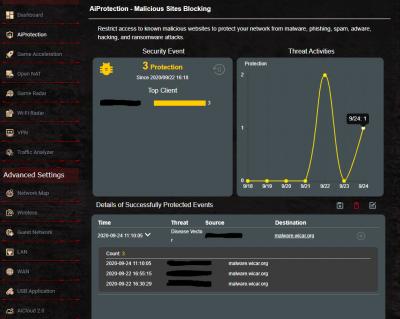
AiProtection stucked at 122 times.
If I manually visit spam site > AiProtection does prompt a warning page to stop me, but just no longer move the counter, it stucked there.

Feedback just sent @ 10:26am, email is chingaik@ktsturbobilletx.com
Thank you.

user posted image
*
Hi Ching Aik,

If you click on the 122 number, do you see any new entry on the "Details of Successfully Protected Events"?

Thank you


Attached thumbnail(s)
Attached Image
ryansxs
post Sep 24 2020, 01:26 PM

Look at all my stars!!
*******
Senior Member
2,378 posts

Joined: Dec 2005


QUOTE(ASUSmy @ Sep 24 2020, 10:05 AM)
Hi ryansxs,

Can you try do the speedtest at the node location and the laptop location without powering the node? This is to compare the different in speed with and without the node.

Thank you
*
Laptop at node location : 194Mbps
Laptop at original position : 59Mbps

Both test done when node is switched off.
Ching Aik
post Sep 24 2020, 01:55 PM

Getting Started
**
Junior Member
58 posts

Joined: Mar 2016


QUOTE(ASUSmy @ Sep 24 2020, 11:21 AM)
Hi Ching Aik,

If you click on the 122 number, do you see any new entry on the "Details of Successfully Protected Events"?

Thank you
*
Hi AsusMY,

Thanks for reply, I thought you missed my post already. thumbup.gif
No new entry since issue reported.
Previously it happened too, but fixed after reset router, then comeback after a while.
It didn't affect our networking, but best if the protection monitor work so I can know which device got problem need look into for prevention.

Below is screenshot as of today:
user posted image

Manually visit spam site will trigger warning message, but no new entry will be record, stuck at 122 times.
user posted image

Regards
ChingAik
TSASUSmy
post Sep 24 2020, 04:15 PM

Look at all my stars!!
*******
Senior Member
2,319 posts

Joined: Mar 2010
QUOTE(ryansxs @ Sep 24 2020, 01:26 PM)
Laptop at node location : 194Mbps
Laptop at original position : 59Mbps

Both test done when node is switched off.
*
Hi ryansxs,

From the result I can see there is almost 3 times better bandwidth with the node added.

I believe this is because there are blockage in between.

It just like phone showing LTE signal but not getting the LTE speed when inside building.

Thank you
tudor_kg
post Sep 24 2020, 06:50 PM

New Member
*
Newbie
33 posts

Joined: May 2017
QUOTE(sHawTY @ Sep 7 2020, 12:46 PM)
No. The issue with my father's AX56U is about not being able to get an IP address when you are trying to connect to 5GHz. And I'm not the only one having this issue. Tons of complaints all over the internet

Never had this issue with RT-N16, AC68U, AC88U, AC86U & GT-AC5300

My anger with ASUS is that they refused to admit that the AX56U is a problematic model and their refusal to pull it back from sales seeing just how many complaints about it in this forum itself
Itu belum campur those people who doesn't know about our forum, perhaps there are hundreds or maybe thousands out there that had issues with their AX56U as well but don't know where to complain publicly
*
hi shawty, i have this exact problem with my ax56u. requires restart daily. if not multiple devices in my home wont be able to connect. sometimes happen on both 2.4 and 5G. but most of the time 5G. tried both official firmware and merlin, it happening on both version.

it wont happen immediately after restart but sooner or later, whether a few hours later or next day, it will happen.

this is my first asus router. i hope asus will fix this very very soon. already considering TP Link AX20 but havent bought it yet. came from Dlink before Asus so i am not considering going back to Dlink. plenty buggy as well.
ryansxs
post Sep 24 2020, 07:11 PM

Look at all my stars!!
*******
Senior Member
2,378 posts

Joined: Dec 2005


QUOTE(ASUSmy @ Sep 24 2020, 04:15 PM)
Hi ryansxs,

From the result I can see there is almost 3 times better bandwidth with the node added.

I believe this is because there are blockage in between.

It just like phone showing LTE signal but not getting the LTE speed when inside building.

Thank you
*
With the link speed between router and node, i believe the speed can be even higher.
I have gotten up to 230mbps one time. Nowadays it lingers in 160Mbps.
That is the reason i posted here, thinking if there could be any specific parameter changes i could do.

Blockage....its the same distance and one wall apart.

In mobile communication, when you get full bar and still getting low throughput is due to congestion. In a mobile cell, the BW allocated for the cell is limited. When more users are in the same cell, the users are to share the resources. Hence high signal (SNR) but throughput is not up to the peak cell throughput.

Reyz
post Sep 25 2020, 09:22 AM

Casual
***
Junior Member
321 posts

Joined: Aug 2008
QUOTE(ASUSmy @ Sep 23 2020, 04:40 PM)
Hi kenlui,

You still can get the AX connectivity from the RT-AX86U if you set it as node.

Thank you
*
Thinking to do same setup buy with tuf ax3000 as main router and ac86u as a node.any compatibility issue if i combine both ac and ax router?the ssid will combined become 1 ssid which is wifi 5 or wifi 6?
TSASUSmy
post Sep 25 2020, 10:03 AM

Look at all my stars!!
*******
Senior Member
2,319 posts

Joined: Mar 2010
QUOTE(Reyz @ Sep 25 2020, 09:22 AM)
Thinking to do same setup buy with tuf ax3000 as main router and ac86u as a node.any compatibility issue if i combine both ac and ax router?the ssid will combined become 1 ssid which is wifi 5 or wifi 6?
*
Hi Reyz,

You will be seeing the same SSID for WiFi 5 and WiFi 6. The node will not have WiFi 6.

Something to consider when you are using TUF-AX3000 as main router or mixing WiFi 5 and WiFi 6.

From the below spec, as you can see, the TUF-AX3000 AC maximum WiFi speed for WiFi 5 is 867Mbps.
Data Rate
802.11a : 6,9,12,18,24,36,48,54 Mbps
802.11b : 1, 2, 5.5, 11 Mbps
802.11g : 6,9,12,18,24,36,48,54 Mbps
802.11n : up to 300 Mbps
802.11ac : up to 867 Mbps
802.11ax (2.4GHz) : up to 574 Mbps
802.11ax (5GHz) : up to 2402 Mbps

For RT-AC86U, the WiFi 5 can up to 2167Mbps, this will limit by the TUF-AX3000.
Data Rate
802.11a : 6,9,12,18,24,36,48,54 Mbps
802.11b : 1, 2, 5.5, 11 Mbps
802.11g : 6,9,12,18,24,36,48,54 Mbps
802.11n : up to 450 Mbps
802.11ac : up to 1734 Mbps
1024QAM (2.4GHz) : up to 750 Mbps
1024QAM (5GHz) : up to2167 Mbps

Thank you

TSASUSmy
post Sep 25 2020, 10:09 AM

Look at all my stars!!
*******
Senior Member
2,319 posts

Joined: Mar 2010
QUOTE(tudor_kg @ Sep 24 2020, 06:50 PM)
hi shawty, i have this exact problem with my ax56u. requires restart daily. if not multiple devices in my home wont be able to connect. sometimes  happen on both 2.4 and 5G. but most of the time 5G. tried both official firmware and merlin, it happening on both version.

it wont happen immediately after restart but sooner or later, whether a few hours later or next day, it will happen.

this is my first asus router. i hope asus will fix this very very soon. already considering TP Link AX20 but havent  bought it yet. came from Dlink before Asus so i am not considering going back to Dlink. plenty buggy as well.
*
Hi tudor_kg,

You may try the beta firmware below and feedback to us if you still got the WiFi disconnection.

https://drive.google.com/file/d/1BlAehhTnXO...rqd09p2iDw/view

Thank you
TSASUSmy
post Sep 25 2020, 02:42 PM

Look at all my stars!!
*******
Senior Member
2,319 posts

Joined: Mar 2010
QUOTE(mostwanted82 @ Sep 16 2020, 03:40 PM)
Limit to 20 may solve the problem but I do not have this issue previously (been using this router for 5 years +), why do i need to set a limit in BT now?

Before that only few devices connected wired and wireless, but now added many devices (smart home sensors, tablets, laptops, robot vacuums), I need to understand is it Asus AC68u already can't support my usage?

Out of memory due to many devices connected?

Or the firmware getting bigger and bigger and using more resources?
*
Hi mostwanted82,

RD are trying to come out a beta firmware for you to test but it will take around 2 weeks come out the firmware.

Will update you again once it is available.

Thank you
pikacu
post Sep 25 2020, 04:19 PM

male tag rosak
*******
Senior Member
7,740 posts

Joined: Jun 2006
From: Some Yih


QUOTE(sHawTY @ Sep 7 2020, 12:46 PM)
No. The issue with my father's AX56U is about not being able to get an IP address when you are trying to connect to 5GHz. And I'm not the only one having this issue. Tons of complaints all over the internet


*
yo. i have Ax56u and I do have this problem. not even merlin know wtf im talking about. disabling WDS didn't do anything apparently.

now im using AX86u and made ax56u as wifi mesh member.

EDIT: LOL its happening also even as ai mesh member, but very less frequent compared when it is as main router. trying out the beta now

This post has been edited by pikacu: Sep 25 2020, 11:16 PM
pikacu
post Sep 25 2020, 04:22 PM

male tag rosak
*******
Senior Member
7,740 posts

Joined: Jun 2006
From: Some Yih


QUOTE(ASUSmy @ Sep 25 2020, 10:09 AM)
Hi tudor_kg,

You may try the beta firmware below and feedback to us if you still got the WiFi disconnection.

https://drive.google.com/file/d/1BlAehhTnXO...rqd09p2iDw/view

Thank you
*
If my AX56u is a member of wifi mesh, can i use this firmware also?
tudor_kg
post Sep 25 2020, 05:00 PM

New Member
*
Newbie
33 posts

Joined: May 2017
QUOTE(ASUSmy @ Sep 25 2020, 10:09 AM)
Hi tudor_kg,

You may try the beta firmware below and feedback to us if you still got the WiFi disconnection.

https://drive.google.com/file/d/1BlAehhTnXO...rqd09p2iDw/view

Thank you
*
yes trying it already. thanks. will feedback next week if still happening
thomas1983
post Sep 25 2020, 07:48 PM

Getting Started
**
Junior Member
159 posts

Joined: Jan 2005


Dear all sifu ,
Can a Singapore set of Ac88u use as unifi router ?
Afraid the setting is not compatible with msia one

This post has been edited by thomas1983: Sep 25 2020, 07:58 PM
pikacu
post Sep 25 2020, 11:11 PM

male tag rosak
*******
Senior Member
7,740 posts

Joined: Jun 2006
From: Some Yih


QUOTE(thomas1983 @ Sep 25 2020, 07:48 PM)
Dear all sifu ,
Can a Singapore set of Ac88u use as unifi router ?
Afraid the setting is not compatible with msia one
*
dont think any issue of this. just set vlan id properly under LAN>iptv
thomas1983
post Sep 25 2020, 11:27 PM

Getting Started
**
Junior Member
159 posts

Joined: Jan 2005


QUOTE(pikacu @ Sep 25 2020, 11:11 PM)
dont think any issue of this. just set vlan id properly under LAN>iptv
*
You mean setting for the unifi playTV?
pikacu
post Sep 25 2020, 11:37 PM

male tag rosak
*******
Senior Member
7,740 posts

Joined: Jun 2006
From: Some Yih


QUOTE(thomas1983 @ Sep 25 2020, 11:27 PM)
You mean setting for the unifi playTV?
*
user posted image

this is my setting for Maxis FTTH. should be no difference on Unifi (if on manual).

If your SG set have this preset, maybe can try..never tried it.

user posted image
thomas1983
post Sep 26 2020, 12:35 AM

Getting Started
**
Junior Member
159 posts

Joined: Jan 2005


QUOTE(pikacu @ Sep 25 2020, 11:37 PM)
user posted image

this is my setting for Maxis FTTH. should be no difference on Unifi (if on manual).

If your SG set have this preset, maybe can try..never tried it.

user posted image
*
Noted but I think no issue for me coz I don’t use the unifi playTV , I using evpad tvbox wink.gif

So I guess there is no issue right

This post has been edited by thomas1983: Sep 26 2020, 12:36 AM

826 Pages « < 606 607 608 609 610 > » Top
 

Change to:
| Lo-Fi Version
0.0293sec    0.27    6 queries    GZIP Disabled
Time is now: 5th December 2025 - 05:20 PM