

QUOTE(goolias @ Apr 15 2019, 10:46 PM)
are your routers support vlan?

From google search i think got support for both router. Also when set up the router can choose few fibre profiles like unifi, maxis fibre home, maxis business, etcHome Networking ASUS Malaysia Networking User & Technical Support, Managed by ASUS Malaysia Representative
|
|
 Apr 15 2019, 10:57 PM Apr 15 2019, 10:57 PM
Show posts by this member only | IPv6 | Post
#10061
|
 
Junior Member
303 posts Joined: Nov 2013 
|
QUOTE(goolias @ Apr 15 2019, 10:46 PM) are your routers support vlan? From google search i think got support for both router. Also when set up the router can choose few fibre profiles like unifi, maxis fibre home, maxis business, etc |
|
|
|
|
|
Apr 15 2019, 11:40 PM
|

Senior Member
5,714 posts Joined: Mar 2007  
|
QUOTE(arza04 @ Apr 15 2019, 10:57 PM) From google search i think got support for both router. Also when set up the router can choose few fibre profiles like unifi, maxis fibre home, maxis business, etc Set either the Maxis Fibre Home or Maxis Fibre Business profile, and see if that works. |
|
|
Apr 16 2019, 08:03 PM
|
|
Newbie
11 posts Joined: Oct 2017
|
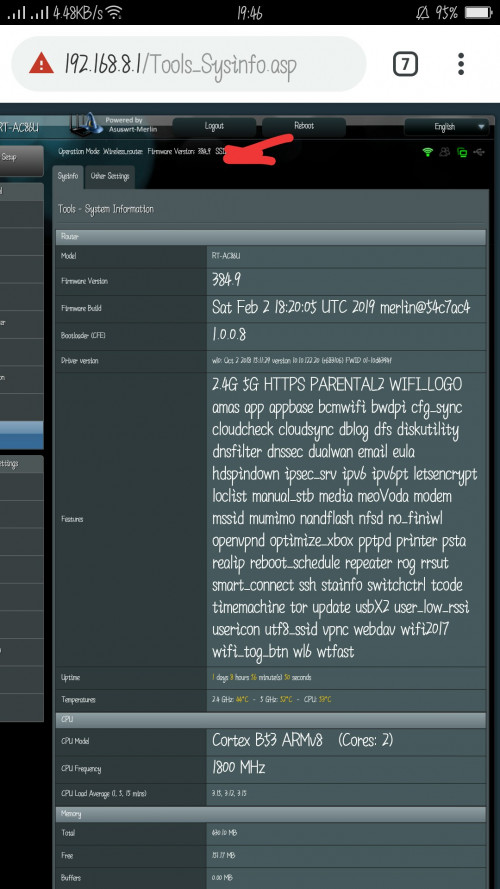 Hi guys, i got my rt86u 1 month. after 3 weeks facing wireless sometimes no internet access? Maybe fee second back to normal. LAN not sure, never use. Got 2 fans installed now wireless settings enable with 2.4 and 5ghz DUAL band smart connect, is this affect? |
|
|
Apr 16 2019, 08:12 PM
|
|
Junior Member
37 posts Joined: Apr 2009
|
Hi.. I am using ASUS RT-AC86U.. has setup and configured to Unifi home.. internet speed excellent but the Unifi IPTV sometime not able to connect.. anything i miss to configure in the router? Can anyone advise please..
|
|
|
Apr 16 2019, 08:29 PM
|
|
Senior Member
5,714 posts Joined: Mar 2007
|
QUOTE(mivec1200 @ Apr 16 2019, 08:12 PM) Hi.. I am using ASUS RT-AC86U.. has setup and configured to Unifi home.. internet speed excellent but the Unifi IPTV sometime not able to connect.. anything i miss to configure in the router? Can anyone advise please.. Unfortunately, it is a limitation of the router. It is an ongoing problem. |
|
|
Apr 19 2019, 11:53 AM
|
 
Elite
8,415 posts Joined: Jul 2008 
|
QUOTE(mivec1200 @ Apr 16 2019, 08:12 PM) Hi.. I am using ASUS RT-AC86U.. has setup and configured to Unifi home.. internet speed excellent but the Unifi IPTV sometime not able to connect.. anything i miss to configure in the router? Can anyone advise please.. QUOTE(SilentVampire @ Apr 16 2019, 08:29 PM) Unfortunately, it is a limitation of the router. It is an ongoing problem. This used to be a bug on a really old firmware. Make sure you are running the latest firmware. https://www.asus.com/my/Networking/RT-AC86U/HelpDesk_BIOS/ |
|
|
|
|
|
Apr 19 2019, 03:07 PM
|
|
Senior Member
5,714 posts Joined: Mar 2007
|
QUOTE(blacktubi @ Apr 19 2019, 11:53 AM) This used to be a bug on a really old firmware. Interesting, I just checked the firmware page a few days ago. This newest firmware is definitely new.Make sure you are running the latest firmware. https://www.asus.com/my/Networking/RT-AC86U/HelpDesk_BIOS/ |
|
|
Apr 19 2019, 04:19 PM
|
|
Senior Member
2,318 posts Joined: Dec 2012
|
QUOTE(blacktubi @ Apr 19 2019, 11:53 AM) This used to be a bug on a really old firmware. Thanks for pointing, just had upgrade latest firmware.Make sure you are running the latest firmware. https://www.asus.com/my/Networking/RT-AC86U/HelpDesk_BIOS/ I remembered I did check yesterday, did not notice any latest firmware available though.  |
|
|
Apr 20 2019, 01:08 PM
|
|
Senior Member
2,318 posts Joined: Dec 2012
|
After upgrade to latest firmware, it quite frequent to came out statement below:-
Apr 20 10:02:40 kernel: jffs2: warning: (721) jffs2_sum_write_data: Not enough space for summary, padsize = -1808 May I know any problem? Before that don't have. |
|
|
Apr 20 2019, 02:37 PM
|
|
Elite
8,415 posts Joined: Jul 2008
|
QUOTE(SilentVampire @ Apr 19 2019, 03:07 PM) Interesting, I just checked the firmware page a few days ago. This newest firmware is definitely new. Yup, it is actually fixed from the previous 2018 firmware update as well.QUOTE(SzeMeng76 @ Apr 20 2019, 01:08 PM) After upgrade to latest firmware, it quite frequent to came out statement below:- You can ignore it if it is not causing any issues.Apr 20 10:02:40 kernel: jffs2: warning: (721) jffs2_sum_write_data: Not enough space for summary, padsize = -1808 May I know any problem? Before that don't have. This post has been edited by blacktubi: Apr 20 2019, 02:38 PM |
|
|
Apr 28 2019, 05:19 PM
Show posts by this member only | IPv6 | Post
#10071
|
|
Junior Member
832 posts Joined: Jul 2016
|
Did the new firmware fix Unifi tv issue?
|
|
|
Apr 28 2019, 06:21 PM
Show posts by this member only | IPv6 | Post
#10072
|

Junior Member
464 posts Joined: Dec 2004
|
QUOTE(kktong83 @ Mar 30 2019, 09:07 AM) My Asus 86u just died, there is no light and no response. But this unit I bought in China 3months ago , does Asus malaysia able to provide warranty? Maybe kena by lightning,no choice same i also send back to china for warranty.take 2 weeks for me to claim back 1 to 1 exchange brand new |
 |
Apr 29 2019, 09:15 AM
Show posts by this member only | IPv6 | Post
#10073
|

Senior Member
2,319 posts Joined: Mar 2010
|
QUOTE(JasonTheGreat @ Apr 28 2019, 05:19 PM) Did the new firmware fix Unifi tv issue? Hi JasonTheGreat,If you are referring to the RT-AC86U HyppTV problem, you can download the beta firmware from my signature. Thank you |
|
|
|
|
|
Apr 29 2019, 07:29 PM
Show posts by this member only | IPv6 | Post
#10074
|
|
Junior Member
832 posts Joined: Jul 2016
|
QUOTE(ASUSmy @ Apr 29 2019, 09:15 AM) Hi JasonTheGreat, Hi why need to factory rest after update? In that case I will loose my current settings.If you are referring to the RT-AC86U HyppTV problem, you can download the beta firmware from my signature. Thank you P,ease advice thanks |
|
|
Apr 30 2019, 09:17 AM
Show posts by this member only | IPv6 | Post
#10075
|
|
Senior Member
2,319 posts Joined: Mar 2010
|
QUOTE(JasonTheGreat @ Apr 29 2019, 07:29 PM) Hi why need to factory rest after update? In that case I will loose my current settings. Hi JasonTheGreat,P,ease advice thanks When there is a major change on the firmware, we would recommend customer to do a factory reset to make everything working properly. If you don't wish to do a factory reset you may do so, but if you still have problem on the router, please do a factory reset and redo the setting. Thank you |
|
|
Apr 30 2019, 10:33 PM
|

Junior Member
447 posts Joined: Jan 2003
|
Hi, I'm noticed my Asus Blue Cave negotiated at 100Mbps for the 4 LAN ports
Any idea what is the issues here? Both NIC are on 1000Mbps but the network map detect at 100Mbps Last year December was ok when able to get 480Mbps over TIME 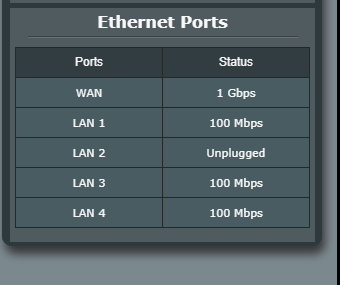 This post has been edited by frostier: Apr 30 2019, 10:33 PM |
|
|
May 1 2019, 01:16 PM
|
|
Elite
8,415 posts Joined: Jul 2008
|
QUOTE(frostier @ Apr 30 2019, 10:33 PM) Hi, I'm noticed my Asus Blue Cave negotiated at 100Mbps for the 4 LAN ports Is your speed actually limited or just a firmware display bug? Any idea what is the issues here? Both NIC are on 1000Mbps but the network map detect at 100Mbps Last year December was ok when able to get 480Mbps over TIME Try using a different cable as well. I know some devices will actually negotiate lower when under power saving or IDLE mode as well. This post has been edited by blacktubi: May 1 2019, 01:17 PM |
|
|
May 1 2019, 02:52 PM
|
|
Junior Member
447 posts Joined: Jan 2003
|
QUOTE(blacktubi @ May 1 2019, 01:16 PM) Is your speed actually limited or just a firmware display bug? resolved. Try using a different cable as well. I know some devices will actually negotiate lower when under power saving or IDLE mode as well. apparently, the old cat5e unable to negotiate 1000Mbps and older cat5e provided by the previous router comes with 2 pairs  changed to the newer cat5e and viola, 1 Gbps |
|
|
May 1 2019, 02:57 PM
|

Junior Member
61 posts Joined: Sep 2017
|
i am having a very strange problem. I've changed my main router to RT-AC1300UHP and Archer C7 as my access point.
So any device connected to my AP (wired), the speed will be capped to 100 Mbps. I will need to unplug my LAN cable and connect directly to my router then only the speed will be back to 500Mbps. Once i did this and plug it back to my AP, my device will be back to 500Mbps but it will reset back on daily basis |
|
|
May 1 2019, 02:57 PM
|
|
Junior Member
447 posts Joined: Jan 2003
|
QUOTE(blacktubi @ May 1 2019, 01:16 PM) Is your speed actually limited or just a firmware display bug? resolved. Try using a different cable as well. I know some devices will actually negotiate lower when under power saving or IDLE mode as well. apparently, the old cat5e unable to negotiate 1000Mbps and older cat5e provided by the previous router comes with 2 pairs changed to the newer cat5e and viola, 1 Gbps |
| Change to: |  0.0225sec 0.0225sec
 0.76 0.76
 6 queries 6 queries
 GZIP Disabled GZIP Disabled
Time is now: 11th December 2025 - 05:33 PM |
 Quote
Quote