Outline ·
[ Standard ] ·
Linear+
Home Networking ASUS Malaysia Networking User & Technical Support, Managed by ASUS Malaysia Representative
|
AVFAN
|
 May 12 2019, 09:30 PM May 12 2019, 09:30 PM
|

|
QUOTE(lwk523 @ May 12 2019, 09:17 AM) Bro, I am facing same problem like you. Did you managed to resolve it ? Need also .. Thank you QUOTE(Phonzy @ May 12 2019, 06:01 PM) i think have to change modem bro. if u have the same model as me it is capped. i am not very sure but for these 3 routers, the current firmware and the one suggested by blacktubi shud work fine. AC1300UHP, RT-AC58U and RT-AC55UHPtake serious note u can't get 800mbps for every device becos it is about the device u test/work with. pc's and laptops in particular - they have firewalls and antivirus. try with other devices rated gigabit, ethernet, u should get 830, 850! |
|
|
|
|
|
Eithanius
|
May 16 2019, 08:06 AM
|
|
|
ASUSmy or any other experts here, need your help a bit... Updated my Asus Lyra firmware from 45122 to 45891 this morning and the Lyra app on iOS failed to detect node 2 and 3. However node 2 and 3 connections are fine considering I still can access the internet from my room on 2nd floor. Primary node is placed on ground floor, node 2 on 1st floor, and node 3 standby. Is it possible to downgrade back to firmware 45122 without having to setup all over again..? 
|
|
|
|
|
|
blacktubi
|
May 16 2019, 09:36 AM
|
-

|
QUOTE(Eithanius @ May 16 2019, 08:06 AM) ASUSmy or any other experts here, need your help a bit... Updated my Asus Lyra firmware from 45122 to 45891 this morning and the Lyra app on iOS failed to detect node 2 and 3. However node 2 and 3 connections are fine considering I still can access the internet from my room on 2nd floor. Primary node is placed on ground floor, node 2 on 1st floor, and node 3 standby. Is it possible to downgrade back to firmware 45122 without having to setup all over again..?
I suggest you to reset everything and use AiMesh mode instead of Lyra mesh. I found it to be a lot more reliable. You can setup using the ASUS router app. |
|
|
|
|
|
Eithanius
|
May 16 2019, 08:23 PM
|
|
|
QUOTE(blacktubi @ May 16 2019, 09:36 AM) I suggest you to reset everything and use AiMesh mode instead of Lyra mesh. I found it to be a lot more reliable. You can setup using the ASUS router app. Does the ASUS Router app supports adding Lyra nodes...? Can't seem to find any settings on that beyond just Lyra offline... EDIT: nvm, found it... This post has been edited by Eithanius: May 16 2019, 10:04 PM |
|
|
|
|
|
Eithanius
|
May 17 2019, 02:58 PM
|
|
|
Is there supposed to be a difference in signal strength between Lyra nodes when setting up mesh on ASUS Lyra app compared to Aimesh on ASUS Router app...?
Or izzit the updated firmware 45891 actually improves the signal...?
|
|
|
|
|
|
yongtjunkit
|
May 18 2019, 01:29 PM
|
|
|
Hi, I was wondering if it's possible to combine 2 Vlan on Lan port 4, I want to combine Vlan 11 and 17 specifically for Lan port 4 for IPTV service( Astro IPTV, currently only live channel works, VOD not working ) 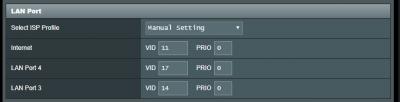 This post has been edited by yongtjunkit: May 18 2019, 02:07 PM
 |
|
|
|
|
|
Danitang
|
May 21 2019, 12:08 PM
|
New Member

|
i was trying to setup Ai cloud
and i got this msg
This router may be in a multiple-NAT environment, and accessing AiCloud from WAN does not work
Model AC86u
|
|
|
|
|
|
SilentVampire
|
May 21 2019, 05:01 PM
|
|
|
QUOTE(Danitang @ May 21 2019, 12:08 PM) i was trying to setup Ai cloud and i got this msg This router may be in a multiple-NAT environment, and accessing AiCloud from WAN does not work Model AC86u You are assigned a private IP. You will need to contact Unifi or Maxis to be assigned a public IP. |
|
|
|
|
|
Danitang
|
May 22 2019, 12:49 AM
|
New Member
|
QUOTE(SilentVampire @ May 21 2019, 05:01 PM) You are assigned a private IP. You will need to contact Unifi or Maxis to be assigned a public IP. thanks for the reply will it be any charges ? if i wanted it to be public ip |
|
|
|
|
|
SilentVampire
|
May 22 2019, 08:24 AM
|
|
|
QUOTE(Danitang @ May 22 2019, 12:49 AM) thanks for the reply will it be any charges ? if i wanted it to be public ip Usually not. But, what is your Internet plan? If you are on Unifi Basic 30Mbps, you won’t get public IP unless you upgrade to Unifi Lite 100Mbps or above. |
|
|
|
|
|
haqiu
|
May 26 2019, 07:23 PM
|
New Member
|
Hi,
i just get one RT-AC5300 router. using firmware 3.0.0.4.384_45717
i unable to connect to my unifi after key in my username and password(already double confirm my id and password is correct from calling tm).
it unable to auto detect my setting ( no "special requirement from ISP option).
but another old Asus router have this option.
contact unifi, they said no guideline for me.
any help?
|
|
|
|
|
|
SilentVampire
|
May 26 2019, 08:00 PM
|
|
|
QUOTE(haqiu @ May 26 2019, 07:23 PM) Hi, i just get one RT-AC5300 router. using firmware 3.0.0.4.384_45717 i unable to connect to my unifi after key in my username and password(already double confirm my id and password is correct from calling tm). it unable to auto detect my setting ( no "special requirement from ISP option). but another old Asus router have this option. contact unifi, they said no guideline for me. any help? Did you try going to the IPTV section to select Unifi? See here: https://setuprouter.com/router/asus/rt-ac53...82263-large.htm |
|
|
|
|
|
Jjuggler
|
May 26 2019, 08:01 PM
|
|
|
QUOTE(haqiu @ May 26 2019, 07:23 PM) Hi, i just get one RT-AC5300 router. using firmware 3.0.0.4.384_45717 i unable to connect to my unifi after key in my username and password(already double confirm my id and password is correct from calling tm). it unable to auto detect my setting ( no "special requirement from ISP option). but another old Asus router have this option. contact unifi, they said no guideline for me. any help? You can go to LAN > IPTV > ISP Profile and select UniFi-Home via the drop down menu. You can refer here. |
|
|
|
|
|
haqiu
|
May 26 2019, 08:48 PM
|
New Member
|
QUOTE(SilentVampire @ May 26 2019, 08:00 PM) Did you try going to the IPTV section to select Unifi? See here: https://setuprouter.com/router/asus/rt-ac53...82263-large.htmthanks a lot, i will try tomorrow coz family memebr using internet now. |
|
|
|
|
|
haqiu
|
 May 26 2019, 08:49 PM May 26 2019, 08:49 PM
|
New Member
|
QUOTE(Jjuggler @ May 26 2019, 08:01 PM) You can go to LAN > IPTV > ISP Profile and select UniFi-Home via the drop down menu. You can refer here. Thanks a lot!! i will try again tomorrow. |
|
|
|
|
|
Jjuggler
|
May 26 2019, 09:17 PM
|
|
|
QUOTE(haqiu @ May 26 2019, 08:49 PM) Thanks a lot!! i will try again tomorrow. No problem.  |
|
|
|
|
|
haqiu
|
May 27 2019, 07:17 PM
|
New Member
|
QUOTE(Jjuggler @ May 26 2019, 09:17 PM) No problem. Thanks a lot guys. finally i can connect to internet.  |
|
|
|
|
|
Jjuggler
|
May 27 2019, 09:00 PM
|
|
|
QUOTE(haqiu @ May 27 2019, 07:17 PM) Thanks a lot guys. finally i can connect to internet. enjoy |
|
|
|
|
|
rjflyguy
|
May 28 2019, 05:02 PM
|
|
|
Guys,
I need some idea from experts here on my 'downloading' issue. My family noticed that when they are connected to the house Wi-Fi, updating the applications (downloading the update files) was very slow. When they switched to using mobile data, the download was very fast.
I didn't noticed the problem until my son highlighted this to me and I started to test. I noticed that updating apps from the playstore was very slow. Torrent was okay, 5Mb to 7Mb per second. Tried to download audio files and were horribly slow but when switched to mobile data, the downloads were quite fast.
Browsing the internet, watching YouTube, emails and other stuff were okay, only downloading updates from PlayStore or several other files have problem.
I am using Unifi and Asus RT-AC55UHP with the beta firmware suggested by Blacktubi. Any idea why? Thanks....
|
|
|
|
|
|
SilentVampire
|
May 28 2019, 07:49 PM
|
|
|
QUOTE(rjflyguy @ May 28 2019, 05:02 PM) Guys, I need some idea from experts here on my 'downloading' issue. My family noticed that when they are connected to the house Wi-Fi, updating the applications (downloading the update files) was very slow. When they switched to using mobile data, the download was very fast. I didn't noticed the problem until my son highlighted this to me and I started to test. I noticed that updating apps from the playstore was very slow. Torrent was okay, 5Mb to 7Mb per second. Tried to download audio files and were horribly slow but when switched to mobile data, the downloads were quite fast. Browsing the internet, watching YouTube, emails and other stuff were okay, only downloading updates from PlayStore or several other files have problem. I am using Unifi and Asus RT-AC55UHP with the beta firmware suggested by Blacktubi. Any idea why? Thanks.... What is your speed? It could be related to the router too. Tagging Blacktubi to assist you. This post has been edited by SilentVampire: May 28 2019, 07:50 PM |
|
|
|
|



 Quote
Quote


 0.0257sec
 0.90
0.90
 6 queries
 GZIP Disabled