Welcome Guest ( Log In | Register )

826 Pages « < 503 504 505 506 507 > » Bottom

Outline · [ Standard ] · Linear+

Home Networking ASUS Malaysia Networking User & Technical Support, Managed by ASUS Malaysia Representative

views
     
frostier
post May 1 2019, 02:57 PM

Casual
***
Junior Member
447 posts

Joined: Jan 2003


QUOTE(gbmitoban @ May 1 2019, 02:57 PM)
i am having a very strange problem. I've changed my main router to RT-AC1300UHP and Archer C7 as my access point.

So any device connected to my AP (wired), the speed will be capped to 100 Mbps. I will need to unplug my LAN cable and connect directly to my router then only the speed will be back to 500Mbps. Once i did this and plug it back to my AP, my device will be back to 500Mbps but it will reset back on daily basis
*
Cable issue?
gbmitoban
post May 1 2019, 03:03 PM

Getting Started
**
Junior Member
61 posts

Joined: Sep 2017
QUOTE(frostier @ May 1 2019, 02:57 PM)
Cable issue?
*
Initially I thought it is cable, but nope.

To fix this, i will need to unplug from my AP and plug directly to my router. Once the speed is back to 500 Mbps, i can just plug it back to my AP mode.

But it will happen again on next day. So I will need to unplug and plug it back.
blacktubi
post May 1 2019, 04:43 PM

-
Group Icon
Elite
8,409 posts

Joined: Jul 2008

QUOTE(gbmitoban @ May 1 2019, 03:03 PM)
Initially I thought it is cable, but nope.

To fix this, i will need to unplug from my AP and plug directly to my router. Once the speed is back to 500 Mbps, i can just plug it back to my AP mode.

But it will happen again on next day. So I will need to unplug and plug it back.
*
Looks like an issue of your clients or the Archer C7 to me. What device is that?
gbmitoban
post May 1 2019, 04:46 PM

Getting Started
**
Junior Member
61 posts

Joined: Sep 2017
QUOTE(blacktubi @ May 1 2019, 04:43 PM)
Looks like an issue of your clients or the Archer C7 to me. What device is that?
*
just a normal desktop, however it will also affect my wireless speed so dont think this is related to the client.

still trying to troubleshoot it, i am thinking either ASUS router not compatible with the C7 as access point or some settings in the router.


khohwillie
post May 1 2019, 05:16 PM

New Member
*
Junior Member
21 posts

Joined: Feb 2011
Hi, should I get a66u, ac67u or ac68u? I don't really know the difference , they all look the same. If I get the ac67u twin pack can I just use the other unit somewhere else ?

Thanks
SilentVampire
post May 1 2019, 10:38 PM

Networking Enthusiast
*******
Senior Member
5,714 posts

Joined: Mar 2007


QUOTE(khohwillie @ May 1 2019, 05:16 PM)
Hi, should I get a66u, ac67u or ac68u? I don't really know the difference , they all look the same. If I get the ac67u twin pack can I just use the other unit somewhere else ?

Thanks
*
Might as well get the RT-AC86U, but if you want to save money, get the RT-AC68U.

This post has been edited by SilentVampire: May 1 2019, 10:38 PM
blacktubi
post May 2 2019, 09:53 AM

-
Group Icon
Elite
8,409 posts

Joined: Jul 2008

QUOTE(khohwillie @ May 1 2019, 05:16 PM)
Hi, should I get a66u, ac67u or ac68u? I don't really know the difference , they all look the same. If I get the ac67u twin pack can I just use the other unit somewhere else ?

Thanks
*
Yup, it is possible to get the RT-AC67U and use them separately. smile.gif
jpong1
post May 2 2019, 10:49 AM

Getting Started
**
Junior Member
292 posts

Joined: Jun 2016
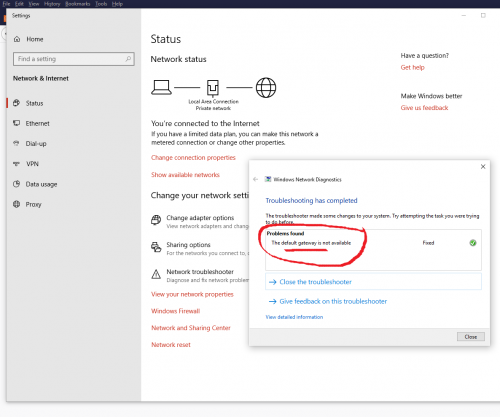
user posted image

Dear all,
on and off, I faced above "default gateway not available" problem ; it can solved with "Troubleshooting" , but very annoying.
anyone has idea how to solve it forever ?
this happened after Turbo-ed and using RT-AC55UHP, TM router no problem.
thanks
blacktubi
post May 2 2019, 11:43 AM

-
Group Icon
Elite
8,409 posts

Joined: Jul 2008

QUOTE(jpong1 @ May 2 2019, 10:49 AM)
user posted image

Dear all,
on and off, I faced above "default gateway not available" problem ; it can solved with "Troubleshooting" , but very annoying.
anyone has idea how to solve it forever ?
this happened after Turbo-ed and using RT-AC55UHP, TM router no problem.
thanks
*
Update the beta firmware here and reset

https://www.blacktubi.com/guide/performance...or-asus-router/
jpong1
post May 2 2019, 12:33 PM

Getting Started
**
Junior Member
292 posts

Joined: Jun 2016
QUOTE(blacktubi @ May 2 2019, 11:43 AM)
thanks, done that months ago...
and now the LAN connetion light very dim but connected....Internet LED light off, but connected.

This post has been edited by jpong1: May 2 2019, 01:02 PM
blacktubi
post May 2 2019, 05:33 PM

-
Group Icon
Elite
8,409 posts

Joined: Jul 2008

QUOTE(jpong1 @ May 2 2019, 12:33 PM)
thanks, done that months ago...
and now the LAN connetion light very dim but connected....Internet LED light off, but connected.
*
Interesting, sounds like the router is not giving IP. Do you changed anything under DHCP?

The high power blue LED will be dim after long usage since it will degraded.

This post has been edited by blacktubi: May 2 2019, 05:38 PM
jpong1
post May 2 2019, 07:58 PM

Getting Started
**
Junior Member
292 posts

Joined: Jun 2016
QUOTE(blacktubi @ May 2 2019, 05:33 PM)
Interesting, sounds like the router is not giving IP. Do you changed anything under DHCP?

The high power blue LED will be dim after long usage since it will degraded.
*
I do nothing to DHCP, it is ENABLED at the moment ; one more thing even more intersting , ie : the 5Ghz LED used to be dim but now very bright.
AtMostFear
post May 2 2019, 10:07 PM

Enthusiast
*****
Senior Member
809 posts

Joined: Mar 2006
From: Ann Arbor


A bit off topic but somewhat related.

I really like the WiFi radar feature on AC86U, unfortunately this feature is not available on RT-AC5300.

Any free alternative app with similar feature? Those with trial mode normally scans the channel band only.
junclj
post May 8 2019, 01:40 PM

Look at all my stars!!
*******
Senior Member
2,348 posts

Joined: Apr 2008


QUOTE(ASUSmy @ Oct 11 2018, 10:27 AM)
Hi All,

For those who are using RT-AC58U or RT-AC55UHP router and have trouble getting the high speed using LAN, you can try updating the beta firmware below. Do let me know is you have any problem with the firmware.

https://www.asuswebstorage.com/navigate/s/B...8A1EEFE35D1B98Y

As for the RT-AC86U HyppTV problem, we are looking at the problem now. We will get back to you ASAP.

Thank you all for your patient.
*
ASUSmy shared content expired, can reupload?
blacktubi
post May 8 2019, 02:31 PM

-
Group Icon
Elite
8,409 posts

Joined: Jul 2008

QUOTE(junclj @ May 8 2019, 01:40 PM)
ASUSmy shared content expired, can reupload?
*
https://www.blacktubi.com/guide/performance...or-asus-router/

I got it archived
lwk523
post May 12 2019, 09:17 AM

Premium Q Trader
******
Senior Member
1,040 posts

Joined: Mar 2006


QUOTE(Phonzy @ Jan 8 2019, 08:46 PM)
Hi there,

I am using a RT-AC58U AC1300 Router.

I've tried so many ways to troubleshoot but all methods have failed so I hope that you guys can end my frustration.

I recently got upgraded to 800 mbps from 100 mbps by Unifi.

However, my speed is always capped at 400 mbps.

I called the Unifi people when they came and test they used their own DLINK router and it hit 800 mbps.

They said all my cables and hardware were already in place and that it was the router setting problem.

Read the forums here and noticed that I had a firmware update, saved my settings, downloaded the firmware and then proceeded to reset factory settings my modem via the RESTORE button under advanced settings.

I then uploaded back the settings I saved.

However, I am still hitting 400 mbps only.

Do you happen to know what is limiting my speed or what am I doing wrongly?

Your advise is much appreciated.

Thank you.
*
Bro, I am facing same problem like you. Did you managed to resolve it ? Need also ..

Thank you
blacktubi
post May 12 2019, 12:28 PM

-
Group Icon
Elite
8,409 posts

Joined: Jul 2008

QUOTE(lwk523 @ May 12 2019, 09:17 AM)
Bro, I am facing same problem like you. Did you managed to resolve it ?  Need also ..

Thank you
*
https://www.blacktubi.com/guide/performance...or-asus-router/

Have you tried this?
lwk523
post May 12 2019, 01:50 PM

Premium Q Trader
******
Senior Member
1,040 posts

Joined: Mar 2006


QUOTE(blacktubi @ May 12 2019, 12:28 PM)
Thanks. Is that ok to flash that fimrware to AC86u ?


blacktubi
post May 12 2019, 03:10 PM

-
Group Icon
Elite
8,409 posts

Joined: Jul 2008

QUOTE(lwk523 @ May 12 2019, 01:50 PM)
Thanks.  Is that ok to flash that fimrware to AC86u ?
*
Nope, only apply for the models mentioned in the article.

RT-AC86U is not affected by that issue.
Phonzy
post May 12 2019, 06:01 PM

On my way
****
Junior Member
542 posts

Joined: Nov 2004
From: Petaling Jaya


QUOTE(lwk523 @ May 12 2019, 09:17 AM)
Bro, I am facing same problem like you. Did you managed to resolve it ?  Need also ..

Thank you
*
i think have to change modem bro. if u have the same model as me it is capped.

826 Pages « < 503 504 505 506 507 > » Top
 

Change to:
| Lo-Fi Version
0.2318sec    0.84    6 queries    GZIP Disabled
Time is now: 8th December 2025 - 05:05 AM