Outline ·
[ Standard ] ·
Linear+
Lenovo IdeaPad Y Series Thread v2, When Y480/580 meet Y400/500
|
ndragon
|
 Dec 28 2012, 01:29 AM Dec 28 2012, 01:29 AM
|

|
QUOTE(sss2sssss @ Dec 28 2012, 12:50 AM) Ya u must dl that software first, don't forget to backup the win 8 iso file ya..... And the default create installer from that software is non-EFI one okay I will try and c how tmr.. just installed win7 on my msata ssd.. the index rating is up! 
edit: I tested ATTO on my msata.. heres the result.. I get full speed wo I think.. not sure if I read correctly.. meaning my msata support sata III?.. 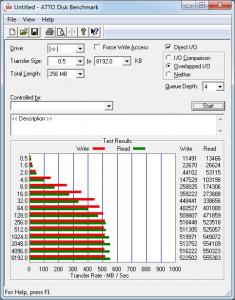
heres a screen shot from Intel rapid storage.. it shows 6gb/s.. not sure if it means anything.. 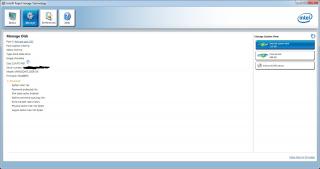
so anyone can help me interpret?.. new to me.. cant digest.. lol This post has been edited by ndragon: Dec 28 2012, 01:41 AM |
|
|
|
|
|
Cobby
|
Dec 28 2012, 03:54 AM
|
Getting Started

|
QUOTE(ndragon @ Dec 28 2012, 01:29 AM) okay I will try and c how tmr.. just installed win7 on my msata ssd.. the index rating is up!
edit: I tested ATTO on my msata.. heres the result.. I get full speed wo I think.. not sure if I read correctly.. meaning my msata support sata III?..
heres a screen shot from Intel rapid storage.. it shows 6gb/s.. not sure if it means anything..
so anyone can help me interpret?.. new to me.. cant digest.. lol Awesome! so confirmed that the mSATA port for Y500 is SATA3!  regarding the windows 7 score, it wil be up since the max for Win7 is 7.9 whereas for Win8 its 9.9, so cant compare between them. |
|
|
|
|
|
tennytyy
|
Dec 28 2012, 09:46 AM
|
|
|
QUOTE(ndragon @ Dec 28 2012, 01:29 AM) » Click to show Spoiler - click again to hide... « okay I will try and c how tmr.. just installed win7 on my msata ssd.. the index rating is up!
edit: I tested ATTO on my msata.. heres the result.. I get full speed wo I think.. not sure if I read correctly.. meaning my msata support sata III?..
heres a screen shot from Intel rapid storage.. it shows 6gb/s.. not sure if it means anything..
so anyone can help me interpret?.. new to me.. cant digest.. lol What is the brand of msata ssd you are using? |
|
|
|
|
|
ndragon
|
Dec 28 2012, 10:02 AM
|
|
|
mushkin atlas.. the dx series..
inside the rapid storage screen shot should have the product code if I m not mistaken..
|
|
|
|
|
|
tennytyy
|
Dec 28 2012, 01:11 PM
|
|
|
i found some nice .gif, and i use it as my siggy. Hope you guys like it too. For y480  Link: http://s8.postimage.org/piyjsq0oh/image.gifFor y580  Link: http://s8.postimage.org/fs5rt5a0h/image.gif |
|
|
|
|
|
xyz_cityhunter
|
Dec 28 2012, 05:31 PM
|
Getting Started
|
Guys, anyone know how to migrate the Win8 from HDD to SSD? I got my Y580 with Win8 but i donno the serial number for the Win8...
|
|
|
|
|
|
lee_what2004
|
Dec 28 2012, 05:35 PM
|
*stare* ji--------

|
Serial number should be inside the BIOS, no need to activate anymore  |
|
|
|
|
|
xyz_cityhunter
|
Dec 28 2012, 05:44 PM
|
Getting Started
|
QUOTE(lee_what2004 @ Dec 28 2012, 05:35 PM) Serial number should be inside the BIOS, no need to activate anymore so i can use the Lenovo OneKey recovery to make a image to install on the ssd or any other way for me to do that? |
|
|
|
|
|
TSkuroneko0509
|
Dec 28 2012, 07:02 PM
|
~~sleeping anywhere, anytime, anyplace~~

|
QUOTE(xyz_cityhunter @ Dec 28 2012, 05:44 PM) so i can use the Lenovo OneKey recovery to make a image to install on the ssd or any other way for me to do that? yep... u can just make factory recovery disc via Lenovo OneKey... or find software that can extract your win8 serial..
Added on December 28, 2012, 7:02 pmor another method is clone your HDD to SSD This post has been edited by kuroneko0509: Dec 28 2012, 07:02 PM |
|
|
|
|
|
xyz_cityhunter
|
Dec 28 2012, 07:15 PM
|
Getting Started
|
QUOTE(kuroneko0509 @ Dec 28 2012, 07:02 PM) yep... u can just make factory recovery disc via Lenovo OneKey... or find software that can extract your win8 serial..
Added on December 28, 2012, 7:02 pmor another method is clone your HDD to SSD just now when i select the odd the path for the recovery file somehow become to C:/temp, is that normal? |
|
|
|
|
|
TSkuroneko0509
|
Dec 28 2012, 07:18 PM
|
~~sleeping anywhere, anytime, anyplace~~
|
QUOTE(xyz_cityhunter @ Dec 28 2012, 07:15 PM) just now when i select the odd the path for the recovery file somehow become to C:/temp, is that normal? which recovery type you picked? based on my y580, there's 3 option... 1. recovery disc with existing backup image 2. recovery disc with current system 3. factory default recovery disc normally would pick the 3rd option, then they will not ask which image file path |
|
|
|
|
|
xyz_cityhunter
|
Dec 28 2012, 07:44 PM
|
Getting Started
|
QUOTE(kuroneko0509 @ Dec 28 2012, 07:18 PM) which recovery type you picked? based on my y580, there's 3 option... 1. recovery disc with existing backup image 2. recovery disc with current system 3. factory default recovery disc normally would pick the 3rd option, then they will not ask which image file path funny my onekey ver8 doesn't have the 3rd option... nvm, now try install fresh using iso... |
|
|
|
|
|
guilt79
|
Dec 28 2012, 08:39 PM
|
Getting Started
|
I'm going to upgrade my Win 7 HB to Win 8 Pro tomorrow.
Any advice such as backup or any Y580 functions that might not able to use after change to Win 8 Pro?
This post has been edited by guilt79: Dec 28 2012, 08:39 PM
|
|
|
|
|
|
xyz_cityhunter
|
Dec 28 2012, 09:07 PM
|
Getting Started
|
QUOTE(kuroneko0509 @ Dec 28 2012, 07:18 PM) which recovery type you picked? based on my y580, there's 3 option... 1. recovery disc with existing backup image 2. recovery disc with current system 3. factory default recovery disc normally would pick the 3rd option, then they will not ask which image file path Your windows is Win8? And what's ur OneKey recovery version? |
|
|
|
|
|
spadeheart
|
Dec 28 2012, 09:11 PM
|
New Member
|
QUESTION!
Y400 VS Y580??
|
|
|
|
|
|
ndragon
|
Dec 28 2012, 09:18 PM
|
|
|
QUOTE(spadeheart @ Dec 28 2012, 09:11 PM) for me i choose y580... u will never go back once u have used FHD.. lol.. dling win8 pro~ |
|
|
|
|
|
arju
|
Dec 28 2012, 09:22 PM
|
Getting Started
|
QUOTE(ndragon @ Dec 28 2012, 09:18 PM) for me i choose y580... u will never go back once u have used FHD.. lol.. dling win8 pro~ what if i use my 22inch monitor via hdmi, do i still need to FHD? not really right? i buy the Y580 normal HD and used that money to upgrade ok? what is price differ between Y580 FHD and nonHD? This post has been edited by arju: Dec 28 2012, 09:24 PM |
|
|
|
|
|
tennytyy
|
Dec 28 2012, 09:27 PM
|
|
|
QUOTE(arju @ Dec 28 2012, 09:22 PM) what if i use my 22inch monitor via hdmi, do i still need to FHD? not really right? i buy the Y580 normal HD and used that money to upgrade ok? what is price differ between Y580 FHD and nonHD? You can't find any non full HD y580 local set here, only full HD version |
|
|
|
|
|
Stefan How
|
 Dec 28 2012, 09:59 PM Dec 28 2012, 09:59 PM
|
Getting Started
|
Well i finally get myself a Y480 with 750GB HDD,running window 7 home premium,GPU is GT640M LE GDDR5..(kinda dissapointed) XD but to confirm with you guys,there is a few model of this with different GPU right?I heard the latest is with 500GB HDD,GPU is GT650M GDDR5 right? Also last question,when i use my y480 to play game on battery pack,why does it lag so much? I mean when its on battery it using the intel HD GPU right?How can i make it to use the nvidia even on battery?  Pardon me,if its too long..its my first post here anyway.. |
|
|
|
|
|
hikashi
|
Dec 28 2012, 10:16 PM
|
|
|
QUOTE(Stefan How @ Dec 28 2012, 09:59 PM) Well i finally get myself a Y480 with 750GB HDD,running window 7 home premium,GPU is GT640M LE GDDR5..(kinda dissapointed) XD but to confirm with you guys,there is a few model of this with different GPU right?I heard the latest is with 500GB HDD,GPU is GT650M GDDR5 right? Also last question,when i use my y480 to play game on battery pack,why does it lag so much? I mean when its on battery it using the intel HD GPU right?How can i make it to use the nvidia even on battery? Pardon me,if its too long..its my first post here anyway.. 1) Yes. 640M is the older gen Y480. Latest is 650M 2) Assume you use Balanced Power Plan when u play game with battery, your machine will conserve battery energy by using internal graphic card only. Try change you power plan to High Performance, or in Lenovo Energy Management to highest available performance mode. Or, you may try play your game by right click the icon> Run with graphic processor> High performance NVIDIA processor |
|
|
|
|



 Quote
Quote


 0.0270sec
 0.11
0.11
 6 queries
 GZIP Disabled