Welcome Guest ( Log In | Register )

Bump Topic Topic Closed RSS Feed
130 Pages « < 27 28 29 30 31 > » Bottom

Outline · [ Standard ] · Linear+

 Lenovo IdeaPad Y Series Thread v2, When Y480/580 meet Y400/500

views
     
xyz_cityhunter
post Dec 29 2012, 11:42 AM

Getting Started
**
Junior Member
238 posts

Joined: Dec 2010
From: Kedah


QUOTE(mrl @ Dec 29 2012, 11:27 AM)
Burn the ISO into a DVD (or USB drive if you want), boot from the drive and proceed installation as usual... when asked which drive to install, select the drive and format it...
hhmmm... i guess this is new coz if I remember correctly on Win7 we can do something like that regardless of license...  rclxub.gif

maybe that's the reason there's no more OEM licensed version, replaced with System Builder version... hhmmm... hmm.gif

I start to feel like Win8 is not friendly if like this, more advantage to the OEM ready build systems, but not exactly friendly with custom build PC? unsure.gif that's off topic though...  laugh.gif

wait, does that mean the upgrade version that we have for Y580/Y480 is retail? or the one downloaded through Upgrade Advisor is properly licensed for OEMs? rclxub.gif
*
The retail is the Win8 that comes with the laptop... if you upgrade from Win7 then it's not retail i think...
Hazmatyre
post Dec 29 2012, 11:49 AM

New Member
*
Junior Member
28 posts

Joined: Aug 2010


Hi hi, Y580 user here! rclxms.gif
Btw wanna ask if able to put in SSD without sending back to Lenovo?
xyz_cityhunter
post Dec 29 2012, 11:56 AM

Getting Started
**
Junior Member
238 posts

Joined: Dec 2010
From: Kedah


QUOTE(Hazmatyre @ Dec 29 2012, 11:49 AM)
Hi hi, Y580 user here! rclxms.gif
Btw wanna ask if able to put in SSD without sending back to Lenovo?
*
Try read a few page back and you will see what sort of problem that you will encounter if you're using Win8 version... sweat.gif
mengfart
post Dec 29 2012, 12:06 PM

༼ つ ◕_◕ ༽つ Giff Me Mana Kotol
******
Senior Member
1,701 posts

Joined: Oct 2010
From: Under your bed
QUOTE(Stefan How @ Dec 29 2012, 11:41 AM)
Yeah I know,this is where is see the home premium os,and I know that gt650m come with free headset..and yeah..I have 2 years warranty..and I think I have hardware faulty issue..that the battery screw came off..+ the plastic broken..can't put it back..should I ask for warranty?
*
bila u beli ?
lightastral
post Dec 29 2012, 12:06 PM

Getting Started
**
Junior Member
220 posts

Joined: Dec 2009
hmm not much info on the fhd screen. any comparison or opinion to your previous laptop or display?

tks
ndragon
post Dec 29 2012, 12:19 PM

noob~
*******
Senior Member
2,000 posts

Joined: Oct 2004


hmm.. win 8 y580 user.. wats ur window performance index for your graphic card?.... mine is 6.8 ni.. lower than when i was on win7..
mrl
post Dec 29 2012, 12:40 PM

Enthusiast
*****
Senior Member
977 posts

Joined: Jan 2009
From: In the middle...


QUOTE(xyz_cityhunter @ Dec 29 2012, 11:42 AM)
The retail is the Win8 that comes with the laptop... if you upgrade from Win7 then it's not retail i think...
*
actually, retail is the one that not comes with the laptop... you buy it seperately, standalone Win8 not together with any system... that's retail licensed version...

previously, the one that comes with the system is OEM licensed... if you buy a laptop and get Windows, that Windows is under OEM license...


Added on December 29, 2012, 12:42 pm
QUOTE(ndragon @ Dec 29 2012, 12:19 PM)
hmm.. win 8 y580 user.. wats ur window performance index for your graphic card?.... mine is 6.8 ni.. lower than when i was on win7..
*
Win7 uses 7.9 scale while Win8 is 9.9 scale (is it? or it's 8.9?) that's why the rating is different... or so I believed... unsure.gif

This post has been edited by mrl: Dec 29 2012, 12:42 PM
tennytyy
post Dec 29 2012, 01:02 PM

Regular
******
Senior Member
1,915 posts

Joined: Jan 2012
From: USJ


QUOTE(ndragon @ Dec 29 2012, 12:19 PM)
hmm.. win 8 y580 user.. wats ur window performance index for your graphic card?.... mine is 6.8 ni.. lower than when i was on win7..
*
Win8 y580 user here, the score for both the graphics is 6.8 for mine, same as yours
ndragon
post Dec 29 2012, 01:16 PM

noob~
*******
Senior Member
2,000 posts

Joined: Oct 2004


QUOTE(mrl @ Dec 29 2012, 12:40 PM)
actually, retail is the one that not comes with the laptop... you buy it seperately, standalone Win8 not together with any system... that's retail licensed version...

previously, the one that comes with the system is OEM licensed... if you buy a laptop and get Windows, that Windows is under OEM license...


Added on December 29, 2012, 12:42 pm

Win7 uses 7.9 scale while Win8 is 9.9 scale (is it? or it's 8.9?) that's why the rating is different... or so I believed... unsure.gif
*
my graphic performance was 7.2 on win7.. n ssd was 7.9...

in win 8.. my graphic is now 6.8.. n ssd is 8.1.. so i also dunno where is the equivalence between win7 n 8...

n win 8 is 9.9 scale.. hehe

QUOTE(tennytyy @ Dec 29 2012, 01:02 PM)
Win8 y580 user here, the score for both the graphics is 6.8 for mine, same as yours
*
so no problem in my win8 installation.. just want to confirm that.. thanks..
Stefan How
post Dec 29 2012, 01:32 PM

Getting Started
**
Junior Member
248 posts

Joined: Dec 2012
QUOTE(mengfart @ Dec 29 2012, 12:06 PM)
bila u beli ?
*
10.Dec..
Alternation
post Dec 29 2012, 02:03 PM

Enthusiast
*****
Senior Member
912 posts

Joined: Feb 2005


When i bought the Y480 (5934-7549) freedos version, i was told that it comes with 2 years warranty but when i check warranty lookup status at lenovo website, it only stated 1 year warranty.

Then i went to warranty extend at (http://support.lenovo.com/templatedata/Web%20Content/JSP/warrantyLookup.jsp#) but still only getting 1 year. Any1 with any idea how to extend it?
hikashi
post Dec 29 2012, 02:30 PM

Pusheeeeeeeett
******
Senior Member
1,065 posts

Joined: Sep 2005

QUOTE(Alternation @ Dec 29 2012, 02:03 PM)
When i bought the Y480 (5934-7549) freedos version, i was told that it comes with 2 years warranty but when i check warranty lookup status at lenovo website, it only stated 1 year warranty.

Then i went to warranty extend at (http://support.lenovo.com/templatedata/Web%20Content/JSP/warrantyLookup.jsp#) but still only getting 1 year. Any1 with any idea how to extend it?
*
http://forum.lowyat.net/index.php?showtopi...80&p=56813669&#
Cobby
post Dec 29 2012, 05:09 PM

Getting Started
**
Junior Member
63 posts

Joined: Jun 2009
From: Kuala Lumpur / Johor Bahru


QUOTE(Alternation @ Dec 29 2012, 02:03 PM)
When i bought the Y480 (5934-7549) freedos version, i was told that it comes with 2 years warranty but when i check warranty lookup status at lenovo website, it only stated 1 year warranty.

Then i went to warranty extend at (http://support.lenovo.com/templatedata/Web%20Content/JSP/warrantyLookup.jsp#) but still only getting 1 year. Any1 with any idea how to extend it?
*
Contact LENOVO.

Check this post:
http://forum.lowyat.net/index.php?showtopi...post&p=56812258

You need this:
1) Scan your receipt of purchase (must have your laptop Serial No in it)
2) If receipt doesnt include S/N, then take a snapshot of your laptop box with the info of the S/N and etc.
3) Attach both the above in an email and send to LENOVO (Check link post).

Hope it helps.
thumbup.gif


Added on December 29, 2012, 5:13 pm
QUOTE(lightastral @ Dec 29 2012, 12:06 PM)
hmm not much info on the fhd screen. any comparison or opinion to your previous laptop or display?

tks
*
Are u referring to the yellowish in the FHD screen?

I have 2 more laptops and some very WHITE some a little YELLOWISH... even if its LED!

You can do the screen calibration yourself.
So far i found out LG parts for Laptop gives the little yellowish in white background.

Other brands give super WHITE background.

wink.gif


Added on December 29, 2012, 5:17 pm
QUOTE(Stefan How @ Dec 28 2012, 10:33 PM)
Its too late Guah...i bought 3 weeks ago,and finding this model y480 is dam hard  sad.gif  only 2 retailer still selling..one is the GT640M LE (current one is from jayacomm) another is GT650M..but the one selling GT650M give window home basic,and he charge me higher price =/ and it sounds like a prank to me as i saw the spec in the flyer is home premium,so i didnt get that one.Well,i promise my dad not to get an overly expensive one..so yeah  cry.gif  *sigh*
*
Bro, can u provide me the shop details/location.
Where u bought it?

This post has been edited by Cobby: Dec 29 2012, 05:17 PM
Alternation
post Dec 29 2012, 05:29 PM

Enthusiast
*****
Senior Member
912 posts

Joined: Feb 2005


QUOTE(Cobby @ Dec 29 2012, 05:09 PM)
Contact LENOVO.

Check this post:
http://forum.lowyat.net/index.php?showtopi...post&p=56812258

You need this:
1) Scan your receipt of purchase (must have your laptop Serial No in it)
2) If receipt doesnt include S/N, then take a snapshot of your laptop box with the info of the S/N and etc.
3) Attach both the above in an email and send to LENOVO (Check link post).

Hope it helps.
thumbup.gif
Thanks


Added on December 29, 2012, 5:34 pmDid any1 encounter bright spot on their screen? I noticed a couple of months ago that I have a bright spot on my monitor. It is about 3 or 4 millimetres across, and the centre is brighter than the edges (which fade out into the rest of the screen)

This post has been edited by Alternation: Dec 29 2012, 05:34 PM
Stefan How
post Dec 29 2012, 05:59 PM

Getting Started
**
Junior Member
248 posts

Joined: Dec 2012
QUOTE(Cobby @ Dec 29 2012, 05:09 PM)
Contact LENOVO.

Check this post:
http://forum.lowyat.net/index.php?showtopi...post&p=56812258

You need this:
1) Scan your receipt of purchase (must have your laptop Serial No in it)
2) If receipt doesnt include S/N, then take a snapshot of your laptop box with the info of the S/N and etc.
3) Attach both the above in an email and send to LENOVO (Check link post).

Hope it helps.
thumbup.gif


Added on December 29, 2012, 5:13 pm

Are u referring to the yellowish in the FHD screen?

I have 2 more laptops and some very WHITE some a little YELLOWISH... even if its LED!

You can do the screen calibration yourself.
So far i found out LG parts for Laptop gives the little yellowish in white background.

Other brands give super WHITE background.

wink.gif


Added on December 29, 2012, 5:17 pm

Bro, can u provide me the shop details/location.
Where u bought it?
*
The location in 3rd floor (if im not mistaken)beside the escalator coming up..and it have alot of lenovo model there,like the z480 and other,but y480 need to be ask only they take from their other store i guess? Lowyat.


Added on December 29, 2012, 6:02 pm
QUOTE(lee_what2004 @ Dec 15 2012, 09:20 AM)
Run some game and then open HWMonitor?
or try use OpenHardwareMonitor.
*
that program burn my gpu =.= when i open it my gpu temp rose up to 60+

This post has been edited by Stefan How: Dec 29 2012, 06:02 PM
guilt79
post Dec 29 2012, 06:07 PM

Getting Started
**
Junior Member
149 posts

Joined: Apr 2011


I watched youtube on how to do clean installation for Win 8.

First say "ISO creation" I downloaded ISO recorder and then, don't know what to do.. Stuck in first level. cry.gif

This post has been edited by guilt79: Dec 29 2012, 07:09 PM
xyz_cityhunter
post Dec 29 2012, 08:26 PM

Getting Started
**
Junior Member
238 posts

Joined: Dec 2010
From: Kedah


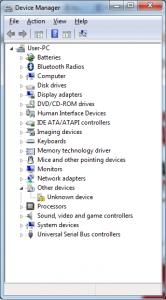
Can anyone help to figure out what is the unknown device? I gave up on Win8 and using Win7 now but i still donno what that thing is, i believe i had everything covered but still got one missing driver... rclxub.gif
Attached Image
lee_what2004
post Dec 29 2012, 08:40 PM

*stare* ji--------
Group Icon
Elite
14,813 posts

Joined: Nov 2006


^can give its hardware id?
ndragon
post Dec 29 2012, 08:48 PM

noob~
*******
Senior Member
2,000 posts

Joined: Oct 2004


QUOTE(xyz_cityhunter @ Dec 29 2012, 08:26 PM)
Can anyone help to figure out what is the unknown device? I gave up on Win8 and using Win7 now but i still donno what that thing is, i believe i had everything covered but still got one missing driver...  rclxub.gif
Attached Image
*
that is in win7 or win8... my win8 i got every driver installed.. just that my bluetooth not working properly.. but i think my y580 bluetooth also has similar problem in win7..

i got all my win8 driver here:
http://forums.lenovo.com/t5/IdeaPad-Y-U-V-...ers/td-p/902751
xyz_cityhunter
post Dec 29 2012, 10:17 PM

Getting Started
**
Junior Member
238 posts

Joined: Dec 2010
From: Kedah


QUOTE(lee_what2004 @ Dec 29 2012, 08:40 PM)
^can give its hardware id?
*
I dun think it even have one... rclxub.gif
Attached Image

QUOTE(ndragon @ Dec 29 2012, 08:48 PM)
that is in win7 or win8... my win8 i got every driver installed.. just that my bluetooth not working properly.. but i think my y580 bluetooth also has similar problem in win7..

i got all my win8 driver here:
http://forums.lenovo.com/t5/IdeaPad-Y-U-V-...ers/td-p/902751
*
I tried to push a mp3 from my phone to laptop via bluetooth and it works on both Win7 and Win8... my driver is Qualcomm Atheros AR3012 Bluetooth 4.0 + HS on Win7...

EDIT: Manage to narrow down the problem, it's indeed the bluetooth, maybe some extra feature...
Found way to check it on http://www.makeuseof.com/tag/how-to-find-u...ndor-device-id/
And the software i use: http://www.halfdone.com/ukd/

This post has been edited by xyz_cityhunter: Dec 29 2012, 10:25 PM

130 Pages « < 27 28 29 30 31 > » Top
Topic ClosedOptions
 

Change to:
| Lo-Fi Version
0.0269sec    0.68    6 queries    GZIP Disabled
Time is now: 4th December 2025 - 08:56 AM