Welcome Guest ( Log In | Register )

Bump Topic Topic Closed RSS Feed
140 Pages « < 14 15 16 17 18 > » Bottom

Outline · [ Standard ] · Linear+

 The LCD Monitor v12.

views
     
OC4/3
post Oct 4 2012, 10:02 PM

.
Group Icon
Elite
4,746 posts

Joined: Dec 2007
From: Speed rule


QUOTE(ThousandMango @ Oct 4 2012, 08:33 PM)
The dell definitely worth a look cause my whole college almost all the labs using this monitor lol

And about colour calibration , can ownself do ? or is it a must  / necessary ?
*
Buy from cytrintech,they sell calibrated monitor smile.gif
DeepMemory
post Oct 4 2012, 10:36 PM

Regular
******
Senior Member
1,805 posts

Joined: Oct 2010
CyntrixTech provide free calibration for their monitors (but forgot to calibrate mine. Make sure you remind them) They also provide recalibration but not sure how much do they charge just pm them will do.
CyntrixTech
post Oct 4 2012, 10:40 PM

Distributor
*******
Senior Member
2,583 posts

Joined: Sep 2011
From: Kuala Lumpur
QUOTE(DeepMemory @ Oct 4 2012, 10:36 PM)
CyntrixTech provide free calibration for their monitors (but forgot to calibrate mine. Make sure you remind them) They also provide recalibration but not sure how much do they charge just pm them will do.
*
We didn't forget to calibrate yours, you didn't want it calibrated and wanted sealed packaging. However, it doesn't matter. Feel free to bring the monitor to our upcoming office and we will calibrate it for you on the spot. We use a professional colorimeter to take the readings and the calibration is done through hardware level which is independent from GPU and there's no need to load any ICC profile. One can also go into service menu to calibrate the monitor to a much higher accuracy. Dell probably don't check and won't void any warranty but it's an 82% color gamut screen so no need to go down this route biggrin.gif

A lot of people don't understand how calibration is done. You can do it by the naked eye through windows and what not, that is obviously inaccurate. Next you can buy DVD/BDs like Disney WOW/DVE/AVIA and etc (heck we have everything), which are usually used for consumers to calibrate TVs and Projectors. They are OK, but don't expect utmost accuracy. Then there is consumer range colorimeter like Spyder and etc, which is also OK, they will calibrate quite accurately. Spyder 2 was a nightmare to use, avoid at all cost. Then there's professional grade meters that cost over RM 1k. And then there's even more professional meters that ISF calibrators use to calibrate TVs and Projectors which apparently looks like a strobe (never gotten to see it).

For consumers and photographers, hardware calibration is more than suffice.

This post has been edited by CyntrixTech: Oct 4 2012, 10:46 PM
DeepMemory
post Oct 4 2012, 10:45 PM

Regular
******
Senior Member
1,805 posts

Joined: Oct 2010
QUOTE(CyntrixTech @ Oct 4 2012, 10:40 PM)
We didn't forget to calibrate yours, you didn't want it calibrated and wanted sealed packaging. However, it doesn't matter. Feel free to bring the monitor to our upcoming office and we will calibrate it for you on the spot. We use a professional colorimeter to take the readings and the calibration is done through hardware level which is independent from GPU and there's no need to load any ICC profile. One can also go into service menu to calibrate the monitor to a much higher accuracy. Dell probably don't check and won't void any warranty but it's an 82% color gamut screen so no need to go down this route biggrin.gif
*
Well you guys mentioned that value added freebies are not valid if I agree to the discounted price so I think that is including the free colour calibration. Well this is just a minor misunderstanding as Dell have made a good job calibrating the monitor anyways from the factory. I hope I can ask for a free colour calibration from you guys in the future when my colour is less 'accurate' tongue.gif
CyntrixTech
post Oct 4 2012, 10:50 PM

Distributor
*******
Senior Member
2,583 posts

Joined: Sep 2011
From: Kuala Lumpur
QUOTE(DeepMemory @ Oct 4 2012, 10:45 PM)
Well you guys mentioned that value added freebies are not valid if I agree to the discounted price so I think that is including the free colour calibration. Well this is just a minor misunderstanding as Dell have made a good job calibrating the monitor anyways from the factory. I hope I can ask for a free colour calibration from you guys in the future when my colour is less 'accurate'  tongue.gif
*
The U2312HM does not have accurate color calibration out of the box. The RGB is rather OFF. We have seen some very good samples that need very little changes to get them accurate. Very hard to find them, it depends on the batch. (Of about 200 monitors we have sold and calibrated, we have seen about 6 pieces or so...didn't bother to collect these "golden samples" tongue.gif) Recently the batch that we have are very accurate. Yours included since you bought yours within 2 weeks time. Even my personal U3011 isn't perfectly accurate out of the box, but it can be calibrated to a very accurate level, much more than U23 or any other 82% screen.

S2340L is a little harder to get accurate calibration. Could be diffraction error from the glossy panel.

That's right. At only 82% color gamut, colors already look much more vivid. On the U3011 and other professional grade IPS screen, many people would first find that the colors to be "inaccurate" because they are too vivid. When I first got my own Ultimate BenQ FP241W back in the days, an upgrade from the "Ultimate gaming screen" Samsung 172x or something, colors look so vivid but after some time you can quickly tell that the Samsung TN panel is garbage in comparison

This post has been edited by CyntrixTech: Oct 4 2012, 10:52 PM

DeepMemory
post Oct 4 2012, 10:59 PM

Regular
******
Senior Member
1,805 posts

Joined: Oct 2010
QUOTE(CyntrixTech @ Oct 4 2012, 10:50 PM)
The U2312HM does not have accurate color calibration out of the box. The RGB is rather OFF. We have seen some very good samples that need very little changes to get them accurate. Very hard to find them, it depends on the batch. Recently the batch that we have are very accurate. Yours included since you bought yours within 2 weeks time. Even my personal U3011 isn't perfectly accurate out of the box, but it can be calibrated to a very accurate level, much more than U23 or any other 82% screen.

S2340L is a little harder to get accurate calibration. Could be diffraction error from the glossy panel.
*
I see. Mine is actually quite good in terms of colour reproduction but take it as a pinch of salt as I have not owned much good monitors tongue.gif Still the U2312HM really shows me that good quality monitors are very different as previously I do not care much about monitors. smile.gif

QUOTE(CyntrixTech @ Oct 4 2012, 10:57 PM)
That's right. At only 82% color gamut, colors already look much more vivid. On the U3011 and other professional grade IPS screen, many people would first find that the colors to be "inaccurate" because they are too vivid. When I first got my own Ultimate BenQ FP241W back in the days, an upgrade from the "Ultimate gaming screen" Samsung 172x or something, colors look so vivid but after some time you can quickly tell that the Samsung TN panel is garbage in comparison
*
Agreed +999. Visited LYP few days ago and when comparing all the monitors they all pale in comparison to the U2312HM. Even the Samsung 3D monitor looks dull lol rclxms.gif
rc2x
post Oct 4 2012, 11:14 PM

Ask me about my vore fettish
******
Senior Member
1,838 posts

Joined: Jun 2008
From: The Grid


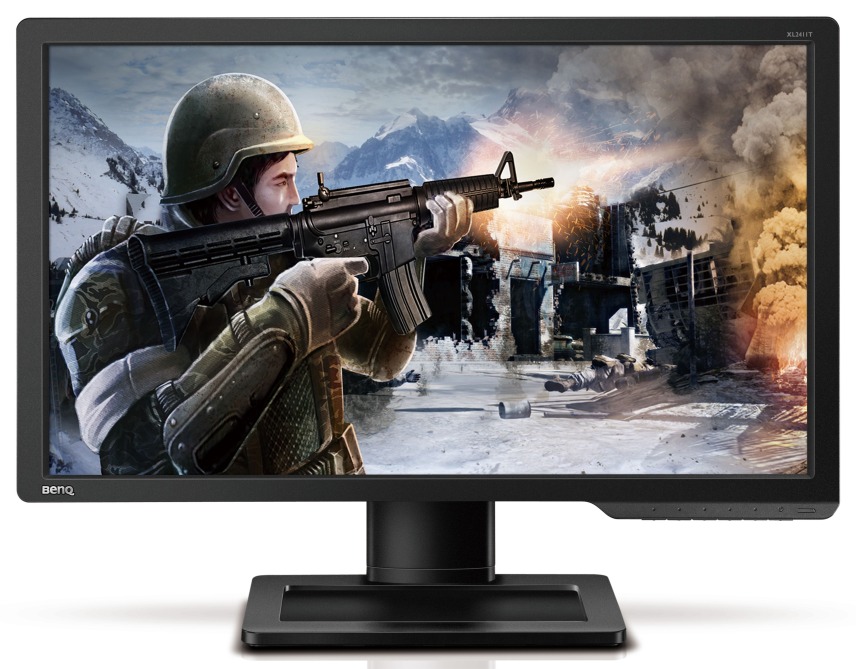
BenQ Unveils the XL2411T 24-Inch Gaming Monitor
QUOTE
Taiwanese company BenQ is just about ready to release a new gaming-friendly monitor, the 24-inch XL2411T which features a 120 Hz refresh rate, support for NVIDIA's 3D Vision 2 technology, and a 1ms GtG response time (TN panel).

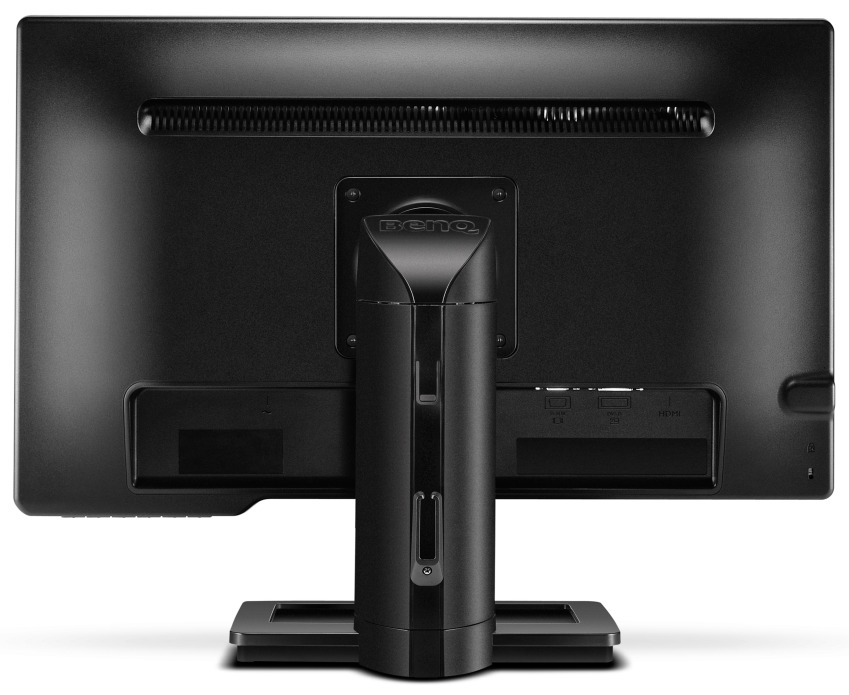
Seen below, BenQ's display also has a native resolution of 1920 x 1080 pixels, a contrast ratio of 1,000:1 (12,000,000:1 DCR), D-Sub, DVI and HDMI connectivity, a 0.001-frame input lag, a stand allowing for height, tilt, pivot, stroke and swivel adjustment, plus a FPS Mode, and the Black eQualizer color engine technology (which improves visibility in dark scenes). Unfortunately BenQ has yet to say when the XL2411T will become available of how much it will cost.

Picture:
» Click to show Spoiler - click again to hide... «

Source: http://www.techpowerup.com/173185/BenQ-Unv...ng-Monitor.html
CyntrixTech
post Oct 4 2012, 11:17 PM

Distributor
*******
Senior Member
2,583 posts

Joined: Sep 2011
From: Kuala Lumpur
BenQ "made" good monitors but plague with funny issues that were never resolved - FP241W. They've lost a lot of market share since then

Neither of them are really bezel free. The S2340L probably uses the same panel as they OEM many panels from LG
ego3nity
post Oct 4 2012, 11:27 PM

Getting Started
**
Junior Member
215 posts

Joined: Jun 2009
QUOTE(ThousandMango @ Oct 4 2012, 06:53 PM)
Hello , i want to ask bout monitors in the market now , looking for more than 21 inch monitor , not too expensive

budget around 500-600

mostly used for digital art , so colour is quite important here.

saw the samsung S23B350H in the newspaper, can anyone tell me if this is good ?

Or are there others out there that is cheaper and better than this ?

Appreciate your replies.
*
You can try Dell S2340L or LG IPS237L, i personally wait for the LG IPS237L

These two are new model which S2340L has been in Malaysia and the LG might be available in Malaysia next week.

QUOTE(CyntrixTech @ Oct 4 2012, 11:30 PM)
Neither of them are really bezel free. The S2340L probably uses the same panel as they OEM many panels from LG
*
yeap correct, there is no frameless bezel, just fake ad in the picture, but im buying it regardless of the frameless bezel.
viruz019
post Oct 4 2012, 11:46 PM

iSeeStars
******
Senior Member
1,518 posts

Joined: Mar 2008
From: Here'n'There


Anyone seen the latest Dell S2240L?

Is it worth getting for it's price?
pixit
post Oct 5 2012, 01:53 AM

Getting Started
**
Junior Member
111 posts

Joined: Jan 2003
QUOTE(csng @ Oct 4 2012, 09:56 PM)
Anyone know if the usb port on the Dell U2312hm can be used to charge an Ipad?
*
Yes, the usb port can be use as what a normal usb port can do. If i am not mistaken the charging ability is according to your motherboard.
Raiko
post Oct 5 2012, 03:34 AM

On my way
****
Senior Member
582 posts

Joined: Jan 2007
From: Shah Alam


i currently have the Dell UltraSharp U2412M, but i think wanna sold it and get a glossy one. which 24" monitor would u guys recommend that got almost near quality as the Dell UltraSharp U2412M ? basically i use it for editing and playing games. much appreciate your suggestions.
TongCN
post Oct 5 2012, 06:56 AM

Look ma, I have lots stars :D
*******
Senior Member
6,624 posts

Joined: Aug 2008
From: Malaysia


If buy from Dell site, don't forget to use the EPP coupon for 10% discount smile.gif search through previous post to find out
sai86
post Oct 5 2012, 01:55 PM

StilL LearninG
*******
Senior Member
4,934 posts

Joined: Sep 2008
From: Setapak


any 24" 16:10 to recommend? aside the dell u24. i really noticed 16:10 monitor is so few in the market rclxub.gif
rc2x
post Oct 5 2012, 06:54 PM

Ask me about my vore fettish
******
Senior Member
1,838 posts

Joined: Jun 2008
From: The Grid


QUOTE(CyntrixTech @ Oct 4 2012, 11:17 PM)
BenQ "made" good monitors but plague with funny issues that were never resolved - FP241W. They've lost a lot of market share since then
*
I also found that it's super extremely hard to find their lcd here. Not much demand here i guess.
JustForFun
post Oct 5 2012, 10:30 PM

Seeker
******
Senior Member
1,281 posts

Joined: Sep 2008


Many people complained that the S series is too reflective for them, careful for potential buyers who are gonna place it under very bright lighting condition.
mrkenn
post Oct 5 2012, 11:48 PM

Enthusiast
*****
Senior Member
723 posts

Joined: Dec 2007
Guys wanna ask. If connect from desktop to monitor, usually from desktop is VGA or DVI? then connect to monitor. But if monitor got VGA, HDMI, DVI, Displayport. Connect to which one? Is there any difference between

Connecting VGA to VGA, VGA to HDMI, VGA to DVI, got any difference?

This post has been edited by mrkenn: Oct 5 2012, 11:49 PM
everling
post Oct 6 2012, 12:20 AM

Look at all my stars!!
*******
Senior Member
3,591 posts

Joined: Feb 2008
QUOTE(mrkenn @ Oct 5 2012, 11:48 PM)
Guys wanna ask. If connect from desktop to monitor, usually from desktop is VGA  or DVI? then connect to monitor. But if monitor got VGA, HDMI, DVI, Displayport. Connect to which one? Is there any difference between

Connecting VGA to VGA, VGA to HDMI, VGA to DVI, got any difference?
*
Best to avoid using VGA unless you must. The order is DisplayPort > DVI > HDMI > VGA. You can get signal noise with VGA cables. And HDMI can have weird issues because it is designed for TV display and not PC display. Least troublesome is DVI and DisplayPort.

This post has been edited by everling: Oct 6 2012, 12:22 AM
JustForFun
post Oct 6 2012, 12:45 AM

Seeker
******
Senior Member
1,281 posts

Joined: Sep 2008


QUOTE(mrkenn @ Oct 5 2012, 11:48 PM)
Guys wanna ask. If connect from desktop to monitor, usually from desktop is VGA  or DVI?
*
It depends on whether you're connecting from your integrated graphics or graphics card. Most if not all dekstop computers will have VGA port from the motherboard for you to connect, however if you have a graphics card with DVI port, you're better off using the DVI port, as it has better performance.
SUSwin7
post Oct 6 2012, 01:21 AM

Regular
******
Senior Member
1,594 posts

Joined: Apr 2010
QUOTE(TongCN @ Oct 5 2012, 06:56 AM)
If buy from Dell site, don't forget to use the EPP coupon for 10% discount smile.gif search through previous post to find out
*
may i know how to use the EPP coupon ya? hmm.gif

140 Pages « < 14 15 16 17 18 > » Top
Topic ClosedOptions
 

Change to:
| Lo-Fi Version
0.0262sec    0.68    6 queries    GZIP Disabled
Time is now: 4th December 2025 - 08:56 AM