


Please advise if it's too low or anything i can do about it. Thank you!
This post has been edited by alexzai: Oct 17 2012, 12:45 AM
The SSD Thread V3, The Speed You Need
|
|
 Oct 17 2012, 12:42 AM Oct 17 2012, 12:42 AM
|
 
Junior Member
26 posts Joined: Oct 2010 
|
Just upgrading from HDD to SSD today, wanna know is my SSD speed is normal or too low? newbie here ps..I'm using Corsair Force 3 120GB Motherboard H77M-D3H Processor Intel i5 3470
Please advise if it's too low or anything i can do about it. Thank you! This post has been edited by alexzai: Oct 17 2012, 12:45 AM |
|
|
|
|
|
Oct 17 2012, 12:51 AM
|

Senior Member
6,012 posts Joined: Feb 2007  
|
QUOTE(alexzai @ Oct 17 2012, 12:42 AM) Just upgrading from HDD to SSD today, wanna know is my SSD speed is normal or too low? newbie here ps..I'm using Corsair Force 3 120GB Motherboard H77M-D3H Processor Intel i5 3470 That SSD is sandforce based » Click to show Spoiler - click again to hide... « Please advise if it's too low or anything i can do about it. Thank you!   Try to use ATTO bench instead, and you should use the ACHI driver from intel, not the default AHCI driver from microsoft Added on October 17, 2012, 12:55 am QUOTE(MaGNiFiCo @ Oct 16 2012, 10:41 PM) if u want some faster hard disk for external i suggest just buy an external that supports usb 3.0. that will do i guess Yup yup, can consider these:bro 010G quite buggy. u shud just stay with current fw for now  http://www.kingston.com/en/usb/personal_business#dthx30 http://www.sandisk.com/products/usb/drives/extreme/ http://www.sony.net/Products/Media/Microva...sm-q/index.html Kingston one is the fastest, close to SATA 3GB/s speed, and larger capacity like 256GB also available. This post has been edited by 1024kbps: Oct 17 2012, 12:55 AM |
|
|
Oct 17 2012, 10:04 AM
|

Senior Member
2,227 posts Joined: Jan 2009
|
QUOTE(iVW @ Oct 16 2012, 09:47 PM) any sifu here would like to enlighten me on how to transform SSD into portable hard disk? I need the SSD with best read/write speed and turn it into portable one If use SSD , the speed will be bottleneckd by the USB port  This post has been edited by skycrawler: Oct 17 2012, 10:04 AM |
|
|
Oct 17 2012, 12:19 PM
|

Senior Member
2,865 posts Joined: Jan 2003
|
QUOTE(noobandroid @ Oct 16 2012, 08:22 PM) i may have a plan to integrate an msata to my current setup, by using gigabyte ez smart response, does it mean the msata will be for mainly caching for hdd? significant increase in overall r/w performance? get a proper SSD instead of using msata cache will benefit more. Also, msata price (Gb/RM) is not good compare to 2.5" SSD |
|
|
Oct 17 2012, 01:13 PM
|
|
Junior Member
312 posts Joined: Jan 2003
|
QUOTE(alexzai @ Oct 17 2012, 12:42 AM) Just upgrading from HDD to SSD today, wanna know is my SSD speed is normal or too low? newbie here ps..I'm using Corsair Force 3 120GB Motherboard H77M-D3H Processor Intel i5 3470 Speed looks about right for Corsair Force 3 120GB. But try other benchmark suites and compare against here:Please advise if it's too low or anything i can do about it. Thank you! http://www.guru3d.com/articles_pages/corsa..._review,12.html |
|
|
Oct 17 2012, 09:49 PM
|

Senior Member
1,561 posts Joined: Feb 2006 From: Penang island
|
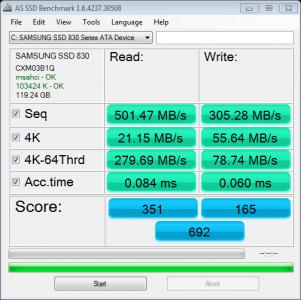
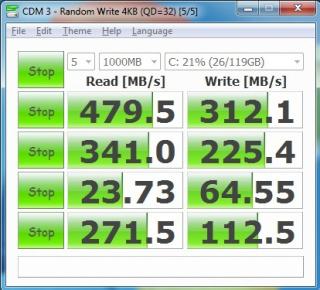
got my samsung 830 128gb today...here is the benchmark i took..and pls give me some advice how to improve it...i feel like it seems low...do i need to install those samsung software? well it does give me a CD but too bad my pc right now has no dvd rom
|
|
|
|
|
|
Oct 17 2012, 10:14 PM
|
|
Senior Member
6,012 posts Joined: Feb 2007
|
QUOTE(intothefantasy @ Oct 17 2012, 09:49 PM) got my samsung 830 128gb today...here is the benchmark i took..and pls give me some advice how to improve it...i feel like it seems low...do i need to install those samsung software? well it does give me a CD but too bad my pc right now has no dvd rom Why i got the feeling that, everyone bough a new SSD sure come here to post SSD bench as ask for help? » Click to show Spoiler - click again to hide... « Sounds like bragging lol  If you compare with the benchmark score with the other user here, yours one look already very good, Can compare the result from here too http://www.tweaktown.com/reviews/4520/sams...iew/index5.html and please install a AHCI driver from Intel if you are using intel mobo, it will improve performance compare to defaul AHCI driver frim microsoft. The Bundled software probably is disk cloning utility, if you install your OS and software from scratch, you dont need it. If your OS is windows 7, you dont have to tweak anything iirc, beside disable hibernation and reduce pagefile size? |
|
|
Oct 17 2012, 10:24 PM
|
|
Senior Member
1,561 posts Joined: Feb 2006 From: Penang island
|
QUOTE(1024kbps @ Oct 17 2012, 10:14 PM) Why i got the feeling that, everyone bough a new SSD sure come here to post SSD bench as ask for help? erm seriously i am not trying to brag here..before this i have help my fren to setup a new rig with m4 128gb inside...and having his score quite high..higher than mine so i would like to clarify only to make sure my ssd is healthy...i am unsure whether my use of 4 hdd + 1 ssd will bottleneck my sata for my ssd..so would just like some advice onlySounds like bragging lol If you compare with the benchmark score with the other user here, yours one look already very good, Can compare the result from here too http://www.tweaktown.com/reviews/4520/sams...iew/index5.html and please install a AHCI driver from Intel if you are using intel mobo, it will improve performance compare to defaul AHCI driver frim microsoft. The Bundled software probably is disk cloning utility, if you install your OS and software from scratch, you dont need it. If your OS is windows 7, you dont have to tweak anything iirc, beside disable hibernation and reduce pagefile size? This post has been edited by intothefantasy: Oct 17 2012, 10:28 PM |
|
|
Oct 17 2012, 10:35 PM
|
|
Senior Member
6,012 posts Joined: Feb 2007
|
QUOTE(intothefantasy @ Oct 17 2012, 10:24 PM) erm seriously i am not trying to brag here..before this i have help my fren to setup a new rig with m4 128gb inside...and having his score quite high..higher than mine so i would like to clarify only to make sure my ssd is healthy...i am unsure whether my use of 4 hdd + 1 ssd will bottleneck my sata for my ssd..so would just like some advice only Just kidding lah Whats your mobo? 4hdd + 1 ssd will not have performance impact for your SSD, i used all my SATA ports on my AMD mobo, 8 of them, no problem(although my ssd benchmark result are somewhat wierd). Again, install the intel AHCI driver first, and run benchmark again. |
|
|
Oct 17 2012, 10:50 PM
|
|
Senior Member
1,561 posts Joined: Feb 2006 From: Penang island
|
hmm can i know how do i install the intel AHCI? in my device manager under IDE ATA/ATAPI controller shows Interl® 7 series/C216 Chipset Family SATA AHCI Controller....i tried to download the intel sata driver again and has no exe file to execute...so i try to install it from the device manager...by updating the driver above...still same thing...i feel like is already installed the 1st time? btw i am using gigabyte z77x-d3h mobo
|
|
|
Oct 17 2012, 11:18 PM
|
|
Senior Member
6,012 posts Joined: Feb 2007
|
QUOTE(intothefantasy @ Oct 17 2012, 10:50 PM) hmm can i know how do i install the intel AHCI? in my device manager under IDE ATA/ATAPI controller shows Interl® 7 series/C216 Chipset Family SATA AHCI Controller....i tried to download the intel sata driver again and has no exe file to execute...so i try to install it from the device manager...by updating the driver above...still same thing...i feel like is already installed the 1st time? btw i am using gigabyte z77x-d3h mobo Did you tried to restart? if you already install the AHCI driver / intel RST,  on AS SSD it will show "iastor" on the highlighted area, if the intel AHCI driver is enabled, "msahci" is the default driver from microsoft, its probably the most stable driver for SSD but the performance is not good compare to native one. |
|
|
Oct 17 2012, 11:22 PM
|
|
Senior Member
1,323 posts Joined: Jan 2003 From: Unknown
|
QUOTE(intothefantasy @ Oct 17 2012, 10:50 PM) hmm can i know how do i install the intel AHCI? in my device manager under IDE ATA/ATAPI controller shows Interl® 7 series/C216 Chipset Family SATA AHCI Controller....i tried to download the intel sata driver again and has no exe file to execute...so i try to install it from the device manager...by updating the driver above...still same thing...i feel like is already installed the 1st time? btw i am using gigabyte z77x-d3h mobo try this --> AHCI: Intel® Rapid Storage Technology Driver for Intel Desktop Boards |
|
|
Oct 17 2012, 11:44 PM
|
|
Senior Member
1,323 posts Joined: Jan 2003 From: Unknown
|
QUOTE(kszg @ Oct 17 2012, 11:37 PM) yes last time i take ssd to connected my pc normail hdd OS WINDOWS XP already to do 100% in normal situation, u can just format your ssd and install windows 7. but since this method is not working for you, i suggest you take out your ssd and put into pc which has windows in it. make your ssd as secondary drive. install the wipe utility and use the wipe utility to wipe out your ssd. if it still not working, just send you ssd for warranty claim.then i put ssd pc then i put disc win7 i press format then i click next installed then still same problem again this first disk wipe utility i naver to do do i need must to do first disk wipe utility then i put windows 7 dvd then do i need press format ??? |
|
|
|
|
|
Oct 18 2012, 02:37 AM
|
|
Junior Member
35 posts Joined: Dec 2009 From: Penang
|
All sifu here...i am thinking to upgrade my laptop (aspire 5750G) to SSD because my current HDD ady spoil..Is it possible to do so ?
|
|
|
Oct 18 2012, 07:48 AM
|
|
Senior Member
1,561 posts Joined: Feb 2006 From: Penang island
|
QUOTE(1024kbps @ Oct 17 2012, 11:18 PM) Did you tried to restart? if you already install the AHCI driver / intel RST, on AS SSD it will show "iastor" on the highlighted area, if the intel AHCI driver is enabled, "msahci" is the default driver from microsoft, its probably the most stable driver for SSD but the performance is not good compare to native one. QUOTE(soultaker @ Oct 17 2012, 11:22 PM) ok thank you both for the guide..i will try this when i get home later after workThis post has been edited by intothefantasy: Oct 18 2012, 07:51 AM |
|
|
Oct 18 2012, 11:28 AM
|

Senior Member
959 posts Joined: Apr 2007
|
Damm...everyday drool looking at SSD price in US!
512gb ocz agility 3 only 280usd, most 128gb below 100usd, 256gb around 170usd... How i wish i am there (or got "tangan" to post it here..) |
|
|
Oct 18 2012, 01:40 PM
|
|
Senior Member
1,561 posts Joined: Feb 2006 From: Penang island
|
well i went back to my house during lunch time and try out the link to install intel sata driver and run back the benchmark...it seems like no different at all and this time i do ensure that i am running intel sata driver instead of the ms sata from the AS SSD benchmark software...
anyway thanks for the information and guide...very helpful indead  This post has been edited by intothefantasy: Oct 18 2012, 01:40 PM |
|
|
Oct 18 2012, 02:11 PM
|
|
Senior Member
1,323 posts Joined: Jan 2003 From: Unknown
|
QUOTE(ic-klass @ Oct 18 2012, 11:28 AM) Damm...everyday drool looking at SSD price in US! Last time almost buy Samsung 830 128GB from US.. cost rm280 for the disk but unfortunately if wanna claim for warranty has to shipped back to US.. end up buying the SSD in Malaysia..512gb ocz agility 3 only 280usd, most 128gb below 100usd, 256gb around 170usd... How i wish i am there (or got "tangan" to post it here..) |
|
|
Oct 18 2012, 02:40 PM
|

All Stars
11,836 posts Joined: Mar 2011 From: Kota Kinabalu, Sabah
|
will there be any issues if i clone my OS partition into the SSD directly? i lazy want to format -> install OS -> install driver -> install program, thats about 60gb things to do
|
|
|
Oct 18 2012, 02:54 PM
|
|
Senior Member
1,323 posts Joined: Jan 2003 From: Unknown
|
QUOTE(noobandroid @ Oct 18 2012, 02:40 PM) will there be any issues if i clone my OS partition into the SSD directly? i lazy want to format -> install OS -> install driver -> install program, thats about 60gb things to do this question has been asked few times already it this thread. i'm pretty sure you are lazy to reinstall your OS since you are also lazy to find the answer for your question. you can clone your disk, but you need to do some tweaking on your windows as some feature will not enable such as TRIM support.. other than than, superfetch & prefetch will not be disable by windows. this only applicable to Windows 7. If you perform clean install of your windows 7, by default once it detect you OS disk is SSD, TRIM support will be enabled. prefetch & superfetch will be disable.. after all it's your choice. good luck. |
|
Topic ClosedOptions
|
| Change to: |  0.0191sec 0.0191sec
 0.15 0.15
 6 queries 6 queries
 GZIP Disabled GZIP Disabled
Time is now: 3rd December 2025 - 09:02 PM |
 Quote
Quote