QUOTE(aneip @ Mar 6 2025, 11:59 AM)
Can share what software you use? I try a few but got forbiden error from tm. I plan to use in 3cx but wanna test simple 1st.
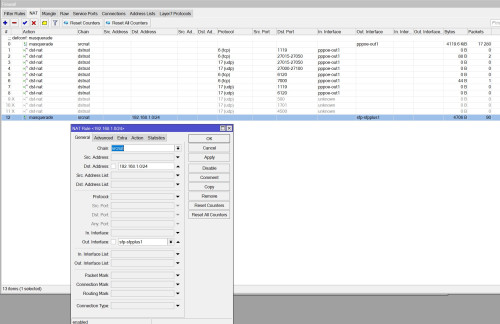
As for "ONU actually perform NAT on the VoIP VLAN" any setting need to change on UNO side for this?
Hi, I am using the Android default Phone app for this. Just tested and it is still working.
The whole ONU NAT for VLAN 400 is the default, at least for me using ZTE F620.
The ONU VoIP stack works like this:
1. VLAN 400 comes into the ONU
2. ONU will pipe the VLAN to CPU and run a DHCP client on it. This process also perform NAT on it.
3. Instead of adding a default route, it will act like a separate VRF. So TM will have all their VLAN starts with 10.x.x.x and they all works because of this.
4. The VoIP subsystem will then attach to this "VRF". That's why in the ONU, you can use Ping or Traceroute tool and it will ask you to select which "VRF" to use.
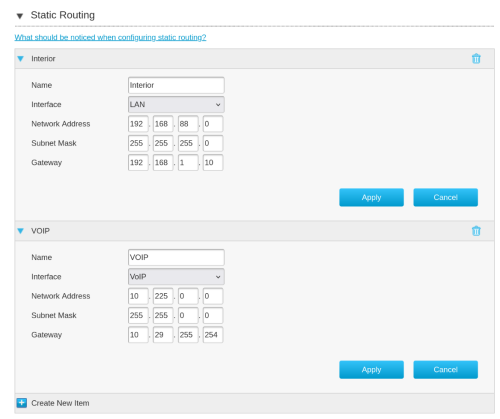
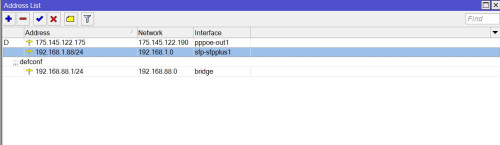
As long as you add the static route correctly, with the IP address and subnet as I stated, not larger, not smaller, it should work.
Try to ping the IP address to make sure you get a reply. If you don't get a reply, your static route setup is wrong.
If it didn't work, can you do a packet capture to make sure TM call server actually reply to your SIP packet?
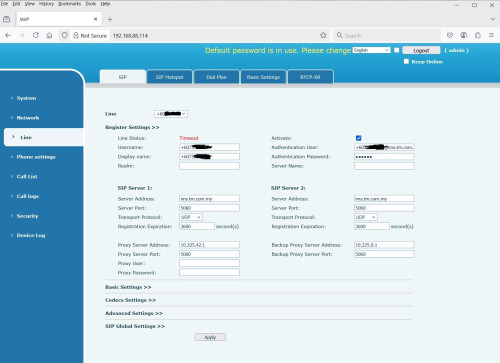
The configuration for SIP server:
Primary Outbound Proxy Server: 10.225.15.220
Secondary Outbound Proxy Server: 10.225.17.220
Both port 5060.


 Feb 17 2025, 06:04 PM



 Quote
Quote




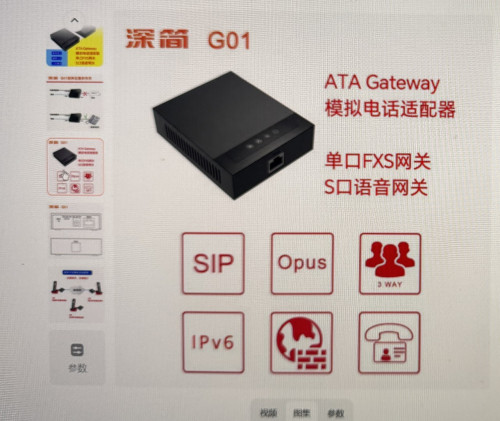
 i have that model and im going to update its firmware soon haha, then use it somewhere else

 His
His 




 0.0210sec
 0.49
0.49
 6 queries
 GZIP Disabled