

From Bandar Tasik Puteri, Rawang
Enterprise Networking Mikrotik Routers (RouterBoard & RouterOS), User and owner discussion group
|
|
 Jun 14 2025, 09:47 AM Jun 14 2025, 09:47 AM
Show posts by this member only | IPv6 | Post
#3321
|
 
Junior Member
610 posts Joined: Apr 2005 From: http://127.0.0.1:80/announce   
|
Ya i can confirm that too (7.20beta2)
From Bandar Tasik Puteri, Rawang |
|
|
|
|
|
Jun 17 2025, 08:50 PM
Show posts by this member only | IPv6 | Post
#3322
|

Junior Member
477 posts Joined: Jan 2003 From: Seri Kembangan 
|
Disable keepalive setting and it should get MTU 1492 (hopefully!). It should be this:
"ppp - do not send initial echo request if keepalive-timeout=disabled;" I'm not upgrading yet. And this is the history of why we're getting MTU 1480 (spoiler, Huawei): https://forum.mikrotik.com/t/pppoe-compatib...bras-nfv/182546 P.S. Hi @Anime4000, same username and picture here and Mikrotik forum. This post has been edited by cwtien: Jun 17 2025, 08:55 PM |
|
|
Jun 17 2025, 11:20 PM
Show posts by this member only | IPv6 | Post
#3323
|

Senior Member
1,207 posts Joined: Aug 2018
|
QUOTE(cwtien @ Jun 17 2025, 08:50 PM) Disable keepalive setting and it should get MTU 1492 (hopefully!). It should be this: You are the man! Works! "ppp - do not send initial echo request if keepalive-timeout=disabled;" I'm not upgrading yet. And this is the history of why we're getting MTU 1480 (spoiler, Huawei): https://forum.mikrotik.com/t/pppoe-compatib...bras-nfv/182546 P.S. Hi @Anime4000, same username and picture here and Mikrotik forum.  Thanks a lot. |
|
|
Jun 18 2025, 12:05 AM
|
|
Senior Member
3,032 posts Joined: Dec 2011
|
QUOTE(cwtien @ Jun 17 2025, 08:50 PM) Disable keepalive setting and it should get MTU 1492 (hopefully!). It should be this: "ppp - do not send initial echo request if keepalive-timeout=disabled;" I'm not upgrading yet. And this is the history of why we're getting MTU 1480 (spoiler, Huawei): https://forum.mikrotik.com/t/pppoe-compatib...bras-nfv/182546 P.S. Hi @Anime4000, same username and picture here and Mikrotik forum. QUOTE(kwss @ Jun 17 2025, 11:20 PM) You are the man! Works! Disabled keep alive still getting 1480. On v7.19.1Thanks a lot. This post has been edited by jusbella: Jun 18 2025, 12:06 AM |
|
|
Jun 18 2025, 12:22 AM
Show posts by this member only | IPv6 | Post
#3325
|
|
Junior Member
813 posts Joined: Jul 2008 From: Kota Kinabalu <-> Kuala Lumpur
|
QUOTE(jusbella @ Jun 18 2025, 12:05 AM) Disabled keep alive still getting 1480. On v7.19.1 need to upgrade to 7.20beta2 to get 1492 jusbella liked this post
|
|
|
Jun 18 2025, 02:39 AM
Show posts by this member only | IPv6 | Post
#3326
|
|
Senior Member
1,882 posts Joined: Sep 2017
|
QUOTE(cwtien @ Jun 17 2025, 08:50 PM) Disable keepalive setting and it should get MTU 1492 (hopefully!). It should be this: It works!!! Thanks!!! "ppp - do not send initial echo request if keepalive-timeout=disabled;"  And i just tried to speedtest with mtu1492,now i didn't need to enable queue for fixing bufferbloat!!!! No more packet lost issue with hitting max speed!!!!  This post has been edited by go626201: Jun 18 2025, 02:50 AM skywardsword and ahlong liked this post
|
|
|
|
|
|
Jun 18 2025, 10:17 AM
|

Senior Member
1,127 posts Joined: Jan 2003
|
QUOTE(cwtien @ Jun 17 2025, 08:50 PM) Disable keepalive setting and it should get MTU 1492 (hopefully!). It should be this: Thanks for sharing. I will wait for stable release of 7.20."ppp - do not send initial echo request if keepalive-timeout=disabled;" I'm not upgrading yet. And this is the history of why we're getting MTU 1480 (spoiler, Huawei): https://forum.mikrotik.com/t/pppoe-compatib...bras-nfv/182546 P.S. Hi @Anime4000, same username and picture here and Mikrotik forum. jusbella liked this post
|
|
|
Jun 21 2025, 12:41 PM
Show posts by this member only | IPv6 | Post
#3328
|
|
Senior Member
3,032 posts Joined: Dec 2011
|
RouterOS 7.19.2 [stable] released
What's new in 7.19.2 (2025-Jun-20 10:55): \*) bfd - fixed socket leak; \*) bgp - fixed withdraw when input.accept-nlri is non-existent; \*) btest - properly close unsuccessful TCP test sockets; \*) console - added prompt to /disk/format command; \*) disk - do not allow to start Btrfs replace command when a Btrfs replace process is already running; \*) disk - improve disk file system detection; \*) hotspot - allow only "http:" and "https:" schemas in dst field; \*) iot - added LoRa interface recovery mechanism; \*) iot - LoRa stability improvement; \*) iot - LR8G/9G firmware update; \*) ip-service - fixed "print count-only interval" when dynamic entries are added (introduced in v7.19); \*) ip-service - fixed setting services by name (introduced in v7.19); \*) ipsec - fixed responder on key exchange compute failure (introduced in v7.19); \*) ipv6 - do not show IPv6 FastPath as active when connection tracking or IPsec is used; \*) l2tp-ether - fixed interface creation/removal process; \*) lte - added support for R11e-LTE6 v039 firmware release; \*) lte - do not dial further if modem detects eSIM without profiles; \*) lte - fixed eSIM management function for mmips and mipsbe architecture CPUs; \*) lte - fixed eSIM provisioning for servers that do not send content-length in the HTTP response; \*) route - fixed destination ordering for SNMP; \*) route - fixed SNMP probing of IPv6 routes; \*) route - make routing table print faster with hw-offload, gateway and blackhole queries; \*) switch - fixed ACL rules when ports are not specified (fixes dynamic rules for RoMON); \*) switch - fixed advertise and speed settings for ether1 on RB5009 (introduced in v7.19.1); \*) webfig - improved screen reader support for WiFi fields in Quickset; \*) webfig - make combobox accessible to screen readers; \*) webfig - more space to branding logo; \*) wifi-qcom - fixed beacon loss issues and improved stability for IPQ-6018; \*) wifi-qcom - improved regulatory compliance; \*) winbox - fixed "Last Topology Change" for bridge port monitor; |
|
|
Jul 8 2025, 12:37 AM
Show posts by this member only | IPv6 | Post
#3329
|
|
Senior Member
3,032 posts Joined: Dec 2011
|
RouterOS 7.19.3 [stable] released
What's new in 7.19.3 (2025-Jul-03 14:23): \*) bridge - allow IPv6 FastPath when dhcp-snooping is enabled; \*) iot - LoRa LNS stability improvement; \*) lte - AT modems, fixed typos in commands sent to modem when APN with authentication is used (AT+CGAUTH; AT$QCPDPP); \*) lte - R11e-LTE and R11e-LTE6, fixed possible crash on device unexpected removal or during RouterOS shutdown; \*) mpls - improved stability when handling VPLS packets; \*) radius - fixed RADIUS client section becoming unresponsive when RadSec is configured, but server is not responding; \*) radius - fixed wrong RadSec port number in logs; \*) radius - properly verify certificate when RadSec is used; \*) sfp - added sfp-power-class and sfp-max-power monitor values for QSFP; \*) supout - added IPv6 NAT section; \*) switch - fixed ACL rules with "redirect-to-cpu" (introduced in v7.19.2); \*) switch - fixed bonding issues after switch reset (introduced in v7.18); \*) switch - fixed port blocking with spanning tree on EN7523 switch (introduced in v7.19); \*) swos - changed firmware file location (URL) for software update checks; \*) system - reduced RouterOS ARM package size; \*) winbox - show/hide corresponding fields when switching RADIUS client mode between RadSec and UDP; |
|
|
Jul 12 2025, 11:48 AM
|
|
Junior Member
181 posts Joined: Apr 2007
|
Hi all, does anyone use Mikrotik with Digi Fiber here?
I am signed up with 2gbps digi fiber plan recently, and I always get recurring disconnections from their pppoe randomly. I am using RB5009UG to fully utilize the 2gbps speed provided, connecting to a skyworth GN630E modem. I'm wondering if there is anything from Digi backend that detects and blocks mikrotik routers or they detect high usage? (I share the internet with more than 30 devices concurrently on average). Note: in a previous configuration with maxis fiber and using Mikrotik 4011 I do not have any such issues even with the 30+ device concurrent loads. The configurations are the same except the difference in PPPOE login details. Any sifus can advise if this might be specific to only Digi fiber? Is there some backend FUP that I am not aware of or is it just that my line happen to be faulty? 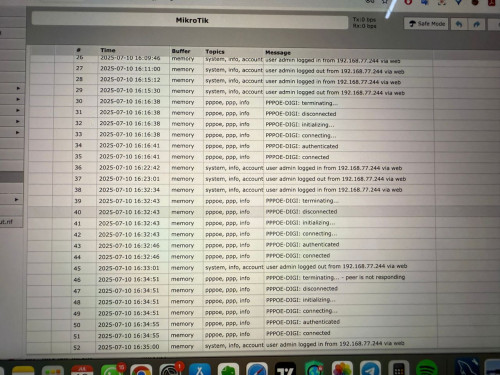 |
|
|
Jul 12 2025, 01:04 PM
Show posts by this member only | IPv6 | Post
#3331
|
|
Senior Member
3,032 posts Joined: Dec 2011
|
QUOTE(boringz @ Jul 12 2025, 11:48 AM) Hi all, does anyone use Mikrotik with Digi Fiber here? Can contact digi careline to clarify their log side first? See what their reply first.I am signed up with 2gbps digi fiber plan recently, and I always get recurring disconnections from their pppoe randomly. I am using RB5009UG to fully utilize the 2gbps speed provided, connecting to a skyworth GN630E modem. I'm wondering if there is anything from Digi backend that detects and blocks mikrotik routers or they detect high usage? (I share the internet with more than 30 devices concurrently on average). Note: in a previous configuration with maxis fiber and using Mikrotik 4011 I do not have any such issues even with the 30+ device concurrent loads. The configurations are the same except the difference in PPPOE login details. Any sifus can advise if this might be specific to only Digi fiber? Is there some backend FUP that I am not aware of or is it just that my line happen to be faulty? |
|
|
Jul 12 2025, 10:19 PM
|
|
Senior Member
1,434 posts Joined: Sep 2021
|
QUOTE(boringz @ Jul 12 2025, 11:48 AM) Hi all, does anyone use Mikrotik with Digi Fiber here? digi fibre its to much trouble why you did change digiI am signed up with 2gbps digi fiber plan recently, and I always get recurring disconnections from their pppoe randomly. I am using RB5009UG to fully utilize the 2gbps speed provided, connecting to a skyworth GN630E modem. I'm wondering if there is anything from Digi backend that detects and blocks mikrotik routers or they detect high usage? (I share the internet with more than 30 devices concurrently on average). Note: in a previous configuration with maxis fiber and using Mikrotik 4011 I do not have any such issues even with the 30+ device concurrent loads. The configurations are the same except the difference in PPPOE login details. Any sifus can advise if this might be specific to only Digi fiber? Is there some backend FUP that I am not aware of or is it just that my line happen to be faulty? you was use maxis without disconnect that mean you maxis fibre prefect maxis have 2gbps not issue RB5009UG can use morethan 30++ devices unifi also no problem and maxis fibre no problem digi fibre its to much trouble batter report MCMC if they unable settle = you may terminate line digi fibre get sign up maxis fibre 2gbps you settle i know you dgi fibre 2 year contract but you need report then digi team visit you house if unable settle still same problem disconnect you may raise report mcm i hope mcmc will help terminate line digi fibre without pay fee tell mcmc was previous use maxis fibre no problem then you may sign up maxis fibre 2gbps |
|
|
Jul 12 2025, 11:25 PM
Show posts by this member only | IPv6 | Post
#3333
|
|
Senior Member
1,207 posts Joined: Aug 2018
|
QUOTE(tng55 @ Jul 12 2025, 10:19 PM) digi fibre its to much trouble why you did change digi My friend ah....you was use maxis without disconnect that mean you maxis fibre prefect maxis have 2gbps not issue RB5009UG can use morethan 30++ devices unifi also no problem and maxis fibre no problem digi fibre its to much trouble batter report MCMC if they unable settle = you may terminate line digi fibre get sign up maxis fibre 2gbps you settle i know you dgi fibre 2 year contract but you need report then digi team visit you house if unable settle still same problem disconnect you may raise report mcm i hope mcmc will help terminate line digi fibre without pay fee tell mcmc was previous use maxis fibre no problem then you may sign up maxis fibre 2gbps You know he is on TM infra. Everything from the ONU all the way to the BNG is TM punya barang. He got frequent disconnection, it's TM punya BNG. Same for all telco on TM infra. I don't think this is something TM cannot solve. Apa sarahan Digi? |
|
|
|
|
|
Jul 12 2025, 11:34 PM
|
|
Senior Member
1,434 posts Joined: Sep 2021
|
QUOTE(kwss @ Jul 12 2025, 11:25 PM) My friend ah.... but he previous maxis fiber that TM infra or maxis own infraYou know he is on TM infra. Everything from the ONU all the way to the BNG is TM punya barang. He got frequent disconnection, it's TM punya BNG. Same for all telco on TM infra. I don't think this is something TM cannot solve. Apa sarahan Digi? |
|
|
Jul 12 2025, 11:56 PM
|
|
Senior Member
1,207 posts Joined: Aug 2018
|
QUOTE(tng55 @ Jul 12 2025, 11:34 PM) but he previous maxis fiber that TM infra or maxis own infra Problem happen all the time. Just so co-incident it happened when he port over. In Unifi thread also got many people suddenly get frequent disconnection. |
|
|
Jul 14 2025, 11:21 AM
|
|
Junior Member
181 posts Joined: Apr 2007
|
hello! yes I am using maxis fiber port over same under TM infra. so happens only issue after changing to digi.
did report to MCMC and threaten about it but so far they only resolve download and upload speed and case closed even though I request to terminate. so I am kinda stuck with this telco for 2 years. really attempting to see if its my issue or mikrotik issue. thanks everyone! |
|
|
Jul 14 2025, 11:26 AM
|
|
Senior Member
1,434 posts Joined: Sep 2021
|
QUOTE(boringz @ Jul 14 2025, 11:21 AM) hello! yes I am using maxis fiber port over same under TM infra. so happens only issue after changing to digi. digi issue ispdid report to MCMC and threaten about it but so far they only resolve download and upload speed and case closed even though I request to terminate. so I am kinda stuck with this telco for 2 years. really attempting to see if its my issue or mikrotik issue. thanks everyone! not issue mikrotik please attach screenshot logs PPPOE disconnect to send MCMC batter case reopen not resolve |
|
|
Jul 14 2025, 11:30 AM
|
|
Junior Member
181 posts Joined: Apr 2007
|
question: is there any specific difference in config for mikrotik if the pppoe is ipv6? as I notice through the digi router given (EX820 TPLINK) they have a connection via ipv6. Not sure this is normal or just so happens to be that way before, which cause the disconnections?
|
|
|
Jul 14 2025, 07:24 PM
Show posts by this member only | IPv6 | Post
#3339
|
|
Senior Member
1,207 posts Joined: Aug 2018
|
QUOTE(boringz @ Jul 14 2025, 11:30 AM) question: is there any specific difference in config for mikrotik if the pppoe is ipv6? as I notice through the digi router given (EX820 TPLINK) they have a connection via ipv6. Not sure this is normal or just so happens to be that way before, which cause the disconnections? Can you be more specific on "have a connection via ipv6"?You mean connection to where? Or did you mean you didn't configure ipv6 on your rb5009? If you have configured ipv6, how did you configure it now? If you toggle keep-alive in your pppoe client will it still disconnect? How about you login to your skyworth and monitor the PON status? Is it still O5 when it disconnect? Or the status change? |
|
|
Jul 19 2025, 11:38 AM
|
|
Junior Member
346 posts Joined: Jul 2012
|
Hi, I have somewhat of a unique situation in my house where the router is installed up on a small wall-mounted wooden plank that cannot fit most routers which sit flat. Noticed that Mikrotik has some options like the hAP AC2, AX2 and even the AX3 that can stand upright/vertical.
I have heard of the learning curve, but if I'm willing to learn routerOS, is it a good idea to get one of these Mikrotik models as opposed to something like a RT-AX59U? |
| Change to: |  0.0241sec 0.0241sec
 0.29 0.29
 6 queries 6 queries
 GZIP Disabled GZIP Disabled
Time is now: 2nd December 2025 - 02:05 AM |
 Quote
Quote