Outline ·
[ Standard ] ·
Linear+
Enterprise Networking Mikrotik Routers (RouterBoard & RouterOS), User and owner discussion group
|
mhwee
|
 Oct 3 2018, 03:39 PM Oct 3 2018, 03:39 PM
|
Getting Started


|
QUOTE(cyberic @ Oct 3 2018, 03:33 PM) Or wait for RB4011? Any news when it will be available in Malaysia? one of the supplier in malaysia answered me that both RB4011 ethernet and wifi version will be available by the end of oct 18. i like RB4011iGS+RM 's spec This post has been edited by mhwee: Oct 3 2018, 03:41 PM |
|
|
|
|
|
mhwee
|
Nov 12 2018, 08:42 PM
|
Getting Started
|
QUOTE(thankyou @ Oct 10 2018, 06:37 PM) [attachmentid=10063574]
RB4011iGS+RM
Looks good! Overkill for home?
Finally, i got this unit!!  This post has been edited by mhwee: Nov 12 2018, 08:43 PM This post has been edited by mhwee: Nov 12 2018, 08:43 PM |
|
|
|
|
|
mhwee
|
Nov 12 2018, 09:51 PM
|
Getting Started
|
QUOTE(thankyou @ Nov 12 2018, 08:55 PM) Is it available locally? How much? yes , locally, from an authorized supplier listed below. 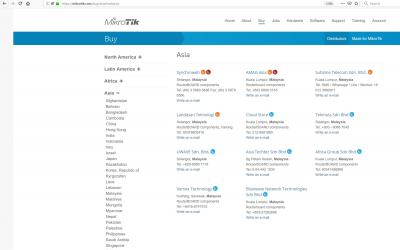
I think his sale still at lazada. You can get it before run out of stock. Please note that i choose RB4011 ethernet version. You may want to wait for wireless version. From what i communicated with the seller, the wireless version need few more weeks to come. This post has been edited by mhwee: Nov 12 2018, 10:43 PM |
|
|
|
|
|
mhwee
|
Nov 12 2018, 11:41 PM
|
Getting Started
|
QUOTE(thankyou @ Nov 12 2018, 11:28 PM) Thanks! Not looking for WiFi version as most likely I'll replace WiFi with Deco M9 Plus. Almost pull the trigger for hEX S. now I'm going to re-consider this for Unifi 800Mbps...  you have same concept and set up like me. I use this RB4011 with orbi RBK50. I always think that separating router and WiFi function into 2 unit will last the router very very long. This post has been edited by mhwee: Nov 12 2018, 11:44 PM |
|
|
|
|
|
mhwee
|
Nov 29 2018, 10:42 PM
|
Getting Started
|
QUOTE(Azusa_San @ Nov 29 2018, 07:23 PM) https://forum.mikrotik.com/viewtopic.php?t=101229Fasttrack only allow established and related packet to bypass the firewall rules, not new packet. http://linux.die.net/man/8/iptables Thanks for the info |
|
|
|
|
|
mhwee
|
Nov 30 2018, 11:13 AM
|
Getting Started
|
QUOTE(zzzhhhzzz @ Nov 30 2018, 10:42 AM) so as of now for Unifi Turbo 800Mbits/s which Mikrotik router will be the best bet (preferably one without Wifi as I wanted to split router and AP) 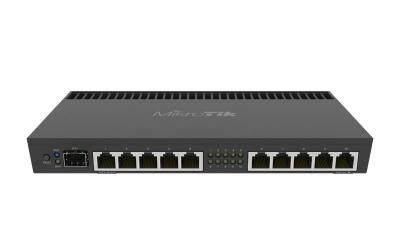
Best , but may not be best bet  This post has been edited by mhwee: Nov 30 2018, 11:16 AM This post has been edited by mhwee: Nov 30 2018, 11:16 AM |
|
|
|
|
|
mhwee
|
Dec 3 2018, 10:20 PM
|
Getting Started
|
QUOTE(crashhog @ Dec 3 2018, 09:31 PM) Hi Guys, I have a Unifi Turbo 500Mbps on a Mikrotik RB750GL with Router OS v6.43.4(stable). Been using like a normal setup nothing fancy. Now I've moved to another house, I was planning to do like in the picture below. Can anyone: 1. Point me to the right direction on how to configure the Mikrotik units? 2. Is RB750 okay for this setup? 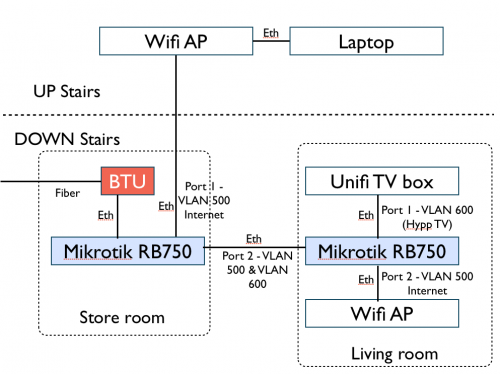 To me, RB750 is too old hardware to handle your 500mbps. Even RB750Gr3 also quite hard to handle without fasttrack enable. Apart from hardware, the diagram is okay. In fact, i am currently using a similar setup. My setup is, i put mikrotik RB4011iGS+RM at the first place (like your storeroom) connecting a Mesh wifi as AP, and i am using a netgear smart switch at the living room. It can do exactly same as your second mikrotik router. You don't need a second router at living room. All the routing traffic should be handled by first powerful mikrotik router. Second area just need a RM180 netgear smart switch to tag and untag the correct vlan and ports. https://www.netgear.com/business/products/s...x#tab-techspecsDHCP is handled by first mikrotik. You will have same ip range for devices connecting to store room AP and devices connecting to living room AP. if you put second mikrotik router, you are just putting unnecessary unit to do the second routing work, and you need to have equal power at second router to prevent bottleneck when you are at your living room network branch. This post has been edited by mhwee: Dec 3 2018, 10:48 PM |
|
|
|
|
|
mhwee
|
Dec 10 2018, 09:49 PM
|
Getting Started
|
QUOTE(crashhog @ Dec 10 2018, 10:22 AM) The RB750Gr3 can handle the traffic without an issue at all. It handles all my house traffic with less than 5% of CPU usage, and most of the time either 0% or 1%. In fact since it has a quad core processor most of the time only one or two is uses. My old RB750GL CPU usage on the other hand does spike up to 20% on occasion but after that stays below 5% for most of the time. I took a look at your suggestion of using the Netgear switch, but the Mikrotik was much more cheaper even when buying the router version. It would have even been cheaper with a Mikrotik Managed Switch. Nope, Rb750gr3 has dual core 880 only. I also have this router Rb750gr3 before I bought my Rb4011igs_rm. Try full network copy 50G files transferring between pc , then do speedtest, look at CPU usage again, it will have spike of cpu usage. if you got firewall rules, queue, you will see the cpu load up when fasttrack disabled. About the fact that you like mikrotik RB260gs managed switch more, it is a choice, up to you. As long as you know how to do the setup. I purchased my netgear switch at around RM 160 only. I bought tru taobao. I don't think your switch or router is cheaper. If your choice of managed switch or router are cheaper, good for you This post has been edited by mhwee: Dec 10 2018, 10:24 PM |
|
|
|
|
|
mhwee
|
Dec 26 2018, 04:32 PM
|
Getting Started
|
QUOTE(chanti-sama @ Dec 26 2018, 10:30 AM) Hi All, I just bought a mikrotik HexS router. I planned to configure my network: unifi -> MT router -> Asus rt-ac1200g+ The Asus is meant for all my devices to connect (pc, phones, laptop, tables). Currently my Asus is set to bridge mode. Does it meant on the mt-router i need to configure those wireless settings and just plug the wireless ap in? Sorry im abit new on this networking I thought Hex S has no wireless setting? It is an Ethernet router. Just set your asus RT-AC1200G+ to AP mode will do. The DHCP is managed by HexS . |
|
|
|
|
|
mhwee
|
 Dec 31 2018, 05:08 PM Dec 31 2018, 05:08 PM
|
Getting Started
|
lol that page is incomplete! Many people buy mikrotik router before even study the setup first...  You have to set Firewall -- nat rules . You also need to set dns settings. Please follow this https://klseet.com/213-tm-unifi/unifi-mikro...setup-for-unifi The setup are similar since all mikrotik router use same routerOS. Ignore the masterport settings , since mikrotik removed masterport and slave port since routerOS 6.41 in Dec 2017 This post has been edited by mhwee: Dec 31 2018, 06:04 PM |
|
|
|
|
|
mhwee
|
Jan 2 2019, 03:23 PM
|
Getting Started
|
QUOTE(hnr2802 @ Jan 2 2019, 01:28 PM) Hi all, Need your advice. Currently using Mikrotik RB2011UiAS-2HnD-IN. Upgraded to turbo 800mbps . Plan to replace my route to 1. RB4011iGS+5HacQ2HnD-IN or 2. Asus AC5300 china set which one you guys would recommend. my priority is wifi coverage & speed I have experience 2 pcs of RT-AC5300, from taobao Asus 旗舰店。Both end up wifi issues, sometimes just dont response to connection. This particular model only. Others like RT-AC88U, RT-AC68U from Asus 旗舰店 still function till today. This post has been edited by mhwee: Jan 2 2019, 03:24 PM |
|
|
|
|
|
mhwee
|
Jan 2 2019, 03:35 PM
|
Getting Started
|
Tested for ? 800mbps? I don't have 800mbps , I am using 300 mbps only. 300mbps makes me download things/movies till nothing to download  RM139 package , cheap what.. If you meant testing and using AC68U, then yes, it is still in very good condition. I have too many routers to take turn...so seldom revive it back nowadays  This post has been edited by mhwee: Jan 2 2019, 03:40 PM This post has been edited by mhwee: Jan 2 2019, 03:40 PM |
|
|
|
|
|
mhwee
|
Jan 2 2019, 04:07 PM
|
Getting Started
|
RB4011 Ethernet type
This post has been edited by mhwee: Jan 2 2019, 04:07 PM
|
|
|
|
|
|
mhwee
|
Mar 12 2019, 09:53 AM
|
Getting Started
|
QUOTE(Sky.Live @ Mar 12 2019, 09:42 AM) Where did you guys buy mikrotik router now? i used to buy from a reseller here.. seems cant locate him anymore Lazada Malaysia |
|
|
|
|
|
mhwee
|
Aug 2 2021, 11:04 AM
|
Getting Started
|
It is now listed on the mikrotik website! https://mikrotik.com/product/rb5009ug_s_inhttps://mikrotik.com/products/group/ethernet-routersUSD219  This post has been edited by mhwee: Aug 2 2021, 11:04 AM This post has been edited by mhwee: Aug 2 2021, 11:04 AM |
|
|
|
|
|
mhwee
|
May 2 2025, 09:28 PM
|
Getting Started
|
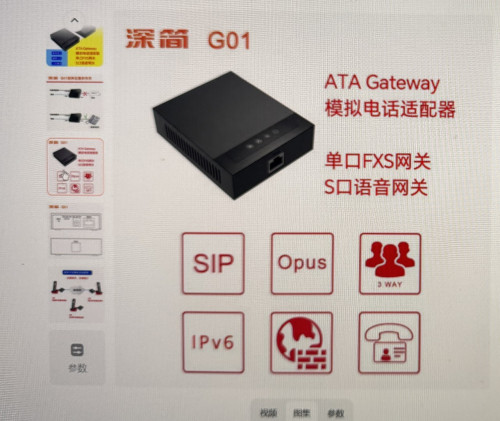
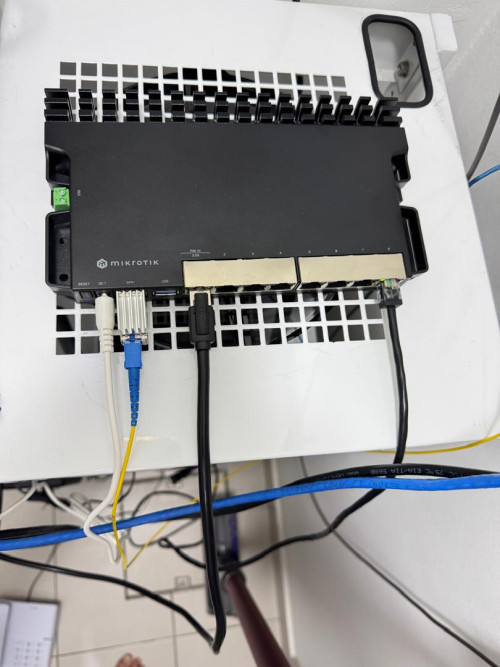
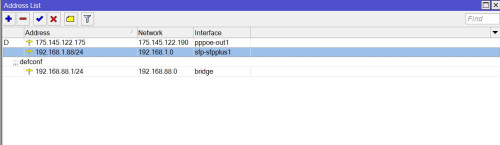
I have made voip working. https://youtube.com/shorts/c94a_dFTuhkIt is only the voip setting i put it wrongly previously. 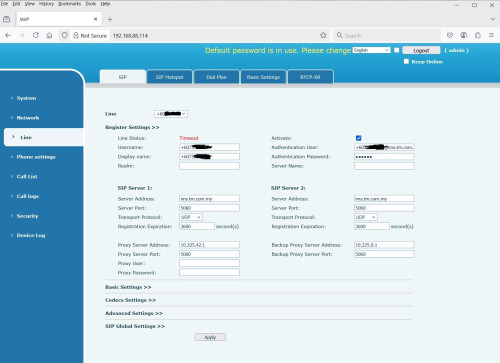 @soonwai I leave ingress-filtering=yes as default. it is still work like untag vlan. Thanks anyway. With this, i can totally replace Skyworth GN630V with RB5009+GPON stick+ATA The max download speed is the same This post has been edited by mhwee: May 3 2025, 04:34 PM |
|
|
|
|




 Quote
Quote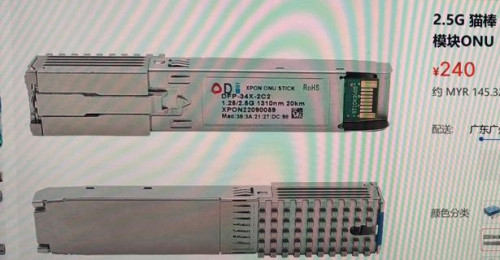

 0.0261sec
 0.47
0.47
 7 queries
 GZIP Disabled