Welcome Guest ( Log In | Register )

176 Pages « < 162 163 164 165 166 > » Bottom

Outline · [ Standard ] · Linear+

Enterprise Networking Mikrotik Routers (RouterBoard & RouterOS), User and owner discussion group

views
     
go626201
post Feb 15 2025, 12:54 PM

Regular
******
Senior Member
1,882 posts

Joined: Sep 2017
QUOTE(kwss @ Feb 15 2025, 12:49 PM)
Yeap, so much better. So I would say highly likely is due to local congestion.

When the TM tech come, why don't you straight away frame him for local congestion and see his reaction? LOL.

Actually the packet loss in the middle are all loss of TTL Time Exceeded packet. I don't know if those are ASIC data plane but since those are Google's router, I assume they are.

The actual packet loss to your endpoint is only 0.5%.

Still doesn't explain why your Mikrotik loss so much TTL Time Exceeded packet, that remains a mystery.
*
Later i will show him the upload and the pingplotter at the same time..haha icon_idea.gif
go626201
post Feb 15 2025, 01:01 PM

Regular
******
Senior Member
1,882 posts

Joined: Sep 2017
If your MikroTik is not using Queue, but IPv6 still experiences high latency while IPv4 is fine, the issue is likely caused by your ISP’s GPON DBA mechanism, IPv6 routing, or ISP QoS policies.
Possible Causes
GPON DBA Mechanism Affecting IPv6 More Than IPv4
GPON uses TDMA (Time Division Multiple Access) for upstream traffic, and your ISP dynamically allocates bandwidth using DBA (Dynamic Bandwidth Allocation).
If the ISP applies a more restrictive DBA policy for IPv6, your ONT might need to wait longer for upstream time slots, causing higher latency.
IPv4 might be prioritized for bandwidth allocation, leading to lower latency.
ISP QoS or Traffic Shaping on IPv6 Traffic
Some ISPs prioritize IPv4 traffic over IPv6 by applying different QoS (Quality of Service) rules.
IPv6 traffic might be rate-limited or queued differently, especially under high network load.
IPv6 Takes a Longer Route (Suboptimal Routing)
Some ISPs use different backbone paths for IPv4 and IPv6.
If IPv6 traffic follows a longer or congested route, it can result in higher latency than IPv4.
You can verify this by checking the number of hops and routing path for IPv6 vs. IPv4.

Maybe is that TDMA causing issue?
kwss
post Feb 15 2025, 01:01 PM

Regular
******
Senior Member
1,207 posts

Joined: Aug 2018
QUOTE(go626201 @ Feb 15 2025, 12:54 PM)
Later i will show him the upload and the pingplotter at the same time..haha icon_idea.gif
*
Post again after they visit.
Remember to also try to get rid of all those error reported by the ONU.
kwss
post Feb 15 2025, 01:04 PM

Regular
******
Senior Member
1,207 posts

Joined: Aug 2018
QUOTE(go626201 @ Feb 15 2025, 01:01 PM)
If your MikroTik is not using Queue, but IPv6 still experiences high latency while IPv4 is fine, the issue is likely caused by your ISP’s GPON DBA mechanism, IPv6 routing, or ISP QoS policies.
Possible Causes
GPON DBA Mechanism Affecting IPv6 More Than IPv4
GPON uses TDMA (Time Division Multiple Access) for upstream traffic, and your ISP dynamically allocates bandwidth using DBA (Dynamic Bandwidth Allocation).
If the ISP applies a more restrictive DBA policy for IPv6, your ONT might need to wait longer for upstream time slots, causing higher latency.
IPv4 might be prioritized for bandwidth allocation, leading to lower latency.
ISP QoS or Traffic Shaping on IPv6 Traffic
Some ISPs prioritize IPv4 traffic over IPv6 by applying different QoS (Quality of Service) rules.
IPv6 traffic might be rate-limited or queued differently, especially under high network load.
IPv6 Takes a Longer Route (Suboptimal Routing)
Some ISPs use different backbone paths for IPv4 and IPv6.
If IPv6 traffic follows a longer or congested route, it can result in higher latency than IPv4.
You can verify this by checking the number of hops and routing path for IPv6 vs. IPv4.

Maybe is that TDMA causing issue?
*
Not possible.
This one works on T-CONT. It won't selectively burn IPv6. In fact it is not even aware of what kind of packet.

I won't deny a lot of ISP cheat only IPv4 packet due to gaming. But that is at upstream, not at L2

This post has been edited by kwss: Feb 15 2025, 01:05 PM
go626201
post Feb 15 2025, 01:10 PM

Regular
******
Senior Member
1,882 posts

Joined: Sep 2017
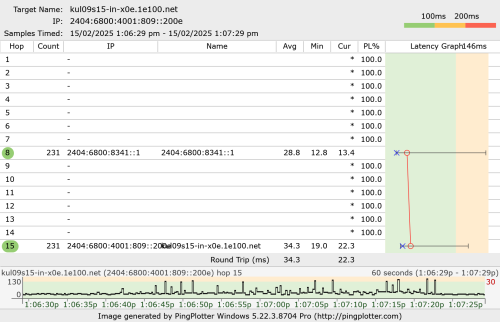
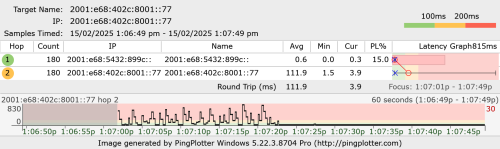
With vpn to Google IPv6 only,and upload to google drive.

user posted image

user posted image

Which mean as long as hitting a higher upload speed(With or without vpn), pure unifi ipv6 usage will all having high latency issue.

This post has been edited by go626201: Feb 15 2025, 01:11 PM
kwss
post Feb 15 2025, 01:14 PM

Regular
******
Senior Member
1,207 posts

Joined: Aug 2018
QUOTE(go626201 @ Feb 15 2025, 01:10 PM)
With vpn to Google IPv6 only,and upload to google drive.

user posted image

user posted image

Which mean as long as hitting a higher upload speed(With or without vpn), pure unifi ipv6 usage will all having high latency issue.
*
Your observation is correct but technically it is the wrong understanding.
When you are using a "correct VPN", you are actually using another circuit that is not congested.
The term "correct VPN" here means the BNG will egress that packet to a different, uncongested MPLS circuit.

You can use the wrong VPN which end up in the congested circuit and still see terrible result.
How to choose the correct or incorrect VPN? Trial and error + pure luck

EDIT:
Ping and traceroute also don't necessary translate directly to packet forwarding performance. This is a very important fact to remember. During packet forwarding, they traverse only data plane. If it is ASIC, then it literally fly by at wirespeed.
However, any ICMP generation will cause the data plane to interrupt and copy the packet to control plane, which is just general purpose CPU and not real time.

This post has been edited by kwss: Feb 15 2025, 01:18 PM
go626201
post Feb 15 2025, 01:20 PM

Regular
******
Senior Member
1,882 posts

Joined: Sep 2017
QUOTE(kwss @ Feb 15 2025, 01:14 PM)
Your observation is correct but technically it is the wrong understanding.
When you are using a "correct VPN", you are actually using another circuit that is not congested.
The term "correct VPN" here means the BNG will egress that packet to a different, uncongested MPLS circuit.

You can use the wrong VPN which end up in the congested circuit and still see terrible result.
How to choose the correct or incorrect VPN? Trial and error + pure luck
*
I think u misunderstanding what i said.
I mean when the upload speed is highly utilize on my Unifi, whether the high speed is using within the vpn or without vpn-pure unifi only.
The latency will spikes on pure unifi. It does not matter about the routing.

The picture i attached just now,both are running at the same time.
Just the 1st one google drive is on vpn route. So the ping is abit higher only.
And the second one is to Unifi ipv6 gateway,and so the ping is keep spiking when the vpn routed uploading to google drive at the same time. (Pure unifi route for the traceroute)

This post has been edited by go626201: Feb 15 2025, 01:21 PM
kwss
post Feb 15 2025, 01:22 PM

Regular
******
Senior Member
1,207 posts

Joined: Aug 2018
QUOTE(go626201 @ Feb 15 2025, 01:20 PM)
I think u misunderstanding what i said.
I mean when the upload speed is highly utilize on my Unifi, whether the high speed is using within the vpn or without vpn-pure unifi only.
The latency will spikes on pure unifi. It does not matter about the routing.

The picture i attached just now,both are running at the same time.
Just the 1st one google drive is on vpn route. So the ping is abit higher only.
And the second one is to Unifi ipv6 gateway,and so the ping is keep spiking when the vpn routed uploading to google drive at the same time. (Pure unifi route for the traceroute)
*
I know. I answered it in my edit while you posting again, lol

Hence performance testing must always be done end to end, using userland software like iperf3, TRex etc.

This post has been edited by kwss: Feb 15 2025, 01:24 PM
go626201
post Feb 15 2025, 02:34 PM

Regular
******
Senior Member
1,882 posts

Joined: Sep 2017
Hi,tm technician came.
And he could not fix it..haha
About the disconnection,i think he know it is their system issue.
If later still disconnect,i will ask for pppoe pass reset.

And upload packet lost or high latency issue,he said he will call back to KL 1st.
And told me to feedback tomorrow.
But i dont think this will be fix. My thought is still the same as looks like their infrastructure configuration not optimized/misconfigure and causing the issue.
Although i can partially mitigate the issue,but i cant mitigate the first packet lost or high latency unless i queue with 1/2-2/3 of upload speed.

Just now he came,and the speed test upload just straight packet lost,but most of my test will having super high latency ms.

And the only thing he done is redo the fiber optic connector.
But i think no difference.

This post has been edited by go626201: Feb 15 2025, 02:35 PM
kwss
post Feb 15 2025, 02:38 PM

Regular
******
Senior Member
1,207 posts

Joined: Aug 2018
QUOTE(go626201 @ Feb 15 2025, 02:34 PM)
Hi,tm technician came.
And he could not fix it..haha
About the disconnection,i think he know it is their system issue.
If later still disconnect,i will ask for pppoe pass reset.

And upload packet lost or high latency issue,he said he will call back to KL 1st.
And told me to feedback tomorrow.
But i dont think this will be fix. My thought is still the same as looks like their infrastructure configuration not optimized/misconfigure and causing the issue.
Although i can partially mitigate the issue,but i cant mitigate the first packet lost or high latency unless i queue with 1/2-2/3 of upload speed.

Just now he came,and the speed test upload just straight packet lost,but most of my test will having super high latency ms.

And the only thing he done is redo the fiber optic connector.
But i think no difference.
*
I already expected that's kind of the outcome.
But you didn't even borrow some ONU to test for error and ask for a swap?
I expect that's the minimum you ask for.
go626201
post Feb 15 2025, 02:41 PM

Regular
******
Senior Member
1,882 posts

Joined: Sep 2017
QUOTE(kwss @ Feb 15 2025, 02:38 PM)
I already expected that's kind of the outcome.
But you didn't even borrow some ONU to test for error and ask for a swap?
I expect that's the minimum you ask for.
*
He did changed a zte onu,but the speed cant hit more than 900mbps.so he change back to GN630V.

This post has been edited by go626201: Feb 15 2025, 02:42 PM
kwss
post Feb 15 2025, 02:47 PM

Regular
******
Senior Member
1,207 posts

Joined: Aug 2018
QUOTE(go626201 @ Feb 15 2025, 02:41 PM)
He did changed a zte onu,but the speed cant hit more than 900mbps.so he change back to GN630V.
*
You should just swap your old Alcatel with the ZTE. At least you can login and get many more stuff out of it. The Alcatel is crazy locked down.
Did you ask him about the OLT you are using and potentially switch you to a different line card?

You should ask a tech to do what they can help you do. Configuring QoS and all those are not their daily job scope.
go626201
post Feb 15 2025, 02:49 PM

Regular
******
Senior Member
1,882 posts

Joined: Sep 2017
QUOTE(kwss @ Feb 15 2025, 02:47 PM)
You should just swap your old Alcatel with the ZTE. At least you can login and get many more stuff out of it. The Alcatel is crazy locked down.
Did you ask him about the OLT you are using and potentially switch you to a different line card?

You should ask a tech to do what they can help you do. Configuring QoS and all those are not their daily job scope.
*
Just wait tomorrow 1st,the technician said he do not close up the report. maybe push up to upper level to check again.
OlgaC4
post Feb 16 2025, 12:19 AM

Look at all my stars!!
*******
Senior Member
5,292 posts

Joined: Nov 2006
Don't waste time on Ipv6. They use all the cheap route.
go626201
post Feb 16 2025, 01:16 AM

Regular
******
Senior Member
1,882 posts

Joined: Sep 2017
QUOTE(OlgaC4 @ Feb 16 2025, 12:19 AM)
Don't waste time on Ipv6. They use all the cheap route.
*
The problem is now the upload high latency issue not only happens to ipv6,it is also affecting ipv4.(Although not serious like ipv6,but occurs spikes to 2X-4X)
So it must be something wrong that need tm to fix it.
kwss
post Feb 17 2025, 01:20 PM

Regular
******
Senior Member
1,207 posts

Joined: Aug 2018
go626201
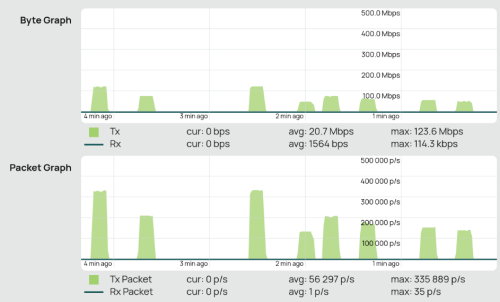
I more or less can reproduce your issue by blasting it with high packet per second (pps).
As you know forwarding / routing performance is based on pps, not bandwidth.

On my setup, anything more than 160k pps will stall the ONU and start missing packet. Mine is all 1gig setup. I am using 2gig service as a symmetric 1gig.

user posted image

With big packet (1400 bytes), 160k pps is equivalent to 1.7Gbps so you probably will pass speedtest.

All test performed using iperf3. Command like below:
iperf3 -c <server> -u -l 16 -b 100M

-l specify the packet length.

You can also use -P to specify number of parallel thread.

Lastly, not exactly sure if this is your issue but this is the only way I can reproduce the problem.


Attached thumbnail(s)
Attached Image
go626201
post Feb 17 2025, 01:50 PM

Regular
******
Senior Member
1,882 posts

Joined: Sep 2017
QUOTE(kwss @ Feb 17 2025, 01:20 PM)
go626201
I more or less can reproduce your issue by blasting it with high packet per second (pps).
As you know forwarding / routing performance is based on pps, not bandwidth.

On my setup, anything more than 160k pps will stall the ONU and start missing packet. Mine is all 1gig setup. I am using 2gig service as a symmetric 1gig.

user posted image

With big packet (1400 bytes), 160k pps is equivalent to 1.7Gbps so you probably will pass speedtest.

All test performed using iperf3. Command like below:
iperf3 -c <server> -u -l 16 -b 100M

-l specify the packet length.

You can also use -P to specify number of parallel thread.

Lastly, not exactly sure if this is your issue but this is the only way I can reproduce the problem.
*
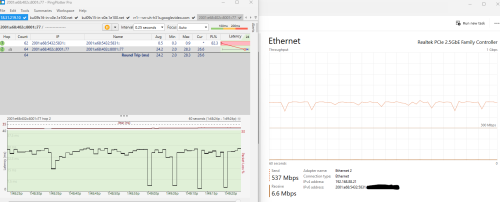
Hi,from what i observed and tested just now.
Seems like my upload problem have been partially fixed. (With uploading without queue to 4 server at the same time)
But i not sure is this temporary only. Will try to test again tonight.
user posted image
Anime4000
post Feb 17 2025, 02:29 PM

Look at all my stars!!
*******
Senior Member
2,399 posts

Joined: Jul 2009
From: /dev/null


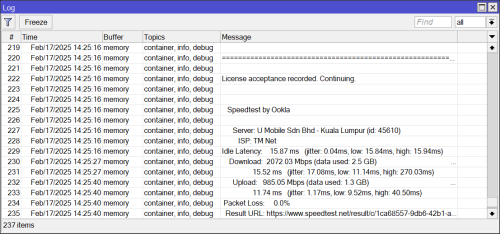
I don't know if anyone has made ookla speedtest on Mikrotik

user posted image
kwss
post Feb 17 2025, 04:55 PM

Regular
******
Senior Member
1,207 posts

Joined: Aug 2018
QUOTE(go626201 @ Feb 17 2025, 01:50 PM)
Hi,from what i observed and tested just now.
Seems like my upload problem have been partially fixed. (With uploading without queue to 4 server at the same time)
But i not sure is this temporary only. Will try to test again tonight.
user posted image
*
Why partially fixed? Looks like fully fixed for me. Any problem that I am not seeing?
You are uploading at full 500 meg and latency is all green without queue. 0 packet loss to BNG.
go626201
post Feb 17 2025, 05:55 PM

Regular
******
Senior Member
1,882 posts

Joined: Sep 2017
QUOTE(kwss @ Feb 17 2025, 04:55 PM)
Why partially fixed? Looks like fully fixed for me. Any problem that I am not seeing?
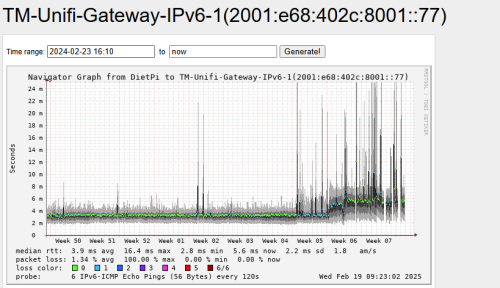
You are uploading at full 500 meg and latency is all green without queue. 0 packet loss to BNG.
*
Ya,it almost 99% okay already.
But i not sure why the idle latency still higher than before FSU.
user posted image

This post has been edited by go626201: Feb 17 2025, 05:59 PM

176 Pages « < 162 163 164 165 166 > » Top
 

Change to:
| Lo-Fi Version
0.0193sec    0.55    6 queries    GZIP Disabled
Time is now: 2nd December 2025 - 11:11 PM