Welcome Guest ( Log In | Register )

176 Pages « < 161 162 163 164 165 > » Bottom

Outline · [ Standard ] · Linear+

Enterprise Networking Mikrotik Routers (RouterBoard & RouterOS), User and owner discussion group

views
     
go626201
post Feb 15 2025, 09:23 AM

Regular
******
Senior Member
1,882 posts

Joined: Sep 2017
QUOTE(kwss @ Feb 15 2025, 07:11 AM)
Read the log file. It's not timeout. The server send you terminate request even immediately after a successful lcp-echo lcp-reply pair.
Did you sold off any of your old router?
I would try to request a PPPoE password change. I suspect someone is trying to use your 1gig password.
If it happen right after FSU, could be that technician.

But this didn't discount the fact you still get tons of Ethernet error on the ONU
*
QUOTE(hsbb @ Feb 15 2025, 07:35 AM)
Change your pppoe 1st in desktop self care. Double login can also make existing connection auto terminated.
*
Never sold my router.
Later 10.30am tm will come and check.
Even if the problem really on password being use,i still need to fix the upload latency spikes.
It came back again in the 1st second when i start upload data.

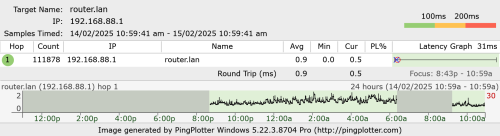
And attached a overnight pingplotter here.
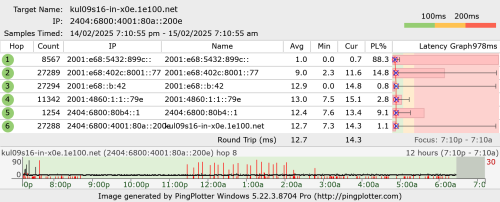
user posted image
After 2.45am no more downtime.

This post has been edited by go626201: Feb 15 2025, 09:24 AM
kwss
post Feb 15 2025, 10:21 AM

Regular
******
Senior Member
1,207 posts

Joined: Aug 2018
QUOTE(go626201 @ Feb 15 2025, 09:23 AM)
Never sold my router.
Later 10.30am tm will come and check.
Even if the problem really on password being use,i still need to fix the upload latency spikes.
It came back again in the 1st second when i start upload data.

And attached a overnight pingplotter here.
user posted image
After 2.45am no more downtime.
*
Can you try connect your PC directly to the Mikrotik and run ping plotter again? Bypass the switch.

You don't get spike while using HEX. Probably because with HEX you cannot use the DAC. So that might be the problem. Look at the massive amount of packet loss with your router.

I'm confident you have more than one issue with your network. None of the problems you are facing is mutually exclusive.

The high error is one.
PPPoE disconnect is another.
Latency spike is the third one.
go626201
post Feb 15 2025, 11:00 AM

Regular
******
Senior Member
1,882 posts

Joined: Sep 2017
QUOTE(kwss @ Feb 15 2025, 10:21 AM)
Can you try connect your PC directly to the Mikrotik and run ping plotter again? Bypass the switch.

You don't get spike while using HEX. Probably because with HEX you cannot use the DAC. So that might be the problem. Look at the massive amount of packet loss with your router.

I'm confident you have more than one issue with your network. None of the problems you are facing is mutually exclusive.

The high error is one.
PPPoE disconnect is another.
Latency spike is the third one.
*
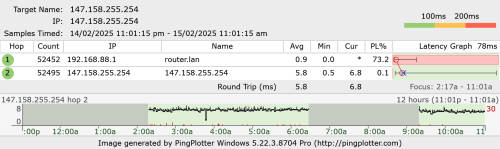
Emm hEX should having the same issue. (upload packet lost and high latency only mainly occurs on ipv6)
The first hop packet lost is normal. Chatgpt said router will not respond 100% with non-direct traceroute.
If i pingplotter to router, no packet at all.

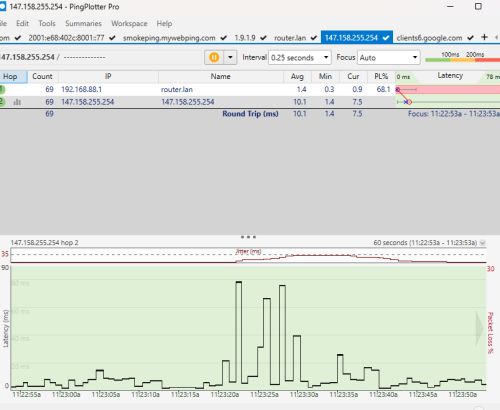
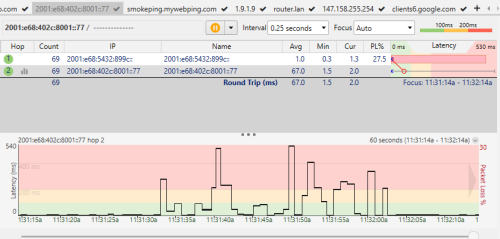
user posted image

For this packet lost is according to the disconnection with unifi.
user posted image

This bypass 2.5G switch. PC direct to mikrotik. (while uploading)
user posted image

This post has been edited by go626201: Feb 15 2025, 11:06 AM
kwss
post Feb 15 2025, 11:07 AM

Regular
******
Senior Member
1,207 posts

Joined: Aug 2018
QUOTE(go626201 @ Feb 15 2025, 11:00 AM)
Emm hEX should having the same issue. (upload packet lost and high latency only mainly occurs on ipv6)
The first hop packet lost is normal. Chatgpt said router will not respond with non-direct traceroute.
If i pingplotter to router, no packet at all.

user posted image

For this packet lost is according to the disconnection with unifi.
user posted image
*
It's normal for a lot of ASIC data plane to throttle or filter TTL Time Exceeded packet because they need to software process them in the control plane.

rb5009 is not one of them. You also get a small loss with Hex, which is also not one of them. I tested with mtr which mimic ping plotter and as you can see all zero loss.

But er .. if you say no problem then just ignore it.

This post has been edited by kwss: Feb 15 2025, 11:09 AM
go626201
post Feb 15 2025, 11:16 AM

Regular
******
Senior Member
1,882 posts

Joined: Sep 2017
QUOTE(kwss @ Feb 15 2025, 11:07 AM)
It's normal for a lot of ASIC data plane to throttle or filter TTL Time Exceeded packet because they need to software process them in the control plane.

rb5009 is not one of them. You also get a small loss with Hex, which is also not one of them. I tested with mtr which mimic ping plotter and as you can see all zero loss.

But er .. if you say no problem then just ignore it.
*
For what i tested,the ipv6 high latency might be due to the bufferbloat when hitting more than 4XXmbps upload with ipv6. (If i using queue and set it limited in 4XXmbps,no spikes at all)
OR maybe if upload with ipv4 then will be ipv4 packet lost and high latency,this one i haven't test.
kwss
post Feb 15 2025, 11:22 AM

Regular
******
Senior Member
1,207 posts

Joined: Aug 2018
QUOTE(go626201 @ Feb 15 2025, 11:16 AM)
For what i tested,the ipv6 high latency might be due to the bufferbloat when hitting more than 4XXmbps upload with ipv6. (If i using queue and set it limited in 4XXmbps,no spikes at all)
OR maybe if upload with ipv4 then will be ipv4 packet lost and high latency,this one i haven't test.
*
Actually for this question, I think only those senior people in TM knows the answer.
I tested mine extensively and don't have this problem. Maybe because my area no longer have local congestion.
I did face this issue last time when local congestion is a daily affair.

It's the same as all the mobile network where they use deep buffer to keep link utilization high.

But I found it weird to only happen for IPv6 as the configuration should be protocol agnostic.

EDIT:
Did you actually use packet mark inside RouterOS? I have a suspicion you match ipv4 address list and mark only ipv4 packet. Hence the behavior

This post has been edited by kwss: Feb 15 2025, 11:26 AM
go626201
post Feb 15 2025, 11:25 AM

Regular
******
Senior Member
1,882 posts

Joined: Sep 2017
QUOTE(kwss @ Feb 15 2025, 11:22 AM)
Actually for this question, I think only those senior people in TM knows the answer.
I tested mine extensively and don't have this problem. Maybe because my area no longer have local congestion.
I did face this issue last time when local congestion is a daily affair.

It's the same as all the mobile network where they use deep buffer to keep link utilization high.

But I found it weird to only happen for IPv6 as the configuration should be protocol agnostic.
*
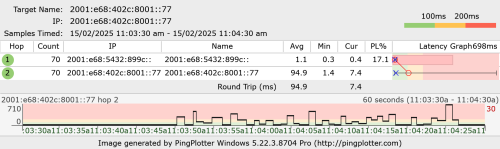
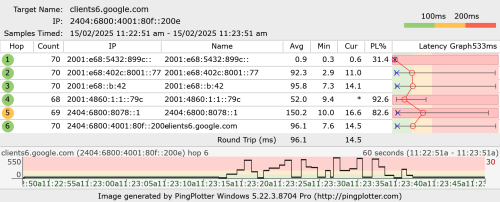
Ah i just tested to force upload to google drive with ipv4.
IPv4 spikes abit,this i can understand most likely due to bufferbloat. (80ms)
IPv6 spikes more abnormal. (more than 400ms)
So when uploading file,ipv6 latency much higher than ipv4.

user posted image

user posted image

For packet mark, not now.
I had reset my mikrotik router,now only pppoe and queue is using on mikrotik. all other function and setting is by default.

This post has been edited by go626201: Feb 15 2025, 11:29 AM
kwss
post Feb 15 2025, 11:29 AM

Regular
******
Senior Member
1,207 posts

Joined: Aug 2018
QUOTE(go626201 @ Feb 15 2025, 11:25 AM)
Ah i just tested to force upload to google drive with ipv4.
IPv4 spikes abit,this i can understand most likely due to bufferbloat. (80ms)
IPv6 spikes more abnormal. (more than 400ms)
So when uploading file,ipv6 latency much higher than ipv4.

user posted image

user posted image
*
I updated my previous reply while you posted lol.
Can you revisit it? Maybe describe a bit how you use mangle and address list?
go626201
post Feb 15 2025, 11:30 AM

Regular
******
Senior Member
1,882 posts

Joined: Sep 2017
QUOTE(kwss @ Feb 15 2025, 11:22 AM)
Actually for this question, I think only those senior people in TM knows the answer.
I tested mine extensively and don't have this problem. Maybe because my area no longer have local congestion.
I did face this issue last time when local congestion is a daily affair.

It's the same as all the mobile network where they use deep buffer to keep link utilization high.

But I found it weird to only happen for IPv6 as the configuration should be protocol agnostic.

EDIT:
Did you actually use packet mark inside RouterOS? I have a suspicion you match ipv4 address list and mark only ipv4 packet. Hence the behavior
*
QUOTE(kwss @ Feb 15 2025, 11:29 AM)
I updated my previous reply while you posted lol.
Can you revisit it? Maybe describe a bit how you use mangle and address list?
*
Just updated my replies, after reset mikrotik no additional setting except pppoe and queue. (And if upload queue disabled packet lost issue much worse)
kwss
post Feb 15 2025, 11:31 AM

Regular
******
Senior Member
1,207 posts

Joined: Aug 2018
How about you delete all the queue rules altogether and test? Is it still spiking on ipv6 only?
go626201
post Feb 15 2025, 11:33 AM

Regular
******
Senior Member
1,882 posts

Joined: Sep 2017
QUOTE(kwss @ Feb 15 2025, 11:31 AM)
How about you delete all the queue rules altogether and test? Is it still spiking on ipv6 only?
*
all Queue disabled. Now no packet lost but latency spikes still occurs.
The fully packet lost when upload seems like very random,last week i tried,it will totally packet lost when utilize high upload speed.

user posted image

Edited:
11.37am already, after the slot appointment time,no technician came. blush.gif
But the tm site show it is onsite...
Although i did report and tell them to check their device 1st before coming.

This post has been edited by go626201: Feb 15 2025, 11:39 AM
OlgaC4
post Feb 15 2025, 11:54 AM

Look at all my stars!!
*******
Senior Member
5,292 posts

Joined: Nov 2006
QUOTE(kwss @ Feb 15 2025, 11:31 AM)
How about you delete all the queue rules altogether and test? Is it still spiking on ipv6 only?
*
Ipv6 is unstable. i disable it .
kwss
post Feb 15 2025, 12:00 PM

Regular
******
Senior Member
1,207 posts

Joined: Aug 2018
QUOTE(go626201 @ Feb 15 2025, 11:33 AM)
all Queue disabled. Now no packet lost but latency spikes still occurs.
The fully packet lost when upload seems like very random,last week i tried,it will totally packet lost when utilize high upload speed.

user posted image

Edited:
11.37am already, after the slot appointment time,no technician came.  blush.gif
But the tm site show it is onsite...
Although i did report and tell them to check their device 1st before coming.
*
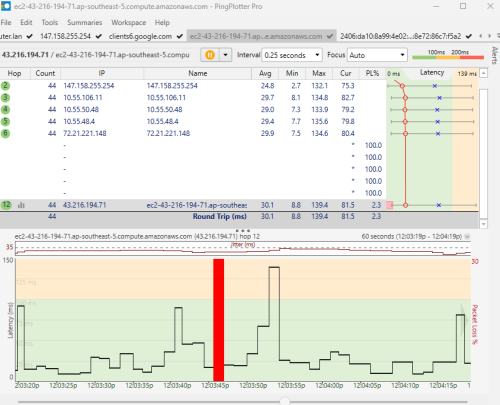
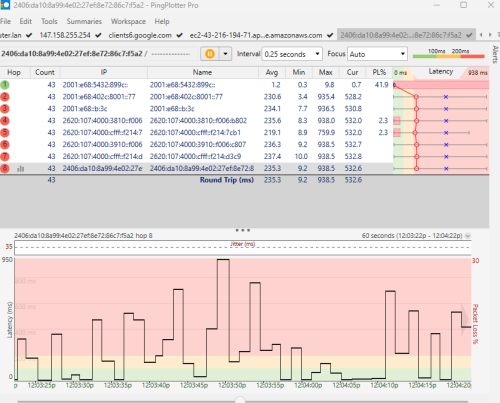
I setup an AWS instance that do nothing.
IPv4: 43.216.194.71
IPv6: 2406:da10:8a99:4e02:27ef:8e72:86c7:f5a2

Can you ping plotter with this 2 address simultaneously?

Ping it like a minute without upload.
Then start the upload.

I just want to get an idea about the congestion behavior.

EDIT:
This TM really lewat one la. Last time my FSU. Appointment 10am, they came 3:30pm.

This post has been edited by kwss: Feb 15 2025, 12:01 PM
go626201
post Feb 15 2025, 12:06 PM

Regular
******
Senior Member
1,882 posts

Joined: Sep 2017
QUOTE(kwss @ Feb 15 2025, 12:00 PM)
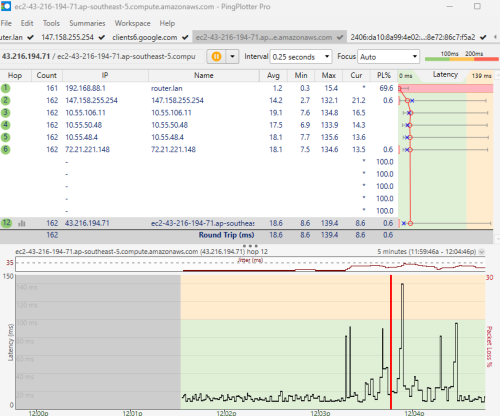
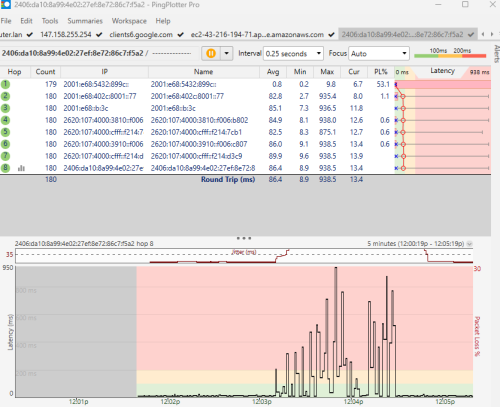
I setup an AWS instance that do nothing.
IPv4: 43.216.194.71
IPv6: 2406:da10:8a99:4e02:27ef:8e72:86c7:f5a2

Can you ping plotter with this 2 address simultaneously?

Ping it like a minute without upload.
Then start the upload.

I just want to get an idea about the congestion behavior.

EDIT:
This TM really lewat one la. Last time my FSU. Appointment 10am, they came 3:30pm.
*
Overview

user posted image

user posted image

60second in upload timeframe.

user posted image

user posted image

FYI queue is disabled after u ask queue off.

This post has been edited by go626201: Feb 15 2025, 12:07 PM
go626201
post Feb 15 2025, 12:09 PM

Regular
******
Senior Member
1,882 posts

Joined: Sep 2017
QUOTE(OlgaC4 @ Feb 15 2025, 11:54 AM)
Ipv6 is unstable. i disable it .
*
I had to fix it for futureproof...
The future is ipv6,unless i am going to stay with ipv4 for another 5-10years. rclxub.gif
kwss
post Feb 15 2025, 12:21 PM

Regular
******
Senior Member
1,207 posts

Joined: Aug 2018
QUOTE(go626201 @ Feb 15 2025, 12:06 PM)
Overview

user posted image

user posted image

60second in upload timeframe.

user posted image

user posted image

FYI queue is disabled after u ask queue off.
*
OK, I can clearly see a ladder pattern in the IPv6 latency.

This is a local congestion but why only IPv6 right?
If you dig back some of my old post in Unifi thread, I talk about how TM cheat speedtest.

They are using the same method to cheat bufferbloat test here.

What happen:
They configure a special queue targeting certain packet. So instead of having a sparse queue which fairly apply to all packet, they create special queue that selectively target IPv4 ICMP packet.
However, they forgot to create the same rule for IPv6.

Now the number might look nice in your ping plotter, but the real packet performance is what you are getting now.

Why queue "workaround" the problem is due to their HQoS.
1gig package has a higher priority traffic class than other traffic. But if you overshoot your upload limit, it ends up queueing.

Remember this is not a guaranteed situation. During peak usage, there is only so much buffer left and they will all be dropped. So HQoS in that case act as a policer instead of a shaper.

So yea, keep bitching to TM until they upgrade their shitty pipe. But it won't happen overnight.

Or keep escalating until someone create a rule for IPv6 so it will "looks good"

This post has been edited by kwss: Feb 15 2025, 12:30 PM
go626201
post Feb 15 2025, 12:30 PM

Regular
******
Senior Member
1,882 posts

Joined: Sep 2017
QUOTE(kwss @ Feb 15 2025, 12:21 PM)
OK, I can clearly see a ladder pattern in the IPv6 latency.

This is a local congestion but why only IPv6 right?
If you dig back some of my old post in Unifi thread, I talk about how TM cheat speedtest.

They are using the same method to cheat bufferbloat test here.

What happen:
They configure a special queue targeting certain packet. So instead of having a sparse queue which fairly apply to all packet, they create special queue that selectively target IPv4 ICMP packet.
However, they forgot to create the same rule for IPv6.

Now the number might look nice in your ping plotter, but the real packet performance is what you are getting now.

Why queue "workaround" the problem is due to their HQoS.
1gig package has a higher priority traffic class than other traffic. But if you overshoot your upload limit, it ends up queueing.

Remember this is not a guaranteed situation. During peak usage, there is only so much buffer left and they will all be dropped. So HQoS in that case act as a policer instead of a shaper.

So yea, keep bitching to TM until they upgrade their shitty pipe. But it won't happen overnight.

Or keep escalating until someone create a rule for IPv6 so it will "looks good"
*
You mean that why there is one day,i said i tried to upload with VPN,and all good?

Let me try it again now.

This post has been edited by go626201: Feb 15 2025, 12:31 PM
kwss
post Feb 15 2025, 12:32 PM

Regular
******
Senior Member
1,207 posts

Joined: Aug 2018
QUOTE(go626201 @ Feb 15 2025, 12:30 PM)
You mean that why there is one day,i said i tried to upload with VPN,and all good?

Let me try it again now.
*
Yup, depending on which VPN you use, they might use different MPLS circuit that's not congested and it will work.

EDIT:
I shutdown my AWS instance already.

This post has been edited by kwss: Feb 15 2025, 12:33 PM
go626201
post Feb 15 2025, 12:43 PM

Regular
******
Senior Member
1,882 posts

Joined: Sep 2017
QUOTE(kwss @ Feb 15 2025, 12:32 PM)
Yup, depending on which VPN you use, they might use different MPLS circuit that's not congested and it will work.

EDIT:
I shutdown my AWS instance already.
*
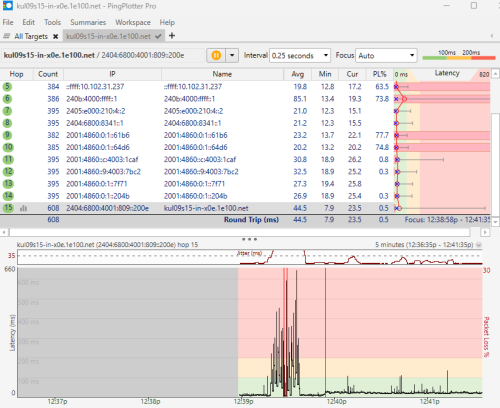
Upload to Google Drive.
Starting spikes is non-vpn-unifi only, and after a packet lost is ON VPN. (Alibaba Cloud SG- Private Peering)
user posted image
kwss
post Feb 15 2025, 12:49 PM

Regular
******
Senior Member
1,207 posts

Joined: Aug 2018
QUOTE(go626201 @ Feb 15 2025, 12:43 PM)
Upload to Google Drive.
Starting spikes is non-vpn-unifi only, and after a packet lost is ON VPN. (Alibaba Cloud SG- Private Peering)
user posted image
*
Yeap, so much better. So I would say highly likely is due to local congestion.

When the TM tech come, why don't you straight away frame him for local congestion and see his reaction? LOL.

Actually the packet loss in the middle are all loss of TTL Time Exceeded packet. I don't know if those are ASIC data plane but since those are Google's router, I assume they are.

The actual packet loss to your endpoint is only 0.5%.

Still doesn't explain why your Mikrotik loss so much TTL Time Exceeded packet, that remains a mystery.

176 Pages « < 161 162 163 164 165 > » Top
 

Change to:
| Lo-Fi Version
0.0159sec    0.42    6 queries    GZIP Disabled
Time is now: 3rd December 2025 - 05:01 AM