Welcome Guest ( Log In | Register )

176 Pages « < 158 159 160 161 162 > » Bottom

Outline · [ Standard ] · Linear+

Enterprise Networking Mikrotik Routers (RouterBoard & RouterOS), User and owner discussion group

views
     
mamakap
post Apr 3 2024, 05:16 AM

Casual
***
Junior Member
403 posts

Joined: Jan 2005
Anyone facing problem with USB drive corrupted after updated to 7.14.2 on RB5009 ? After updated to the latest RouterOS, my USB drive keep corrupting and all my container gone. mad.gif After rebooted the router, reformat the USB drive and redo my container, a day later the USB drive corrupted again. I even change to use another brand of USB drive, still the same, very annoying!! I have no choice but to downgrade to 7.13.5 dry.gif Strange thing is my AX3 with USB drive have no issue, maybe I don't use container on that device?

This post has been edited by mamakap: Apr 3 2024, 05:20 AM
loonsave
post May 8 2024, 10:44 AM

Regular
******
Senior Member
1,635 posts

Joined: May 2005


I am using Asus TUF AX5400 currently in a 900sqft condo. So far the Wifi coverange is acceptable. The WiFi and Internet speed somehow unstable and I schedule to reboot it every night. Another problem is after I disable the Surfshark VPN connection in the router. The streaming quality constant at 480p until I reboot the router.

I have few requirements for a wireless router, and wonder mikrotik hap ax3 fit into it or not.

1. Docker services, eg: HomeAssistant/Uptime
2. VPN services to Surfshark
3. Decent and stable wifi coverage for whole house
4. Split the 2.4G/5G SSID due to some smart home devices cannot connect to 5Ghz network

user posted image
go626201
post May 8 2024, 01:00 PM

Regular
******
Senior Member
1,882 posts

Joined: Sep 2017
QUOTE(loonsave @ May 8 2024, 10:44 AM)
I am using Asus TUF AX5400 currently in a 900sqft condo. So far the Wifi coverange is acceptable. The WiFi and Internet speed somehow unstable and I schedule to reboot it every night. Another problem is after I disable the Surfshark VPN connection in the router. The streaming quality constant at 480p until I reboot the router.

I have few requirements for a wireless router, and wonder mikrotik hap ax3 fit into it or not.

1. Docker services, eg: HomeAssistant/Uptime
2. VPN services to Surfshark
3. Decent and stable wifi coverage for whole house
4. Split the 2.4G/5G SSID due to some smart home devices cannot connect to 5Ghz network

user posted image
*
1. if i am not wrong,u need a pendrive / external usb ssd/hdd drive for docker related services
2. With Wireguard protocol yes,but the speed might not be able to hit the max speed with your internet plan. (And while utilize high speed with vpn,your router cpu usage will also be high due to vpn data encryption)
3. Use your current Asus TUF AX5400 as Wifi AP,the processing power stress will be lower for both device. (Or you can place both on different place with connected ethernet connection)
4. Yes,routeros does support this kind of wifi setup.
loonsave
post May 8 2024, 01:14 PM

Regular
******
Senior Member
1,635 posts

Joined: May 2005


QUOTE(go626201 @ May 8 2024, 01:00 PM)
1. if i am not wrong,u need a pendrive / external usb ssd/hdd drive for docker related services
2. With Wireguard protocol yes,but the speed might not be able to hit the max speed with your internet plan. (And while utilize high speed with vpn,your router cpu usage will also be high due to vpn data encryption)
3. Use your current Asus TUF AX5400 as Wifi AP,the processing power stress will be lower for both device. (Or you can place both on different place with connected ethernet connection)
4. Yes,routeros does support this kind of wifi setup.
*
2. I don't need max speed, as long as it able to stream with decent quality. It's acting weird on current router, where it can stream fine with Surfshark Wireguard VPN, but as soon as I disconnect the VPN, the streaming quality dropped to 480p, until I restart the router.
3. I was thinking to make current Asus TUF AX5400 as access point, but I also want to keep minimal devices. That's why I am considering hap ax3 instead of RB5009UG. It's a small condo and I don't have ethernet connection else where. I have around 30 devices connected via WiFi, and half of them are smart home devices. Thus, WiFi coverage and stability is the utmost important requirement.

This post has been edited by loonsave: May 8 2024, 01:22 PM
go626201
post May 8 2024, 03:07 PM

Regular
******
Senior Member
1,882 posts

Joined: Sep 2017
QUOTE(loonsave @ May 8 2024, 01:14 PM)
2. I don't need max speed, as long as it able to stream with decent quality. It's acting weird on current router, where it can stream fine with Surfshark Wireguard VPN, but as soon as I disconnect the VPN, the streaming quality dropped to 480p, until I restart the router.
3. I was thinking to make current Asus TUF AX5400 as access point, but I also want to keep minimal devices. That's why I am considering hap ax3 instead of RB5009UG. It's a small condo and I don't have ethernet connection else where. I have around 30 devices connected via WiFi, and half of them are smart home devices. Thus, WiFi coverage and stability is the utmost important requirement.
*
I would suggest to use the Asus router as AP 1st,and if you still having issue,then setup another ssid on mikrotik hap ax3 for the iot devices.

soonwai
post May 8 2024, 03:40 PM


********
All Stars
11,459 posts

Joined: Oct 2007
From: KL


QUOTE(loonsave @ May 8 2024, 10:44 AM)
...

I have few requirements for a wireless router, and wonder mikrotik hap ax3 fit into it or not.

1. Docker services, eg: HomeAssistant/Uptime
2. VPN services to Surfshark
3. Decent and stable wifi coverage for whole house
4. Split the 2.4G/5G SSID due to some smart home devices cannot connect to 5Ghz network

*
I have RB5009 as main router (router, capsman, vpn) and ax3 (containers & 5Ghz wifi.) and ax2 (2.4 & 5Ghz wifi) as APs Not sure how a single ax3 would fare if everything is on it.

1. Docker so far working quite reliably. I have AdGuard Home, UptimeKuma and Lego on the ax3. Using a USB3 thumb drive for container storage.
2. Main RB5009 router set for NordVPN, VPN Unlimited and Zerotier. Seldom use the VPN though so can't say much about it.
3. I use ax3 and ax2 for 2-storey house. Coverage pretty good. 2.4Ghz active only on the ax2 for IOT and legacy devices. ax3 is 5Ghz only, covers back of the house (up & downstairs). ax2 covers the front (up & down)
4. Multiple SSIDs no problem. Can set to your heart's content.

Before I got the ax3 & 2, I used Deco M9 Plus and then X20. Also tried TM's DLink for a week or 2 which was pretty good. Don't like and have never used Asus for many years already.

This post has been edited by soonwai: May 8 2024, 03:48 PM
loonsave
post May 8 2024, 04:21 PM

Regular
******
Senior Member
1,635 posts

Joined: May 2005


QUOTE(soonwai @ May 8 2024, 03:40 PM)
I have RB5009 as main router (router, capsman, vpn) and ax3 (containers & 5Ghz wifi.) and ax2 (2.4 & 5Ghz wifi) as APs  Not sure how a single ax3 would fare if everything is on it.

1. Docker so far working quite reliably. I have AdGuard Home, UptimeKuma and Lego on the ax3. Using a USB3 thumb drive for container storage.
2. Main RB5009 router set for NordVPN, VPN Unlimited and Zerotier. Seldom use the VPN though so can't say much about it.
3. I use ax3 and ax2 for 2-storey house. Coverage pretty good. 2.4Ghz active only on the ax2 for IOT and legacy devices. ax3 is 5Ghz only, covers back of the house (up & downstairs). ax2 covers the front (up & down)
4. Multiple SSIDs no problem. Can set to your heart's content.

Before I got the ax3 & 2, I used Deco M9 Plus and then X20. Also tried TM's DLink for a week or 2 which was pretty good. Don't like and have never used Asus for many years already.
*
I am thinking the combination of RB5009 + GPON SFP + Asus Router for WiFi, or a single AX3 for my need. Obviously a single AX3 is cheaper than option 1.
Schedule reboot the current Asus router also caused me another headache where my Homepod mini in master bedroom won't reconnect to the Wifi occasionally. Sometimes need to open the door, or open the Home app in iPhone to reconnect, where the Homepod mini in living room that next to the router just working fine.
Maybe I just get the AX3 to try it out. VPN is a good to have solutions since Surfshark VPN do not have app for Apple TV yet.
hasmidzul_jojo
post May 10 2024, 07:41 PM

Getting Started
**
Junior Member
203 posts

Joined: Feb 2008
Anyone tried adlist dns features on mikrotik?How was it?
OlgaC4
post Jul 3 2024, 08:55 AM

Look at all my stars!!
*******
Senior Member
5,296 posts

Joined: Nov 2006
You need to re-boot (3min cool down) every 10days if you want good fast respond.
If you on maxis and reboot too many times. It will drop your connection to lower tier server until you stable.

This post has been edited by OlgaC4: Jul 3 2024, 10:45 AM
soonwai
post Aug 29 2024, 03:39 PM


********
All Stars
11,459 posts

Joined: Oct 2007
From: KL


Finally Winbox for Linux & Mac. 4.0b1

https://download.mikrotik.com/routeros/winb...Box_Windows.zip
https://download.mikrotik.com/routeros/winb...inBox_Linux.zip
https://download.mikrotik.com/routeros/winb...eta1/WinBox.dmg

syahpian
post Sep 7 2024, 10:14 AM

Enthusiast
*****
Junior Member
813 posts

Joined: Jul 2008
From: Kota Kinabalu <-> Kuala Lumpur


QUOTE(soonwai @ Aug 29 2024, 03:39 PM)
user posted image

design so neat, have dark mode somemore laugh.gif
quadcube
post Sep 7 2024, 01:34 PM

Regular
******
Senior Member
1,924 posts

Joined: May 2009
From: Yokohama, JP


QUOTE(soonwai @ Aug 29 2024, 04:39 PM)
ah finally, no longer need to use nrlquaker's winbox-mac laugh.gif
soonwai
post Sep 18 2024, 01:28 AM


********
All Stars
11,459 posts

Joined: Oct 2007
From: KL


Updated to macOS 15.0 on 2 x MacBook Airs and 1 x Mac mini and all unable to connect to Wifi. iPhones, iPads & HomePods updated to 18.0 are OK.

APs are hAP ax2 and hAP ax3 capsman managed by RB5009. All on latest stable 7.15.3.

Will troubleshoot tomorrow.

Update:
• Turned off FT (Fast Transition) and the Macs connect again. No idea whose fault it is.
• The Macs had no problem connecting to neighbour's wifi. One is Skyworth and the other one, I think, is DLink.

This post has been edited by soonwai: Sep 18 2024, 09:28 AM
biatche
post Sep 18 2024, 07:08 AM

Regular
******
Senior Member
1,649 posts

Joined: Jan 2003
QUOTE(soonwai @ Sep 18 2024, 01:28 AM)
Updated to macOS 15.0 on 2 x MacBook Air and 1 x Mac mini and unable to connect to Wifi. iPhones, iPads & HomePods updated to 18.0 are OK.

APs are hAP ax2 and hAP ax3 capsman managed by RB5009.

Will troubleshoot tomorrow.
*
I've deployed mikrotik AP's to customers in the past, its often the apple devices that have issues connecting to the MT's.

What channels do you have the AP's setup on?

This post has been edited by biatche: Sep 18 2024, 07:08 AM
soonwai
post Sep 21 2024, 01:43 AM


********
All Stars
11,459 posts

Joined: Oct 2007
From: KL


QUOTE(biatche @ Sep 18 2024, 07:08 AM)
I've deployed mikrotik AP's to customers in the past, its often the apple devices that have issues connecting to the MT's.

What channels do you have the AP's setup on?
*
1 AP is 2.4Ghz/5Ghz and one more is 5Ghz only. Just 2 to cover my house. As for the channels, 5Ghz is set to AX 80Mhz, no channels specified except to skip all DFS. 2Ghz is set to AX, 20Mhz, channels 1, 6 & 11.

So far I've no probs with my Apple devices (Mac minis, phones, laptops, HomePods & watches) with the above config. This current problem just started with macOS 15 and only for my MacBooks and Mac minis. iPhones, iPads & watches all OK.

This post has been edited by soonwai: Sep 21 2024, 01:44 AM
soonwai
post Sep 21 2024, 03:33 PM


********
All Stars
11,459 posts

Joined: Oct 2007
From: KL


QUOTE(soonwai @ Sep 18 2024, 01:28 AM)
Updated to macOS 15.0 on 2 x MacBook Airs and 1 x Mac mini and all unable to connect to Wifi. iPhones, iPads & HomePods updated to 18.0 are OK.

APs are hAP ax2 and hAP ax3 capsman managed by RB5009. All on latest stable 7.15.3.

Will troubleshoot tomorrow.

Update:
• Turned off FT (Fast Transition) and the Macs connect again. No idea whose fault it is.
• The Macs had no problem connecting to neighbour's wifi. One is Skyworth and the other one, I think, is DLink.
*
From Mikrotik forum and working for me too.

encryption=ccmp,gcmp,ccmp-256,gcmp-256 to encryption=ccmp,gcmp

Now working with FT enabled.
kwss
post Oct 25 2024, 08:26 PM

Regular
******
Senior Member
1,208 posts

Joined: Aug 2018
MikroTik and Ampere co-developing a groundbreaking product line with server-class CPUs
QUOTE
Riga, Latvia & Santa Clara, CA, USA – MikroTik, a leading European IT manufacturer, and Ampere®️, an innovative US-based leader in Cloud Native Processors, are proud to announce a collaboration to develop a new line of products featuring state-of-the-art server-class CPUs that will push the boundaries of cost-effective, efficient, and powerful networking.

This trailblazing collaboration aims to bring unprecedented value to a wide range of users – from data network hobbyists and small offices to global enterprise conglomerates that are looking to leverage better infrastructure to potentially save millions of dollars.

The new product line, set to debut in the coming months, will capitalize on MikroTik’s flexible networking software – RouterOS – combined with Ampere’s cutting-edge Cloud Native Processors. The result is a suite of solutions designed to meet the needs of data centers, cloud service providers, edge computing specialists, and a broad spectrum of IT professionals who require top-tier performance without breaking the bank or sacrificing power efficiency.

“MikroTik’s upcoming Ampere-based products will bring the high-performance networking that enterprises need, but at a dramatically smaller cost and energy footprint,” said Jeff Wittich, Chief Product Officer at Ampere. “We are excited to collaborate with MikroTik to bring innovative, efficient solutions to market.”

“This collaboration will not only empower individuals and small businesses, but it will also deliver truly scalable solutions for larger organizations seeking to reduce operational costs. We believe this is a major leap towards creating a more connected, smarter world with a better accessibility of technology, which has been our mission from the start,” said John Tully, CEO of MikroTik.
Source: https://help.mikrotik.com/docs/spaces/ROS/b...rver-class+CPUs

This is interesting. I hope they finally has a "run to completion" engine to compete with Cisco, Nokia and Juniper.

Product for comparison:
Cisco 8000, Cisco 8500, Cisco ASR 9900
Nokia 7750 SR, Nokia 7730 SRX
Juniper MX304, Juniper MX10004/8

This post has been edited by kwss: Oct 25 2024, 08:26 PM
go626201
post Jan 26 2025, 11:17 PM

Regular
******
Senior Member
1,882 posts

Joined: Sep 2017
Guys!!
Mikrotik RouterOS Finally implement IPv6 Fasttrack!!!

What's new in 7.18beta2 (2025-Jan-21 11:27):
*) ipv6 - added FastTrack support;
*) ipv6 - added routing FastPath support;
kwss
post Jan 28 2025, 04:57 AM

Regular
******
Senior Member
1,208 posts

Joined: Aug 2018
I tested it on a rb750gr3 and it's proven working. It works on an ancient rb450g too!

HOWTO enable IPv6 fasttrack:
Step 1:
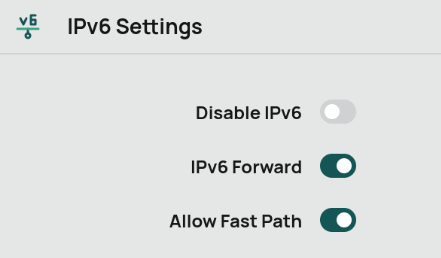
Go to IPv6 > Settings.
Enable IPv6 Forward and Allow Fast Path.
user posted image

Step 2:
Reboot the router.

Step 3:
Go to IPv6 > Firewall
Delete everything inside Filter Rules, NAT, Mangle. You must delete them all. Merely disabling the rule won't work well.

Step 4:
Go to IPv6 > Firewall > Filter Rules.
Add the following:
Chain: Forward
Action: Fasttrack connection

Step 5:
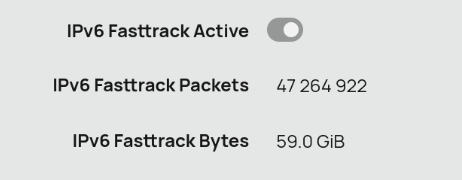
Go to IPv6 > Settings
Verify it is working
user posted image

HOWTO do firewall:
Step 1:
Go to IPv6 > Firewall > Raw
Add whatever rule you want here.

Example (Block access from Internet to your Mikrotik DoH resolver):
Add the following rule:
Chain: prerouting
Protocol: tcp
Dst Port: 53
In Interface: NOT ! <interface name>. Add all your LAN interface and bridge here
Action: drop

Repeat the same thing again for UDP port:
Chain: prerouting
Protocol: udp
Dst Port: 53
In Interface: NOT ! <interface name>. Add all your LAN interface and bridge here
Action: drop

HOWTO More efficient CPU usage for IPv4
Basically repeat the same thing for IPv4 > Firewall.
Remove everything in Filter Rules.
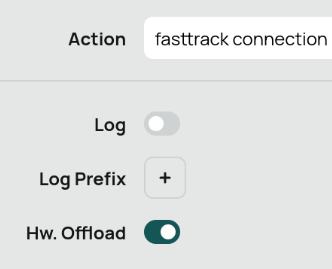
Add Chain: Forward, Action: fasttrack connection.
If your SoC support hardware NAT, enable it: Hw. Offload
user posted image

Add everything you want to block inside Raw.
The default firewall rules are kind of useless and CPU intensive since Filter Rules is stateful while Raw are stateless.

Useless in the sense they can all be rewritten using stateless rule.
For blocking bogon, add them into routing table and blackhole instead of matching address list. It is super fast!

This post has been edited by kwss: Jan 28 2025, 05:02 AM

Anime4000
post Jan 31 2025, 09:52 AM

Look at all my stars!!
*******
Senior Member
2,399 posts

Joined: Jul 2009
From: /dev/null


kwss basically re-add IPv6 Fasttrack just like in IPv4?
clear existing rules,
add Fasttrack
put back Filter, NAT and Mangle firewall

thing is, I do have IPv6 NAT (fc00::/7 ULA) because Unifi refuse to give at least /60 subnet

I hope IPv6 NAT works

176 Pages « < 158 159 160 161 162 > » Top
 

Change to:
| Lo-Fi Version
0.0253sec    0.62    6 queries    GZIP Disabled
Time is now: 15th December 2025 - 03:48 PM