QUOTE(biatche @ Feb 14 2025, 02:11 PM)
Yesterday night i see the Subtel price the RB5009 at RM1400++ I bought it few year ago below rm1k...
Almost 40-50% price up....
Enterprise Networking Mikrotik Routers (RouterBoard & RouterOS), User and owner discussion group
|
|
Feb 14 2025, 02:54 PM
Show posts by this member only | IPv6 | Post
#3221
|
![]() ![]() ![]() ![]() ![]() ![]()
Senior Member
1,882 posts Joined: Sep 2017 |
|
|
|
|
|
|
Feb 14 2025, 05:07 PM
Show posts by this member only | IPv6 | Post
#3222
|
![]() ![]() ![]() ![]() ![]() ![]()
Senior Member
1,207 posts Joined: Aug 2018 |
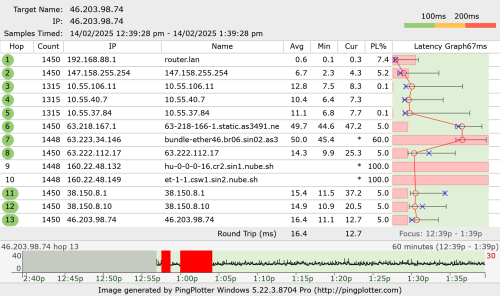
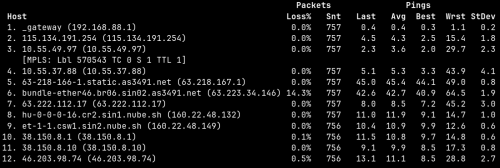
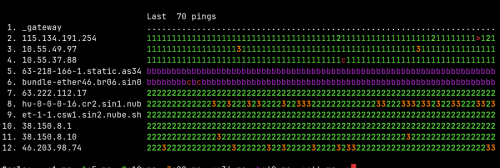
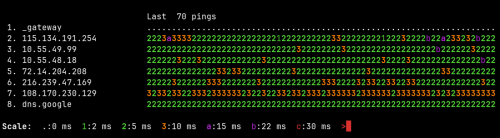
QUOTE(go626201 @ Feb 14 2025, 01:39 PM) I mainly use pppoe and wireguard with alot of Mangle only. Whenever you use rb5009, your packet loss will be very high, even to rb5009.BGP or others like openvpn or something else no use. But use somemore on address-list for mangle usage. And i just update my rb5009 status on unifi thread, i "almost" overturn my assumption on rb5009 death. (1:39PM) ![]() Edited: dc again after 1+hours. Now change back to hEX for further monitoring. This is from your PC to router, before they even reach your ONU. Looks like your Windows PC is missing IPv6 for rb5009 as well? Or this is an IPv4 test on purpose? From your youtube video, I cannot really tell for sure if the port is flapping just from the way it blinks. So regardless which ONU the rb5009 will still dc right? Just depends on how long you need to wait? And this is all without using UPS, all with their own original power brick? + new network cable? Not exactly ping plotter but I think we can compare the difference between packet loss ![]() ![]() This post has been edited by kwss: Feb 14 2025, 05:51 PM |
|
|
Feb 14 2025, 05:51 PM
Show posts by this member only | IPv6 | Post
#3223
|
![]() ![]() ![]() ![]() ![]() ![]()
Senior Member
1,882 posts Joined: Sep 2017 |
QUOTE(kwss @ Feb 14 2025, 05:07 PM) Whenever you use rb5009, your packet loss will be very high, even to rb5009. No, ipv6 for windows already fix either for hEX or RB5009. no longer drop. And yes i choose random ipv4 result just now to prove the connection still alive for 40min with rb5009. but die after around 90-100mins.This is from your PC to router, before they even reach your ONU. Looks like your Windows PC is missing IPv6 for rb5009 as well? Or this is an IPv4 test on purpose? From your youtube video, I cannot really tell for sure if the port is flapping just from the way it blinks. So regardless which ONU the rb5009 will still dc right? Just depends on how long you need to wait? And this is all without using UPS, all with their own original power brick? + new network cable? Yes,but i did change to old onu for now.and now using hEX again for monitoring purpose. and dc occurs once 20mins after switch to hEX. So this make me think it is still a possibility that tm faults. But after that dc,so far no dc occurs from 3.34pm until now. (Old ONU using new ONU adapter,and hEX using own adapter,new cable between Old onu and hEX) Dont test with that ip,not stable,the host keep suffer attack now.so the line might be packet lost for current time. I start a pingplotter to 8.8.8.8 just now.later i will upload the screenshot. (This was done with old ONU + hEX (Vention cable),PC connected to 2.5G switch and connected with 1G hEX-Ugreen cable) This post has been edited by go626201: Feb 14 2025, 05:56 PM |
|
|
Feb 14 2025, 05:55 PM
Show posts by this member only | IPv6 | Post
#3224
|
![]() ![]() ![]() ![]() ![]() ![]()
Senior Member
1,207 posts Joined: Aug 2018 |
QUOTE(go626201 @ Feb 14 2025, 05:51 PM) No, ipv6 for windows already fix either for hEX or RB5009. no longer drop. And yes i choose random ipv4 result just now to prove the connection still alive for 40min with rb5009. but die after around 90-100mins. Can you keep your torrent client on while doing the test?Yes,but i did change to old onu for now.and now using hEX again for monitoring purpose. and dc occurs once 20mins after switch to hEX. So this make me think it is still a possibility that tm faults. But after that dc,so far no dc occurs from 3.34pm until now. (Old ONU using new ONU adapter,and hEX using own adapter,new cable between Old onu and hEX) I wonder if generating more traffic will make you dc faster. That day you left it and went sleep it is on for 6 hours straight right? That was with a quiet network? |
|
|
Feb 14 2025, 05:59 PM
Show posts by this member only | IPv6 | Post
#3225
|
![]() ![]() ![]() ![]() ![]() ![]()
Senior Member
1,882 posts Joined: Sep 2017 |
QUOTE(kwss @ Feb 14 2025, 05:55 PM) Can you keep your torrent client on while doing the test? U mean Wednesday when we discuss right,yes after thursday 3am+ i going to sleep,and no dc at all,but the dc occurs after afternoon yesterday.I wonder if generating more traffic will make you dc faster. That day you left it and went sleep it is on for 6 hours straight right? That was with a quiet network? If i start torrenting,i think the latency will spikes. torrenting causing different issue,but still usable. But should not cause disconnect i think. And about the last replies before sleep,u suggest me to use hEX or refresh. I just use hEX with queue,the speed will be limited to around 600M/300M. (With upload queue only) This post has been edited by go626201: Feb 14 2025, 06:04 PM |
|
|
Feb 14 2025, 06:02 PM
Show posts by this member only | IPv6 | Post
#3226
|
![]() ![]() ![]() ![]() ![]() ![]()
Senior Member
1,207 posts Joined: Aug 2018 |
QUOTE(go626201 @ Feb 14 2025, 05:59 PM) U mean Wednesday when we discuss right,yes after thursday 3am+ i going to sleep,and no dc at all,but the dc occurs after afternoon yesterday. Ok. If you say so. I have no idea and cannot spot any pattern of dc.If i start torrenting,i think the latency will spikes. torrenting causing different issue,but still usable. But should not cause disconnect i think. How about you just test each setup for at least 3 days from now instead of changing everyday. It is really hard to tell which one is more stable given that frequency of your disconnect is not fixed. But from your ping plotter I can definitely tell if you are using rb5009 or hex. |
|
|
|
|
|
Feb 14 2025, 06:05 PM
|
![]() ![]() ![]() ![]() ![]() ![]()
Senior Member
1,882 posts Joined: Sep 2017 |
okay good i dc now!!!!
|
|
|
Feb 14 2025, 06:07 PM
Show posts by this member only | IPv6 | Post
#3228
|
![]() ![]() ![]() ![]() ![]() ![]()
Senior Member
1,207 posts Joined: Aug 2018 |
|
|
|
Feb 14 2025, 06:08 PM
Show posts by this member only | IPv6 | Post
#3229
|
![]() ![]() ![]() ![]() ![]() ![]()
Senior Member
1,882 posts Joined: Sep 2017 |
|
|
|
Feb 14 2025, 06:11 PM
Show posts by this member only | IPv6 | Post
#3230
|
![]() ![]() ![]() ![]() ![]() ![]()
Senior Member
1,207 posts Joined: Aug 2018 |
QUOTE(go626201 @ Feb 14 2025, 06:08 PM) Well, if you can dc yourself just by starting a torrent client then I think it is a good news?You can officially report to TM, wait for them to come and test till they fix it. 1000x better than some random dc that need few hours to show up. |
|
|
Feb 14 2025, 06:13 PM
|
![]() ![]() ![]() ![]() ![]() ![]()
Senior Member
1,882 posts Joined: Sep 2017 |
QUOTE(kwss @ Feb 14 2025, 06:11 PM) Well, if you can dc yourself just by starting a torrent client then I think it is a good news? Now keep dc... But is a good news for me actually that i no need to waste money to buy new router. You can officially report to TM, wait for them to come and test till they fix it. 1000x better than some random dc that need few hours to show up. I stop torrent to see how 1st. This post has been edited by go626201: Feb 14 2025, 06:14 PM kwss liked this post
|
|
|
Feb 14 2025, 06:18 PM
Show posts by this member only | IPv6 | Post
#3232
|
![]() ![]() ![]() ![]() ![]() ![]()
Senior Member
1,207 posts Joined: Aug 2018 |
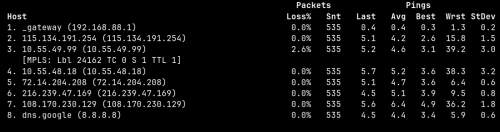
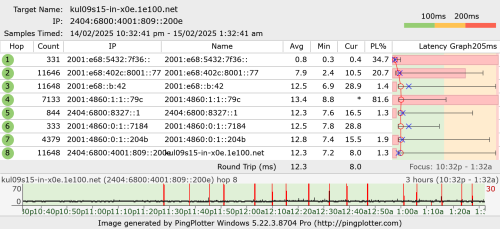
QUOTE(go626201 @ Feb 14 2025, 06:13 PM) Now keep dc... But is a good news for me actually that i no need to waste money to buy new router. I think I will catch you tomorrow again. Gotta off already.I stop torrent to see how 1st. Sharing my 8.8.8.8 result for you to compare later: ![]() ![]() go626201 liked this post
|
|
|
Feb 14 2025, 06:20 PM
Show posts by this member only | IPv6 | Post
#3233
|
![]() ![]() ![]() ![]() ![]() ![]()
Senior Member
1,882 posts Joined: Sep 2017 |
QUOTE(kwss @ Feb 14 2025, 06:18 PM) I think I will catch you tomorrow again. Gotta off already. Thanks for your helps.Sharing my 8.8.8.8 result for you to compare later: ![]() ![]() Now my result not accurate...haha cant compare. Let me fix it with TM 1st. I observe tonight,maybe will contact TM tomorrow or Sunday. |
|
|
|
|
|
Feb 14 2025, 11:39 PM
|
![]() ![]() ![]() ![]() ![]() ![]()
Senior Member
1,649 posts Joined: Jan 2003 |
QUOTE(go626201 @ Feb 14 2025, 06:20 PM) Thanks for your helps. "hi sir, what router are u using?"Now my result not accurate...haha cant compare. Let me fix it with TM 1st. I observe tonight,maybe will contact TM tomorrow or Sunday. "mikrotik" "sorry sir, what is that" "can you please turn off your modem and turn it on again after 5minutes? " sudden hangup. "hello? mr patel do we still have you on the line?" This post has been edited by biatche: Feb 14 2025, 11:42 PM |
|
|
Feb 14 2025, 11:53 PM
Show posts by this member only | IPv6 | Post
#3235
|
![]() ![]() ![]() ![]() ![]() ![]()
Senior Member
1,882 posts Joined: Sep 2017 |
QUOTE(biatche @ Feb 14 2025, 11:39 PM) "hi sir, what router are u using?" haha but i livechat to complain not calling 100."mikrotik" "sorry sir, what is that" "can you please turn off your modem and turn it on again after 5minutes? " sudden hangup. "hello? mr patel do we still have you on the line?" TM will send their technical team come to check tomorrow morning. I already expect them to said is my fault,but i still need to report 1st. Or they will not take a look on my issue. I will appeal if they not fix my issue. And update to my network status: I have about 3-4 hours of stable network. But after 11pm until now,the disconnection had occurs for 4 time already. About every 10min happens once. This post has been edited by go626201: Feb 14 2025, 11:55 PM |
|
|
Feb 15 2025, 12:59 AM
|
![]() ![]() ![]()
Junior Member
447 posts Joined: Aug 2009 |
QUOTE(go626201 @ Feb 14 2025, 11:53 PM) haha but i livechat to complain not calling 100. Is there anything in your pppoe config related to PADT/I or LCP echo request or Auto retry or system retry? Or in torrent setting which related to idle, need to reduce the time.TM will send their technical team come to check tomorrow morning. I already expect them to said is my fault,but i still need to report 1st. Or they will not take a look on my issue. I will appeal if they not fix my issue. And update to my network status: I have about 3-4 hours of stable network. But after 11pm until now,the disconnection had occurs for 4 time already. About every 10min happens once. |
|
|
Feb 15 2025, 01:14 AM
Show posts by this member only | IPv6 | Post
#3237
|
![]() ![]() ![]() ![]() ![]() ![]()
Senior Member
1,207 posts Joined: Aug 2018 |
QUOTE(go626201 @ Feb 14 2025, 11:53 PM) haha but i livechat to complain not calling 100. Remember to borrow all their ONU, login and check the error rate while they are here. TM will send their technical team come to check tomorrow morning. I already expect them to said is my fault,but i still need to report 1st. Or they will not take a look on my issue. I will appeal if they not fix my issue. And update to my network status: I have about 3-4 hours of stable network. But after 11pm until now,the disconnection had occurs for 4 time already. About every 10min happens once. Check the error statistic for fiber too. You had a small number of them. Can you post the full ONU log showing the port flapping? Save a copy. Show them your 2 Tik + 1 TP-Link as device under test too. This should save both party a lot of time. Also ask them for the password and VoIP PIN. See if they can swap your old ONU with another model from Huawei or ZTE? Perhaps ask them what OLT are you using now. Plus if there's another optical splitter that can connect you to a different line card. This post has been edited by kwss: Feb 15 2025, 01:18 AM |
|
|
Feb 15 2025, 01:26 AM
|
![]() ![]() ![]() ![]() ![]() ![]()
Senior Member
1,882 posts Joined: Sep 2017 |
QUOTE(hsbb @ Feb 15 2025, 12:59 AM) Is there anything in your pppoe config related to PADT/I or LCP echo request or Auto retry or system retry? Or in torrent setting which related to idle, need to reduce the time. I got mikrotik pppoe log running. and this disconnect is not cause by torrenting. The disconnect on last evening is totally a coincidence. (After that dc,i have about 3 hours okay)After 11pm,i get a frequent disconnection even until now. (Torenting off) QUOTE(kwss @ Feb 15 2025, 01:14 AM) Remember to borrow all their ONU, login and check the error rate while they are here. Let them check 1st.Check the error statistic for fiber too. You had a small number of them. Can you post the full ONU log showing the port flapping? Save a copy. Show them your 2 Tik + 1 TP-Link as device under test too. This should save both party a lot of time. Also ask them for the password and VoIP PIN. See if they can swap your old ONU with another model from Huawei or ZTE? Perhaps ask them what OLT are you using now. Plus if there's another optical splitter that can connect you to a different line card. No port flapping now. both side no log related to ethernet for disconnection. My thought: ONU is not the main cause of this issue,it might be something wrong else. Mikrotik support did said this: " I would say that the number of active PPPoE sessions exceeds the value configured on server, contact your ISP or check server configuration." Updated: With attached a short log about pppoe disconnection. https://pastebin.com/TnUwxk9V ![]() This post has been edited by go626201: Feb 15 2025, 01:34 AM |

|
|
Feb 15 2025, 07:11 AM
Show posts by this member only | IPv6 | Post
#3239
|
![]() ![]() ![]() ![]() ![]() ![]()
Senior Member
1,207 posts Joined: Aug 2018 |
QUOTE(go626201 @ Feb 15 2025, 01:26 AM) I got mikrotik pppoe log running. and this disconnect is not cause by torrenting. The disconnect on last evening is totally a coincidence. (After that dc,i have about 3 hours okay) Read the log file. It's not timeout. The server send you terminate request even immediately after a successful lcp-echo lcp-reply pair.After 11pm,i get a frequent disconnection even until now. (Torenting off) Let them check 1st. No port flapping now. both side no log related to ethernet for disconnection. My thought: ONU is not the main cause of this issue,it might be something wrong else. Mikrotik support did said this: " I would say that the number of active PPPoE sessions exceeds the value configured on server, contact your ISP or check server configuration." Updated: With attached a short log about pppoe disconnection. https://pastebin.com/TnUwxk9V ![]() Did you sold off any of your old router? I would try to request a PPPoE password change. I suspect someone is trying to use your 1gig password. If it happen right after FSU, could be that technician. But this didn't discount the fact you still get tons of Ethernet error on the ONU This post has been edited by kwss: Feb 15 2025, 07:14 AM |
|
|
Feb 15 2025, 07:35 AM
|
![]() ![]() ![]()
Junior Member
447 posts Joined: Aug 2009 |
QUOTE(kwss @ Feb 15 2025, 07:11 AM) Read the log file. It's not timeout. The server send you terminate request even immediately after a successful lcp-echo lcp-reply pair. Change your pppoe 1st in desktop self care. Double login can also make existing connection auto terminated.Did you sold off any of your old router? I would try to request a PPPoE password change. I suspect someone is trying to use your 1gig password. If it happen right after FSU, could be that technician. But this didn't discount the fact you still get tons of Ethernet error on the ONU |
| Change to: | 0.0162sec
0.38
6 queries
GZIP Disabled
Time is now: 3rd December 2025 - 06:44 AM |