Welcome Guest ( Log In | Register )

Outline · [ Standard ] · Linear+

Enterprise Networking Mikrotik Routers (RouterBoard & RouterOS), User and owner discussion group

views
     
Gaara92
post Jun 28 2021, 04:09 PM

Herald
****
Junior Member
612 posts

Joined: Mar 2008


QUOTE(delaciox @ Jun 16 2021, 10:17 AM)
i mean use one btu inout with 2  pppoe unifi
which one is correct setting? WAN2 is connect BTU port

A.
WAN2 -> VRRP1 -> VLAN500 -> PPPOE unifiA
~~~~ -> VRRP2 -> VLAN500 -> PPPOE unifiB
B.
WAN2 ->VLAN500 -> VRRP1 -> PPPOE unifi A
~~~~~~~ ~~~~ -> VRRP2 -> PPPOE unifi B
*
I didn't know you can use one BTU to connect dual unifi? Have you tried thm?
Anime4000
post Jun 28 2021, 05:44 PM

Look at all my stars!!
*******
Senior Member
2,400 posts

Joined: Jul 2009
From: /dev/null


QUOTE(Gaara92 @ Jun 28 2021, 04:08 PM)
CCR is your solution. Go adopt one of 'em  biggrin.gif
*
now saving some money, need bought SFP28 NIC and 10G Transceiver,
the cost almost 4K,

right now rampage Maxis Archer C5v stock router, so far no crash and no PPPoE disconnect,
being stock router can't do advanced stuff.
matrism
post Jun 28 2021, 06:03 PM

Getting Started
**
Junior Member
65 posts

Joined: Nov 2004
From: Bukit Jelutong


Hi sifus..

Im thinking to replace my current router dir882 with mikrotik hex.

This is my plan setup
Hex-> wired to both asus xt8 main and node

Hex will control dhcp server etc.. and xt8 act as an AP

Im using 1gbps time.. is this ok?

This post has been edited by matrism: Jun 28 2021, 06:04 PM
go626201
post Jun 28 2021, 06:36 PM

Regular
******
Senior Member
1,882 posts

Joined: Sep 2017
QUOTE(matrism @ Jun 28 2021, 06:03 PM)
Hi sifus..

Im thinking to replace my current router dir882 with mikrotik hex.

This is my plan setup
Hex-> wired to both asus xt8 main and node

Hex will control dhcp server etc.. and xt8 act as an AP

Im using 1gbps time.. is this ok?
*
Better get hAP ac². A bit stronger processor then hEX. (Just disable the Wifi function and all similar to hEX.)

Edit:
Or hAP ac³ with bigger storage- nand flash(128MB) and ram . most older mikrotik router only have 16MB Flash storage.

This post has been edited by go626201: Jun 28 2021, 06:54 PM
hao0302
post Jul 1 2021, 05:58 PM

New Member
*
Junior Member
49 posts

Joined: May 2011


hi can anyone help me with this.

attachment is the simple diagram of two site ipsec vpn

no issue to access remote site ip address, but cant find a way to route out to internet via remote wan ip

example on hex

ipsec policy is set to
src: 10.1.1.0/22
dst: 0.0.0.0/0

NAT
src any to dst any (wan interface)

policy is allow src all to internet interface

i was trying to set 10.1.3.0/24 route to one of the interface on remote site but it failed.

anyone can enlighten me if i need to config mangle routing mark for this?

any question is while i tried to set ipsec policy - src and dst to 0.0.0.0/0, all the connection will be down. Does it mean all the connection will default route to remote site?

I am able to set ipsec policy as any on enterprise firewall (forti, pan-os), while it will only hit the ipsec policy while the route is pointing remote site.


Attached thumbnail(s)
Attached Image
rodyeo
post Jul 2 2021, 12:19 AM

New Member
*
Junior Member
12 posts

Joined: Aug 2005
Reference link... https://www.facebook.com/rodyeo/posts/10158812035487663

*** Horray!!! Finally it is working!
After weeks of hard work RnD not forgetting guide from MikroTik Community Members!
@@@ Many special thanks to "Alex K. Anwar" of http://www.neosky.id for professional troubleshooting guide and I manage to solved my SOHO MikroTik RB750Gr3 Router to do Dual WAN Failover to hAPac2 Wireless Router?
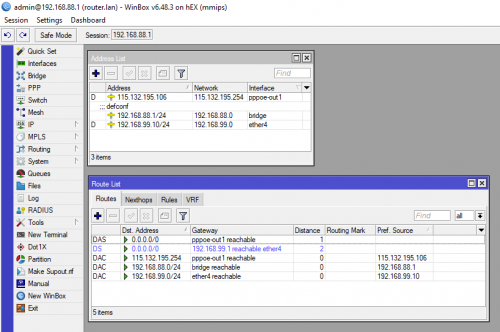
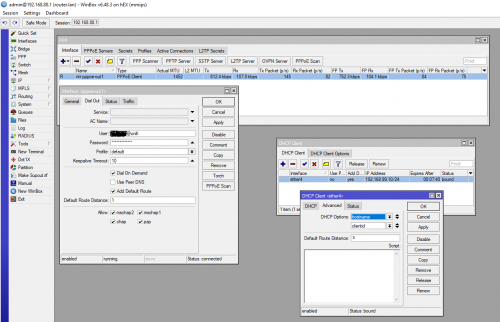
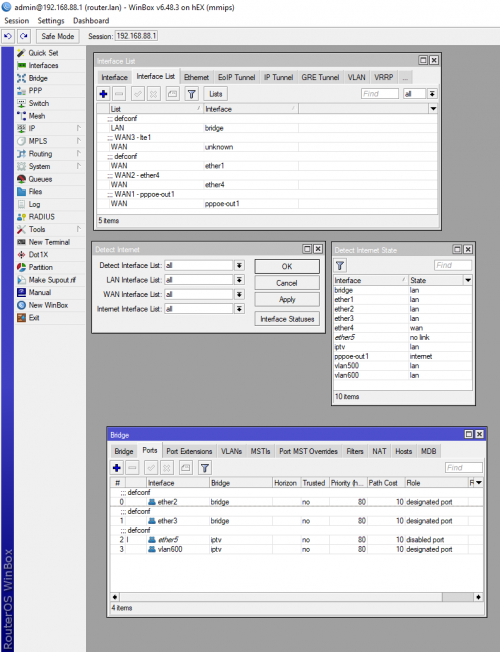
Here is the secrets -> Solutions synopsis: The problem is resolved when I use reserved DHCP IP MAC assignment and I added in DHCP client ether4. Added ether4 to WAN Interface List and remove ether 4 from LAN Bridge list. Changed DHCP client ether4 Distance to 3. Cause LTE1 uses Distance 2 by default when Mobile USB Adaptor is plug in to the MikroTik Router USB port when I need a WAN3 Failover later. Best part is no complex script needed!
WAN1 is on PPPoE-out1 bridge via fiber optic cable Modem.
and
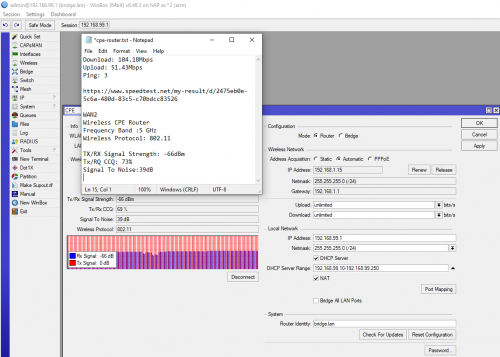
WAN2 is on Ether4 via Wireless CPE Router.
Does this Route Table make sense?
if WAN1 suffers outage to Internet
then WAN2 take over link
else WAN1 is back online
then switch back to WAN1
and drop WAN2 link
end if.
WAN1 0.0.0.0/0 Distance 1 (PPPoE_out1) [Fiber cable link]
WAN2 0.0.0.0/0 Distance 3 (Ether4) [Wireless CPE link]
*** WAN3 0.0.0.0/0 Distance 2 (Lte1) [Reserved for future backup]
192.168.88.0 Distance 0 (LAN bridge)
192.168.99.0 Distance 0 (WAN bridge)
WAN1 Gateway and IP X.X.X.X Distance 0 X.X.X.X [Dynamic]
WAN2 Gateway and IP 192.168.99.1 Distance 1 192.168.99.10 [Static]
*** Adding a WAN3 interface via lte1 USB Mobile Internet Data Plan @ TM UniFi Air Plan as future backup Internet connectivity later.

Rodney Yeo
http://rodyeo.dyndns.org
https://www.facebook.com/rodyeo
9W2YJ

user posted image
user posted image
user posted image
user posted image

This post has been edited by rodyeo: Jul 2 2021, 12:19 AM

delaciox
post Jul 9 2021, 01:30 AM

Getting Started
**
Junior Member
185 posts

Joined: Dec 2008
From: Puchong


QUOTE(Gaara92 @ Jun 28 2021, 04:09 PM)
I didn't know you can use one BTU to connect dual unifi? Have you tried thm?
*
i think maybe can use, after release mco i will try new setting. vrrp change mac and try again
i use this try on 2 mikrotik, 1 build pppoe server, and 1 use for testing


CODE

/interface bridge
add comment="LAN bridge" name=bridge_LAN
add comment="VRRP mac bridge" name=bridge_VRRP_mac

/interface ethernet
set [ find default-name=ether1 ] l2mtu=1596 mac-address=C4:AD:34:AA:0D:64 name=\
   Masterport
set [ find default-name=ether2 ] l2mtu=1596 mac-address=C4:AD:34:AA:0D:65 name=\
   WAN2
set [ find default-name=ether3 ] l2mtu=1596 mac-address=C4:AD:34:AA:0D:66 name=\
   "ether3_to switch"
set [ find default-name=ether4 ] l2mtu=1596 mac-address=C4:AD:34:AA:0D:67
set [ find default-name=ether5 ] l2mtu=1596 mac-address=C4:AD:34:AA:0D:68

/interface vrrp
add interface=bridge_VRRP_mac name=vrrp1
add interface=bridge_VRRP_mac name=vrrp2 vrid=2

/interface vlan
add interface=WAN2 name=vlan.500 vlan-id=500

/interface pppoe-client
add disabled=no interface=vrrp1 name=pppoe-out1 password=pppoea user=pppoea
add disabled=no interface=vrrp2 name=pppoe-out2 password=pppoeb user=pppoeb

/ip pool
add name=pool1 ranges=192.168.0.2-192.168.0.200

/ip dhcp-server
add address-pool=pool1 disabled=no interface=bridge_LAN name=server1

/interface bridge nat
add action=src-nat chain=srcnat src-mac-address=\
   00:00:5E:00:01:01/FF:FF:FF:FF:FF:FF to-src-mac-address=C4:AD:34:AA:0D:75
add action=src-nat chain=srcnat src-mac-address=\
   00:00:5E:00:01:02/FF:FF:FF:FF:FF:FF to-src-mac-address=C4:AD:34:AA:0D:76
add action=dst-nat chain=dstnat dst-mac-address=\
   C4:AD:34:AA:0D:75/FF:FF:FF:FF:FF:FF to-dst-mac-address=00:00:5E:00:01:01
add action=dst-nat chain=dstnat dst-mac-address=\
   C4:AD:34:AA:0D:76/FF:FF:FF:FF:FF:FF to-dst-mac-address=00:00:5E:00:01:02

/interface bridge port
add bridge=bridge_LAN interface="ether3_to switch"
add bridge=bridge_LAN interface=ether4
add bridge=bridge_LAN interface=ether5
add bridge=bridge_VRRP_mac interface=vlan.500

/interface bridge settings
set use-ip-firewall=yes

/ip address
add address=100.10.10.10/24 interface=bridge_VRRP_mac network=100.10.10.0
add address=100.10.10.11/24 interface=vrrp1 network=100.10.10.0
add address=100.10.10.12/24 interface=vrrp2 network=100.10.10.0
add address=192.168.0.1/24 interface=bridge_LAN network=192.168.0.0

/ip dhcp-server network
add address=192.168.0.0/24 gateway=192.168.0.1 netmask=24

/ip dns
set allow-remote-requests=yes servers=94.140.14.14,94.140.15.15,8.8.8.8,8.8.4.4

/ip firewall filter
add action=reject chain=forward comment=\
   "\C6\C1\B1\CEMircoSoft\CF\B5\C1\D0\B2\FA\C6\B7\B8\FC\D0\C2" content=\
   update.microsoft.com disabled=yes reject-with=icmp-network-unreachable
add action=reject chain=forward comment=\
   "\C6\C1\B1\CEMircoSoft\CF\B5\C1\D0\B2\FA\C6\B7\B8\FC\D0\C2" content=\
   download.microsoft.com disabled=yes reject-with=icmp-network-unreachable
add action=reject chain=forward comment=\
   "\C6\C1\B1\CEMircoSoft\CF\B5\C1\D0\B2\FA\C6\B7\B8\FC\D0\C2" content=\
   download.windowsupdate.com disabled=yes reject-with=\
   icmp-network-unreachable
add action=reject chain=forward comment=\
   "\C6\C1\B1\CEMircoSoft\CF\B5\C1\D0\B2\FA\C6\B7\B8\FC\D0\C2" content=\
   wustat.windows.com disabled=yes reject-with=icmp-network-unreachable
add action=reject chain=forward comment=\
   "\C6\C1\B1\CEMircoSoft\CF\B5\C1\D0\B2\FA\C6\B7\B8\FC\D0\C2" content=\
   ntservicepack.microsoft.com disabled=yes reject-with=\
   icmp-network-unreachable
add action=reject chain=forward comment=\
   "\C6\C1\B1\CEMircoSoft\CF\B5\C1\D0\B2\FA\C6\B7\B8\FC\D0\C2" content=\
   stats.microsoft.com disabled=yes reject-with=icmp-network-unreachable
add action=reject chain=forward comment=\
   "\C6\C1\B1\CEMircoSoft\CF\B5\C1\D0\B2\FA\C6\B7\B8\FC\D0\C2" content=\
   windowsupdate.com disabled=yes reject-with=icmp-network-unreachable
add action=drop chain=input dst-port=53 in-interface=pppoe-out1 protocol=udp
add action=drop chain=input dst-port=53 in-interface=pppoe-out1 protocol=tcp
add action=drop chain=input dst-port=53 in-interface=pppoe-out2 protocol=tcp
add action=drop chain=input dst-port=53 in-interface=pppoe-out2 protocol=udp

/ip firewall mangle
add action=change-mss chain=forward comment="Change MSS" new-mss=1440 \
   passthrough=yes protocol=tcp tcp-flags=syn
add action=mark-connection chain=input comment=InOut in-interface=pppoe-out1 \
   new-connection-mark=PCC1 passthrough=yes
add action=mark-connection chain=input in-interface=pppoe-out2 \
   new-connection-mark=PCC2 passthrough=yes
add action=mark-routing chain=output connection-mark=PCC1 new-routing-mark=\
   PCC_Rout1 passthrough=yes
add action=mark-routing chain=output connection-mark=PCC2 new-routing-mark=\
   PCC_Rout2 passthrough=yes
add action=mark-connection chain=prerouting comment=PCC connection-mark=no-mark \
   dst-address-list="" dst-address-type=!local in-interface=bridge_LAN \
   new-connection-mark=PCC1 passthrough=yes per-connection-classifier=\
   both-addresses-and-ports:2/0
add action=mark-connection chain=prerouting connection-mark=no-mark \
   dst-address-type=!local in-interface=bridge_LAN new-connection-mark=PCC2 \
   passthrough=yes per-connection-classifier=both-addresses-and-ports:2/1
add action=mark-routing chain=prerouting connection-mark=PCC1 in-interface=\
   bridge_LAN new-routing-mark=PCC_Rout1 passthrough=yes
add action=mark-routing chain=prerouting connection-mark=PCC2 in-interface=\
   bridge_LAN new-routing-mark=PCC_Rout2 passthrough=yes

/ip firewall nat
add action=masquerade chain=srcnat out-interface=pppoe-out1
add action=masquerade chain=srcnat out-interface=pppoe-out2

/ip route
add comment=ISP1 distance=1 gateway=pppoe-out1 routing-mark=PCC_Rout1 scope=10
add comment=ISP2 distance=1 gateway=pppoe-out2 routing-mark=PCC_Rout2 scope=10
add check-gateway=ping comment=ISP1 distance=1 gateway=pppoe-out1 scope=10
add check-gateway=ping comment=ISP2 distance=2 gateway=pppoe-out2 scope=10


This post has been edited by delaciox: Jul 9 2021, 01:31 AM
sam_01
post Jul 10 2021, 12:39 AM

New Member
*
Junior Member
22 posts

Joined: Nov 2004
From: Malaysia


Hey All,

Just got myself a HA AC2. I've been wanting to learn how to configure VLAN filtering and managed to get it running for Unifi PPPoE and HyppTV. Hopefully this will help anyone who is interested biggrin.gif

CODE

Reference: https://wiki.mikrotik.com/wiki/Manual:Interface/Bridge#Bridge_VLAN_Filtering
This setup is basically a combination of Example #1 and Example #3.
Physical connections:
Port 1 - To BTU
Port 5 - to IPTV box.

# -------------- PPPoE configuration ----------------------- #
# Create  VLAN interface VLAN500 for PPPoE.
/interface vlan
add interface=bridge mtu=1472 name=vlan500 vlan-id=500


# Create PPPoE interface and attach to VLAN500.
/interface pppoe-client
add add-default-route=yes allow=pap,chap disabled=no interface=vlan500 name=\
   pppoe-out1 password=xxxxx use-peer-dns=yes user=xxxx@unifi

# -------------- VLAN configuration ----------------------- #
# Using default bridge.
# Disable VLAN filtering first.
/interface bridge set bridge vlan-filtering=no

# Configure PVID 600 on port 5. This is for traffic from IPTV box to Mikrotik.
/interface bridge port
add bridge=bridge comment=defconf interface=ether3
add bridge=bridge comment=defconf interface=ether4
add bridge=bridge comment=defconf interface=wlan1
add bridge=bridge comment=defconf interface=wlan2
add bridge=bridge comment=defconf interface=ether1
add bridge=bridge interface=ether5 pvid=600


# Create 2 VLANs 500 (PPPoE)& 600 (HyppTV).
# For VLAN500, tag port 1 and bridge.
# For VLAN600, tag port 1 and untag port 5. This for traffic from Mikrotik to IPTV.
/interface bridge vlan
add bridge=bridge comment=PPPoE tagged=ether1,bridge vlan-ids=500
add bridge=bridge comment=iptv tagged=ether1 untagged=ether5 vlan-ids=600


# Important! - Enable VLAN filtering. Without this PVID will not be in effect.
/interface bridge set bridge vlan-filtering=yes


# Check system logs. Wait for PPPoE to connect.
# Reboot your IPTV box.


asellus
post Jul 10 2021, 08:02 AM

#gompusas
Group Icon
Elite
4,541 posts

Joined: Jan 2003
From: BSRPPG51 Access Concentrator


QUOTE(sam_01 @ Jul 10 2021, 12:39 AM)
» Click to show Spoiler - click again to hide... «

*
For hAP ac, the old way of having a separate dedicated bridge for IPTV is still relevant. But for other routers with shit switch chips (looking at you RB4011iGS and RB1100AH et. al), the method above IS THE ONLY WAY you can use to have IPTV without any penalty to performance.
asellus
post Jul 21 2021, 08:17 AM

#gompusas
Group Icon
Elite
4,541 posts

Joined: Jan 2003
From: BSRPPG51 Access Concentrator


This explains why prices for RB4011iGS routers drops in the last couple of weeks. Better save saving money now.
go626201
post Jul 21 2021, 01:05 PM

Regular
******
Senior Member
1,882 posts

Joined: Sep 2017
QUOTE(asellus @ Jul 21 2021, 08:17 AM)
This explains why prices for RB4011iGS routers drops in the last couple of weeks. Better save saving money now.
*
Finally, i almost want to buy the RB4011 already,thanks for your news.
If i didn't saw your post i might buy it on 25 July from shopee... rclxms.gif rclxms.gif

Wonderful setup. brows.gif

This post has been edited by go626201: Jul 21 2021, 01:05 PM
asellus
post Jul 22 2021, 01:35 PM

#gompusas
Group Icon
Elite
4,541 posts

Joined: Jan 2003
From: BSRPPG51 Access Concentrator


QUOTE(go626201 @ Jul 21 2021, 01:05 PM)
Finally, i almost want to buy the RB4011 already,thanks for your news.
If i didn't saw your post i might buy it on 25 July from shopee...  rclxms.gif  rclxms.gif

Wonderful setup.  brows.gif
*
Should be available very shortly from now. If Australians prices to be taken into context, Malaysia's prices should be similar to RB4011iGS when it first appears in SubTel's shop.
mamakap
post Jul 22 2021, 02:23 PM

Casual
***
Junior Member
403 posts

Joined: Jan 2005
Damn... I Just got the RB4011 4 months ago.
go626201
post Jul 22 2021, 04:49 PM

Regular
******
Senior Member
1,882 posts

Joined: Sep 2017
QUOTE(asellus @ Jul 22 2021, 01:35 PM)
Should be available very shortly from now. If Australians prices to be taken into context, Malaysia's prices should be similar to RB4011iGS when it first appears in SubTel's shop.
*
I already ask SubTel on shopee,but seems like they still didn't have estimate time for RB5009.
Gaara92
post Jul 24 2021, 05:18 AM

Herald
****
Junior Member
612 posts

Joined: Mar 2008


QUOTE(asellus @ Jul 22 2021, 01:35 PM)
Should be available very shortly from now. If Australians prices to be taken into context, Malaysia's prices should be similar to RB4011iGS when it first appears in SubTel's shop.
*
Great news! Can't wait to get it hehe
My last RB was RB2011 series, since then I just bough the hAP series and hEX
Dr.Baumstein
post Jul 24 2021, 03:07 PM

New Member
*
Newbie
14 posts

Joined: Mar 2017
Hi. May i ask is it possible the hap ac2 USB port able to power a rPi 3 model B or not?
mamakap
post Jul 25 2021, 07:46 AM

Casual
***
Junior Member
403 posts

Joined: Jan 2005
RB5009 intro video

mhwee
post Aug 2 2021, 11:04 AM

Getting Started
**
Junior Member
241 posts

Joined: Sep 2005
From: Johor
It is now listed on the mikrotik website!

https://mikrotik.com/product/rb5009ug_s_in
https://mikrotik.com/products/group/ethernet-routers

USD219
drool.gif

This post has been edited by mhwee: Aug 2 2021, 11:04 AM
megablur
post Aug 5 2021, 09:50 AM

New Member
*
Newbie
7 posts

Joined: Sep 2012
Guys, I have checked with a Mikrotik Disty for the RB 5009. The product is ready for importation. You can contact them for booking. RSP is RM948.00. I have already indicated my intention to get one. It is not listed on their site yet.

https://ecommerce.synchroweb.com/index.php?...rmation/contact


user posted image

This post has been edited by megablur: Aug 5 2021, 09:52 AM
go626201
post Aug 5 2021, 12:40 PM

Regular
******
Senior Member
1,882 posts

Joined: Sep 2017
QUOTE(megablur @ Aug 5 2021, 09:50 AM)
Guys, I have checked with a Mikrotik Disty for the RB 5009. The product is ready for importation. You can contact them for booking. RSP is RM948.00. I have already indicated my intention to get one. It is not listed on their site yet.

https://ecommerce.synchroweb.com/index.php?...rmation/contact
user posted image
*
Got estimated stock time?
I just asked Subtel too,waiting for their replies.

Edit:
I had order from Subtel, estimated times - 3-5 weeks.
Order Price : RM999 included delivery fee.

This post has been edited by go626201: Aug 5 2021, 03:27 PM


Change to:
| Lo-Fi Version
0.0354sec    1.15    6 queries    GZIP Disabled
Time is now: 25th December 2025 - 12:29 AM