Welcome Guest ( Log In | Register )

176 Pages « < 92 93 94 95 96 > » Bottom

Outline · [ Standard ] · Linear+

Enterprise Networking Mikrotik Routers (RouterBoard & RouterOS), User and owner discussion group

views
     
MX510
post Dec 26 2018, 05:00 PM

Love Me Sin Hate Me Sinner
*******
Senior Member
4,038 posts

Joined: Aug 2005
From: Earth


QUOTE(weikee @ Dec 13 2018, 09:54 PM)
Found the problem

1) In DHCPv6 Client, uncheck the "address", by default is check. This is new features added
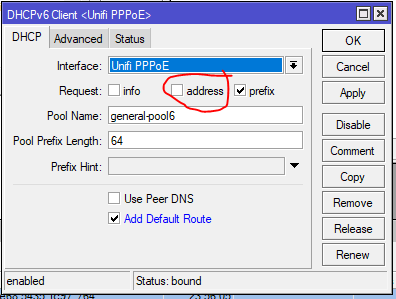
user posted image

2) After that, i face rebinding issue when the router got reset, it hold the old prefix. Google and found the solution by adding script into ppp "on up:"

https://forum.mikrotik.com/viewtopic.php?t=122420
This workaround works for me. Create an on-up script under the PPP profile. This will force a release (and subsequent renewal). This is mine:
Script:
:local interfaceName [/interface get $interface name];
:delay 10
:log info "profile-pppoe-isp client up: ipv6 dhcp-client release";
/ipv6 dhcp-client release [find interface=$interfaceName];
*
Tqvm for sharing

I think i got this issue with maxishit fibre
amirsubhi
post Dec 27 2018, 10:16 PM

The Power Is IN Your Hand!
******
Senior Member
1,472 posts

Joined: Apr 2005
From: SumwHeRe In MaLaYsIa


QUOTE(chanti-sama @ Dec 26 2018, 10:30 AM)
Hi All,

I just bought a mikrotik HexS router. I planned to configure my network: unifi -> MT router -> Asus rt-ac1200g+

The Asus is meant for all my devices to connect (pc, phones, laptop, tables). Currently my Asus is set to bridge mode. Does it meant on the mt-router i need to configure those wireless settings and just plug the wireless ap in?

Sorry im abit new on this networking
*
set the asus as AP mode,SSID and password, n u r set,

mikrotik u dont need to configure any wireless setting
chanti-sama
post Dec 31 2018, 04:13 PM

Enthusiast
*****
Senior Member
710 posts

Joined: Jan 2003
From: In the backyard. Up to no good!


Hi all i have issue connecting to tm using the mikrotik hexS. I followed the step by step guide to setup mikrotik for tmunifi

https://wiki.mikrotik.com/wiki/Mikrotik_and...y_arpee/soonwai

Below is my topology:
Modem > hexS > laptop

These are the steps i did
1. Plugged wan cable to port 1
2. Via quick set configured ppoe - username/password
3. Set vlan500 to interface 1
4. Set ppoe-out1 to vlan500

By now the guide said i should have internet. It didnt... I checked the logs it shows the router trying to connect and disconnect immediately. Im not sure how to furthee trace...

So right now i revert back to the unifi router they gave me. Not sure which part i missed out..
mhwee
post Dec 31 2018, 05:08 PM

Getting Started
**
Junior Member
241 posts

Joined: Sep 2005
From: Johor
lol that page is incomplete! Many people buy mikrotik router before even study the setup first... hmm.gif

You have to set Firewall -- nat rules . You also need to set dns settings.

Please follow this https://klseet.com/213-tm-unifi/unifi-mikro...setup-for-unifi

The setup are similar since all mikrotik router use same routerOS.

Ignore the masterport settings , since mikrotik removed masterport and slave port since routerOS 6.41 in Dec 2017

This post has been edited by mhwee: Dec 31 2018, 06:04 PM
weikee
post Dec 31 2018, 05:58 PM

10k Club
********
All Stars
12,019 posts

Joined: Jan 2003
QUOTE(mhwee @ Dec 31 2018, 05:08 PM)
lol that page is incomplete! Many people buy mikrotik router for before even study the setup first... hmm.gif

You have to set Firewall -- nat rules  . You also need to set dns settings.

Please follow this https://klseet.com/213-tm-unifi/unifi-mikro...setup-for-unifi

The setup are similar since all mikrotik router use same routerOS.

Ignore the masterport settings , since mikrotik removed masterport and slave port since routerOS 6.41 in Dec 2017
*
Yeah, i find the quick setup guide not working for me for my 2nd mikrotik (hap ac2) . I end up going back to my notes (from klseet also), and make some amendment due to changes in some setting after so many years. And it work again.
chanti-sama
post Dec 31 2018, 10:10 PM

Enthusiast
*****
Senior Member
710 posts

Joined: Jan 2003
From: In the backyard. Up to no good!


QUOTE(mhwee @ Dec 31 2018, 05:08 PM)
lol that page is incomplete! Many people buy mikrotik router before even study the setup first... hmm.gif

You have to set Firewall -- nat rules  . You also need to set dns settings.

Please follow this https://klseet.com/213-tm-unifi/unifi-mikro...setup-for-unifi

The setup are similar since all mikrotik router use same routerOS.

Ignore the masterport settings , since mikrotik removed masterport and slave port since routerOS 6.41 in Dec 2017
*
Tq masta... I have many more to learn.
hnr2802
post Jan 2 2019, 01:28 PM

On my way
****
Senior Member
627 posts

Joined: May 2009


Hi all,

Need your advice.
Currently using Mikrotik RB2011UiAS-2HnD-IN.

Upgraded to turbo 800mbps . Plan to replace my route to

1. RB4011iGS+5HacQ2HnD-IN
or
2. Asus AC5300 china set

which one you guys would recommend.

my priority is wifi coverage & speed
MX510
post Jan 2 2019, 01:30 PM

Love Me Sin Hate Me Sinner
*******
Senior Member
4,038 posts

Joined: Aug 2005
From: Earth


QUOTE(hnr2802 @ Jan 2 2019, 01:28 PM)
Hi all,

Need your advice.
Currently using Mikrotik RB2011UiAS-2HnD-IN.

Upgraded to turbo 800mbps . Plan to replace my route to

1. RB4011iGS+5HacQ2HnD-IN
or
2. Asus AC5300 china set

which one you guys would recommend.

my priority is wifi coverage & speed
*
I will vote for no 1

For AP you can use Mesh AP :-)

Or use Amplifi HD instead


hnr2802
post Jan 2 2019, 01:42 PM

On my way
****
Senior Member
627 posts

Joined: May 2009


QUOTE(MX510 @ Jan 2 2019, 01:30 PM)
I will vote for no 1

For AP you can use Mesh AP :-)

Or use Amplifi HD instead
*
from my research my old mikrotik router have better 2.4ghz dbi compared to RB4011. furthermore it have internal wifi antenna. im afraid the coverage will not be as good as before.
mhwee
post Jan 2 2019, 03:23 PM

Getting Started
**
Junior Member
241 posts

Joined: Sep 2005
From: Johor
QUOTE(hnr2802 @ Jan 2 2019, 01:28 PM)
Hi all,

Need your advice.
Currently using Mikrotik RB2011UiAS-2HnD-IN.

Upgraded to turbo 800mbps . Plan to replace my route to

1. RB4011iGS+5HacQ2HnD-IN
or
2. Asus AC5300 china set

which one you guys would recommend.

my priority is wifi coverage & speed
*
I have experience 2 pcs of RT-AC5300, from taobao Asus 旗舰店。Both end up wifi issues, sometimes just dont response to connection. This particular model only. Others like RT-AC88U, RT-AC68U from Asus 旗舰店 still function till today.

This post has been edited by mhwee: Jan 2 2019, 03:24 PM
hnr2802
post Jan 2 2019, 03:30 PM

On my way
****
Senior Member
627 posts

Joined: May 2009


QUOTE(mhwee @ Jan 2 2019, 03:23 PM)
I have experience 2 pcs of RT-AC5300, from taobao Asus 旗舰店。Both end up wifi issues, sometimes just dont response to connection. This particular model only. Others like RT-AC88U, RT-AC68U from Asus 旗舰店 still function till today.
*
thanks for the input bro. have u tested ac86u?
mhwee
post Jan 2 2019, 03:35 PM

Getting Started
**
Junior Member
241 posts

Joined: Sep 2005
From: Johor
Tested for ? 800mbps?

I don't have 800mbps , I am using 300 mbps only. 300mbps makes me download things/movies till nothing to download smile.gif RM139 package , cheap what..


If you meant testing and using AC68U, then yes, it is still in very good condition. I have too many routers to take turn...so seldom revive it back nowadays tongue.gif

This post has been edited by mhwee: Jan 2 2019, 03:40 PM
hnr2802
post Jan 2 2019, 03:51 PM

On my way
****
Senior Member
627 posts

Joined: May 2009


QUOTE(mhwee @ Jan 2 2019, 03:35 PM)
Tested for ? 800mbps?

I don't have 800mbps , I am using 300 mbps only. 300mbps makes me download things/movies till nothing to download  smile.gif RM139 package , cheap what..
If you meant testing and using AC68U, then yes, it is still in very good condition. I have too many routers to take turn...so seldom revive it back nowadays  tongue.gif
*
so now what is your fav or day-to-day router?
mhwee
post Jan 2 2019, 04:07 PM

Getting Started
**
Junior Member
241 posts

Joined: Sep 2005
From: Johor
RB4011 Ethernet type

This post has been edited by mhwee: Jan 2 2019, 04:07 PM
soonwai
post Jan 2 2019, 10:31 PM


********
All Stars
11,459 posts

Joined: Oct 2007
From: KL


QUOTE(chanti-sama @ Dec 31 2018, 04:13 PM)
Hi all i have issue connecting to tm using the mikrotik hexS. I followed the step by step guide to setup mikrotik for tmunifi

https://wiki.mikrotik.com/wiki/Mikrotik_and...y_arpee/soonwai

Below is my topology:
Modem > hexS > laptop

These are the steps i did
1. Plugged wan cable to port 1
2. Via quick set configured ppoe - username/password
3. Set vlan500 to interface 1
4. Set ppoe-out1 to vlan500

By now the guide said i should have internet. It didnt... I checked the logs it shows the router trying to connect and disconnect immediately. Im not sure how to furthee trace...

So right now i revert back to the unifi router they gave me. Not sure which part i missed out..
*
Managed to get it working? The guide kinda works. Just have to make sure "use-peer-dns" is checked. There's also one here: https://forum.lowyat.net/topic/4202122/all

The one on Mikrotik's wiki won't/can't be updated since Mikrotik disabled non-staff access to it.

Assuming you used QuickSet, a few things to note. I'll update the guide one of these days.
1. As mhwee said, ignore the master/slave stuff.
2. If you're getting connect/disconnect, check that you have set vlan500 interface vlan-id to 500. Common oversight.
3. Incorrect username/password will also cause this, log shows auth error, but I'm sure no-one here will make that mistake.
4. In pppoe-client, check use-peer-dns. Previously default was checked but not anymore.

So:
1. If you did #4, you don't need to set DNS.
2. If you used QuickSet, the correct NAT (srcnat) rule will be set.
3. If you didn't use QuickSet, make sure you have proper firewall rules to the input chain. A common result of not having these is that your router will be participating in a DNS or other amplification attack in a matter of hours or days.

This post has been edited by soonwai: Jan 2 2019, 10:48 PM
soonwai
post Jan 2 2019, 10:47 PM


********
All Stars
11,459 posts

Joined: Oct 2007
From: KL


QUOTE(hnr2802 @ Jan 2 2019, 01:28 PM)
Hi all,

Need your advice.
Currently using Mikrotik RB2011UiAS-2HnD-IN.

Upgraded to turbo 800mbps . Plan to replace my route to

1. RB4011iGS+5HacQ2HnD-IN
or
2. Asus AC5300 china set

which one you guys would recommend.

my priority is wifi coverage & speed
*
I'd choose the RB4011 as a router only + a cheap wifi AP. Currently I'm using an RM149 Aztech FG7008GR which is basically 5HacQ2HnT.

Am able to get sustained 850Mbps using 3-chain wifi to LAN locally. Dun have a 4-chain device.
https://forum.lowyat.net/topic/4543383/all
hnr2802
post Jan 3 2019, 12:06 AM

On my way
****
Senior Member
627 posts

Joined: May 2009


QUOTE(soonwai @ Jan 2 2019, 10:47 PM)
I'd choose the RB4011 as a router only + a cheap wifi AP. Currently I'm using an RM149 Aztech FG7008GR which is basically 5HacQ2HnT.

Am able to get sustained 850Mbps using 3-chain wifi to LAN locally. Dun have a 4-chain device.
https://forum.lowyat.net/topic/4543383/all
*
The sustained 850Mbps using 3 chain wifi is from aztech touter?
soonwai
post Jan 3 2019, 12:31 AM


********
All Stars
11,459 posts

Joined: Oct 2007
From: KL


QUOTE(hnr2802 @ Jan 3 2019, 12:06 AM)
The sustained 850Mbps using 3 chain wifi is from aztech touter?
*
Yeah, using the Aztech router. MBP shows link speed as 1300Mbps ie: 433x3
Unfortunately the Aztech can't see any link info.

MBP <--wifi--> Aztech <--Gbe--> Server

Mind you, it's just an artificial iperf3 test.
chanti-sama
post Jan 3 2019, 12:33 AM

Enthusiast
*****
Senior Member
710 posts

Joined: Jan 2003
From: In the backyard. Up to no good!


Hi soonwai

I followed your steps in the post. Checking the logs i can see the unifi is authenticated and connected. But im not getting data thru. Its very strange, i did a ping to the gateway x.x.88.1 is responsive but when ping to google or major site.. seems like no data is coming out.

I left the firewall rules as the default configuration. Could it be dhcp?

When i checked the peer dns. It auto assigned the default unifi dns
And the nat is masquerade and bind to the unifi-internet interface

By now the laptop at port 2 should have access to internet. But its not so.
soonwai
post Jan 3 2019, 12:46 AM


********
All Stars
11,459 posts

Joined: Oct 2007
From: KL


QUOTE(chanti-sama @ Jan 3 2019, 12:33 AM)
Hi soonwai

I followed your steps in the post. Checking the logs i can see the unifi is authenticated and connected. But im not getting data thru. Its very strange, i did a ping to the gateway x.x.88.1 is responsive but when ping to google or major site.. seems like no data is coming out.

I left the firewall rules as the default configuration. Could it be dhcp?

When i checked the peer dns. It auto assigned the default unifi dns
And the nat is masquerade and bind to the unifi-internet interface

By now the laptop at port 2 should have access to internet. But its not so.
*
Can you post "/export compact hide-sensitive" ? Just dump the whole thing , it's not too long. Remove any sensitive info. No need to do any guesswork if you can do this.

Can you ping 8.8.8.8 from PC? If no, probably masq is set wrongly.

Can you dig or nslookup google.com and get an IP address? If no, maybe DNS set wrongly.

As for DHCP, is your PC getting the correct ip, mask, router ip and DNS? DNS should be the router.

Since you were having prob earlier, did you start from scratch? 1. Reset to defaults 2. Use Quickset for initial settings?

This post has been edited by soonwai: Jan 3 2019, 12:57 AM

176 Pages « < 92 93 94 95 96 > » Top
 

Change to:
| Lo-Fi Version
0.0202sec    0.81    6 queries    GZIP Disabled
Time is now: 20th December 2025 - 01:33 AM