

i have setup my mikrotik for ipv6 connectivity. after web ipv6 test, they said my ICMP not reachable. how do i improve the score?
Enterprise Networking Mikrotik Routers (RouterBoard & RouterOS), User and owner discussion group
Enterprise Networking Mikrotik Routers (RouterBoard & RouterOS), User and owner discussion group
|
|
 Jan 14 2016, 10:32 AM Jan 14 2016, 10:32 AM
Return to original view | IPv6 | Post
#1
|
 
Senior Member
627 posts Joined: May 2009  
|
i have setup my mikrotik for ipv6 connectivity. after web ipv6 test, they said my ICMP not reachable. how do i improve the score?
|
|
|
|
|
|
Mar 23 2016, 07:31 PM
Return to original view | IPv6 | Post
#2
|
|
Senior Member
627 posts Joined: May 2009
|
Hi all i accidently enable bridge all lan ports at the quick set page. But i want to disable it. But the tick box don't appear at the quick set page anymore. How do i manually disable it?
|
|
|
Feb 6 2018, 10:54 PM
Return to original view | Post
#3
|
|
Senior Member
627 posts Joined: May 2009
|
Hi all, currently im on RouterOS v6.41.1
Followed the KLseet Guidelines for IPv6 setup but could not get it working. It would be great if you guys could help me. Error Code: address pool error: pool not found: IPv6 (4) This post has been edited by hnr2802: Feb 6 2018, 11:12 PM |
|
|
Feb 7 2018, 11:21 AM
Return to original view | Post
#4
|
|
Senior Member
627 posts Joined: May 2009
|
QUOTE(hnr2802 @ Feb 6 2018, 10:54 PM) Hi all, currently im on RouterOS v6.41.1 My IPv6 status in mikrotik is Bound but my devices cannot get IPv6. Hope someone could help me.Followed the KLseet Guidelines for IPv6 setup but could not get it working. It would be great if you guys could help me. Error Code: address pool error: pool not found: IPv6 (4)  


This post has been edited by hnr2802: Feb 7 2018, 11:24 AM |
|
|
Feb 8 2018, 12:46 AM
Return to original view | IPv6 | Post
#5
|
|
Senior Member
627 posts Joined: May 2009
|
QUOTE(rioven @ Feb 8 2018, 12:10 AM) Based from 1st picture, change interface to bridge (or bridge-local). The last picture, also change interface to bridge (or bridge-local). Thanks man. Now everything worked. Wonder why should set it bridge instead as per guide states that pppoe port? |
|
|
Feb 19 2018, 03:53 PM
Return to original view | IPv6 | Post
#6
|
|
Senior Member
627 posts Joined: May 2009
|
Hi all, currently im on RouterOS v6.41.1
Trying to configure vlan600 for hypptv but failed. The only issue that im unable to disable the master port on my iptv port ethernet 5 Any ideas? |
|
|
|
|
|
Mar 3 2018, 09:54 AM
Return to original view | IPv6 | Post
#7
|
|
Senior Member
627 posts Joined: May 2009
|
QUOTE(soonwai @ Mar 2 2018, 09:57 PM) Post a /export. Easier to help that way. What do you mean “Post a /export.”I usually get any general contractor or an electrical guy to do it. They'll charge less than a network person. In my case, I supplied the Cat5e/6 cables, did the crimping and keystones myself. They did the cabling, conduit or hacking and the holes for the jacks & faceplates. Start off by asking them how much they charge to a pull a telephone cable. That should give you an idea of how low they'll go. |
|
|
Mar 3 2018, 11:43 AM
Return to original view | IPv6 | Post
#8
|
|
Senior Member
627 posts Joined: May 2009
|
Here are my setting screenshot. Currently the hypptv not attached to the router.
Interfaces>Interface>ether5 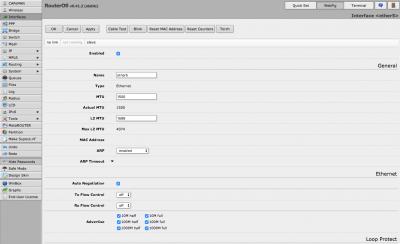
Interfaces>VLAN>vlan600 
Bridge>Bridge>hypptv 
Bridge>Ports>ether5 
Bridge>Ports>vlan600 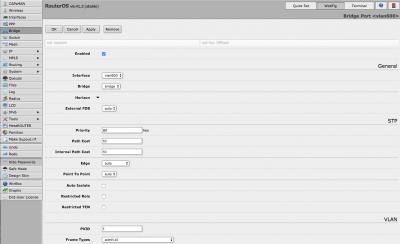
|
|
|
Mar 3 2018, 11:55 AM
Return to original view | IPv6 | Post
#9
|
|
Senior Member
627 posts Joined: May 2009
|
CODE # mar/03/2018 11:59:28 by RouterOS 6.41.2 # software id = IS1P-EK45 # # model = 2011UAS-2HnD # serial number = 402602E92990 /interface bridge add admin-mac=D4:CA:6D:7C:72:B1 auto-mac=no comment=defconf name=bridge add fast-forward=no name=hypptv /interface wireless set [ find default-name=wlan1 ] band=2ghz-onlyn channel-width=20/40mhz-Ce country=malaysia disabled=no distance=indoors frequency=auto mode=ap-bridge ssid=H&M wireless-protocol=\ 802.11 wps-mode=disabled /interface vlan add interface=ether1 name=vlan500 vlan-id=500 add interface=ether1 name=vlan600 vlan-id=600 /interface pppoe-client add add-default-route=yes disabled=no interface=vlan500 name=pppoe-out1 password=XXXXXX service-name=unifi user=XXXXX@unifi /interface list add comment=defconf name=WAN add comment=defconf name=LAN /interface wireless security-profiles set [ find default=yes ] authentication-types=wpa2-psk mode=dynamic-keys supplicant-identity=MikroTik wpa-pre-shared-key=0172031002 wpa2-pre-shared-key=0172031002 /ip pool add name=dhcp ranges=192.168.88.10-192.168.88.254 /ip dhcp-server add address-pool=dhcp disabled=no interface=bridge name=defconf /ppp profile set *0 dhcpv6-pd-pool=pppoev6 /interface bridge port add bridge=bridge comment=defconf interface=ether2 add bridge=bridge comment=defconf interface=ether3 add bridge=bridge comment=defconf interface=ether4 add bridge=hypptv comment=defconf hw=no interface=ether5 add bridge=bridge comment=defconf interface=ether6 add bridge=bridge comment=defconf interface=ether7 add bridge=bridge comment=defconf interface=ether8 add bridge=bridge comment=defconf interface=ether9 add bridge=bridge comment=defconf interface=sfp1 add bridge=bridge comment=defconf interface=wlan1 add bridge=bridge interface=vlan600 /interface list member add comment=defconf interface=bridge list=LAN add comment=defconf interface=ether1 list=WAN add interface=pppoe-out1 list=WAN /ip address add address=192.168.88.1/24 comment=defconf interface=ether2 network=192.168.88.0 /ip dhcp-client add comment=defconf dhcp-options=hostname,clientid interface=ether1 /ip dhcp-server network add address=192.168.88.0/24 comment=defconf gateway=192.168.88.1 /ip dns set allow-remote-requests=yes servers=8.8.8.8,8.8.4.4,2001:4860:4860::8888,2001:4860:4860::8844 /ip dns static add address=192.168.88.1 name=router.lan /ip firewall filter add action=accept chain=input comment="defconf: accept established,related,untracked" connection-state=established,related,untracked add action=drop chain=input comment="defconf: drop invalid" connection-state=invalid add action=accept chain=input comment="defconf: accept ICMP" protocol=icmp add action=drop chain=input comment="defconf: drop all not coming from LAN" in-interface-list=!LAN add action=accept chain=forward comment="defconf: accept in ipsec policy" ipsec-policy=in,ipsec add action=accept chain=forward comment="defconf: accept out ipsec policy" ipsec-policy=out,ipsec add action=fasttrack-connection chain=forward comment="defconf: fasttrack" connection-state=established,related add action=accept chain=forward comment="defconf: accept established,related, untracked" connection-state=established,related,untracked add action=drop chain=forward comment="defconf: drop invalid" connection-state=invalid add action=drop chain=forward comment="defconf: drop all from WAN not DSTNATed" connection-nat-state=!dstnat connection-state=new in-interface-list=WAN /ip firewall nat add action=masquerade chain=srcnat comment="defconf: masquerade" ipsec-policy=out,none out-interface-list=WAN /ipv6 address add from-pool=pppoev6 interface=bridge /ipv6 dhcp-client add add-default-route=yes interface=pppoe-out1 pool-name=pppoev6 request=prefix use-peer-dns=no /ipv6 firewall address-list add address=::/128 comment="defconf: unspecified address" list=bad_ipv6 add address=::1/128 comment="defconf: lo" list=bad_ipv6 add address=fec0::/10 comment="defconf: site-local" list=bad_ipv6 add address=::ffff:0.0.0.0/96 comment="defconf: ipv4-mapped" list=bad_ipv6 add address=::/96 comment="defconf: ipv4 compat" list=bad_ipv6 add address=100::/64 comment="defconf: discard only " list=bad_ipv6 add address=2001:db8::/32 comment="defconf: documentation" list=bad_ipv6 add address=2001:10::/28 comment="defconf: ORCHID" list=bad_ipv6 add address=3ffe::/16 comment="defconf: 6bone" list=bad_ipv6 add address=::224.0.0.0/100 comment="defconf: other" list=bad_ipv6 add address=::127.0.0.0/104 comment="defconf: other" list=bad_ipv6 add address=::/104 comment="defconf: other" list=bad_ipv6 add address=::255.0.0.0/104 comment="defconf: other" list=bad_ipv6 /ipv6 firewall filter add action=accept chain=input comment="defconf: accept established,related,untracked" connection-state=established,related,untracked add action=drop chain=input comment="defconf: drop invalid" connection-state=invalid add action=accept chain=input comment="defconf: accept ICMPv6" protocol=icmpv6 add action=accept chain=input comment="defconf: accept UDP traceroute" port=33434-33534 protocol=udp add action=accept chain=input comment="defconf: accept DHCPv6-Client prefix delegation." dst-port=546 protocol=udp src-address=fe80::/16 add action=accept chain=input comment="defconf: accept IKE" dst-port=500,4500 protocol=udp add action=accept chain=input comment="defconf: accept ipsec AH" protocol=ipsec-ah add action=accept chain=input comment="defconf: accept ipsec ESP" protocol=ipsec-esp add action=accept chain=input comment="defconf: accept all that matches ipsec policy" ipsec-policy=in,ipsec add action=drop chain=input comment="defconf: drop everything else not coming from LAN" in-interface-list=!LAN add action=accept chain=forward comment="defconf: accept established,related,untracked" connection-state=established,related,untracked add action=drop chain=forward comment="defconf: drop invalid" connection-state=invalid add action=drop chain=forward comment="defconf: drop packets with bad src ipv6" src-address-list=bad_ipv6 add action=drop chain=forward comment="defconf: drop packets with bad dst ipv6" dst-address-list=bad_ipv6 add action=drop chain=forward comment="defconf: rfc4890 drop hop-limit=1" hop-limit=equal:1 protocol=icmpv6 add action=accept chain=forward comment="defconf: accept ICMPv6" protocol=icmpv6 add action=accept chain=forward comment="defconf: accept HIP" protocol=139 add action=accept chain=forward comment="defconf: accept IKE" dst-port=500,4500 protocol=udp add action=accept chain=forward comment="defconf: accept ipsec AH" protocol=ipsec-ah add action=accept chain=forward comment="defconf: accept ipsec ESP" protocol=ipsec-esp add action=accept chain=forward comment="defconf: accept all that matches ipsec policy" ipsec-policy=in,ipsec add action=drop chain=forward comment="defconf: drop everything else not coming from LAN" in-interface-list=!LAN /ipv6 nd set [ find default=yes ] advertise-dns=yes interface=bridge mtu=1480 /ipv6 nd prefix default set preferred-lifetime=1h valid-lifetime=2h /lcd interface pages set 0 interfaces=sfp1,ether1,ether2,ether3,ether4,ether5,ether6,ether7,ether8,ether9,ether10 /system clock set time-zone-name=Asia/Kuala_Lumpur /tool mac-server set allowed-interface-list=LAN /tool mac-server mac-winbox set allowed-interface-list=LAN |
|
|
Mar 3 2018, 12:23 PM
Return to original view | IPv6 | Post
#10
|
|
Senior Member
627 posts Joined: May 2009
|
QUOTE(soonwai @ Mar 3 2018, 12:07 PM) hnr2802 Thanks soonwai . my hypptv is working now. but when i test in the hypptv Network Connectivity Test the Multicast Connectivity marked "X" or not not established. should i be worried or can i fix that with mikrotik. running the same test using unifi standard router all the test was ok.Jut had a quick look since I’m at the coffee shop. But try this. Vlan600 is currently a port in “bridge”. It should be a port in “hypptv”. So just change that and it should work. Don’t worry about master/slave ports. Since v6.41, no more master/slave already. |
|
|
Jan 2 2019, 01:28 PM
Return to original view | IPv6 | Post
#11
|
|
Senior Member
627 posts Joined: May 2009
|
Hi all,
Need your advice. Currently using Mikrotik RB2011UiAS-2HnD-IN. Upgraded to turbo 800mbps . Plan to replace my route to 1. RB4011iGS+5HacQ2HnD-IN or 2. Asus AC5300 china set which one you guys would recommend. my priority is wifi coverage & speed |
|
|
Jan 2 2019, 01:42 PM
Return to original view | Post
#12
|
|
Senior Member
627 posts Joined: May 2009
|
QUOTE(MX510 @ Jan 2 2019, 01:30 PM) I will vote for no 1 from my research my old mikrotik router have better 2.4ghz dbi compared to RB4011. furthermore it have internal wifi antenna. im afraid the coverage will not be as good as before.For AP you can use Mesh AP :-) Or use Amplifi HD instead |
|
|
Jan 2 2019, 03:30 PM
Return to original view | IPv6 | Post
#13
|
|
Senior Member
627 posts Joined: May 2009
|
QUOTE(mhwee @ Jan 2 2019, 03:23 PM) I have experience 2 pcs of RT-AC5300, from taobao Asus 旗舰店。Both end up wifi issues, sometimes just dont response to connection. This particular model only. Others like RT-AC88U, RT-AC68U from Asus 旗舰店 still function till today. thanks for the input bro. have u tested ac86u? |
|
|
|
|
|
Jan 2 2019, 03:51 PM
Return to original view | IPv6 | Post
#14
|
|
Senior Member
627 posts Joined: May 2009
|
QUOTE(mhwee @ Jan 2 2019, 03:35 PM) Tested for ? 800mbps? so now what is your fav or day-to-day router?I don't have 800mbps , I am using 300 mbps only. 300mbps makes me download things/movies till nothing to download  RM139 package , cheap what.. RM139 package , cheap what..If you meant testing and using AC68U, then yes, it is still in very good condition. I have too many routers to take turn...so seldom revive it back nowadays  |
|
|
Jan 3 2019, 12:06 AM
Return to original view | IPv6 | Post
#15
|
|
Senior Member
627 posts Joined: May 2009
|
QUOTE(soonwai @ Jan 2 2019, 10:47 PM) I'd choose the RB4011 as a router only + a cheap wifi AP. Currently I'm using an RM149 Aztech FG7008GR which is basically 5HacQ2HnT. The sustained 850Mbps using 3 chain wifi is from aztech touter?Am able to get sustained 850Mbps using 3-chain wifi to LAN locally. Dun have a 4-chain device. https://forum.lowyat.net/topic/4543383/all |
|
|
Jan 4 2019, 05:19 PM
Return to original view | Post
#16
|
|
Senior Member
627 posts Joined: May 2009
|
Hi, guys can you share guide. To setup ipv6 for the current firmware update.
|
| Change to: |  0.0295sec 0.0295sec
 0.53 0.53
 7 queries 7 queries
 GZIP Disabled GZIP Disabled
Time is now: 5th December 2025 - 09:02 PM |
 Quote
Quote