Welcome Guest ( Log In | Register )

176 Pages « < 91 92 93 94 95 > » Bottom

Outline · [ Standard ] · Linear+

Enterprise Networking Mikrotik Routers (RouterBoard & RouterOS), User and owner discussion group

views
     
zzzhhhzzz
post Nov 30 2018, 10:42 AM

Regular
******
Senior Member
1,671 posts

Joined: Apr 2012
so as of now for Unifi Turbo 800Mbits/s which Mikrotik router will be the best bet (preferably one without Wifi as I wanted to split router and AP)
mhwee
post Nov 30 2018, 11:13 AM

Getting Started
**
Junior Member
241 posts

Joined: Sep 2005
From: Johor
QUOTE(zzzhhhzzz @ Nov 30 2018, 10:42 AM)
so as of now for Unifi Turbo 800Mbits/s which Mikrotik router will be the best bet (preferably one without Wifi as I wanted to split router and AP)
*
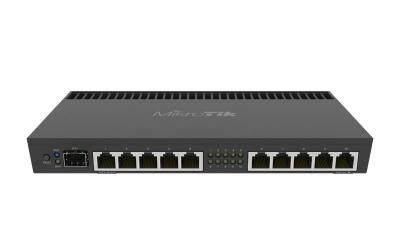
https://mikrotik.com/product/rb4011igs_rm

Attached Image

Best , but may not be best bet biggrin.gif

This post has been edited by mhwee: Nov 30 2018, 11:16 AM
maxiscool
post Dec 1 2018, 10:11 PM

Casual
***
Junior Member
379 posts

Joined: Jan 2003
QUOTE(ahlong @ Nov 30 2018, 09:12 AM)
yup.. im turbo-ed 300mbps

fasttrack on = 340/360 mbps
fasttrack off = 65/75 mbps

i've got many simple queue list and if i enable the fasttrack, they'll (kids/neighbours around 15+ devices) eat all my bandwidth yaw  cry.gif
*
Ok, that about right I guess.

Yes, I understood the simple queues no longer working. For that workaround, I separated the subnet for the devices, and place in the "source" range for fasttrack, so other devices will follow the queues. ( You may use dedicated IP if not many devices for yourself)

This post has been edited by maxiscool: Dec 1 2018, 10:12 PM
ahlong
post Dec 2 2018, 03:24 PM

not a debt collector
****
Junior Member
612 posts

Joined: Apr 2005
From: http://127.0.0.1:80/announce


QUOTE(maxiscool @ Dec 1 2018, 10:11 PM)
Ok, that about right I guess.

Yes, I understood the simple queues no longer working. For that workaround, I separated the subnet for the devices, and place in the "source" range  for fasttrack, so other devices will follow the queues. ( You may use dedicated IP if not many devices for yourself)
*
yeah bro..

At first, im stuck with 100mbps (fasttrack disable / simple queues enable)

After refering to this Mikrotik thread MikrotiK Fasttack + Simple Queues, fasttracking and simple queueing works like a charm!

Thanks to the thread and the guide. I followed the second post guide. The first one will not make ur simple queue works.

The lazy part is adding IPaddress range to firewall > filter rules bcoz i have 15+ diff interface+ipaddress/pool to put in..

What to do... need to put them all and just finished added since 12pm+ doing it hahahahaha..

Now just monitor the simple queues menu watching if i missed any address/pool range so that neighbour/kids didnt eat all my bandwidth

Seems all good for now..

jio
post Dec 2 2018, 06:43 PM

Casual
***
Junior Member
383 posts

Joined: May 2005
If you have under-powered hardware with faster internet speed the router can handle without relying on fasttrack (and don't want to upgrade), then I suggest you only use queues to limit subset of the traffic that you want to control (e.g. kids or guest network). It is up to you how/when to decide when a connection should be fasttracked. Once it is fasttracked, it will bypass any subsequent queue & firewall rules processing for that particular connection. For example, you may want to examine tls-host SNI name before deciding to fasttrack the connection or not. Using IP range is a bad approach. Modify the fasttrack rule to match/exclude connection mark etc. instead. You most likely already using connection/packet marking for firewall rules anyway.

If you're sharing the internet subscription cost with your neighbour, I strongly suggest you to upgrade the router to something better (hap ac2 or RB4011, RB750Gr3 not recommended you need its lower power consumption or it is to be placed hidden in a distribution box commonly found in the newer apartment/condo).
System Error Message
post Dec 2 2018, 11:54 PM

Regular
******
Senior Member
1,781 posts

Joined: Jul 2010
best can be misleading in the manner mentioned. I have the CCR1036, its not the best, im ready for 10G internet without using any hardware acceleration, but TM still hasnt turboed me and im still paying 300+ every month stuck at 100mb/s.

I always say to get the best within your budget, and to ensure it is fit for purpose. Whats important is that it does what you want at the speeds you want. Many simply buy mikrotik and configure it like a home router rather than using the wealth of features that it provides.

This post has been edited by System Error Message: Dec 2 2018, 11:54 PM
crashhog
post Dec 3 2018, 09:31 PM

New Member
*
Newbie
5 posts

Joined: Nov 2004


Hi Guys,

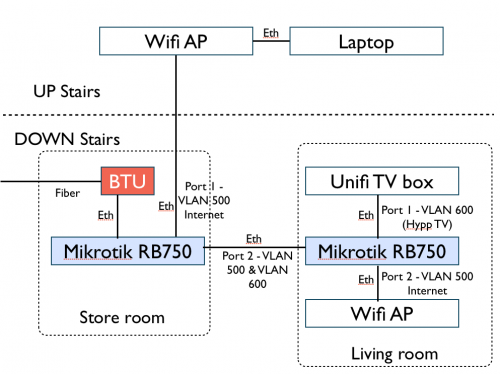
I have a Unifi Turbo 500Mbps on a Mikrotik RB750GL with Router OS v6.43.4(stable). Been using like a normal setup nothing fancy. Now I've moved to another house, I was planning to do like in the picture below.

Can anyone:
1. Point me to the right direction on how to configure the Mikrotik units?
2. Is RB750 okay for this setup?

user posted image
mhwee
post Dec 3 2018, 10:20 PM

Getting Started
**
Junior Member
241 posts

Joined: Sep 2005
From: Johor
QUOTE(crashhog @ Dec 3 2018, 09:31 PM)
Hi Guys,

I have a Unifi Turbo 500Mbps on a Mikrotik RB750GL with Router OS v6.43.4(stable). Been using like a normal setup nothing fancy. Now I've moved to another house, I was planning to do like in the picture below.

Can anyone:
1. Point me to the right direction on how to configure the Mikrotik units?
2. Is RB750 okay for this setup?

user posted image
*
To me, RB750 is too old hardware to handle your 500mbps. Even RB750Gr3 also quite hard to handle without fasttrack enable.

Apart from hardware, the diagram is okay. In fact, i am currently using a similar setup. My setup is, i put mikrotik RB4011iGS+RM at the first place (like your storeroom) connecting a Mesh wifi as AP, and i am using a netgear smart switch at the living room. It can do exactly same as your second mikrotik router. You don't need a second router at living room. All the routing traffic should be handled by first powerful mikrotik router. Second area just need a RM180 netgear smart switch to tag and untag the correct vlan and ports. https://www.netgear.com/business/products/s...x#tab-techspecs

DHCP is handled by first mikrotik. You will have same ip range for devices connecting to store room AP and devices connecting to living room AP.

if you put second mikrotik router, you are just putting unnecessary unit to do the second routing work, and you need to have equal power at second router to prevent bottleneck when you are at your living room network branch.

This post has been edited by mhwee: Dec 3 2018, 10:48 PM
weikee
post Dec 5 2018, 11:59 PM

10k Club
********
All Stars
12,019 posts

Joined: Jan 2003
QUOTE(crashhog @ Dec 3 2018, 09:31 PM)
Hi Guys,

I have a Unifi Turbo 500Mbps on a Mikrotik RB750GL with Router OS v6.43.4(stable). Been using like a normal setup nothing fancy. Now I've moved to another house, I was planning to do like in the picture below.

Can anyone:
1. Point me to the right direction on how to configure the Mikrotik units?
2. Is RB750 okay for this setup?

user posted image
*
Living room just get a switch that supports vlan will do. Mikrotik RB260GS can do the job.

My house use similar setup, but I didn't route vlan500 over, just 600 and 100(lan vlan)
crashhog
post Dec 10 2018, 10:22 AM

New Member
*
Newbie
5 posts

Joined: Nov 2004


QUOTE(mhwee @ Dec 3 2018, 10:20 PM)
To me, RB750 is too old hardware to handle your 500mbps. Even RB750Gr3 also quite hard to handle without fasttrack enable.

Apart from hardware, the diagram is okay. In fact, i am currently using a similar setup. My setup is, i put mikrotik RB4011iGS+RM at the first place (like your storeroom) connecting a Mesh wifi as AP, and i am using a netgear smart switch at the living room. It can do exactly same as your second mikrotik router. You don't need a second router at living room. All the routing traffic should be handled by first powerful mikrotik router. Second area just need a RM180 netgear smart switch to tag and untag the correct vlan and ports. https://www.netgear.com/business/products/s...x#tab-techspecs

DHCP is handled by first mikrotik. You will have same ip range for devices connecting to store room AP and devices connecting to living room AP.

if you put second mikrotik router, you are just putting unnecessary unit to do the second routing work, and you need to have equal power at second router to prevent bottleneck when you are at your living room network branch.
*
The RB750Gr3 can handle the traffic without an issue at all. It handles all my house traffic with less than 5% of CPU usage, and most of the time either 0% or 1%. In fact since it has a quad core processor most of the time only one or two is uses.

My old RB750GL CPU usage on the other hand does spike up to 20% on occasion but after that stays below 5% for most of the time.

I took a look at your suggestion of using the Netgear switch, but the Mikrotik was much more cheaper even when buying the router version. It would have even been cheaper with a Mikrotik Managed Switch. biggrin.gif
crashhog
post Dec 10 2018, 10:25 AM

New Member
*
Newbie
5 posts

Joined: Nov 2004


QUOTE(weikee @ Dec 5 2018, 11:59 PM)
Living room just get a switch that supports vlan will do. Mikrotik RB260GS can do the job.

My house use similar setup, but I didn't route vlan500 over, just 600 and 100(lan vlan)
*
With a help of a friend of mine we ended up doing the same thing as you. I think there should be a guide (probably on Mikrotik's Wiki) on how to setup Unifi TV using a 2 router setup smile.gif
weikee
post Dec 10 2018, 10:28 AM

10k Club
********
All Stars
12,019 posts

Joined: Jan 2003
QUOTE(crashhog @ Dec 10 2018, 10:25 AM)
With a help of a friend of mine we ended up doing the same thing as you. I think there should be a guide (probably on Mikrotik's Wiki) on how to setup Unifi TV using a 2 router setup  smile.gif
*
Cool.
mhwee
post Dec 10 2018, 09:49 PM

Getting Started
**
Junior Member
241 posts

Joined: Sep 2005
From: Johor
QUOTE(crashhog @ Dec 10 2018, 10:22 AM)
The RB750Gr3 can handle the traffic without an issue at all. It handles all my house traffic with less than 5% of CPU usage, and most of the time either 0% or 1%. In fact since it has a quad core processor most of the time only one or two is uses.

My old RB750GL CPU usage on the other hand does spike up to 20% on occasion but after that stays below 5% for most of the time.

I took a look at your suggestion of using the Netgear switch, but the Mikrotik was much more cheaper even when buying the router version. It would have even been cheaper with a Mikrotik Managed Switch.  biggrin.gif
*
Nope, Rb750gr3 has dual core 880 only. I also have this router Rb750gr3 before I bought my Rb4011igs_rm. Try full network copy 50G files transferring between pc , then do speedtest, look at CPU usage again, it will have spike of cpu usage. if you got firewall rules, queue, you will see the cpu load up when fasttrack disabled.


About the fact that you like mikrotik RB260gs managed switch more, it is a choice, up to you. As long as you know how to do the setup. I purchased my netgear switch at around RM 160 only. I bought tru taobao. I don't think your switch or router is cheaper. If your choice of managed switch or router are cheaper, good for you

This post has been edited by mhwee: Dec 10 2018, 10:24 PM
weikee
post Dec 13 2018, 09:26 AM

10k Club
********
All Stars
12,019 posts

Joined: Jan 2003
Anyone here have update instruction to configure ipv6 for unifi? the one on the web don't seem to work. Running on firmware 6.43.7 may have some changes
weikee
post Dec 13 2018, 09:54 PM

10k Club
********
All Stars
12,019 posts

Joined: Jan 2003
Found the problem

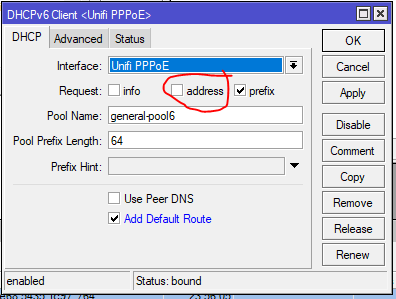
1) In DHCPv6 Client, uncheck the "address", by default is check. This is new features added

user posted image

2) After that, i face rebinding issue when the router got reset, it hold the old prefix. Google and found the solution by adding script into ppp "on up:"

https://forum.mikrotik.com/viewtopic.php?t=122420
This workaround works for me. Create an on-up script under the PPP profile. This will force a release (and subsequent renewal). This is mine:
Script:
:local interfaceName [/interface get $interface name];
:delay 10
:log info "profile-pppoe-isp client up: ipv6 dhcp-client release";
/ipv6 dhcp-client release [find interface=$interfaceName];

This post has been edited by weikee: Dec 14 2018, 09:09 AM
weikee
post Dec 13 2018, 09:54 PM

10k Club
********
All Stars
12,019 posts

Joined: Jan 2003
BTW, i notice lowyat can't be access when i have ipv6 enable. Any idea why?

mitodna
post Dec 16 2018, 01:14 AM

Getting Started
********
All Stars
14,039 posts

Joined: Jan 2003
Edit:

951G-2HnD does support 800mbps in LAN after fasttrack

This post has been edited by mitodna: Dec 18 2018, 11:51 AM
chanti-sama
post Dec 26 2018, 10:30 AM

Enthusiast
*****
Senior Member
710 posts

Joined: Jan 2003
From: In the backyard. Up to no good!


Hi All,

I just bought a mikrotik HexS router. I planned to configure my network: unifi -> MT router -> Asus rt-ac1200g+

The Asus is meant for all my devices to connect (pc, phones, laptop, tables). Currently my Asus is set to bridge mode. Does it meant on the mt-router i need to configure those wireless settings and just plug the wireless ap in?

Sorry im abit new on this networking


mhwee
post Dec 26 2018, 04:32 PM

Getting Started
**
Junior Member
241 posts

Joined: Sep 2005
From: Johor
QUOTE(chanti-sama @ Dec 26 2018, 10:30 AM)
Hi All,

I just bought a mikrotik HexS router. I planned to configure my network: unifi -> MT router -> Asus rt-ac1200g+

The Asus is meant for all my devices to connect (pc, phones, laptop, tables). Currently my Asus is set to bridge mode. Does it meant on the mt-router i need to configure those wireless settings and just plug the wireless ap in?

Sorry im abit new on this networking
*
I thought Hex S has no wireless setting? It is an Ethernet router. Just set your asus RT-AC1200G+ to AP mode will do. The DHCP is managed by HexS .
chanti-sama
post Dec 26 2018, 04:39 PM

Enthusiast
*****
Senior Member
710 posts

Joined: Jan 2003
From: In the backyard. Up to no good!


QUOTE(mhwee @ Dec 26 2018, 04:32 PM)
I thought Hex S has no wireless setting? It is an Ethernet router. Just set your asus RT-AC1200G+ to AP mode will do. The DHCP is managed by HexS .
*
yes.... i wanted to separate the router from the wireless unit. thanks for the tip. So the dhcp will be on HexS side and asus set to AP. ok

176 Pages « < 91 92 93 94 95 > » Top
 

Change to:
| Lo-Fi Version
0.0345sec    1.03    6 queries    GZIP Disabled
Time is now: 19th December 2025 - 10:27 AM