QUOTE(mhwee @ Dec 3 2018, 10:20 PM)
To me, RB750 is too old hardware to handle your 500mbps. Even RB750Gr3 also quite hard to handle without fasttrack enable.
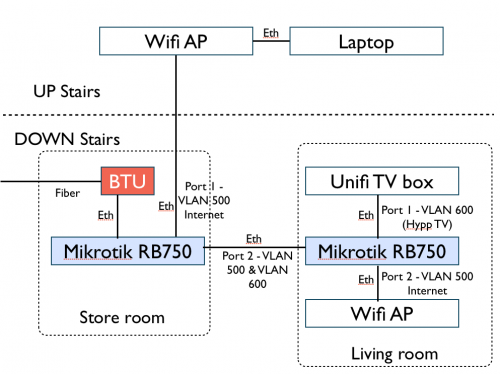
Apart from hardware, the diagram is okay. In fact, i am currently using a similar setup. My setup is, i put mikrotik RB4011iGS+RM at the first place (like your storeroom) connecting a Mesh wifi as AP, and i am using a netgear smart switch at the living room. It can do exactly same as your second mikrotik router. You don't need a second router at living room. All the routing traffic should be handled by first powerful mikrotik router. Second area just need a RM180 netgear smart switch to tag and untag the correct vlan and ports.
https://www.netgear.com/business/products/s...x#tab-techspecsDHCP is handled by first mikrotik. You will have same ip range for devices connecting to store room AP and devices connecting to living room AP.
if you put second mikrotik router, you are just putting unnecessary unit to do the second routing work, and you need to have equal power at second router to prevent bottleneck when you are at your living room network branch.
The RB750Gr3 can handle the traffic without an issue at all. It handles all my house traffic with less than 5% of CPU usage, and most of the time either 0% or 1%. In fact since it has a quad core processor most of the time only one or two is uses.
My old RB750GL CPU usage on the other hand does spike up to 20% on occasion but after that stays below 5% for most of the time.
I took a look at your suggestion of using the Netgear switch, but the Mikrotik was much more cheaper even when buying the router version. It would have even been cheaper with a Mikrotik Managed Switch.



 Dec 3 2018, 09:31 PM


 Quote
Quote


 0.0646sec
 0.66
0.66
 7 queries
 GZIP Disabled