Outline ·
[ Standard ] ·
Linear+
INTEL OVERCLOCKING THREAD, TIPS,Q n A, Results...Great For NueBis
|
lim5659
|
 Sep 30 2008, 06:47 PM Sep 30 2008, 06:47 PM
|
Getting Started


|
Need some advice. I'm switching my EP43-DS3L mobo for another board because the gigabyte board has poor overclockability. I'm thinking of getting a Asus P5Q mobo. Is it good for OC? Thanks in advance.
|
|
|
|
|
|
cloudstrife07
|
Oct 1 2008, 12:16 AM
|
|
|
what's willamette average temp for idle and load? mine is p4 1.7Ghz overclocked to 1.87Ghz (+10% increment bus speed), stock vcore, stock intel cooler. temp 48C idle and 63C load.using OCCT for stress test.
Added on October 1, 2008, 3:06 amupdate: i lowered the bus speed to stock back. i forgot that this board doesn't have AGP/PCI lock  This post has been edited by cloudstrife07: Oct 1 2008, 03:06 AM This post has been edited by cloudstrife07: Oct 1 2008, 03:06 AM |
|
|
|
|
|
seanlimys
|
Oct 7 2008, 02:35 PM
|
|
|
wana c E5200 OC screenies...
|
|
|
|
|
|
mfcm
|
Oct 7 2008, 09:55 PM
|
|
|
QUOTE(seanlimys @ Oct 7 2008, 02:35 PM) wana c E5200 OC screenies... QUOTE(rlhc17 @ Sep 18 2008, 10:36 AM) Value OC proc  @4.3ghz 
e5200 oc by raymond  This post has been edited by mfcm: Oct 7 2008, 09:56 PM This post has been edited by mfcm: Oct 7 2008, 09:56 PM |
|
|
|
|
|
seanlimys
|
Oct 8 2008, 08:18 AM
|
|
|
damn..wat cooler?but vcore so high..if can hit 500X8 den its ok for me
|
|
|
|
|
|
mfcm
|
Oct 8 2008, 11:44 AM
|
|
|
QUOTE(seanlimys @ Oct 8 2008, 08:18 AM) damn..wat cooler?but vcore so high..if can hit 500X8 den its ok for me not sure wat cooler he using..probably Deepcool Killer Whale btw here his 4Ghz clock  
|
|
|
|
|
|
irenic
|
Oct 8 2008, 11:44 PM
|
|
|
waa mfcm become raymond's assistant already ar? hehe j/k  btw it's great seeing 4ghz and above become a standard oc range for dual core.. i believe with proper cooling, n mix with raymond's skill, his proc can go higher  |
|
|
|
|
|
Punish
|
Oct 9 2008, 07:35 PM
|
|
|
too bad high clock on e5200 only can be achieve using low fsb....
GTG
This post has been edited by Punish: Oct 9 2008, 07:35 PM
|
|
|
|
|
|
mfcm
|
Oct 9 2008, 10:58 PM
|
|
|
QUOTE(irenic @ Oct 8 2008, 11:44 PM) waa mfcm become raymond's assistant already ar? hehe j/k btw it's great seeing 4ghz and above become a standard oc range for dual core.. i believe with proper cooling, n mix with raymond's skill, his proc can go higher hahah nor lar   its jus i saw he post in DFI thread..so jus paste here since he ask for e52 ss  credit to raymond  |
|
|
|
|
|
syahirax
|
Oct 10 2008, 05:52 PM
|
|
|
QUOTE(lim5659 @ Sep 30 2008, 06:47 PM) Need some advice. I'm switching my EP43-DS3L mobo for another board because the gigabyte board has poor overclockability. I'm thinking of getting a Asus P5Q mobo. Is it good for OC? Thanks in advance. not sure about other p5q series but P5Q deluxe is awesome mobo. |
|
|
|
|
|
Kuntau
|
Oct 14 2008, 07:48 PM
|
|
|
Hi all I need help.. I just bought Q9550 & Asus P5Q. Q9550 should be running 2.83GHz with 8.5x multiplier but cpu-z showing me only x6 or sometimes x8. From my previous experience this is some kind of CPU saving mode.. but I don't want this. Anyone know where I can disable this? 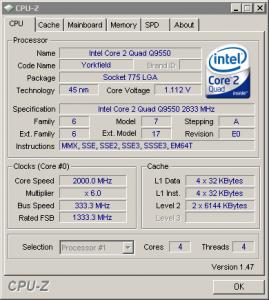
|
|
|
|
|
|
hilmiangah
|
Oct 14 2008, 08:18 PM
|
Kongsi Gelap Elite Ramadass

|
in the bios disable EIST.
|
|
|
|
|
|
OC4/3
|
Oct 14 2008, 08:48 PM
|
.
|
QUOTE(Kuntau @ Oct 14 2008, 07:48 PM) Hi all I need help.. I just bought Q9550 & Asus P5Q. Q9550 should be running 2.83GHz with 8.5x multiplier but cpu-z showing me only x6 or sometimes x8. From my previous experience this is some kind of CPU saving mode.. but I don't want this. Anyone know where I can disable this?
EIST and C1E |
|
|
|
|
|
Kuntau
|
Oct 15 2008, 03:03 AM
|
|
|
QUOTE(OC4/3 @ Oct 14 2008, 08:48 PM) EIST stand for? Sorry this is my first time using intel  |
|
|
|
|
|
hilmiangah
|
Oct 15 2008, 09:50 AM
|
Kongsi Gelap Elite Ramadass
|
enhanced intel speedstep technology
its their power saving feature.
|
|
|
|
|
|
syahirax
|
Oct 16 2008, 03:47 PM
|
|
|
QUOTE(Kuntau @ Oct 15 2008, 03:03 AM) EIST stand for? Sorry this is my first time using intel what i did was disable all cpu feature in my bios. This post has been edited by syahirax: Oct 16 2008, 03:47 PM |
|
|
|
|
|
Kuntau
|
Oct 16 2008, 04:30 PM
|
|
|
Hi guys.. Unfortunately CPUZ still showing only x8 multiplier after I disable all those CPU feature.. It detect correct in BIOS tho ( 333 x 8.5 = 2.83GHz) but in Windows it is (333 x 8 = 2.66GHz) only.
Or CPU-Z give me wrong value? What else I can use other than CPU-Z?
Thanks
|
|
|
|
|
|
Aura
|
Oct 16 2008, 04:36 PM
|
|
|
QUOTE(hilmiangah @ Oct 15 2008, 09:50 AM) enhanced intel speedstep technology its their power saving feature. Yup.... that's wat EIST stands for.... it is a power saving feature which is activated when ur PC is idling.... Our bro here has become the walking dictionary.... |
|
|
|
|
|
kazairol
|
Oct 16 2008, 06:10 PM
|
|
|
why i got bsod when i disable eist? right now i run my pc with eist on.
|
|
|
|
|
|
hilmiangah
|
Oct 16 2008, 06:28 PM
|
Kongsi Gelap Elite Ramadass
|
QUOTE(Kuntau @ Oct 16 2008, 04:30 PM) Hi guys.. Unfortunately CPUZ still showing only x8 multiplier after I disable all those CPU feature.. It detect correct in BIOS tho ( 333 x 8.5 = 2.83GHz) but in Windows it is (333 x 8 = 2.66GHz) only. Or CPU-Z give me wrong value? What else I can use other than CPU-Z? Thanks by reading ur statement there i suppose u use the wolfdale proc but cpuz cannot detect the .5 multiplier. its either u have to flash ur mobo bios to the latest one or u use the old cpuz. |
|
|
|
|



 Quote
Quote





 0.0327sec
 0.53
0.53
 6 queries
 GZIP Disabled