Welcome Guest ( Log In | Register )

Bump Topic Topic Closed RSS Feed
211 Pages « < 183 184 185 186 187 > » Bottom

Outline · [ Standard ] · Linear+

 INTEL OVERCLOCKING THREAD, TIPS,Q n A, Results...Great For NueBis

views
     
boon.fong
post Sep 3 2008, 11:45 AM

Getting Started
**
Junior Member
199 posts

Joined: Jan 2008
From: Klang, Selangor


hi all, i am new at overclocking, if my oc pass the POST but reboot when come to window, what does it mean, is it i had reach the limit or the problem of the voltage. I also tried to set the voltage at 1.3v but the cpu-z only show 1.26-1.288v (is it because of the vdroop)

thanks
Alienwarez
post Sep 3 2008, 01:15 PM

Protégé
****
Senior Member
546 posts

Joined: May 2008
increse vcore....still not stabil if got bsod.
arvil20
post Sep 3 2008, 06:02 PM

Getting Started
**
Junior Member
61 posts

Joined: Mar 2008
From: Kuala Lumpur


Some People Say Celeron D After Clock Is better Than Dual Core Without Clock Is It Real?
tkh_1001
post Sep 3 2008, 06:28 PM

Look at all my stars!!
*******
Senior Member
2,547 posts

Joined: Oct 2007


QUOTE(boon.fong @ Sep 3 2008, 11:45 AM)
hi all, i am new at overclocking, if my oc pass the POST but reboot when come to window, what does it mean, is it i had reach the limit or the problem of the voltage. I also tried to set the voltage at 1.3v but the cpu-z only show 1.26-1.288v (is it because of the vdroop)

thanks
*
i suggest u read thru this guide thumbup.gif

http://forum.lowyat.net/index.php?act=ST&f...0#entry15451675
bokbeng
post Sep 4 2008, 01:32 AM

Getting Started
**
Junior Member
132 posts

Joined: Mar 2008
i just use the intelburn test. if u passed the linpack test, does it mean that your com has stable?
CHiNO730
post Sep 4 2008, 03:17 AM

On my way
****
Senior Member
526 posts

Joined: Aug 2008


QUOTE(roa85 @ Aug 26 2008, 06:04 PM)
Hi guys, newbie here 1st post

Just some quick question about overclocking my new pc

I had disabled C1E and Speedstep, but my proc will still auto downclock when idle(6*400fsb instead of 8.5*400fsb), is this normal?

also load line calibration? enable or not to enable??

overclocked my q9550 to 3.41Ghz @ 1.26vcore, temp is around 62c(load) BUT my nb temp is at 70c(idle) and 87c(load) during prime95 test. How far sifu recommend nb temp to be? 87c is scary ler

My Pc Spec:
Q9550
Asus Maximus 2 Formula
4x 2gb kingston hyperx ddr2 1066
640gb wd hdd
2x HD4870 cfire
CM cosmos s
*
87c is too hot. It won't damage the nb outright, but over time, not so good. Did you increase voltage to the bridges? It will be okay if you run a small 40mm fan on it - most users who get high nb temps will go for a fan, putting a fan near it, is not exactly the same is running a fan on it - so try that. Also, check to see if your heatsink is properly mounted on the nb - you might have to remove it and reapply thermal grease and try it again, if the fan isn't working, I have a feeling your heatsink is the problem.


Added on September 4, 2008, 3:25 am
QUOTE(hilmiangah @ Aug 27 2008, 12:24 AM)
well it load at 72'c max.....
i think that is kinda high..
what u guys think..
*
IMO too high. OCCT sets a default alarm when temps go past 70C for stress testing - so your rig would set off the alarm.

Keeping it under 65C is better, and most users can get below 60C even on the stock cooler. If you're using the stock cooler, you need to upgrade to something better, or run a better cooling setup in the case.

Did you increase the vcore? If so, that's why it's running hot. If you can't upgrade the cooler now, you'll have to reduce the overclock until you can, otherwise your processor will spoil or lose performance. The components get derated when exposed to high heat, so performance will also go with it.

Also, are you running it in an air-con room?

25C set on my aircon, and I can run 50% overclock on my E6420 under 58C with a Zalman Cooler. To me that's pretty hot, and I'm already trying to figure out why I can't run it cooler.

This post has been edited by CHiNO730: Sep 4 2008, 03:25 AM

lim5659
post Sep 5 2008, 06:14 PM

Getting Started
**
Junior Member
60 posts

Joined: Jun 2007
From: Bintulu


Hi, I'm a newbie at OC. Need some help with my rig.
I achieved 3.71(413x9)G at vcore 1.3v for E8400 with RAM latency at 5-5-5-15, vRam 2.0v. However, i can't go pass 413 for my CPU even if i lowered the multiplier to 6. Tried increased vMCH +0.1, or CPU VTT +0.1v but to no avail as well. System stable with temp at load 52-53oC. Please advice how to increase the FSB of my CPU. I read about my cpu- it can go for 520-530 for FSB. Thanks.

My specs is in my signature. Thank you. (PCI E set at 100)

This post has been edited by lim5659: Sep 5 2008, 06:27 PM
Hoodlums
post Sep 5 2008, 06:22 PM

On my way
****
Senior Member
598 posts

Joined: Sep 2004


Hurms, my E4400 can stable OC @ 333Mhz*9 @ 1.35VCore, pass IntelBurnTest.
Daily use 356Mhz*9 @ 1.4625VCore.
tkh_1001
post Sep 5 2008, 06:54 PM

Look at all my stars!!
*******
Senior Member
2,547 posts

Joined: Oct 2007


thats weird case... but i dont think p43 is that bad gua...

could it be ur ram holding u back? try add vdimm to 2.1v n see if it can go above or not...

reduce ur vmch n vtt back to stock again as simply add voltage to these might cause harm...

and iirc gigabyte didnt state how much is the value =.= this mobo have value for vtt n vmch?


lim5659
post Sep 5 2008, 06:59 PM

Getting Started
**
Junior Member
60 posts

Joined: Jun 2007
From: Bintulu


thanks tkh. My RAM is Kingston HyperX DDR2-6400 2G kit(5-5-5-15)--> regretted. I will try to increase the vdimm and see. and of course lower the vMCH and VTT. Would increasing PCI E help?(101-105)


Added on September 5, 2008, 7:13 pmMy stock vMCH is 1.1v, CPU VTT is 1.2v. It doesn't work with increasing the vdimm to 2.1v. Got anything to do with MCH frequency latch, or SPD? I set it at 400Mhz for strapping and 2.0B (2x333) for SPD. It doesn't work with 2.0D (2x400). Thanks again.

This post has been edited by lim5659: Sep 5 2008, 07:14 PM
tkh_1001
post Sep 5 2008, 07:16 PM

Look at all my stars!!
*******
Senior Member
2,547 posts

Joined: Oct 2007


oh ya bro... forgot to ask, did u set ur ram divider to 1:1 ?

not really sure pcie clock wud do... but its advised to put it on stock 100..
lim5659
post Sep 5 2008, 07:19 PM

Getting Started
**
Junior Member
60 posts

Joined: Jun 2007
From: Bintulu


yes. ratio 1:1. i put my PCI E at stock 100. Could it be the strapping and SPD? Thanks bro. smile.gif


This post has been edited by lim5659: Sep 5 2008, 07:22 PM
ne0cz
post Sep 5 2008, 08:26 PM

Zoom Zoom
*******
Senior Member
5,372 posts

Joined: May 2008
From: Nokia HQ


Adjust ur RAM timings...my cheapo rig goes up to 3.4 b4 I hate it 4 its heat. So, any successs?
soulfly
post Sep 6 2008, 12:22 AM

revving towards 10,000 rpm
Group Icon
VIP
15,903 posts

Joined: Jan 2003
From: Miri


passing POST doesn't mean your system already stable. loading windows is a bit more stressful than just system POST, so any instability may be instantly occur.

just as basic.... increase more voltage when something is not stable. which voltage? trial and error.
kazairol
post Sep 6 2008, 02:44 PM

Regular
******
Senior Member
1,008 posts

Joined: Aug 2006
originally from here, post#50
QUOTE(hilmiangah @ Sep 6 2008, 12:35 PM)
try intelburntest la bro.
see how many seconds it will stand.
i bet u have to push up more vcore.
*
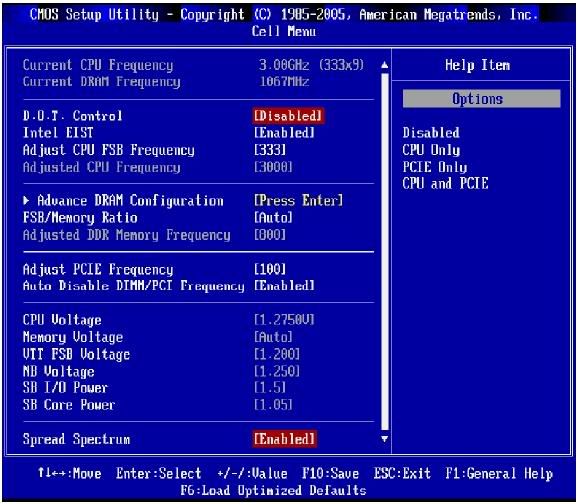
i want to do so, but i cant. my bios voltage setting is read only. wonder why. hmm.gif

QUOTE(AceCombat @ Sep 6 2008, 12:35 PM)
bro,lets say u running 1:1,ur ram should be running 830MHz.
try to lower to CL5 which is 5-5-5-15,then pump some vdimm to it,for value ram with passive cooled,u may just pump to 2.4vdimm for short burst,remember,short burst.
if u wan daily use,830mhz CL5 2.2vdimm wont kill ur ram biggrin.gif
and it should be stable.
*
i wish i can adjust the voltage.. i see in ur sig, u also use msi p35 neo3 mobo right? can teach me how adjust the voltage?
another thing is i need to enable intel eist, if not, got bsod after windows boot screen with code stop:0x000000f4.
why this happen?? icon_question.gif

This post has been edited by kazairol: Sep 6 2008, 02:49 PM
hilmiangah
post Sep 6 2008, 03:32 PM

Kongsi Gelap Elite Ramadass
Group Icon
Elite
5,602 posts

Joined: Jul 2007
From: The Holiest Of Hole


maybe its under some control setting or something.
AceCombat
post Sep 6 2008, 05:03 PM


Group Icon
Elite
5,434 posts

Joined: Dec 2006


QUOTE(kazairol @ Sep 6 2008, 02:44 PM)
originally from here, post#50

i want to do so, but i cant. my bios voltage setting is read only. wonder why. hmm.gif
i wish i can adjust the voltage.. i see in ur sig, u also use msi p35 neo3 mobo right? can teach me how adjust the voltage?
another thing is i need to enable intel eist, if not, got bsod after windows boot screen with code stop:0x000000f4.
why this happen?? icon_question.gif
*
teh voltage can be easily adjust in the overclocking page there ah,why leh?
can u post up ur bios screen here and see whether same like mine?
kazairol
post Sep 6 2008, 07:01 PM

Regular
******
Senior Member
1,008 posts

Joined: Aug 2006
QUOTE(AceCombat @ Sep 6 2008, 05:03 PM)
teh voltage can be easily adjust in the overclocking page there ah,why leh?
can u post up ur bios screen here and see whether same like mine?
*
here from bios, under cell menu(from pdf manual, dont have camera to take picture);
user posted image

that grey in color is read only.
setting that i use now is d.o.t. disable, eist enable, spread spectrum disable.
hilmiangah
post Sep 6 2008, 07:10 PM

Kongsi Gelap Elite Ramadass
Group Icon
Elite
5,602 posts

Joined: Jul 2007
From: The Holiest Of Hole


try enable the dot setting.
kazairol
post Sep 6 2008, 07:21 PM

Regular
******
Senior Member
1,008 posts

Joined: Aug 2006
QUOTE(hilmiangah @ Sep 6 2008, 07:10 PM)
try enable the dot setting.
*
hmm.. tha manual said disabled d.o.t. if u wanna oc it manually.. use d.o.t. only if u wannna oc from windows. there is installer to do this.

211 Pages « < 183 184 185 186 187 > » Top
Topic ClosedOptions
 

Change to:
| Lo-Fi Version
0.0216sec    0.16    6 queries    GZIP Disabled
Time is now: 7th December 2025 - 04:04 PM