Outline ·
[ Standard ] ·
Linear+
INTEL OVERCLOCKING THREAD, TIPS,Q n A, Results...Great For NueBis
|
Kuntau
|
 Oct 14 2008, 07:48 PM Oct 14 2008, 07:48 PM
|

|
Hi all I need help.. I just bought Q9550 & Asus P5Q. Q9550 should be running 2.83GHz with 8.5x multiplier but cpu-z showing me only x6 or sometimes x8. From my previous experience this is some kind of CPU saving mode.. but I don't want this. Anyone know where I can disable this? 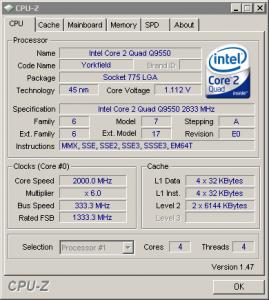
|
|
|
|
|
|
Kuntau
|
Oct 15 2008, 03:03 AM
|
|
|
QUOTE(OC4/3 @ Oct 14 2008, 08:48 PM) EIST stand for? Sorry this is my first time using intel  |
|
|
|
|
|
Kuntau
|
Oct 16 2008, 04:30 PM
|
|
|
Hi guys.. Unfortunately CPUZ still showing only x8 multiplier after I disable all those CPU feature.. It detect correct in BIOS tho ( 333 x 8.5 = 2.83GHz) but in Windows it is (333 x 8 = 2.66GHz) only.
Or CPU-Z give me wrong value? What else I can use other than CPU-Z?
Thanks
|
|
|
|
|
|
Kuntau
|
Oct 16 2008, 09:36 PM
|
|
|
QUOTE(hilmiangah @ Oct 16 2008, 06:28 PM) by reading ur statement there i suppose u use the wolfdale proc but cpuz cannot detect the .5 multiplier. its either u have to flash ur mobo bios to the latest one or u use the old cpuz. Wolfdale is code name? If so.. I got yorkfield here. Using cpu-z v1.47.. where can find older version?  Thank you.
Added on October 16, 2008, 9:38 pmTrying v1.48 released today also show no different.. v1.46 also same..  This post has been edited by Kuntau: Oct 16 2008, 09:42 PM
 |
|
|
|
|
|
Kuntau
|
Oct 16 2008, 10:44 PM
|
|
|
QUOTE(hilmiangah @ Oct 16 2008, 10:40 PM) bro i really think u need to update ur bios la. ur proc has 8.5 multiplier la bro and yet the cpuz show only 8.0. Any recommended bios? EDIT: btw.. it show correctly in BIOS.. 8.5 x 333 but in windows... all goes wrong.. is it really bios? This post has been edited by Kuntau: Oct 16 2008, 10:45 PM |
|
|
|
|
|
Kuntau
|
Oct 16 2008, 11:02 PM
|
|
|
Asus P5Q
|
|
|
|
|
|
Kuntau
|
Oct 17 2008, 09:08 AM
|
|
|
QUOTE(hilmiangah @ Oct 16 2008, 11:42 PM) can u check what bios is currently on ur mobo.
Added on October 16, 2008, 11:43 pmand which p5q coz there is like dozens of them. P5Q only.. no PRO no SE no PREMIUM etc.. http://www.asus.com/products.aspx?modelmen...=11&l3=709&l4=0 |
|
|
|
|
|
Kuntau
|
Oct 17 2008, 07:22 PM
|
|
|
QUOTE(hilmiangah @ Oct 17 2008, 01:54 PM) try flash the bios to the latest one. During my overclocking day years ago, floppy is they only way to flash bios but from Asus website also give instruction to use floppy disk (which I dont have).. Any other method? Can use USB drive? |
|
|
|
|
|
Kuntau
|
Oct 17 2008, 10:27 PM
|
|
|
QUOTE(dro @ Oct 17 2008, 09:54 PM) i flashed an asus P5K like 2 nites ago using usb it was easy....there's a utility called "EZ FLASH 2" it does the job for u in bios.....jes need to select which file it is  Select from where? Floppy or USB drive? ok back to business. Now I think cpu-z is buggy because CoreTemp give me the correct value. See screenshot below  
Added on October 17, 2008, 10:30 pmQUOTE(krainsyafiq95 @ Oct 17 2008, 10:09 PM) if i want to overclock my E6420, just go to bios n only setting te FSb or other things? what stuff must be good to oc? psu?mobo? else? No offense, but you I think should read the fundamental firstThis post has been edited by Kuntau: Oct 17 2008, 10:30 PM |
|
|
|
|
|
Kuntau
|
Oct 17 2008, 11:31 PM
|
|
|
QUOTE(lytros @ Oct 17 2008, 11:02 PM) Hi guys and gals, Trying to OC my Q9450, so far managed a stable 3GHz (350*8) sync with ram (Corsair XMS2 800Mhz) Voltages: Vcore 1.15 FSB 1.10 Vdimm 1.9, 4-4-4-12 Tried out on IBT 15 loops. Screenshot as below: » Click to show Spoiler - click again to hide... « What u guys think? Any rooms for improvements? Thanks. go for 400fsb! |
|
|
|
|
|
Kuntau
|
Oct 18 2008, 12:39 AM
|
|
|
QUOTE(lytros @ Oct 17 2008, 11:36 PM) Yeah I'm going for that. Just checking whether I'm on the right track. Are my temps ok so far? Idle 45 C, Max on IBT 62 C as for me anything < 80C is acceptable  |
|
|
|
|
|
Kuntau
|
Oct 19 2008, 05:59 AM
|
|
|
QUOTE(flyboi @ Oct 18 2008, 10:27 PM) Bro! What is the vid shown on ur coretemp when ur running ur Q9550 at stock speed(2.83G). I can see that your vid is 1.25V at 3.4G. I think under 1.2v but not sure.. later when reboot time I'll confirm this again, with so much thing on start-up very lazy to reboot LOL  |
|
|
|
|
|
Kuntau
|
Oct 20 2008, 12:43 AM
|
|
|
QUOTE(flyboi @ Oct 19 2008, 06:45 AM) Urs is EO stepping right? Take your time bro! Coz from the stock vid we can expect the overclockabillity of the chip. My vid is 1.1V for stock speed. Cheers! Yeah E0.. but right now still stuck with stock cooling.. any recommended aftermarket cooling for this chip? |
|
|
|
|
|
Kuntau
|
Oct 20 2008, 02:11 AM
|
|
|
QUOTE(flyboi @ Oct 20 2008, 01:20 AM) I'm using the xigmatek red scorpion with the crossbow. Quite pleased with it. Anyway, what is your vid at stock speed? 1.1v Erm.. THERMALRIGHT IFX-14 you think can fit in CM690 casing or not? This post has been edited by Kuntau: Oct 20 2008, 02:44 AM Attached thumbnail(s)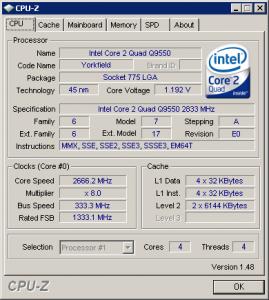
|
|
|
|
|
|
Kuntau
|
Oct 20 2008, 11:52 AM
|
|
|
QUOTE(Izwan898 @ Oct 20 2008, 11:43 AM) Guys, I have a bit of a problem here with OC... I OCed my rig(as in the sig) to 4Ghz = 500x8 @ 1.375v vcore...on 1:1 though...I've already passed OCCT and Orthos for cpu stressing (8 hours) but when I'm surfing the net with mozilla firefox, it sometimes give out an error...and my utorrent also got error this morning which it never does... The question is do I need to increase my cpu vtt voltage to make it stable? What kind of error? you didnt state clearly |
|
|
|
|
|
Kuntau
|
Oct 21 2008, 01:20 AM
|
|
|
QUOTE(andythung @ Oct 21 2008, 01:16 AM) zzz...i just chg tis mobo only ler~~  btw...any software can chg the vcore??  that is the reason the highend mobo so expensive and yours cheap You got what you paid |
|
|
|
|



 Quote
Quote


 0.0516sec
 0.47
0.47
 7 queries
 GZIP Disabled