Outline ·
[ Standard ] ·
Linear+
Official Microsoft Windows Vista Discussion Thread, Strictly NO warez discussion
|
adriankhoo153
|
 Mar 5 2007, 01:15 PM Mar 5 2007, 01:15 PM
|

|
Hey guys, do ur COA sticker have two holes with a thin line of genuine words? I guess this is to prevent u from tearing out the COA. But the holes looks like terkoyak.. Anyway hope u can help me with this slight problem i face on my Home Premium Before loading this screen, there is a little err how to describe ah? The quater bottom of my notebook screen seem to flickers a little. I duno how to describe how it look like la.. Anyone have this problem? 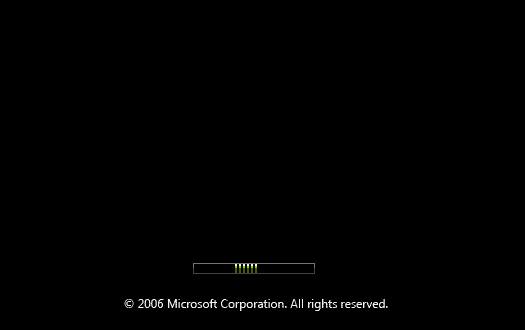 This post has been edited by adriankhoo153: Mar 5 2007, 01:28 PM This post has been edited by adriankhoo153: Mar 5 2007, 01:28 PM |
|
|
|
|
|
vailance
|
Mar 5 2007, 02:38 PM
|
|
|
QUOTE(adriankhoo153 @ Mar 5 2007, 01:15 PM) may i know why the boot screens only has the bar? i tot retail/oem has vista logo when booting up vista.. or im wrong |
|
|
|
|
|
dualshock
|
Mar 5 2007, 03:02 PM
|
|
|
for those who is using nvidia graphic card with whql 100.65 driver, have u ever tried to change the gamma settings for your graphic card and after restarting your pc, the gamma settings are back to it's default value?
anyone faced this problem before, or any advise? thanks
|
|
|
|
|
|
adriankhoo153
|
Mar 5 2007, 03:07 PM
|
|
|
QUOTE(vailance @ Mar 5 2007, 02:38 PM) may i know why the boot screens only has the bar? i tot retail/oem has vista logo when booting up vista.. or im wrong It will load this screen first. After this screen there be another Window Vista logo screen  Something like that. Btw, this one is a fake. The ori one got a little shinny thing one   This post has been edited by adriankhoo153: Mar 5 2007, 03:12 PM This post has been edited by adriankhoo153: Mar 5 2007, 03:12 PM |
|
|
|
|
|
dualshock
|
Mar 5 2007, 03:36 PM
|
|
|
from what i read on the internet, the startup screen has been disabled to reduced the startup time of vista...it can be enabled back in the msconfig menu...IIRC
|
|
|
|
|
|
dattebayo
|
Mar 5 2007, 03:42 PM
|
|
|
QUOTE(adriankhoo153 @ Mar 5 2007, 03:07 PM) It will load this screen first. After this screen there be another Window Vista logo screen Something like that. Btw, this one is a fake. The ori one got a little shinny thing one I have never see the windows logo in vista boot screen is this the usual tweak in XP?  ok, heres the way to enable the eye candy during the bootscreen http://www.howtogeek.com/howto/windows-vis...-windows-vista/This post has been edited by dattebayo: Mar 5 2007, 03:47 PM |
|
|
|
|
|
vailance
|
Mar 5 2007, 03:45 PM
|
|
|
QUOTE(dattebayo @ Mar 5 2007, 03:42 PM) I have never see the windows logo in vista boot screen is this the usual tweak in XP? yalo.. how u do that.. i also i want it!! btw, how to disable the boot screens.. mind to share? |
|
|
|
|
|
WingKalimdor
|
Mar 5 2007, 03:45 PM
|
|
|
QUOTE(vailance @ Mar 5 2007, 02:38 PM) may i know why the boot screens only has the bar? i tot retail/oem has vista logo when booting up vista.. or im wrong The logo will appear with a song after the boot screen bar success boot to windows. For the windows vista logo is those windows vista come from longhorn. To recognise that version is genuine you might refer to my picture attachment to prevent your confusing in windows vista. Attached thumbnail(s)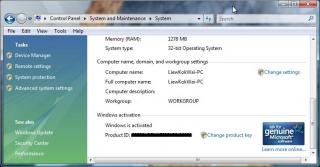
|
|
|
|
|
|
adriankhoo153
|
Mar 5 2007, 04:24 PM
|
|
|
QUOTE(WingKalimdor @ Mar 5 2007, 03:45 PM) The logo will appear with a song after the boot screen bar success boot to windows. For the windows vista logo is those windows vista come from longhorn. To recognise that version is genuine you might refer to my picture attachment to prevent your confusing in windows vista. Yup, it wil only appear after the boot screen bar. The one i posted is picture from internet punya. That is tweak from Xp one i guess. The original one looks shiny with song when boot up.  QUOTE To recognise that version is genuine you might refer to my picture attachment to prevent your confusing in windows vista. Why did u darken the product id? If one see this product id they can activate or pirated it ah?  Btw, this is the original Vista Logo 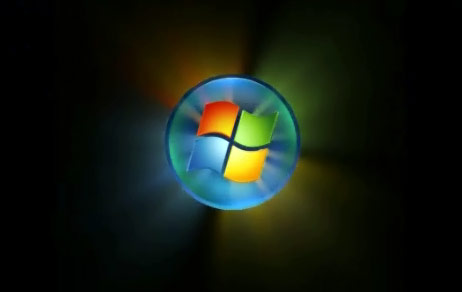 This post has been edited by adriankhoo153: Mar 5 2007, 04:33 PM This post has been edited by adriankhoo153: Mar 5 2007, 04:33 PM |
|
|
|
|
|
billytong
|
Mar 5 2007, 05:00 PM
|
|
|
QUOTE(asmly14 @ Mar 4 2007, 08:12 PM) No. Will automatically disabled by windows itself. Why bother to upgrade to vista if your system barely supports it? XP runs much smoother and less resource hogging. It is because the RAM itself is the only thing that doesnt pass Vista Aero requirement.  and I have a unused thumbdrive sitting on my desk |
|
|
|
|
|
adriankhoo153
|
Mar 5 2007, 05:03 PM
|
|
|
QUOTE(billytong @ Mar 5 2007, 05:00 PM) It is because the RAM itself is the only thing that doesnt pass Vista Aero requirement. and I have a unused thumbdrive sitting on my desk thumbdrive ready boost is just a vitual ram. It won;t act as powerful as the normal Ram |
|
|
|
|
|
linkinstreet
|
Mar 5 2007, 05:11 PM
|
Red Bull Addict

|
QUOTE(billytong @ Mar 5 2007, 05:00 PM) It is because the RAM itself is the only thing that doesnt pass Vista Aero requirement. and I have a unused thumbdrive sitting on my desk add another RAM? And I have a feeling that your thumbdrive might not pass the ReadyBoost qualification |
|
|
|
|
|
clausman
|
Mar 5 2007, 05:19 PM
|
|
|
anyone has any prob wif webcam runnin on vista? i cant seem to run it with my msn messenger live. I have downloaded the latest vista-approved driver for my webcam (microsoft brand). thw webcam is functional (i can see myself on msn) but the other party can't. I have tried wif alot of frens. still not working...
anything wrong?
|
|
|
|
|
|
adriankhoo153
|
Mar 5 2007, 05:38 PM
|
|
|
QUOTE(linkinstreet @ Mar 5 2007, 05:11 PM) add another RAM? And I have a feeling that your thumbdrive might not pass the ReadyBoost qualification My built in Webcam driver in my notebook have no problem..
Added on March 5, 2007, 5:39 pmQUOTE(linkinstreet @ Mar 5 2007, 05:11 PM) add another RAM? And I have a feeling that your thumbdrive might not pass the ReadyBoost qualification I doubt that too but i think he mention his thumbnail is readyboost. This post has been edited by adriankhoo153: Mar 5 2007, 05:39 PM |
|
|
|
|
|
Joey-kun
|
Mar 5 2007, 07:05 PM
|
|
|
for those of you running vista: how is it with gaming?
|
|
|
|
|
|
linkinstreet
|
Mar 5 2007, 08:44 PM
|
Red Bull Addict
|
All games working for me, bar for Carbon, which needs to be tweaked a little to make it work
|
|
|
|
|
|
billytong
|
Mar 5 2007, 08:55 PM
|
|
|
QUOTE(linkinstreet @ Mar 5 2007, 05:11 PM) add another RAM? And I have a feeling that your thumbdrive might not pass the ReadyBoost qualification Let me put it in this way. If I add another 512MB, my PC can run aero, but I do not wish to spend money to add RAM. I wonder it is possible to use USB drive make my PC qualify to run aero. |
|
|
|
|
|
ian31
|
Mar 5 2007, 10:54 PM
|
Getting Started

|
QUOTE(linkinstreet @ Mar 3 2007, 01:51 PM) no, you need 1GB RAM to get aero I just installed vista and got Aero to run with 512 ram. Getting a WEI for ram of 2.9. You'll probably just need a decent video card to run aero. |
|
|
|
|
|
linkinstreet
|
Mar 5 2007, 11:08 PM
|
Red Bull Addict
|
QUOTE(billytong @ Mar 5 2007, 08:55 PM) Let me put it in this way. If I add another 512MB, my PC can run aero, but I do not wish to spend money to add RAM. I wonder it is possible to use USB drive make my PC qualify to run aero. No, unliek physical RAM, readyboost is just liek the name implied, it's just a boost. While your PC can be a bit faster because of the prefetch now being stored in the thumbdrive, it does not emulate the ram where it stores the Desktop UI and rendering information |
|
|
|
|
|
mzaidi
|
Mar 6 2007, 03:30 PM
|
|
|
I have 2 HDD partition on my PC, C & D. I installed Windows XP on partition C, and Windows Vista on partition D. After using Vista for a week and testing all my favorite apps to make sure they work on Vista, I want to uninstall XP and use Vista solely, but I can't find any option to uninstall Vista (either from Vista itself or from XP). The only solution I can think of is to delete the Vista's folder in partition D, tried that, and it won't work. I can't delete that folder at all. I was prompted with this error:  Tried deleting the folder in Safe mode and even using Unlocker and I got the same error. Is there any way I can uninstall Vista / delete Vista folder without reformatting partition D? I have lots of other files in that partition and there's no easy way for me to backup them other than burning them all in DVDs which will cost me lots of time & money. |
|
|
|
|



 Quote
Quote





 0.0179sec
 0.31
0.31
 6 queries
 GZIP Disabled