

QUOTE(Mokuton @ Jun 13 2010, 12:01 AM)
question 1 :
is the upload speed 2MB/s ~ for 20Mbps unifi users?
for example to megaupload or rapidshare?
question 2 :
they don't allow to use my own modem & router?

Unifi Official TM UniFi High Speed Broadbrand Thread V5, Still, NO cap 4 all unifi packages 4 now
|
|
 Jun 13 2010, 10:58 AM Jun 13 2010, 10:58 AM
|
 
Junior Member
51 posts Joined: Dec 2008 From: Earth 
|
QUOTE(Mokuton @ Jun 13 2010, 12:01 AM) question 1 : is the upload speed 2MB/s ~ for 20Mbps unifi users? for example to megaupload or rapidshare? question 2 : they don't allow to use my own modem & router? |
|
|
|
|
|
Jun 13 2010, 11:46 AM
|
 
Elite
195 posts Joined: Sep 2006  
|
QUOTE(Mokuton @ Jun 13 2010, 10:58 AM) still looking for answers. I don't use megaupload or rapidshare so I can't tell you. Youtube upload is definitely over 1.3MB/s, rapidshare from what I can see as a free user is only 200-300KB/s.As for your own router/modem, it's what we've been discussing for the last 10 pages or so.. so you can just refer to that  Added on June 13, 2010, 11:56 amAnyway just settled Lucas's problem. TM did not disclose his PPPoE pass and the router seems to be working fine but it was malfunctioning for some reason. Still on 7.05 firmware and default username/password combination, something could have happened when it went online.. who knows  This post has been edited by rizvanrp: Jun 13 2010, 11:56 AM |
|
|
Jun 13 2010, 01:09 PM
|

Junior Member
21 posts Joined: Jun 2005
|
Hmm no wonder i couldn't access my router...
|
|
|
Jun 13 2010, 01:39 PM
|

Senior Member
652 posts Joined: Jan 2005 
|
QUOTE(rizvanrp @ Jun 13 2010, 11:46 AM) I don't use megaupload or rapidshare so I can't tell you. Youtube upload is definitely over 1.3MB/s, rapidshare from what I can see as a free user is only 200-300KB/s. As for your own router/modem, it's what we've been discussing for the last 10 pages or so.. so you can just refer to that Added on June 13, 2010, 11:56 amAnyway just settled Lucas's problem. TM did not disclose his PPPoE pass and the router seems to be working fine but it was malfunctioning for some reason. Still on 7.05 firmware and default username/password combination, something could have happened when it went online.. who knows QUOTE(dick1971 @ Jun 13 2010, 01:09 PM) Hmm no wonder i couldn't access my router... Thanks Riz for solving my problem.Strange, i can access my router now, even with the WAN port connected to the FiberHome. (using the same PC this morning, i cant get access to 192.168.0.1) @dick1971 Still having problems accessing your router? This post has been edited by Lucas: Jun 13 2010, 01:39 PM |
|
|
Jun 13 2010, 01:44 PM
|
|
Elite
195 posts Joined: Sep 2006
|
@Lucas
I started the router without the WAN port plugged in, then I logged in and disabled the TR-069 feature + secured the other features. |
|
|
Jun 13 2010, 05:01 PM
|
|
Senior Member
652 posts Joined: Jan 2005
|
QUOTE(rizvanrp @ Jun 13 2010, 01:44 PM) @Lucas yeah, i noticed that. Thanks a lot for the assistance. TM ppl will wonder why they cant connect to the router anymore. Backup-ing my router settings at the moment.I started the router without the WAN port plugged in, then I logged in and disabled the TR-069 feature + secured the other features. |
|
|
|
|
|
Jun 13 2010, 05:10 PM
|
 
Trade Dispute
3,379 posts Joined: Apr 2006 From: KL 
|
waiting for uniFi to be available at my area is a painful process..
|
|
|
Jun 13 2010, 07:00 PM
|

Senior Member
4,474 posts Joined: Jan 2003
|
Question. What is 20mb and what to expect?
QUOTE Answer. It can only mean the maximum speed of the connection which would be 20Mb/s (megabits per second) To put things into perspective, if you currently have 4mb broadband, that is 512 kb/s maximum speed (although in my own experience, i get max 400 kb/s). So just imagine if you upgrade to 20mb An uppercase B means Bytes, and a lowercase b means bits. There are 8 bits in a Byte so: 20Mb/s megabits per second = 2.5MB/s MegaBytes per second or 20480Kb/s Kilobits per second or 2560KB/s KiloBytes per second.  And don't forget, it's 20mb download AND UPLOAD !!! Which would make unifi a good connection to host stuff. But then again, when cap goes active, you wouldn't want to waste your bandwidth uploading stuff to others..... sly tmnut  This is why malaysian broadband is fail with a capital F. Tmnut is too stingy although it is a monopoly and already has huge profit margins This is why malaysian broadband is fail with a capital F. Tmnut is too stingy although it is a monopoly and already has huge profit margins  Hope that answers  And as usual, don't expect 100% of that total 2.5MB/s especially for international connections. Our tmnut provider is said to provide somewhere between 70-80% of the promised speed. If they don't, make sure you take the required screenshots of proof and lodge a complaint to CFM for them to whip tmnut into action to correct the matter  @Lucas Any screenshots for utorrent after switching to your own router? I would be interested to see Side note: even with better download speed, megaupload/rapidshare etc have download speed caps for free users. QUOTE I don't use megaupload or rapidshare so I can't tell you. Youtube upload is definitely over 1.3MB/s, rapidshare from what I can see as a free user is only 200-300KB/s. So you probably won't get full speed from your connection unless your using a paid account for those services :/ meh. If you want the minimum broadband speed to get the most out of FREE USER megaupload and rapidshare downloads, then 5mb unifi is your best bet. Some landed property implementations, you either have poles, or the greenbox. Like my area, all the cabling is done underground so i get the greenbox. Inside it is that ftth white box you see from the pole (i know since i saw them open it up )  This post has been edited by Moogle Stiltzkin: Jun 13 2010, 07:30 PM |
|
|
Jun 13 2010, 08:16 PM
|

Junior Member
5 posts Joined: Jul 2005 From: petaling jaya/shah alam
|
the telephone pole with the FTTH box looks so "clean".. compared to their korean "cousins".. hahaha... no wonder internet is cheap in Korea, maybe because of the mess of the wiring there??
 anyway, a quick quest, recently fried my router which was wayyy better that the one tmnut gave me.. i am looking into a new one, something that can download torrents, media server n also dualband for some HD streaming to the tv.. budget is rm400-500 or below is even better.. any suggestions?? saw someone's suggestion on the linksys, but its a lil above my budget.. |
|
|
Jun 13 2010, 10:00 PM
|
|
Senior Member
652 posts Joined: Jan 2005
|
QUOTE(rizvanrp @ Jun 12 2010, 08:15 PM) @Lucas Tonite's scan results:Wow, what assholes. Anyway, if the default gateway is the same but you cannot access the configuration.. its likely they may have changed the management port from TCP 80 to something else. Call them up and ask for the details. If they refuse to give you access to the unit, either just reset the router back to stock config (if you know how to reconfigure it) or use a port scanner on the router and check what ports are open. And no, the webmail password is different from the PPPoE password. Both should be printed on your install slip though. --- It seems that TM has upgraded their router firmware. Hardware box and stickers still say firmware 7.05 but it definitely is not 7.05 anymore.  Firmware 7.05 port scan  Firmware 7.xx(?) port scan (new firmware) As you can see, there's no http server banner anymore. Which means you cannot access your own router config. Furthermore, Lucas says they're not willing to give users their PPPoE user/pass combination anymore and you're forced to use a 8 digit pin combination on the back of the router as your wifi pass. It looks like TM failed WPA security 101.. I wonder how long it would take to generate a rainbow table for an 8 digit wifi pin number. Furthermore, you won't be able to set port forwarding anymore. I also have no f***ing clue why there are random ports like POP and SQUID open. I'll look into this soon. Its probably reversible  Server banner is back on, but with few additional ports opened |
|
|
Jun 13 2010, 10:01 PM
|
|
Senior Member
534 posts Joined: Mar 2008
|
QUOTE(dr3nchippo @ Jun 13 2010, 08:16 PM) the telephone pole with the FTTH box looks so "clean".. compared to their korean "cousins".. hahaha... no wonder internet is cheap in Korea, maybe because of the mess of the wiring there?? Well, it's cheaper because they don't have to dig the ground to lay the cable. Same in Japan.anyway, a quick quest, recently fried my router which was wayyy better that the one tmnut gave me.. i am looking into a new one, something that can download torrents, media server n also dualband for some HD streaming to the tv.. budget is rm400-500 or below is even better.. any suggestions?? saw someone's suggestion on the linksys, but its a lil above my budget.. |
|
|
Jun 13 2010, 10:06 PM
|
|
Elite
195 posts Joined: Sep 2006
|
@Lucas
I did a port scan when I was checking it, it looked identical to mine.. none of those extra ports. Might wanna check your PC or something :3 |
|
|
Jun 13 2010, 10:53 PM
|

Senior Member
603 posts Joined: Dec 2008
|
TM went the absolute wrong way by pushing for TV services over IP.(IPTV)
They could have streamlined and make things easier by delivering cable tv over a separate band and use regular PPPoE accounts for internet allowing other isps to share their data network instead of dividing portions of their services by using virtual circuits(VCs). Look at other countries GPON implementation. Their ONUs have RF ports in addition to network and phone ports.  With that your VCs are well taken care off.Just connect to the internet like your ADSL accounts via PPPoE. Singapore's NBN is like this. |
|
|
|
|
|
Jun 13 2010, 10:57 PM
|

Senior Member
4,234 posts Joined: Sep 2006
|
QUOTE(iipohbee @ Jun 13 2010, 10:53 PM) TM went the absolute wrong way by pushing for TV services over IP.(IPTV) If they do that they'll get competitionThey could have streamlined and make things easier by delivering cable tv over a separate band and use regular PPPoE accounts for internet allowing other isps to share their data network instead of dividing portions of their services by using virtual circuits(VCs). Look at other countries GPON implementation. Their ONUs have RF ports in addition to network and phone ports. With that your VCs are well taken care off.Just connect to the internet like your ADSL accounts via PPPoE. Singapore's NBN is like this. Since the government gave them virtually a freehand in implementing the Fibre network, from what we can see anyways, of course they want to do something that makes it hard for competition to exist. It's not TM's fault in doing so, they have their shareholder's interest in mind. It's the Goverment fault for not doing more to prevent this from happening. This post has been edited by kaiserreich: Jun 13 2010, 10:59 PM |
|
|
Jun 13 2010, 11:03 PM
|
|
Senior Member
603 posts Joined: Dec 2008
|
QUOTE(kaiserreich @ Jun 13 2010, 10:57 PM) If they do that they'll get competition That RF port id supposed to connect directly to your STB. It doesn't affect your internet experience at all since both services are entirely on different wavelength/bands in comparison with IPTV which shares bandwidth with your internet. TM divides the bandwidth using virtual circuits to give you guaranteed resources for IPTV.Since the government gave them virtually a freehand in implementing the Fibre network, from what we can see anyways, of course they want to do something that makes it hard for competition to exist. Then again TM does not have existing cable tv infrastructure like Starhub in Singapore. |
|
|
Jun 14 2010, 12:40 AM
|
|
Junior Member
21 posts Joined: Jun 2005
|
Still unable to access, dont want to try and error bcoz i dont want to mess the setting, not like streamyx close one eye also can...last time using streamyx with wrt610n no problem,but now few time have turn off my airport off and on again to able to surf internet using macbook
|
|
|
Jun 14 2010, 01:12 AM
|

Senior Member
810 posts Joined: Feb 2008 From: 127.0.0.1
|
I'm wondering how much power we can get from the router's usb port.
Powering a cooler pad, probably can charge devices as well? 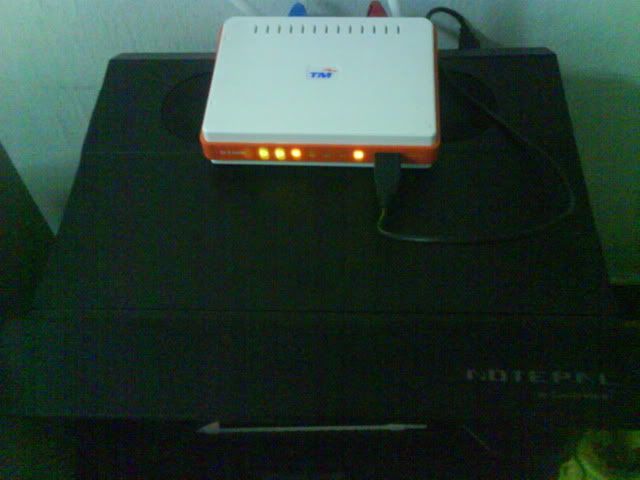 Safe or unsafe?  |
|
|
Jun 14 2010, 03:10 AM
|
|
Junior Member
360 posts Joined: Jan 2003
|
uh...i dun understand why do doing this stupid thing.
i tftp it, change a bit my modem config...then hohoho! but seriously, i will not recommend ppl to subscribe unifi, the service and rules just plain stupid |
|
|
Jun 14 2010, 10:42 AM
|

Senior Member
2,516 posts Joined: Feb 2007 From: Uarla Umpur
|
QUOTE(guardioo @ Jun 14 2010, 03:10 AM) but seriously, i will not recommend ppl to subscribe unifi, the service and rules just plain stupid but but but do we have other choices ? no.. so no matter what we still will have to subscribe to unifi if we want higher speed... |
|
|
Jun 14 2010, 11:26 AM
|

Junior Member
181 posts Joined: Mar 2010
|
QUOTE(JinXXX @ Jun 14 2010, 10:42 AM) but but but do we have other choices ? no.. so no matter what we still will have to subscribe to unifi if we want higher speed... unifi is key for high speed but it just to expansive not to mention not covering whole malaysia..... |
|
Topic ClosedOptions
|
| Change to: |  0.0598sec 0.0598sec
 0.61 0.61
 7 queries 7 queries
 GZIP Disabled GZIP Disabled
Time is now: 14th December 2025 - 07:06 AM |
 Quote
Quote