Outline ·
[ Standard ] ·
Linear+
Hardware General Mac Upgrade Discussion, Ram, HHD, OS/updates, Cable, Driver etc
|
b48753
|
 Aug 12 2010, 09:05 AM Aug 12 2010, 09:05 AM
|

|
QUOTE(Eithanius @ Aug 10 2010, 01:21 PM) Read ECC...  There are reports that using non-ECC memory modules work fine, but then again it is always recommended to use ECC RAM as Mac Pros are designed to just in case to avoid certain risks of the machine hanging due to data corruption on the modules... Haha..  New Intel Mac Pro makes me sometimes miss Power Macs, which works fine with normal DDR RAM..  This post has been edited by b48753: Aug 12 2010, 09:06 AM This post has been edited by b48753: Aug 12 2010, 09:06 AM |
|
|
|
|
|
babylo32
|
Aug 22 2010, 09:21 PM
|
New Member

|
is it neccessary upgrading the new iMac harddrive to ssd??
|
|
|
|
|
|
dvlzplayground
|
Aug 23 2010, 01:50 AM
|
|
|
of course no. upgrade if u want extra performance. the imacs with traditional hdds are pretty fast already
|
|
|
|
|
|
Ojimaru
|
Aug 23 2010, 08:55 AM
|
|
|
QUOTE(babylo32 @ Aug 22 2010, 09:21 PM) is it neccessary upgrading the new iMac harddrive to ssd?? Yes if you plan to swing the iMac vigorously around while copying gigabyte-sized files to the hard drive. |
|
|
|
|
|
mfitri77
|
Aug 24 2010, 10:37 AM
|
|
|
I've used hitachi 5400rpm drives and it worked fine, but does anybody here have any experience with the 7200 drives? Also, have anybody here tried putting a 1tb hard drive in a macbook pro 15? mid 2010?
|
|
|
|
|
|
TheiPhone3GS
|
Aug 26 2010, 03:18 PM
|
Getting Started
|
just out of curiosity, will u be able to change the processor from the core i5-680 to a core i5-760?
will the imac be unoperatable after changing the processor?
|
|
|
|
|
|
dvlzplayground
|
Aug 26 2010, 10:26 PM
|
|
|
^ nope, u cannot simply change the imacs processor like PC. the processor is soldered to the motherboard. if u wanna upgrade the proc, upgrade when u purchase it. same goes to the GPU (no graphic card, juz the gpu chip). u can only upgrade the HDD n RAM, n even that is a bit of a hassle |
|
|
|
|
|
mfitri77
|
Aug 29 2010, 07:32 AM
|
|
|
The small hard disk in my new 13" Macbook demands an upgrade, so I went around Lowyat yesterday trying to source out a hard disk.
The SSD guy I talked to couldn't give me a definite warranty period for a X-25M 160GB SSD, so after some though, decided to buy a standard rotational hard disk. I reasoned that the only advantage of an SSD is loading speed, and no shock problems, but these days they should have eliminated it from standard hard disk also.
My normal supplier didn't have a hitachi drive in stock, nor the 1TB hard disk (seems many came back complaining that they can't fit the bigger drive into the notebook bay. She then suggested the WD Scorpio Black, 500GB 7200rpm drive. After some though, decided to take a chance I upgraded.
Installed snow leopard, ilife and mac office. During installation, while the DVD player was spinning, the system was heating up, and I was worried that the temp increase was due to the HD. Finished installing, and after a standard use (office, web surfing, some light gaming), am happy to report that :-
1. During normal operation, laptop stays cool and comfortable.
2. Noise coming from the notebook is not really that noticeable - Unless you put your ear directly over the hd enclosure.
3. Performance didn't really notice, maybe a bit fast at loading/startup, happy to report that some beach balls have disappeared,=.
4. Sudden Motion Sensor didn't conflict with the HD - Although mine didn't come with the free-fall sensor, maybe that's why no kernel oanic so far. Its a BEKT drive (No free fall, sudden motion sensor)
5. No clicking sound as the drive tries to park the head during use.
Overall, I'd say good value.
|
|
|
|
|
|
andylhyap
|
Sep 13 2010, 12:32 AM
|
New Member
|
Just installed a Momentus XT 500GB Hybrid on my Macbook Pro 13". Well kinda liking it if compare to previous WD Scorpio Blue 500GB.
During my WD Scorpio Blue time, I am facing some lagging when running some applications (eg. Safari). The mouse cursor is turning for 20-30 sec. before the app runs. Look around and found out that I am not the only person having this problem. (macforum)
Then decided to give a try to Momentus XT. A bit costly in compare to WD but the performance is kinda fast. Well, a bit hot comparing to WD but no more lagging. (which is why i bought Mac in the first place).
Hope this give you all some reviews on Momentus XT.
|
|
|
|
|
|
hackwire
|
Sep 14 2010, 11:54 PM
|
|
|
i need some advise, my macbook white is running out of hard disk space and i need a new hard disk that is fast and stable. Is it possible to get this hard disk in low yat plaze instead of Apple ?
What brand is compatible and im looking at around 500GB. I check mine is only 148GB .
i need some technical assistant as well to transfer my existing apps and folders to the new hard disk as well.. Any shop recommendation that provide cheaper than Apple?thanks
|
|
|
|
|
|
dvlzplayground
|
Sep 15 2010, 12:37 AM
|
|
|
QUOTE(hackwire @ Sep 14 2010, 11:54 PM) i need some advise, my macbook white is running out of hard disk space and i need a new hard disk that is fast and stable. Is it possible to get this hard disk in low yat plaze instead of Apple ? What brand is compatible and im looking at around 500GB. I check mine is only 148GB . i need some technical assistant as well to transfer my existing apps and folders to the new hard disk as well.. Any shop recommendation that provide cheaper than Apple?thanks yes you can. any 2.5" SATA drive would work. the seagate momentus XT 500gb as mentioned by andylhyap is a good choice. shud be around rm450-500. for something cheaper i'd recommend hitachi travelstar 7k500 (5k500 is good too) or WD scorpio black 500gb (make sure to get the BEKT version, not BEVT). scorpio blue got a few bad reviews around here despite recommendations from a lot of websites also bear in mind 500gb is actually ~460gb. that's why ur 160gb drive only shows 148gb. it'll only show up as 500gb if u're running snow leopard. im not that familiar with lowyat so i cant recommend any shops for you, but u might wanna try installing the new harddisk and also transferring ur stuff urself. it's very easy  juz need to buy/borrow 2 screwdrivers This post has been edited by dvlzplayground: Sep 15 2010, 12:37 AM |
|
|
|
|
|
hackwire
|
Sep 15 2010, 07:35 AM
|
|
|
oh u mean it's easy to DIY the hard disk replacement in macbook?
will check out how to do it in you tube than..
thanks man. that will save me the service charges i suppose.
I probably go for 1Tera to save the hassle of changing another in future. Currently i kept transfering files to my external hdd everytime the hdd is full.
movies are the culprit in storage these days.
|
|
|
|
|
|
dvlzplayground
|
Sep 15 2010, 01:18 PM
|
|
|
yeap, look for instructions at ifixit.com. juz make sure u get the correct screwdrivers. as for ur files, u can simply clone ur current HDD to the new one by using disk utility or carbon copy cloner
|
|
|
|
|
|
hackwire
|
Sep 15 2010, 06:21 PM
|
|
|
thanks man. i will look into that.
|
|
|
|
|
|
iZuDeeN
|
Sep 18 2010, 12:59 PM
|
|
|
Guys,
anywhere i can download mac updates offline? when i run the software update it has about 10prog ~1GB
plan to download in office when the connection is fast
windows has it WSUS ; i format pc about 2-3 month once and just run the WSUS client; it install all applicable patch and save time & download bandwidth
|
|
|
|
|
|
cRazYee
|
Sep 18 2010, 07:57 PM
|
|
|
reckon this once again 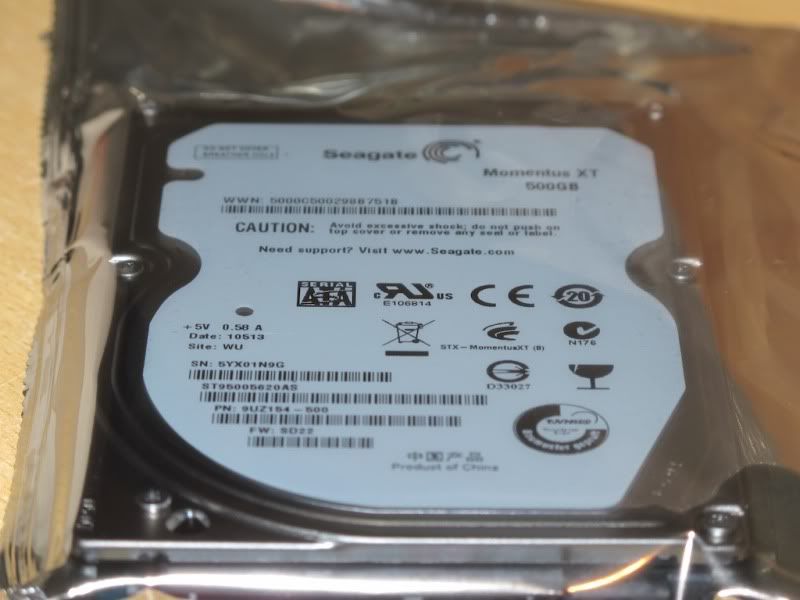 |
|
|
|
|
|
arshad
|
Sep 19 2010, 01:13 PM
|
|
|
can you guys recommend me any good hard disk 1 TB for macbook pro? Thanks.
|
|
|
|
|
|
nimrod323
|
Sep 19 2010, 07:07 PM
|
|
|
QUOTE(cRazYee @ Sep 18 2010, 07:57 PM) reckon this once again » Click to show Spoiler - click again to hide... « how much and where you can get one? |
|
|
|
|
|
HellZoker
|
Sep 20 2010, 07:00 PM
|
Getting Started
|
hi all,
i was wondering...if i'm currently using mac os X tiger, and i want to upgrade to snow leopard can i just bought the snow leopard installer for only RM109 instead of the whole mac box set which cost ard RM800++? (suggestion from the apple page)
|
|
|
|
|
|
feins
|
Sep 20 2010, 07:10 PM
|
Getting Started
|
Unless u have an intel processor as PowerPC don't support for snow leopard.
|
|
|
|
|



 Quote
Quote




 0.0201sec
 1.00
1.00
 6 queries
 GZIP Disabled