
Welcome Guest ( Log In | Register )

11 Pages  1 2 3 > » Bottom

Outline · [ Standard ] · Linear+

Hardware General Mac Upgrade Discussion, Ram, HHD, OS/updates, Cable, Driver etc

views
     
dvlzplayground
post Jun 24 2009, 01:28 PM

Web developer Nadzim.com
*******
Senior Member
7,916 posts

Joined: Jul 2005
From: Kuala Lumpur


Sorry if OOT, but i guess quite appropriate here since we're talking abt hard disks

it's the second time now that my boot camp partition (windows xp sp2...for gaming of course) cant boot. after the winxp loading screen suddenly got BSOD then auto reboot. The BSOD was too fast that i cant read anything.

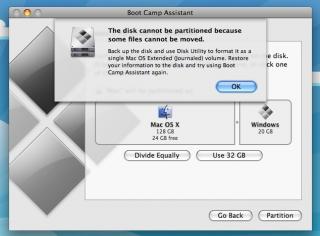
anyway, the first time I just restore the hdd to a single Mac volume. then when i wanted to partition again using bootcamp assistant, an error popped up saying that the HDD is not in a single partition, eventho i just restored it. i used my GPartEd cd (what a saviour!) to clear things up and everything in bootcamp assistant went fine.

but then after a few months the BSOD problem came up again. after restoring to single partition, bootcamp assistant again gives me the same error when trying to partition. although I know GPartEd can solve this but i'm wondering what's the cause behind this? im not keen of the idea on doing all this again in a few months.

my system spec is as below, on leopard 10.5.7. thanks in advance

This post has been edited by dvlzplayground: Jun 24 2009, 05:09 PM


Attached thumbnail(s)
Attached Image
dvlzplayground
post Jul 7 2009, 11:47 PM

Web developer Nadzim.com
*******
Senior Member
7,916 posts

Joined: Jul 2005
From: Kuala Lumpur


QUOTE(jind86 @ Jul 7 2009, 05:25 PM)
hey guys, im planning to get an external hard drive to store my stuff and also to use for time machine.. i stumbled upon this WD hard drive and it states that it is "formatted for Mac".. what exactly does that mean? what's the difference compared to others which also work with Macs but are not "formatted for Mac"?

http://store.westerndigital.com/store/wdus.../catid.13093000
*
its just a marketing trick tongue.gif, you can grab any hard disk and format it for a Mac (HFS+). but then windows users cant use it tongue.gif. so when u buy an external hard disk, just format it as FAT, unless you memang dun want windows users to peek into ur hard drive wink.gif
dvlzplayground
post Aug 9 2009, 07:55 PM

Web developer Nadzim.com
*******
Senior Member
7,916 posts

Joined: Jul 2005
From: Kuala Lumpur


guys, cant i get some opinions? im looking forward to upgrade my HDD to a 320GB one (maybe 500gb if the price not much difference)

should i go for the hitachi travelstar 5k320, 7k320, wd scorpio blue or scorpio black (bekt)? so far i read the hitachi and scorpioblue got positive results, so which of the two is better in ur opinion? for the 7k320 and the scorpioblack seems like mixed results particularly about the vibration issue. how bad is it for a 15" macbookpro unibody? i dont need the (supposedly) performance increase but it's always nice to have more speed ;p.

im also thinking about getting a 320gb (again, maybe 500gb..depends) wd passport essential and swapping its drive with my notebook's, is it advisable? which model hdd is in there and how big is the cache?

thanks
dvlzplayground
post Aug 9 2009, 11:28 PM

Web developer Nadzim.com
*******
Senior Member
7,916 posts

Joined: Jul 2005
From: Kuala Lumpur


thx preducer, thats a nice site smile.gif seems like the 500gb scorpio blue is one of the best 500gb drives out there. can it be said for the 320gb one as well?

i also have a WD 500gb mybook essential which i intend to use for time machine backup. so if i put in a 500gb drive in my notebook, will it work for time machine (since both are same capacity)? or do i need to make partitions?


Added on August 9, 2009, 11:59 pmoh wait i just read other pages from that website. now i know why some ppl say a 5400rpm 500gb can outperform a 7200rpm 320gb. inner/outer disk. wow i never thought abt that. impressive

This post has been edited by dvlzplayground: Aug 9 2009, 11:59 PM
dvlzplayground
post Aug 17 2009, 07:18 PM

Web developer Nadzim.com
*******
Senior Member
7,916 posts

Joined: Jul 2005
From: Kuala Lumpur


QUOTE(leelifestyle @ Aug 15 2009, 09:39 PM)
hey guys.
hw bout if i wanna upgrade ram?
the speed can be higher than before?
*
computer speed or ram speed?
dvlzplayground
post Aug 24 2009, 12:08 AM

Web developer Nadzim.com
*******
Senior Member
7,916 posts

Joined: Jul 2005
From: Kuala Lumpur


QUOTE(krfour @ Aug 23 2009, 09:17 PM)
Hi guyz...

Juz wanna to now that possible upgrade mac desktop to pc system...hehe

coz i very like the mac design...but not enough money to buy it...if i can get the used mac destop, i hope can rebuild that mac to pc system...

Or ur guyz have any suggestion...
p/s: last time i also use mac system since 1994...and the last one was the imac G3, was bought on year 1999...but now the imac was broken...only left imac keyboard and still use in my pc... smile.gif
*
that's a really weird thing to do. but if u want to proceed, its possible but juz make sure u're getting an Intel Mac. that's all. dont forget to spend extra money on ur antivirus
dvlzplayground
post Aug 25 2009, 04:53 AM

Web developer Nadzim.com
*******
Senior Member
7,916 posts

Joined: Jul 2005
From: Kuala Lumpur


QUOTE(krfour @ Aug 24 2009, 02:04 AM)
haha...so i can build pc destop in mac machine? but why i must spend extra money for antivirus??


Added on August 24, 2009, 2:05 am
yeah...can? smile.gif
*
because it will be VERY EMBARASSING when u send ur iMac to a repair shop because 'got virus'
dvlzplayground
post Aug 27 2009, 09:40 PM

Web developer Nadzim.com
*******
Senior Member
7,916 posts

Joined: Jul 2005
From: Kuala Lumpur


QUOTE(terencetoo @ Aug 26 2009, 11:19 PM)
do u guys really need to use 6GB or RAM? hmm i found out 4GB is sufficient at the moment...but loading application is slightly slow..is this normal?
*
slow loading application is normally due to harddisk speed (need time to search around the platter for the app's files). this is one area that will improve a lot if u use solid state drives

but when u 1st launch an app, the app's files will go to the RAM. this is why when u quit the app, then open again, it will launch faster since ur computer doesnt need to look for the app in the harddisk...juz look in RAM. so more RAM, more apps u open can be stored in it = more apps can be quickly relaunched
dvlzplayground
post Aug 28 2009, 05:12 AM

Web developer Nadzim.com
*******
Senior Member
7,916 posts

Joined: Jul 2005
From: Kuala Lumpur


QUOTE(MetalZone @ Aug 28 2009, 02:07 AM)
yes some time back WD released the 2.5" 1TB already
*
1TB 2.5" SSD oso can tongue.gif http://www.engadget.com/2009/01/10/puresil...b-2-5-inch-ssd/
dvlzplayground
post Aug 28 2009, 05:19 AM

Web developer Nadzim.com
*******
Senior Member
7,916 posts

Joined: Jul 2005
From: Kuala Lumpur


0.53 Ghz is a lot of difference smile.gif is your MB white the one with the intel GMA 950? then the jump to nvidia 9400M is hugeee. not to mention from DDR2 to DDR3.

apart from the performance, u'll get a much better display and battery

i'd say the 13" 2.53 Ghz is the perfect choice. maybe u wanna consider the 15" 2.53 Ghz as well for a bigger screen
dvlzplayground
post Aug 28 2009, 11:57 AM

Web developer Nadzim.com
*******
Senior Member
7,916 posts

Joined: Jul 2005
From: Kuala Lumpur


additional RM800 + additional RM400 for ACPP actually lol

i cant say worth it or not...some people juz find 13" too small. but some people also find 15" too heavy. i fall in the former ;p
dvlzplayground
post Aug 28 2009, 03:11 PM

Web developer Nadzim.com
*******
Senior Member
7,916 posts

Joined: Jul 2005
From: Kuala Lumpur


QUOTE(Bahir. @ Aug 28 2009, 12:38 PM)
@dvlzplayground, Thanks for the lively help! I actually have the FIRST Macbook... tongue.gif So yeah... The 13" works pretty well for me, mostly because when im at home i have a 19" monitor that i hook up to... tongue.gif

Thanks much for the help.!
*
if u already have a 19" monitor then no worries hehe smile.gif *actually u need to worry about getting a miniDisplayPort-to-whatever adapter*
dvlzplayground
post Sep 7 2009, 09:50 PM

Web developer Nadzim.com
*******
Senior Member
7,916 posts

Joined: Jul 2005
From: Kuala Lumpur


QUOTE(D3vilsim @ Sep 7 2009, 05:44 PM)
Wonder anyone connect MBP 13" to HDMI LCD b4 ?? how ah ?? =P

Understand appl only have mini display port to DVI cable.... can we get DIV to HDMI cable connect with apple cable and to HDMI LCD input ??

will it be different in terms of display quality ??
*
im using mini displayport to HDMI cable. i dont think its available in malaysia. i ordered form US, monoprice.com. but there's another adapter (i forgot the brand and price) which supports audio as well. try google
dvlzplayground
post Sep 8 2009, 10:30 AM

Web developer Nadzim.com
*******
Senior Member
7,916 posts

Joined: Jul 2005
From: Kuala Lumpur


QUOTE(Eithanius @ Sep 7 2009, 11:01 PM)
It's in Malaysia alright.... Go check it out Mac City in 1U outlet, they do carry them...
*
oh do they? how much do they sell it?

QUOTE(Kernkraft400 @ Sep 8 2009, 04:16 AM)
Rm300 for 2x2gb corsair rams for the MBP mid 09' 13" ? Where can be purchase them?
*
if kingston around rm240
dvlzplayground
post Sep 8 2009, 08:30 PM

Web developer Nadzim.com
*******
Senior Member
7,916 posts

Joined: Jul 2005
From: Kuala Lumpur


QUOTE(jinaun @ Sep 8 2009, 11:22 AM)
MBP 13" uses DDR3 not DDR2

DDR3 2GB SODIMM currently is RM150-RM155 per stick
*
i know my own machine

n there are places that sell DDR3 2GB SODIMM for around rm120-130 per stick
dvlzplayground
post Sep 13 2009, 05:48 PM

Web developer Nadzim.com
*******
Senior Member
7,916 posts

Joined: Jul 2005
From: Kuala Lumpur


QUOTE(jinaun @ Sep 13 2009, 01:42 PM)
i'm using scorpio black and, damn... the intellipark is annoying
*
what is intellipark?
dvlzplayground
post Sep 14 2009, 11:31 AM

Web developer Nadzim.com
*******
Senior Member
7,916 posts

Joined: Jul 2005
From: Kuala Lumpur


the GP drives are only for desktop right?

im new to this thing. so this 'issue' is the same with scorpio black and blue?

anyway, is there any chance for a 500gb scorpio black before december?
dvlzplayground
post Oct 26 2009, 12:44 PM

Web developer Nadzim.com
*******
Senior Member
7,916 posts

Joined: Jul 2005
From: Kuala Lumpur


QUOTE(miour @ Oct 26 2009, 12:34 PM)
hi all
need help n opinion here
i,m having macbook alu 13 inch,planning to upgrade HDD to 500GB and  RAM to 4G.
-if i change the HDD,how can i copy the data from the original HDD to the new one???
-any recommended HDD type n RAM???
*
i just recently upgraded myself. here's my blog post hehe http://ninezerothree.wordpress.com/2009/10...ok-pro-upgrade/

the best way is to make a clone of the HDD. in my post, i swapped the HDD first and then Restore it from my old one. you can also Restore to the new HDD and then swap. both works.

recommended HDD: WD scorpio blue (quite a lot of us here using this) and hitachi travelstar 5k500...both should be around rm280 now. as for RAM, im currently looking for a pair myself...all the major brands (kingston, mushkin, etc) seem like no difference right now so i have yet to make a decision.
dvlzplayground
post Oct 28 2009, 03:15 AM

Web developer Nadzim.com
*******
Senior Member
7,916 posts

Joined: Jul 2005
From: Kuala Lumpur


i think i know which extra pins ure talking about. if u connect the hard drive to the SATA connector, the pins are not inserted. i have no idea what it is as well, but it appears that they're not meant to be connected to the computer.

during the IDE days there were a set of pins where it lets you choose between a Master / Slave connection. im pretty sure SATA doesnt need this, but are they any similar SATA configurations im not aware of?
dvlzplayground
post Nov 5 2009, 10:24 PM

Web developer Nadzim.com
*******
Senior Member
7,916 posts

Joined: Jul 2005
From: Kuala Lumpur


the only 1 TB notebook hard drive i know of is from Western Digital, but it's a 12.5mm model instead of the more regular 9.5mm...meaning it wont fit in a MacBook. another 1 TB notebook drive is from a brand named Pure Silicon, but its an SSD. and very expensive tongue.gif. i believe what u meant by 'cpu-like' hard drives are the big ones? you can just call it a desktop HDD..the proper name is 3.5" HDD. Notebook drives are 2.5" HDD. there are also 1.8" HDDs.

most computers today (actually, i think ALL computers) use SATA (serial ATA). ATA (its normally called PATA or IDE) is a very outdated technology. however some shops still sell IDE drives, so be careful. anyway, your best choice now is to upgrade to a 500gb HDD because its widely available and of very good value (around RM280). a lot of us here (including myself) are using a WD Scorpio Blue, another good one is the Hitachi TravelStar 5k500.

about bootcamp, AFAIK bootcamp is for internal HDD. running another OS from USB would be very slow.

i don't mean to offend, but try to learn more on these stuff before you spend ur money on it. i'm just concerned if a shop try to con you. to summarize, what you should be looking for is a 2.5" SATA HDD, the 9.5mm variant.

and yes, both RAM and HDD can be upgraded yourself, but make sure you know what you're doing

11 Pages  1 2 3 > » Top
 

Change to:
| Lo-Fi Version
0.1282sec    0.25    7 queries    GZIP Disabled
Time is now: 2nd December 2025 - 04:52 AM