Welcome Guest ( Log In | Register )

Bump Topic Topic Closed RSS Feed
66 Pages « < 27 28 29 30 31 > » Bottom

Outline · [ Standard ] · Linear+

 Seagate 7200.11 hard drive firmware woes, Barracuda 7.11, FW:SD15, 1.5TB/1TB/500GB

views
     
RacingTech
post Jan 22 2009, 10:13 PM

Casual
***
Junior Member
404 posts

Joined: Jan 2003
From: Kuching, Sarawak


QUOTE(skyline1301 @ Jan 22 2009, 10:02 PM)
can someone do a tutorial to update the firmware..scare if i mess it up..
*
easy! just burn the ISO into cd > adjust your pc to boot from cd > when the screen is up, choose "s" to confirm the model > then select the model u have from option 1 or 2 or 3 then just wait for the process to end > lastly power off pc n then wait a moment n power on again your pc! WALA!!! u r done!!!
ar188
post Jan 22 2009, 10:14 PM

Look at all my stars!!
*******
Senior Member
9,206 posts

Joined: Jun 2006
QUOTE(Matrix @ Jan 22 2009, 08:21 PM)
NOOOO!!!!! THE SD1A Bricked my drive!!!!!!

.
haha! this kind of things better dun joke,
after 320th power cycle, then only report back to say its quite safe.. biggrin.gif
cyew86
post Jan 22 2009, 10:14 PM

oh my ...
*******
Senior Member
4,251 posts

Joined: Aug 2006
how to know whether it's 320th power cycle? some drives bricked in just few days, some users used for 1 whole year also never brick
protoNium
post Jan 22 2009, 10:18 PM

Regular
******
Senior Member
1,098 posts

Joined: Jan 2003
From: 'U'nknown 'P'lace in 'M'alaysia
Hi.. thanks guys for the firmware info..
I already updated mine (the 500GB ST3500320AS SD15 one).. works perfectly fine.. smile.gif

to update the firmware (from the readme file) :

Basic instructions:
1) Create the FreeDOS bootable floppy or CD-ROM.
2) Use a standard desktop PC with an integrated SATA controller, or
a common SATA add-in controller like a Promise SATA150-TX2.
3) Disconnect all PATA or SATA devices from the system, except the
device needing the firmware update.
4) Boot the system using the update floppy or CD.

...and after that u need to select ur HDD version such as A, B or C (ex: A => ST3500320AS)


user posted image
ar188
post Jan 22 2009, 10:20 PM

Look at all my stars!!
*******
Senior Member
9,206 posts

Joined: Jun 2006
QUOTE(cyew86 @ Jan 22 2009, 10:14 PM)
how to know whether it's 320th power cycle? some drives bricked in just few days, some users used for 1 whole year also never brick
*
there was alot which came back within 1-3months of usage recently .. maybe not 100% of the failed drive caused by this log rewrite problem but could be high numbers return numbers..
cyew86
post Jan 22 2009, 10:32 PM

oh my ...
*******
Senior Member
4,251 posts

Joined: Aug 2006
hopefully SD1A firmware won't fail us wink.gif
but the way Seagate address this problem is really shakehead.gif
ericpires
post Jan 22 2009, 10:33 PM

Arsenal FC
*******
Senior Member
2,657 posts

Joined: Feb 2008
From: Highbury House, 75 Drayton Park, London


hmm well i need to buy a new hdd b4 i can update, well hopefully this firmware... works.. if not, hehehe
cyew86
post Jan 22 2009, 10:34 PM

oh my ...
*******
Senior Member
4,251 posts

Joined: Aug 2006
so far there has not been any complain from LYN community ... compared to the earlier version ... lol
alien0110
post Jan 22 2009, 10:34 PM

Getting Started
**
Junior Member
272 posts

Joined: Apr 2006
Successfully updated my ST3500320AS drive, after reboot, windows will install new device driver for the harddisk.
ar188
post Jan 22 2009, 10:42 PM

Look at all my stars!!
*******
Senior Member
9,206 posts

Joined: Jun 2006
QUOTE(cyew86 @ Jan 22 2009, 10:32 PM)
hopefully SD1A firmware won't fail us wink.gif
but the way Seagate address this problem is really shakehead.gif
*
yeah, those healthy drive terus die after the 1st SD1A..! doh.gif
dokidoki
post Jan 22 2009, 10:52 PM

I am not War machine~
*******
Senior Member
4,630 posts

Joined: Jul 2005
From: PJ somewhere~


my ST31000333AS is CC1H version.... is it mean i am safe??
don_naza
post Jan 22 2009, 11:02 PM

Getting Started
**
Junior Member
110 posts

Joined: Jul 2007
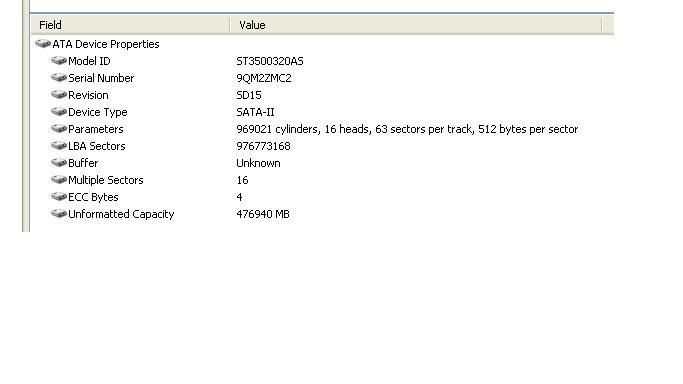
my HDD summary:

user posted image


shinjite
post Jan 22 2009, 11:19 PM

�ŞħĬΩĵΐŦ��
********
All Stars
19,320 posts

Joined: Jan 2003
From: Klang


QUOTE(dokidoki @ Jan 22 2009, 10:52 PM)
my ST31000333AS is CC1H version.... is it mean i am safe??
*
Yeah~~the most affected ones are drives with SD15
ericpires
post Jan 22 2009, 11:22 PM

Arsenal FC
*******
Senior Member
2,657 posts

Joined: Feb 2008
From: Highbury House, 75 Drayton Park, London


My 1 is OEM 1tb can use this latest firmware? how do u update if my hdd is an external hdd???
cyew86
post Jan 22 2009, 11:27 PM

oh my ...
*******
Senior Member
4,251 posts

Joined: Aug 2006
QUOTE(ericpires @ Jan 22 2009, 11:22 PM)
My 1 is OEM 1tb can use this latest firmware? how do u update if my hdd is an external hdd???
*
my 500GB is OEM as well, no problem smile.gif
but for your 1TB version, and external hdd, then not sure laugh.gif
boonykun
post Jan 22 2009, 11:36 PM

On my way
****
Senior Member
690 posts

Joined: Jul 2008
From: Taman Equine. Seri Kembangan


QUOTE(don_naza @ Jan 22 2009, 11:02 PM)
my HDD summary:

user posted image
*
yeap.. it's time for you to ~_~ Update your firmware XD
skyline1301
post Jan 22 2009, 11:44 PM

Getting Started
**
Junior Member
201 posts

Joined: Feb 2006
From: BESUT,TERENGGANU


QUOTE(RacingTech @ Jan 22 2009, 10:13 PM)
easy! just burn the ISO into cd > adjust your pc to boot from cd > when the screen is up, choose "s" to confirm the model > then select the model u have from option 1 or 2 or 3 then just wait for the process to end > lastly power off pc n then wait a moment n power on again your pc! WALA!!! u r done!!!
*
forgot to tell that is use it as external also..i'm using laptop and use the 500gb hdd as external..how to update the firmware?
nuodi
post Jan 22 2009, 11:51 PM

Getting Started
**
Junior Member
216 posts

Joined: Aug 2005
From: KL


jeezzuz... finally did the update... scary le sweat.gif

My 2 models confirm ok for update :

ST3750330AS SD15 retail version
ST31000340AS SD15 OEM( bought from allngap) rclxms.gif

quite straight forward process... no need to remove other unaffected hdds to perform the update.


This post has been edited by nuodi: Jan 23 2009, 12:03 AM
chyu89
post Jan 22 2009, 11:53 PM

I'm not a gynaecologist but I'll take a look
*******
Senior Member
2,465 posts

Joined: Sep 2007
From: Kuala Lumpur     Status: Freeride not dead
Just update my 500gb. For those who want to burn ISO CD but don't have the software can get it here.

http://pcsupport.about.com/od/toolsofthetr...burnisofile.htm
ericpires
post Jan 22 2009, 11:57 PM

Arsenal FC
*******
Senior Member
2,657 posts

Joined: Feb 2008
From: Highbury House, 75 Drayton Park, London


QUOTE(cyew86 @ Jan 22 2009, 11:27 PM)
my 500GB is OEM as well, no problem smile.gif
but for your 1TB version, and external hdd, then not sure laugh.gif
*
QUOTE(skyline1301 @ Jan 22 2009, 11:44 PM)
forgot to tell that is use it as external also..i'm using laptop and use the 500gb hdd as external..how to update the firmware?
*
how to update when the hdd is external hdd? hmm.gif

66 Pages « < 27 28 29 30 31 > » Top
Topic ClosedOptions
 

Change to:
| Lo-Fi Version
0.0181sec    0.32    6 queries    GZIP Disabled
Time is now: 5th December 2025 - 05:33 AM