Welcome Guest ( Log In | Register )

Bump Topic Topic Closed RSS Feed

Outline · [ Standard ] · Linear+

 Seagate 7200.11 hard drive firmware woes, Barracuda 7.11, FW:SD15, 1.5TB/1TB/500GB

views
     
don_naza
post Jan 20 2009, 10:05 PM

Getting Started
**
Junior Member
110 posts

Joined: Jul 2007
my RMA'ed 500gb seagate hardisk just came back from singapore yesterday.
going to pick it up tomorrow at PCZONE.
hope that there wont be any problem after this....

........

This post has been edited by don_naza: Jan 20 2009, 10:06 PM
don_naza
post Jan 21 2009, 11:28 PM

Getting Started
**
Junior Member
110 posts

Joined: Jul 2007
QUOTE(xelnamikaze @ Jan 21 2009, 11:18 PM)
please do tell us if your RMA'ed HDD have further problems in future .. if yes .. then Seagate very lousy already ..
*
bro, my HDD was returned b'coz the sata cable was burnt, not bcoz of this firmware issue.
right now, it has been working succesfully for the first 6 hours. biggrin.gif
however, still dunno what my HDD's fate will be tomorrow, day after tomorow, next month.... mad.gif

will keep you guys updated.

anyway, how to check the firmware version?
what should i do now? only back-up all the data? update the firmware?
pls advise, thanks!

rclxms.gif
don_naza
post Jan 21 2009, 11:48 PM

Getting Started
**
Junior Member
110 posts

Joined: Jul 2007
when i start my pc, bios shows:

master...: none
master...: none

is this the bad news?

but my drives are still accessible in windows.
what do i do??
don_naza
post Jan 22 2009, 11:02 PM

Getting Started
**
Junior Member
110 posts

Joined: Jul 2007
my HDD summary:

user posted image


don_naza
post Jan 25 2009, 12:39 AM

Getting Started
**
Junior Member
110 posts

Joined: Jul 2007
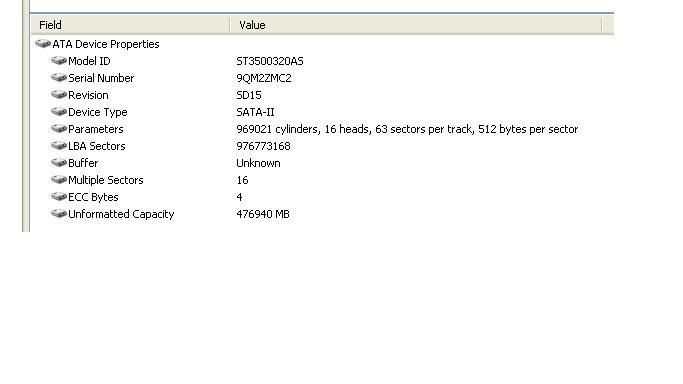
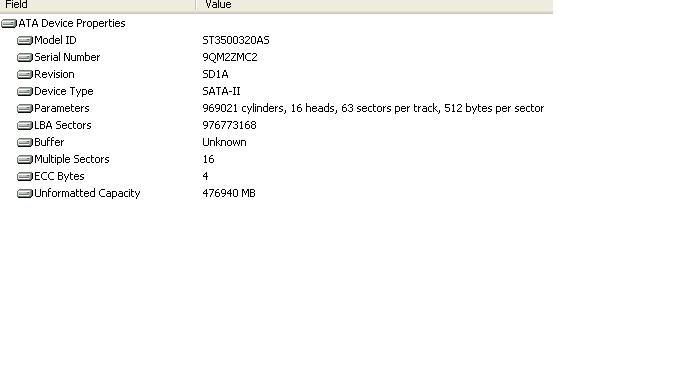
guys, my turn to update:

before:

user posted image

after:

user posted image


first time flashing my HDD, very nervous and shaking waiting for the results, lol!

lets hope this revised firmware works fine. anyway, thanks to all for your guidance and flashing tutorial, especially for this thread founder. peace!
don_naza
post Jan 25 2009, 12:43 AM

Getting Started
**
Junior Member
110 posts

Joined: Jul 2007
yup, before and after also can detect.

my data also still intact in there. pheww!
don_naza
post Jan 25 2009, 11:27 PM

Getting Started
**
Junior Member
110 posts

Joined: Jul 2007
QUOTE(Cyclonechuah @ Jan 25 2009, 10:25 AM)
you should've edit the picture and erase the serial number of your picture before you post it.  sweat.gif
*
wah, is it dangerous?

should i delete the post?
don_naza
post Jan 27 2009, 11:28 AM

Getting Started
**
Junior Member
110 posts

Joined: Jul 2007
guys, any updates on the seagate outrage?

hows your HDD doing now?
don_naza
post Jan 27 2009, 10:47 PM

Getting Started
**
Junior Member
110 posts

Joined: Jul 2007
what is seagate doing now? is the actual problem has been rectified by them?


don_naza
post Jan 28 2009, 09:11 PM

Getting Started
**
Junior Member
110 posts

Joined: Jul 2007
i see no differences with my HDD, be it before or after updating the firmware.

hurmm...
don_naza
post Jan 31 2009, 12:48 PM

Getting Started
**
Junior Member
110 posts

Joined: Jul 2007
my pc cannot shutdown ydterday, is it b'coz of my HDD?
don_naza
post Mar 20 2009, 11:23 AM

Getting Started
**
Junior Member
110 posts

Joined: Jul 2007
finally,

"disk boot failure. please insert disk system"

mine is 500GB, updated to latest firmware, SD1A.
seagate can go to hell after this.

This post has been edited by don_naza: Mar 20 2009, 11:24 AM
don_naza
post Mar 20 2009, 05:56 PM

Getting Started
**
Junior Member
110 posts

Joined: Jul 2007
does my HDD can still be used??

it read as "disk boot failure....pls insert system disk"..

sad.gif
don_naza
post Mar 21 2009, 08:25 PM

Getting Started
**
Junior Member
110 posts

Joined: Jul 2007
QUOTE(r4g3 @ Mar 20 2009, 08:21 PM)
same problem as me a month ago

welcome to the club  sad.gif
*
then, what do we do?? cry.gif
don_naza
post Mar 23 2009, 08:52 PM

Getting Started
**
Junior Member
110 posts

Joined: Jul 2007
one month minimum for RMA...
don_naza
post Mar 24 2009, 09:46 PM

Getting Started
**
Junior Member
110 posts

Joined: Jul 2007
guys, my HDD sometimes can read, can boot like normal.

but sometimes my pc failed to boot due to disk boot failure.

so, shud I RMA the HDD?

or shud I just ignore the disk failure? need your advices, thanks!
don_naza
post Mar 24 2009, 11:54 PM

Getting Started
**
Junior Member
110 posts

Joined: Jul 2007
guys I just did some test on my HDD, firmware SD1A 500GB barracuda using the SeaTools for window. i run the test because lately there is always "disk boot failure, pls insert system disk" on my PC.

so far, my HDD has FAILED:

1. SMART test
2. short drive self test

what do the test trying to tell me actually?
does it mean that I should dispose of my HDD?
is it mean that my HDD is dead already?

really need your attention, thanks!
don_naza
post Mar 25 2009, 09:19 PM

Getting Started
**
Junior Member
110 posts

Joined: Jul 2007
if I RMA it, what are they going to do?

they haven't got the stable firmware yet, right??

or should I just buy a new Western Digital?
don_naza
post Mar 28 2009, 10:17 PM

Getting Started
**
Junior Member
110 posts

Joined: Jul 2007
mine updated to SD1A also died already.

failed SMART, failed short DST.

no use flashing to the newer firmware. poor Shitgate.
don_naza
post Mar 28 2009, 11:33 PM

Getting Started
**
Junior Member
110 posts

Joined: Jul 2007
hope that yours won't have the same fate like mine...

2 Pages  1 2 >Top
Topic ClosedOptions
 

Change to:
| Lo-Fi Version
0.0397sec    0.57    7 queries    GZIP Disabled
Time is now: 9th December 2025 - 08:44 PM