Welcome Guest ( Log In | Register )

248 Pages « < 40 41 42 43 44 > » Bottom

Outline · [ Standard ] · Linear+

 Official TM UniFi High Speed Broadband Thread V43, READ 1ST PAGE FOR RELEVANT WIFI INFO!

views
     
Anime4000
post Jun 1 2025, 01:04 PM

Look at all my stars!!
*******
Senior Member
2,399 posts

Joined: Jul 2009
From: /dev/null


QUOTE(aneip @ Jun 1 2025, 10:50 AM)
Got full speed with blank PLOAM?
*
in Mikrotik Bandwidth Test,
Download 2200,
Upload 1110 Mbps

QUOTE(tng55 @ Jun 1 2025, 12:03 PM)
if Unifi Elite come then ask about VOIP VLAN TAG 400 for ATA you got linksys and other thing just ask Unifi Elite team
i hope works

and you PON Stick register and then ask VOIP imported for project hope will be happy

when Unifi Elite team come you visit ???
*
Supposed this Monday,
I wanna kill VEIP cause D-Link in Router mode cannot use
Push all PPTP because it's simple

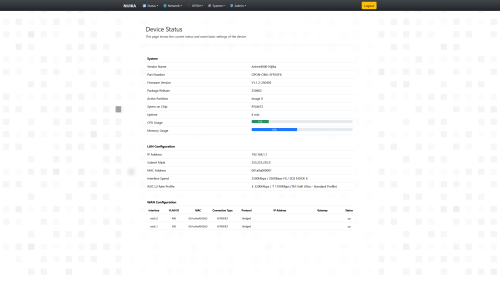
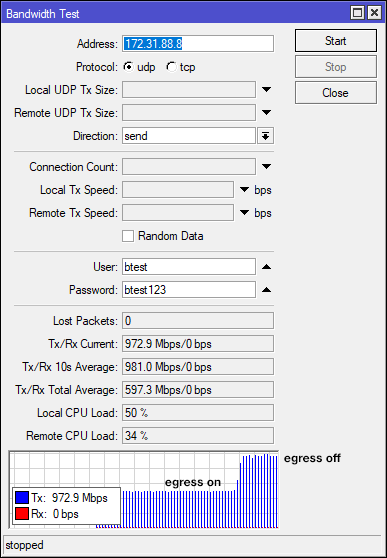
I also tweaking Realtek SDK for my V2.0 PON Stick, due tc command not fit into SoC, Realtek has own ASIC Flow Control and Egress
user posted image

I try egress 512Mbps and it works, I making own patches now

there will be 3 mode:
0 = disable
1 = 2488/1244
2 = 2048/1024

This post has been edited by Anime4000: Jun 1 2025, 01:31 PM
westlife
post Jun 1 2025, 05:50 PM

10k Club
********
All Stars
14,256 posts

Joined: Jan 2011
QUOTE(hsbb @ May 31 2025, 11:20 PM)
NTV7 become DidikTV. Not just unifi tv but also in astro tv or in whatever tv provider name nationwide include online live tv.
*
ok. thanks. managed to find it now. tongue.gif
hsbb
post Jun 1 2025, 06:53 PM

Casual
***
Junior Member
447 posts

Joined: Aug 2009


QUOTE(Anime4000 @ Jun 1 2025, 01:04 PM)
in Mikrotik Bandwidth Test,
Download 2200,
Upload 1110 Mbps
Supposed this Monday,
I wanna kill VEIP cause D-Link in Router mode cannot use
Push all PPTP because it's simple

I also tweaking Realtek SDK for my V2.0 PON Stick, due tc command not fit into SoC, Realtek has own ASIC Flow Control and Egress

user posted image

I try egress 512Mbps and it works, I making own patches now

there will be 3 mode:
0 = disable
1 = 2488/1244
2 = 2048/1024
*
Found any config deep in any ont about anu/ont type? Set it to 10g/10g if available. Also upstream bandwidth to max 9535488 (kbit/s)

** I think SN auth only working for ur service port, not ur neighbors or area OLT.

This post has been edited by hsbb: Jun 1 2025, 07:07 PM
Anime4000
post Jun 2 2025, 02:48 AM

Look at all my stars!!
*******
Senior Member
2,399 posts

Joined: Jul 2009
From: /dev/null


hsbb kwss aneip tng55 touch n go rm55

because TM make my bandwidth crap and PPPoE slow, I had to rebuild the PON Stick Firmware to address this issue

due to tc not available, the SoC and SDK has ASIC bandwidth, can say it like Layer 1.5 which L2 not used? but it operate at hardware level instead

so, I make few mode to address this issue, with minimal Flow Control which router side need to support it, like TP-Link Archer BE550 work well and understand PPPoE Flow Control

user posted image

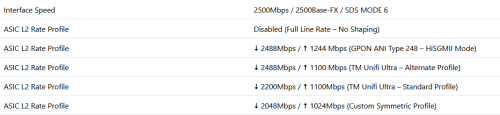
the modes:
0 = Disabled (Full Line Rate – No Shaping)
1 = ⬇️ 2488 Mbps / ⬆️ 1244 Mbps (GPON ANI Type 248 – HiSGMII Mode)
2 = ⬇️ 2488 Mbps / ⬆️ 1100 Mbps (TM Unifi Ultra – Alternate Profile)
3 = ⬇️ 2200 Mbps / ⬆️ 1100 Mbps (TM Unifi Ultra – Standard Profile)
4 = ⬇️ 2048 Mbps / ⬆️ 1024 Mbps (Custom Symmetric Profile)

user posted image
kwss
post Jun 2 2025, 03:26 AM

Regular
******
Senior Member
1,207 posts

Joined: Aug 2018
QUOTE(Anime4000 @ Jun 2 2025, 02:48 AM)
hsbb kwss aneip tng55 touch n go rm55

because TM make my bandwidth crap and PPPoE slow, I had to rebuild the PON Stick Firmware to address this issue

due to tc not available, the SoC and SDK has ASIC bandwidth, can say it like Layer 1.5 which L2 not used? but it operate at hardware level instead

so, I make few mode to address this issue, with minimal Flow Control which router side need to support it, like TP-Link Archer BE550 work well and understand PPPoE Flow Control

user posted image

the modes:
0 = Disabled (Full Line Rate – No Shaping)
1 = ⬇️ 2488 Mbps / ⬆️ 1244 Mbps (GPON ANI Type 248 – HiSGMII Mode)
2 = ⬇️ 2488 Mbps / ⬆️ 1100 Mbps (TM Unifi Ultra – Alternate Profile)
3 = ⬇️ 2200 Mbps / ⬆️ 1100 Mbps (TM Unifi Ultra – Standard Profile)
4 = ⬇️ 2048 Mbps / ⬆️ 1024 Mbps (Custom Symmetric Profile)

user posted image
*
Okay, so the SoC allow packet pacing on the ASIC.
But does this solve your random disconnect issue or the IPv4 speed issue?
Anime4000
post Jun 2 2025, 03:35 AM

Look at all my stars!!
*******
Senior Member
2,399 posts

Joined: Jul 2009
From: /dev/null


QUOTE(kwss @ Jun 2 2025, 03:26 AM)
Okay, so the SoC allow packet pacing on the ASIC.
But does this solve your random disconnect issue or the IPv4 speed issue?
*
so far no pppoe die on RB5009,
thing is, the RB5009 SFP to 2.5G Ethernet seem have bug, the ROS 7.20 beta has address this issue, but I not sure in long term
but, stress test on TP-Link Archer BE550 (via converter) seem stable on full blast upload

so I thought, RB5009 thing? the 88E6393 switch chip bug or Mikrotik firmware?
just to be safe, use Queue Tree

in other hand, IPv4 still slow regardless ranting.gif

This post has been edited by Anime4000: Jun 2 2025, 03:37 AM
kwss
post Jun 2 2025, 03:45 AM

Regular
******
Senior Member
1,207 posts

Joined: Aug 2018
QUOTE(Anime4000 @ Jun 2 2025, 03:35 AM)
so far no pppoe die on RB5009,
thing is, the RB5009 SFP to 2.5G Ethernet seem have bug, the ROS 7.20 beta has address this issue, but I not sure in long term
but, stress test on TP-Link Archer BE550 (via converter) seem stable on full blast upload

so I thought, RB5009 thing? the 88E6393 switch chip bug or Mikrotik firmware?
just to be safe, use Queue Tree

in other hand, IPv4 still slow regardless ranting.gif
*
I honestly think packet pacing has nothing to do with the pppoe disconnect. Maybe TM fixed it or something. Maybe it is just by chance.
For many decades nobody needs packet pacing to keep pppoe alive. Not during dial-up era. Not during DSL era. Not during FTTP era. Today won't be the day we need this. Like seriously...

Packet pacing is useful if you don't want to overrun buffer, especially from higher speed interface to lower speed interface. That's about it. I cannot wrap my head around how it can solve all the problems you are facing.
Anime4000
post Jun 2 2025, 04:07 AM

Look at all my stars!!
*******
Senior Member
2,399 posts

Joined: Jul 2009
From: /dev/null


QUOTE(kwss @ Jun 2 2025, 03:45 AM)
I honestly think packet pacing has nothing to do with the pppoe disconnect. Maybe TM fixed it or something. Maybe it is just by chance.
For many decades nobody needs packet pacing to keep pppoe alive. Not during dial-up era. Not during DSL era. Not during FTTP era. Today won't be the day we need this. Like seriously...

Packet pacing is useful if you don't want to overrun buffer, especially from higher speed interface to lower speed interface. That's about it. I cannot wrap my head around how it can solve all the problems you are facing.
*
I not sure which at fault,

at least my PON Stick has address this issue, now I going to use it, put aside all ONU ONR
no matter what ONU I use, as long LCP echo not reach either way, disconnect

use old ONU 1GbE, still facing dropped packet due to 1GbE
use newer ONU 2.5GbE, LAN to GPON has bottleneck, if not handle properly, LCP echo lost

well, I limiting my self now via QoS
hope TM fix this seem very thin hope

No hope on Ease on LCP echo loss
No RFC4638 on their Huawei PPPoE-AC
No hope to solve IPv4 slow issue on ibse02.rsh

There some area still on Juniper Network that handle PPPoE and no issue like this

since Huawei BRAS going all VM Cloud now, I sure there fault somewhere on their VXLAN

This post has been edited by Anime4000: Jun 2 2025, 04:08 AM
kwss
post Jun 2 2025, 04:15 AM

Regular
******
Senior Member
1,207 posts

Joined: Aug 2018
QUOTE(Anime4000 @ Jun 2 2025, 04:07 AM)
I not sure which at fault,

at least my PON Stick has address this issue, now I going to use it, put aside all ONU ONR
no matter what ONU I use, as long LCP echo not reach either way, disconnect

use old ONU 1GbE, still facing dropped packet due to 1GbE
use newer ONU 2.5GbE, LAN to GPON has bottleneck, if not handle properly, LCP echo lost

well, I limiting my self now via QoS
hope TM fix this seem very thin hope

No hope on Ease on LCP echo loss
No RFC4638 on their Huawei PPPoE-AC
No hope to solve IPv4 slow issue on ibse02.rsh

There some area still on Juniper Network that handle PPPoE and no issue like this

since Huawei BRAS going all VM Cloud now, I sure there fault somewhere on their VXLAN
*
Don't get me wrong. Having new feature for your product is definitely good. Giving user control is a good thing.

Just saying none of this can solve TM problem. I tried MTU 1492 and it didn't work. I still need PLOAM password for my ONU to work.
I don't know what is happening to your area.
Maybe just ask the Elite team to move you off that BNG.
Cursed IP address might not be a thing, but I think cursed BNG is real.
At least tng55 have a track record of moving off a broken BNG.

EDIT:
I recalled one encounter with an ex-customer. His mantra is this: If something is broken, buying a new one will surely fix it.

This post has been edited by kwss: Jun 2 2025, 04:18 AM
Anime4000
post Jun 2 2025, 05:30 AM

Look at all my stars!!
*******
Senior Member
2,399 posts

Joined: Jul 2009
From: /dev/null


QUOTE(kwss @ Jun 2 2025, 04:15 AM)
Don't get me wrong. Having new feature for your product is definitely good. Giving user control is a good thing.

Just saying none of this can solve TM problem. I tried MTU 1492 and it didn't work. I still need PLOAM password for my ONU to work.
I don't know what is happening to your area.
Maybe just ask the Elite team to move you off that BNG.
Cursed IP address might not be a thing, but I think cursed BNG is real.
At least tng55 have a track record of moving off a broken BNG.

EDIT:
I recalled one encounter with an ex-customer. His mantra is this: If something is broken, buying a new one will surely fix it.
*
user posted image

this all ONU I have tried, even I get that Skyworth crap before TM giving me, later I have two more crap to play with.

I retry again PLOAM without Password, just S/N.

ONU that can change S/N:
Huawei HG8240H5
D-Link DPN-FX3060V A1
D-Link DPN-FX3060V B2

ONU can Auth without PLOAM just S/N
Huawei HG8240H5 ❌
D-Link DPN-FX3060V A1 ✅
D-Link DPN-FX3060V B2 ✅
D-Link DPN-FX3060V B2 as Huawei HG8240H5 with ME 350,370&373 ✅

this is something, D-Link pretending as Huawei works without PLOAM but not Huawei it self 🤣

later I try change my PON Stick S/N +1 eg: NIJK24000002 see what happend

and then, force TM to solve slowness of IPv4 traffic?
I try ask TM to check their BNG and move mine to something better or use backup BNG

I can guess MTU 1492 is considered as fixed, if that case, I just bother speed issue on IPv4
tng55
post Jun 2 2025, 11:29 AM

Regular
******
Senior Member
1,440 posts

Joined: Sep 2021


QUOTE(Anime4000 @ Jun 2 2025, 05:30 AM)
user posted image

this all ONU I have tried, even I get that Skyworth crap before TM giving me, later I have two more crap to play with.

I retry again PLOAM without Password, just S/N.

ONU that can change S/N:
Huawei HG8240H5
D-Link DPN-FX3060V A1
D-Link DPN-FX3060V B2

ONU can Auth without PLOAM just S/N
Huawei HG8240H5 ❌
D-Link DPN-FX3060V A1 ✅
D-Link DPN-FX3060V B2 ✅
D-Link DPN-FX3060V B2 as Huawei HG8240H5 with ME 350,370&373 ✅

this is something, D-Link pretending as Huawei works without PLOAM but not Huawei it self 🤣

later I try change my PON Stick S/N +1 eg: NIJK24000002 see what happend

and then, force TM to solve slowness of IPv4 traffic?
I try ask TM to check their BNG and move mine to something better or use backup BNG

I can guess MTU 1492 is considered as fixed, if that case, I just bother speed issue on IPv4
*
today is monday any news update unifi elite team coming ??
Anime4000
post Jun 2 2025, 11:50 AM

Look at all my stars!!
*******
Senior Member
2,399 posts

Joined: Jul 2009
From: /dev/null


QUOTE(tng55 @ Jun 2 2025, 11:29 AM)
today is monday any news update unifi elite team coming ??
*
not yet, I waiting for today, take work day off now, hah
tng55
post Jun 2 2025, 11:55 AM

Regular
******
Senior Member
1,440 posts

Joined: Sep 2021


QUOTE(Anime4000 @ Jun 2 2025, 11:50 AM)
not yet, I waiting for today, take work day off now, hah
*
yah public holiday today i think wont come have to wait tomorow
tng55
post Jun 2 2025, 12:17 PM

Regular
******
Senior Member
1,440 posts

Joined: Sep 2021


QUOTE(Anime4000 @ Jun 2 2025, 03:35 AM)
so far no pppoe die on RB5009,
thing is, the RB5009 SFP to 2.5G Ethernet seem have bug, the ROS 7.20 beta has address this issue, but I not sure in long term
but, stress test on TP-Link Archer BE550 (via converter) seem stable on full blast upload

so I thought, RB5009 thing? the 88E6393 switch chip bug or Mikrotik firmware?
just to be safe, use Queue Tree

in other hand, IPv4 still slow regardless ranting.gif
*
Mikrotik RB5009 problem or firmware bugs hmm
how possible tp link stable getting full speed upload blast

hope find solution for Mikrotik or have you report Mikrotik for about bugs to get fix firmware
Anime4000
post Jun 2 2025, 12:32 PM

Look at all my stars!!
*******
Senior Member
2,399 posts

Joined: Jul 2009
From: /dev/null


QUOTE(tng55 @ Jun 2 2025, 12:17 PM)
Mikrotik RB5009 problem or firmware bugs hmm
how possible tp link stable getting full speed upload blast

hope find solution for Mikrotik or have you report Mikrotik for about bugs to get fix firmware
*
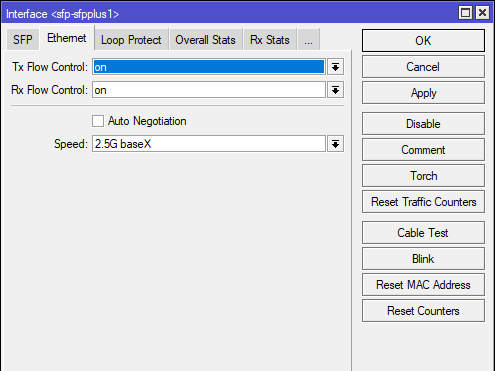
I can guess Flow Control not understand by Mikrotik? despite I have enable it

user posted image
tng55
post Jun 2 2025, 01:54 PM

Regular
******
Senior Member
1,440 posts

Joined: Sep 2021


QUOTE(Anime4000 @ Jun 2 2025, 12:32 PM)
I can guess Flow Control not understand by Mikrotik? despite I have enable it

user posted image
*
hmm let do testing stress enable vs disable you may testing
hsbb
post Jun 2 2025, 05:48 PM

Casual
***
Junior Member
447 posts

Joined: Aug 2009


QUOTE(Anime4000 @ Jun 2 2025, 05:30 AM)
user posted image

this all ONU I have tried, even I get that Skyworth crap before TM giving me, later I have two more crap to play with.

I retry again PLOAM without Password, just S/N.

ONU that can change S/N:
Huawei HG8240H5
D-Link DPN-FX3060V A1
D-Link DPN-FX3060V B2

ONU can Auth without PLOAM just S/N
Huawei HG8240H5 ❌
D-Link DPN-FX3060V A1 ✅
D-Link DPN-FX3060V B2 ✅
D-Link DPN-FX3060V B2 as Huawei HG8240H5 with ME 350,370&373 ✅

this is something, D-Link pretending as Huawei works without PLOAM but not Huawei it self 🤣

later I try change my PON Stick S/N +1 eg: NIJK24000002 see what happend

and then, force TM to solve slowness of IPv4 traffic?
I try ask TM to check their BNG and move mine to something better or use backup BNG

I can guess MTU 1492 is considered as fixed, if that case, I just bother speed issue on IPv4
*
QUOTE
later I try change my PON Stick S/N +1 eg: NIJK24000002 see what happend

Can connect?
annoymous1234
post Jun 2 2025, 06:33 PM

Look at all my stars!!
*******
Senior Member
7,616 posts

Joined: Mar 2009

Is SWU 5.0 100mbps RM79?
Anime4000
post Jun 2 2025, 11:34 PM

Look at all my stars!!
*******
Senior Member
2,399 posts

Joined: Jul 2009
From: /dev/null


hsbb kwss aneip tng55

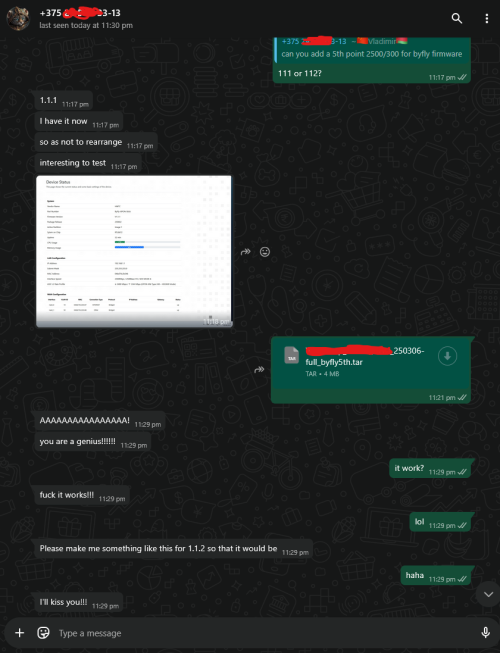
you know what, my team test the ASIC/Layer 1.5 Egress/Ingress test at Belarus Byfly ISP 2Gbps/300Mbps (Huawei OLT)

user posted image

it works, no more dropped packet, so my Nijika Stick not the fault haha

This post has been edited by Anime4000: Jun 2 2025, 11:36 PM
kwss
post Jun 3 2025, 01:50 AM

Regular
******
Senior Member
1,207 posts

Joined: Aug 2018
QUOTE(Anime4000 @ Jun 2 2025, 11:34 PM)
hsbb kwss aneip tng55

you know what, my team test the ASIC/Layer 1.5 Egress/Ingress test at Belarus Byfly ISP 2Gbps/300Mbps (Huawei OLT)

user posted image

it works, no more dropped packet, so my Nijika Stick not the fault haha
*
You mean what kind of packet? LCP-Echo or just the dropped packet counter of the interface?
If you pace the transmit and it never overrun the buffer then no packet will be dropped. It is expected.
But for a shared infrastructure, you never know how much is the current utilization, that's why congestion control algorithm is a thing. Then again there's algorithm like BBR which tries to gain an unfair advantage of using up the pipe by blasting it and accepting high transmit retry as normal business.

248 Pages « < 40 41 42 43 44 > » Top
 

Change to:
| Lo-Fi Version
0.0169sec    0.48    6 queries    GZIP Disabled
Time is now: 6th December 2025 - 07:55 PM