Welcome Guest ( Log In | Register )

250 Pages « < 41 42 43 44 45 > » Bottom

Outline · [ Standard ] · Linear+

 Official TM UniFi High Speed Broadband Thread V43, READ 1ST PAGE FOR RELEVANT WIFI INFO!

views
     
tng55
post Jun 3 2025, 02:05 AM

Regular
******
Senior Member
1,441 posts

Joined: Sep 2021


QUOTE(Anime4000 @ Jun 2 2025, 11:34 PM)
hsbb kwss aneip tng55

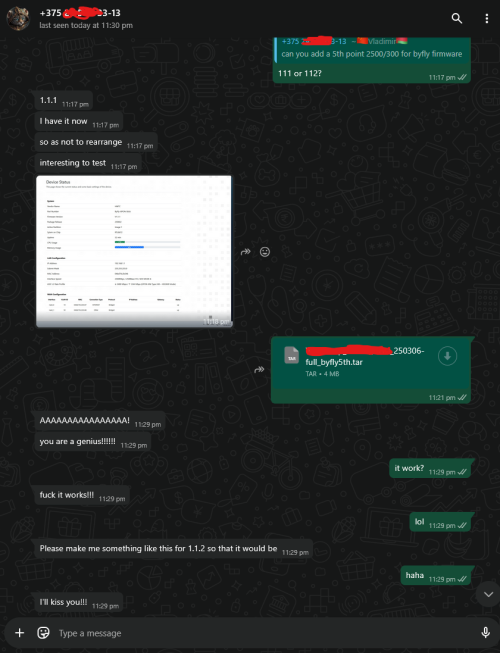
you know what, my team test the ASIC/Layer 1.5 Egress/Ingress test at Belarus Byfly ISP 2Gbps/300Mbps (Huawei OLT)

user posted image

it works, no more dropped packet, so my Nijika Stick not the fault haha
*
what country that Byfly ISP hmm 2Gbps but upload 300mbps lol if his isp 2gbps/1gbps will be nice seen his area huawei OLT

but TM Huawei OLT trouble
kwss
post Jun 3 2025, 02:29 AM

Regular
******
Senior Member
1,208 posts

Joined: Aug 2018
Anime4000 Your kind of jam.
How to bring data centre-like connectivity to your home with IPTTTH
https://blog.apnic.net/2025/05/26/how-to-br...me-with-ipttth/
Anime4000
post Jun 3 2025, 03:00 AM

Look at all my stars!!
*******
Senior Member
2,399 posts

Joined: Jul 2009
From: /dev/null


QUOTE(kwss @ Jun 3 2025, 01:50 AM)
You mean what kind of packet? LCP-Echo or just the dropped packet counter of the interface?
If you pace the transmit and it never overrun the buffer then no packet will be dropped. It is expected.
But for a shared infrastructure, you never know how much is the current utilization, that's why congestion control algorithm is a thing. Then again there's algorithm like BBR which tries to gain an unfair advantage of using up the pipe by blasting it and accepting high transmit retry as normal business.
*
have few user tried, especially full GPON speed and no PPP disconnect for him,

QUOTE(hsbb @ Jun 2 2025, 05:48 PM)
Can connect?
*
expected not work +1 S/N
user posted image

Only S/N: NIJK24000001 works without PLOAM Password thumbup.gif
user posted image

QUOTE(tng55 @ Jun 3 2025, 02:05 AM)
what country that Byfly ISP hmm 2Gbps but upload 300mbps lol if his isp 2gbps/1gbps will be nice seen his area huawei OLT

but TM Huawei OLT trouble
*
kinda funny, unlike my guy at italy, uncap GPON, but still run on PPPoE with /29 routed, just like Unifi Biz 6 IP address (1 for router)

This post has been edited by Anime4000: Jun 3 2025, 03:05 AM
kiritoffx
post Jun 3 2025, 05:22 AM

Enthusiast
*****
Junior Member
728 posts

Joined: Feb 2013
From: Malaysia


Attached Image

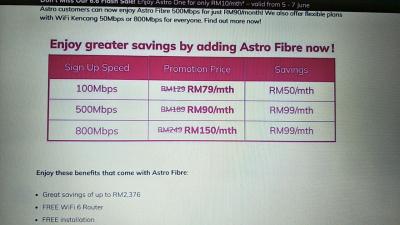
can someone tell me the current offer plan with SWU? my contract is about to expire. i want to compare with this astro deals
YoungMan
post Jun 3 2025, 09:03 AM

Look at all my stars!!
*******
Senior Member
6,805 posts

Joined: Oct 2008
From: Kuala Lumpur


QUOTE(kiritoffx @ Jun 3 2025, 05:22 AM)
Attached Image

can someone tell me the current offer plan with SWU? my contract is about to expire. i want to compare with this astro deals
*
Search SWU in this topic, you should find all the posts related to it.
hsbb
post Jun 3 2025, 09:52 AM

Casual
***
Junior Member
447 posts

Joined: Aug 2009


QUOTE(hsbb @ Jun 1 2025, 06:53 PM)
Found any config deep in any ont about anu/ont type? Set it to 10g/10g if available. Also upstream bandwidth to max 9535488 (kbit/s)

** I think SN auth only working for ur service port, not ur neighbors or area OLT.
*
Here Anime4000, only NIJK24000001 registered.
tng55
post Jun 3 2025, 12:31 PM

Regular
******
Senior Member
1,441 posts

Joined: Sep 2021


QUOTE(Anime4000 @ Jun 3 2025, 03:00 AM)
have few user tried, especially full GPON speed and no PPP disconnect for him,
expected not work +1 S/N
user posted image

Only S/N: NIJK24000001 works without PLOAM Password thumbup.gif
user posted image
kinda funny, unlike my guy at italy, uncap GPON, but still run on PPPoE with /29 routed, just like Unifi Biz 6 IP address (1 for router)
*
his guy from italy hmm his home got fixed ip address for home like unifi biz 6 IP address
his home got fixed 5x ip address + 1 router = 6 ip address fixed for home ????
his guy don't have 1gbps upload ?? or ask him upgrade package 2gbps/1gbps upload
dannychen
post Jun 3 2025, 05:35 PM

Regular
******
Senior Member
1,263 posts

Joined: Dec 2009
QUOTE(Rainings @ May 31 2025, 11:16 AM)
My current package: SWU3.0 RM119/m with free STD.

Digging thru this threads.
What is the best play here to get smoothest upgraded from SWU 3.0> SWU 5.0?
1. Apply online account termination and wait TM sales to call for offer?
2. Apply port out from TM to Allo fiber, Digi fiber, Astro fiber RM90/m and wait TM counter offer?
3. Visit TM point and request for SWU 5.0 but might force to bundle with Unifi mobile?

I don't care about Disney+, Netflix or any entertainment packages.
My ideal package is to get cheapest package RM90/m with free STD, because I think getting a fixed fee is better than temporary free 6 months deal in a long run.
If we ever get boosted again, from 500mpbs > 800Mbps+STD with RM90/m. I think is a crazy deal.
*
QUOTE(nicktaylor @ May 31 2025, 06:23 PM)
Went to KLCC Unifi store just now,

Current package  : Unifi home 500Mbps Pro upgrade (lastime swu sumthing) - Rm119

Deal with 1 lady staff, using the previous script given related to check contract and been contacted by astro for package 500mbps with rm90,

Upon checking contract, mine still active until Sept 2025, she firmly said that cannot give other offer sir, since still in contract but kindly reaffirm that once contracts end there still be other offering they will offer.

Seems they oso know edy to counter our script, i tried oso mention, bout the transfer id, and possibility of astro absorbed my remaining month contract (making story only), but she not even flinch to offer me the current SWU offer. So now at klcc, not like before can just get that offer while still in contract.. Iskk..iskk..

She just said, kindly check properly sir, worried that u pay 2 bills at one time if not done right. Pftt..

Guess will try again my luck later Sept 2025.. Anyways.. Goodluck to others guys.. Penat oii naik klcc nie.. Nseb boleh lepak2 chillies.. Hahha.. 🤓
*
QUOTE(idoloveyou @ Jun 1 2025, 08:52 AM)
Hi All, which unifi store operate on Saturday? gonna try my luck switching to rm90/500mbps, currently on 500mbps rm119 , still got 5month contract remaining, no astro.
saw there is a successful case here.
*
Tried the termination trick online. One lady called from 03-20217930 called and offer SWU 5.0 at RM 90 / month for 500mbps package free Disney Hotstar for 12 months with renewal of 24 months. Originally was told <6 months contract entitle to change. Subsequently, was told unable to proceed due to previous bill waiver, contract left 4 months and estimated penalty RM479.

No luck. Have to stay with Unifi for now without any new offer.

fruitie
post Jun 3 2025, 06:57 PM

Rise and Shine
Group Icon
Staff
72,820 posts

Joined: Sep 2005
From: KUL

QUOTE(dannychen @ Jun 3 2025, 05:35 PM)
Tried the termination trick online. One lady called from 03-20217930 called and offer SWU 5.0 at RM 90 / month for 500mbps package free Disney Hotstar for 12 months with renewal of 24 months. Originally was told <6 months contract entitle to change. Subsequently, was told unable to proceed due to previous bill waiver, contract left 4 months and estimated penalty RM479.

No luck. Have to stay with Unifi for now without any new offer.
*
Try again after 4 months then. Out of contract has better bargaining power.
alexwsk
post Jun 3 2025, 11:19 PM

Look at all my stars!!
*******
Senior Member
4,094 posts

Joined: Jan 2003
From: USJ


QUOTE(bigduck @ May 29 2025, 02:09 PM)
Did mine at usj taipan branch yesterday, morning already updated to swu 5.0 500mbps
*
haiz, I'm too late, went to same branch told me my existing package 300Mbps @RM99 is already very cheap and unable to gv 500Mbps @RM90 cry.gif

QUOTE(dannychen @ Jun 3 2025, 05:35 PM)
Tried the termination trick online. One lady called from 03-20217930 called and offer SWU 5.0 at RM 90 / month for 500mbps package free Disney Hotstar for 12 months with renewal of 24 months. Originally was told <6 months contract entitle to change. Subsequently, was told unable to proceed due to previous bill waiver, contract left 4 months and estimated penalty RM479.

No luck. Have to stay with Unifi for now without any new offer.
*
how to terminate online? I'm going to try this as well
blacktubi
post Jun 3 2025, 11:21 PM

-
Group Icon
Elite
8,413 posts

Joined: Jul 2008

MTU issue again? 1492 causing some pages not to load properly

1480 then all is good
jusbella
post Jun 4 2025, 12:07 AM

Look at all my stars!!
*******
Senior Member
3,034 posts

Joined: Dec 2011


QUOTE(blacktubi @ Jun 3 2025, 11:21 PM)
MTU issue again? 1492 causing some pages not to load properly

1480 then all is good
*
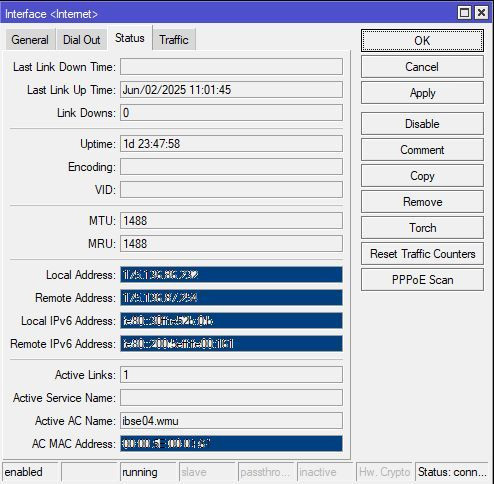
In mikrotik log. Not sure helpful not?


Attached thumbnail(s)
Attached Image
dannychen
post Jun 4 2025, 09:58 AM

Regular
******
Senior Member
1,263 posts

Joined: Dec 2009
QUOTE(alexwsk @ Jun 3 2025, 11:19 PM)
haiz, I'm too late, went to same branch told me my existing package 300Mbps @RM99 is already very cheap and unable to gv 500Mbps @RM90  cry.gif
how to terminate online? I'm going to try this as well
*
login to unifi selfcare portal on desktop. under view service>my service details>support>request service termination.
ahlong
post Jun 4 2025, 10:18 AM

not a debt collector
****
Junior Member
611 posts

Joined: Apr 2005
From: http://127.0.0.1:80/announce


QUOTE(jusbella @ Jun 4 2025, 12:07 AM)
In mikrotik log. Not sure helpful not?
*
i think this problem since.. dont remember.. mine set to 1488.. 1490 error 1489 error 1488 no error.
cyberic
post Jun 4 2025, 10:37 AM

Regular
******
Senior Member
1,130 posts

Joined: Jan 2003


QUOTE(ahlong @ Jun 4 2025, 10:18 AM)
i think this problem since.. dont remember.. mine set to 1488.. 1490 error 1489 error 1488 no error.
*
I thought Mikrotik always use 1480? Haven't try 1488
ahlong
post Jun 4 2025, 10:54 AM

not a debt collector
****
Junior Member
611 posts

Joined: Apr 2005
From: http://127.0.0.1:80/announce


QUOTE(cyberic @ Jun 4 2025, 10:37 AM)
I thought Mikrotik always use 1480? Haven't try 1488
*
ya i thought so too. but i try the max value first until the errors gone.

user posted image

This post has been edited by ahlong: Jun 4 2025, 10:56 AM
kwss
post Jun 4 2025, 01:20 PM

Regular
******
Senior Member
1,208 posts

Joined: Aug 2018
QUOTE(ahlong @ Jun 4 2025, 10:54 AM)
ya i thought so too. but i try the max value first until the errors gone.

user posted image
*
Set MRU to 1500. It will massively decrease the chance of website breakage.

I have confirmed return path can actually do 1500 for IPv4.
For IPv6, it will get blocked by the BNG if anything is more than 1492. This is some cheap dirty trick to workaround those stupid router TM gave that have stupid IPv6 setup.
kwss
post Jun 4 2025, 01:42 PM

Regular
******
Senior Member
1,208 posts

Joined: Aug 2018
QUOTE(jusbella @ Jun 4 2025, 12:07 AM)
In mikrotik log. Not sure helpful not?
*
This is some shenanigan done by TM. Long time back, TM will not broadcast RA but I don't know what convinced them this is such a great idea.
No properly configured router will accept RA. Mikrotik by default will never accept RA.
Accepting RA is a security issue as it means anyone on the L2 network can poison your upstream route.

The correct way is do it using DHCPv6 IA_NA. However for some reason, if you try to configure it like this, you get nothing. Not even the prefix.

Conclusion: TM still don't fully understand IPv6.
sadlyfalways
post Jun 4 2025, 01:48 PM

Regular
******
Senior Member
1,185 posts

Joined: Nov 2020
QUOTE(tng55 @ Jun 3 2025, 02:05 AM)
what country that Byfly ISP hmm 2Gbps but upload 300mbps lol if his isp 2gbps/1gbps will be nice seen his area huawei OLT

but TM Huawei OLT trouble
*
even in the uk i subscribe to 1.6gbps package last time, upload only 115mbps

anything more need leased line sad.gif

but i dont upload much, just for show only
sadlyfalways
post Jun 4 2025, 02:05 PM

Regular
******
Senior Member
1,185 posts

Joined: Nov 2020
QUOTE(kiritoffx @ Jun 3 2025, 05:22 AM)
Attached Image

can someone tell me the current offer plan with SWU? my contract is about to expire. i want to compare with this astro deals
*
please begging you dont take with astro, its a curse.

my grandmother using this, if got issue with phone or internet, nobody want to take ownership.

in the end u need to call astro, who will call maxis, who will call tm, and have to wait for a time when all 3 are free to come to your house.

just stick with unifi if you care about uptime, maxis if you are about international (Europe/UK/USA) traffic

250 Pages « < 41 42 43 44 45 > » Top
 

Change to:
| Lo-Fi Version
0.0207sec    0.53    6 queries    GZIP Disabled
Time is now: 10th December 2025 - 04:26 AM