kwss tng55 hsbb blacktubiI created
NIJIKA Firmware Utility, this allow set command quickly and safely
for example, one of my customer switch from Unifi to TIME, want to reuse NIJIKA stick, just execute "nijika isp time", then put PPPoE Password as PLOAM Password and S/N, reboot, enjoy...
calling "nijika isp time" will modify internal behavior like, using SFU mode, OMCI, Huawei Proprietary ME, etc...
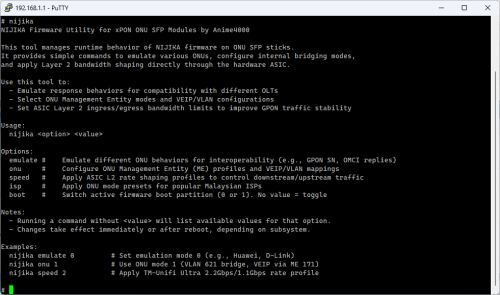
CODE
# nijika onu
Unsupported or missing mode ID:
Usage: /bin/onu_mode [mode]
Supported mode:
0 | sfu Apply Single Family Unit mode
1 | hgu Apply Home Gateway Unit mode
2 | compat Apply Compatibility / Bridge-only mode (bridge all VLANs)
3 | manage Apply VLAN Managed Bridge-only mode (bridge all VLANs)
# nijika isp
Available ISPs for quick configuration:
unifi Telekom Malaysia (Unifi, ZTEG/ALCL/HWTC/FHTT OLT)
maxis Maxis Communications (HSBA or Own Infra)
time TIME dotCom Bhd (Huawei OLT only)
allo Allo Technology (ALCL or HWTC OLT)
Example: nijika isp unifi
# nijika speed
Supported mode:
0. Disabled (Full Line Rate – No Shaping)
1. Dn 2488 Mbps / Up 1244 Mbps (GPON ANI Type 248 – HiSGMII Mode)
2. Dn 2488 Mbps / Up 1100 Mbps (TM Unifi Ultra – Alternate Profile)
3. Dn 2200 Mbps / Up 1100 Mbps (TM Unifi Ultra – Standard Profile)
4. Dn 2048 Mbps / Up 1024 Mbps (Custom Symmetric Profile)
5. Dn 2488 Mbps / Up 300 Mbps (byfly 2488/300Mbps Standard Profile)
# _
command "nijika speed" to solve issue at bad area, by default, it use Mode 1,
all these exist as my past experience, improve and we gather all OLT quirks, thus V2.0 exist


 Jun 4 2025, 02:09 PM


 Quote
Quote





 0.0168sec
 0.99
0.99
 6 queries
 GZIP Disabled