Outline ·
[ Standard ] ·
Linear+
Unifi Official TM UniFi High Speed Broadband Thread V42, READ 1ST PAGE FOR RELEVANT WIFI INFO!
|
heLL_bOy
|
 Dec 26 2024, 08:37 PM Dec 26 2024, 08:37 PM
|

|
QUOTE(go626201 @ Dec 26 2024, 12:27 PM) I can confirm UDP bottleneck issue, since some of my Wireguard usage to SG is unable to run for the similar high speed with TCP usage. (But it might also depends of the routing,As i can get abit higher UDP speed to LeaseWeb SG(400+Mbps/40ms routing) compare to other SG server(200-300Mbps/10+ms routing).) Edited: I didn't have 500mbps or higher speed OVH SG vps,or it might be a metric to see is that better for TM private peering network server. Anyone have the high bandwidth speed Dedicated server or VPS with OVH SG might be able to see any similar issue with TM. thanks for your info  so your ovh able to run full speed on 100mbps on udp ? |
|
|
|
|
|
Godhand73
|
Dec 26 2024, 09:01 PM
|
New Member

|
QUOTE(vkashin @ Dec 26 2024, 08:19 PM) do update back once you stopped by TM Point to ask; as far as i know the RM159 for 1Gbps plan is actually 500 Mbps plan with speed upgrade to 1Gbps for 24 months, and after that it will drop back to 500Mbps Have to mention SWU package and specifically stating "500Mbps with speed upgrade to 1Gbps for 24 months" previously. Not sure if there's any change as of now Thanks for the info. I'm going to the TM Point this sunday. Will update later |
|
|
|
|
|
ThE-1cY
|
Dec 26 2024, 09:23 PM
|
|
|
Slow unifi and high ping around 100ms+ now anyone? Speed test less than 20Mbps at Fast.com. Location Ipoh.
This post has been edited by ThE-1cY: Dec 26 2024, 09:24 PM
|
|
|
|
|
|
YoungMan
|
Dec 26 2024, 09:55 PM
|
|
|
QUOTE(Godhand73 @ Dec 26 2024, 06:12 PM) So I gotta go up to the counter and ask for the 1Gbps for RM 159 package? That's it? Do I have to mention SWU package or whatsoever? Is there a possibility where they say no to that? Of course there is a possibility for them to say no, or force you bundle with Unifi postpaid. You can check if the Unifi postpaid has no contract, terminate it after 1 month. QUOTE(vkashin @ Dec 26 2024, 08:19 PM) do update back once you stopped by TM Point to ask; as far as i know the RM159 for 1Gbps plan is actually 500 Mbps plan with speed upgrade to 1Gbps for 24 months, and after that it will drop back to 500Mbps Have to mention SWU package and specifically stating "500Mbps with speed upgrade to 1Gbps for 24 months" previously. Not sure if there's any change as of now Yes as of now this is the latest package but interesting to see if there's any change. |
|
|
|
|
|
dev/numb
|
Dec 26 2024, 10:18 PM
|
|
|
QUOTE(go626201 @ Dec 26 2024, 12:27 PM) I can confirm UDP bottleneck issue, since some of my Wireguard usage to SG is unable to run for the similar high speed with TCP usage. (But it might also depends of the routing,As i can get abit higher UDP speed to LeaseWeb SG(400+Mbps/40ms routing) compare to other SG server(200-300Mbps/10+ms routing).) Edited: I didn't have 500mbps or higher speed OVH SG vps,or it might be a metric to see is that better for TM private peering network server. Anyone have the high bandwidth speed Dedicated server or VPS with OVH SG might be able to see any similar issue with TM. Possible they’re throttling WireGuard default port 51820? Did you try switching to a different port, eg: 443, 500, 1194, 4500, etc? Maybe lower MTU value as well? |
|
|
|
|
|
azimwahab81 P
|
Dec 26 2024, 10:22 PM
|
New Member
|
Hi guys, i've been upgraded to the 1gbps plan and was given the ONR D-Link DPN-FX3060V combo box. Was experiencing constant issues with the 5GHz wifi so finally decided to use the ASUS TUF-AX4200 router via GPON Bridge mode. Was able to get 900+ download speed but not after a few days the internet speed will drop to 100/200 mbps. Need to restart the D-Link ONR to fix the matter. After a few more days, same issue will repeat itself which requires me to restart the ONR again. I've attached the internet speed test results from the ASUS Router which shows the speed drop. 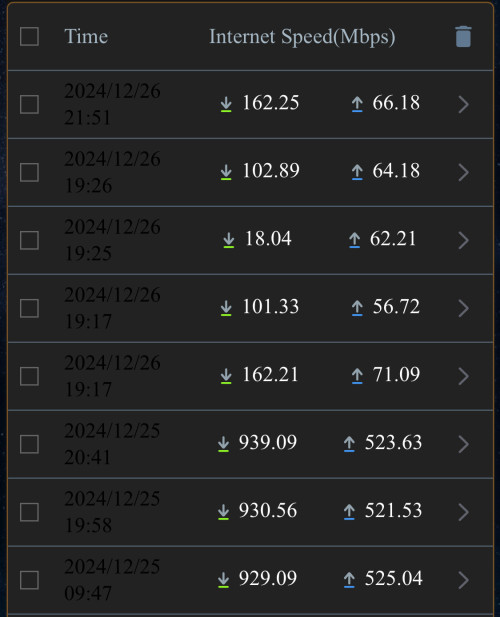 Any advice how to fix this issue permanently? |
|
|
|
|
|
countingcrows
|
Dec 26 2024, 11:24 PM
|
Getting Started
|
QUOTE(azimwahab81 @ Dec 26 2024, 10:22 PM) Hi guys, i've been upgraded to the 1gbps plan and was given the ONR D-Link DPN-FX3060V combo box. Was experiencing constant issues with the 5GHz wifi so finally decided to use the ASUS TUF-AX4200 router via GPON Bridge mode.
Was able to get 900+ download speed but not after a few days the internet speed will drop to 100/200 mbps. Need to restart the D-Link ONR to fix the matter. After a few more days, same issue will repeat itself which requires me to restart the ONR again. I've attached the internet speed test results from the ASUS Router which shows the speed drop.
https://forum.lowyat.net/index.php?showtopi...ost&p=110637988QUOTE(kwss @ Oct 18 2024, 11:57 AM) Firmware v2.0.3 for black D-Link ONR. Thanks to MarcoFromTropojaDownload link: https://www.mediafire.com/file/4s9bfvbco0hw...flowid.bin/fileSHA-256 sum: e91b8b93b3bf93a5836631179f8404443abccb328369a34f90f8ea47c0dba81a |
|
|
|
|
|
Cloudx
|
Dec 26 2024, 11:53 PM
|
|
|
Hi I am using Dlink router which was provided by TM the model is DIR-X3060Z. It have both 2.4Ghz & 5Ghz spectrum enabled. However I notice that the 5Ghz spectrum drops very frequently once dropped my laptop will not be able to connect to it and reverts to 2.4Ghz. To restore it I will need to restart the router in order for my laptop to discover the signal once again. Does anyone face similar issue? Is this the router problem?
|
|
|
|
|
|
heLL_bOy
|
Dec 27 2024, 10:35 AM
|
|
|
QUOTE(dev/numb @ Dec 26 2024, 10:18 PM) Possible they’re throttling WireGuard default port 51820? Did you try switching to a different port, eg: 443, 500, 1194, 4500, etc? Maybe lower MTU value as well? using different port doesn't help, seem all udp are bottleneck already |
|
|
|
|
|
dchk
|
Dec 27 2024, 11:26 AM
|
|
|
Checking with anyone that has recently subscribed to Unifi. I heard they now combine the modem and router into 1 device. Formerly it was 2 separate device.
I plan to install a TP-Link mesh wifi, so wanted to know the right setup
|
|
|
|
|
|
azimwahab81 P
|
Dec 27 2024, 12:04 PM
|
New Member
|
QUOTE(countingcrows @ Dec 26 2024, 11:24 PM) Thank you. Will try updating the firmware. |
|
|
|
|
|
enduser
|
Dec 27 2024, 02:38 PM
|
|
|
QUOTE(dchk @ Dec 27 2024, 11:26 AM) Checking with anyone that has recently subscribed to Unifi. I heard they now combine the modem and router into 1 device. Formerly it was 2 separate device. I plan to install a TP-Link mesh wifi, so wanted to know the right setup Whats ur subscribe speed? imo just use back the old onr, keep the new one as spare |
|
|
|
|
|
PRSXFENG
|
Dec 27 2024, 02:51 PM
|
|
|
QUOTE(dchk @ Dec 27 2024, 11:26 AM) Checking with anyone that has recently subscribed to Unifi. I heard they now combine the modem and router into 1 device. Formerly it was 2 separate device. I plan to install a TP-Link mesh wifi, so wanted to know the right setup yes, however there are still some guides here on how to bridge mode them, but it depends on the model you get from them which is random (unless 1/2gbps, then you get dlink) |
|
|
|
|
|
aniq8676
|
Dec 27 2024, 03:48 PM
|
|
|
QUOTE(Cloudx @ Dec 26 2024, 11:53 PM) Hi I am using Dlink router which was provided by TM the model is DIR-X3060Z. It have both 2.4Ghz & 5Ghz spectrum enabled. However I notice that the 5Ghz spectrum drops very frequently once dropped my laptop will not be able to connect to it and reverts to 2.4Ghz. To restore it I will need to restart the router in order for my laptop to discover the signal once again. Does anyone face similar issue? Is this the router problem? Have you tried updating the firmware to the latest version? New Firmware version: DIR-X3060Z_240719_1.0.6 This post has been edited by aniq8676: Dec 27 2024, 03:49 PM |
|
|
|
|
|
Rhetoric
|
Dec 27 2024, 05:35 PM
|
|
|
Been years since I last setting up my internet on my own. Do I still have to call TM to check the password?.
|
|
|
|
|
|
Yluxion
|
Dec 27 2024, 05:47 PM
|
|
|
QUOTE(Rhetoric @ Dec 27 2024, 05:35 PM) Been years since I last setting up my internet on my own. Do I still have to call TM to check the password?. Yes. You need to contact unifi customer service to obtain PPOE password, at the same time I would suggest you ask them your VOIP details & password as well. |
|
|
|
|
|
msrazi
|
Dec 27 2024, 07:28 PM
|
Getting Started
|
QUOTE(kwss @ Oct 18 2024, 11:57 AM) Firmware v2.0.3 for black D-Link ONR. Thanks to MarcoFromTropojaDownload link: https://www.mediafire.com/file/4s9bfvbco0hw...flowid.bin/fileSHA-256 sum: e91b8b93b3bf93a5836631179f8404443abccb328369a34f90f8ea47c0dba81a Do u have the firmware for white ONR? |
|
|
|
|
|
msrazi
|
Dec 27 2024, 07:30 PM
|
Getting Started
|
I got this message from TM. https://i.unifi.my/pnMesh |
|
|
|
|
|
bugipunch
|
Dec 27 2024, 08:15 PM
|
Getting Started
|
QUOTE(Rhetoric @ Dec 27 2024, 05:35 PM) Been years since I last setting up my internet on my own. Do I still have to call TM to check the password?. no. If u still have access to the internet u can just copy the username and password. Only call tm if u have lost the username and password and they will send u the new username and password through sms. |
|
|
|
|
|
blacktubi
|
Dec 27 2024, 10:20 PM
|
-

|
QUOTE(msrazi @ Dec 27 2024, 07:30 PM) I got this message from TM. https://i.unifi.my/pnMeshSo TM is letting everyone to buy the 2.5G ONU even for non 1Gbps/2Gbps users now That's interesting  |
|
|
|
|



 Quote
Quote










 0.0244sec
 1.00
1.00
 6 queries
 GZIP Disabled