

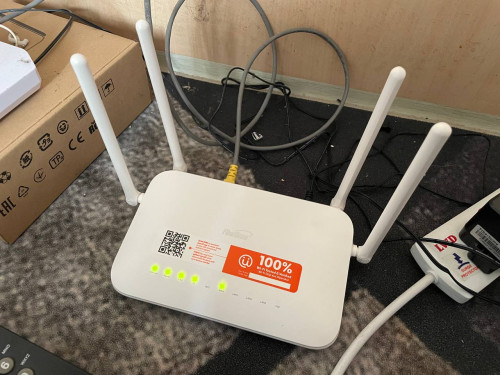
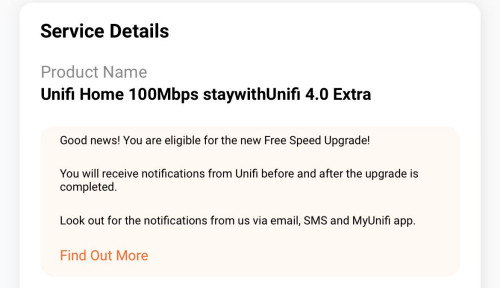
Successfully switch to the StayWithUnifi 4.0
Got free Fiberhome SR1041Y router, For me this router is enough.
Unifi Official TM UniFi High Speed Broadband Thread V42, READ 1ST PAGE FOR RELEVANT WIFI INFO!
|
|
 Jan 17 2024, 05:21 PM Jan 17 2024, 05:21 PM
Show posts by this member only | IPv6 | Post
#801
|
 
Senior Member
1,524 posts Joined: Dec 2020 From: Perak  
|
Successfully switch to the StayWithUnifi 4.0 Got free Fiberhome SR1041Y router, For me this router is enough. |
|
|
|
|
|
Jan 17 2024, 09:15 PM
Show posts by this member only | IPv6 | Post
#802
|

Senior Member
1,058 posts Joined: Nov 2009
|
Did anyone with SWU 1.0 try to ask for SWU 4.0? Impossible to renew contract from 129 to 139/149 right?
|
|
|
Jan 17 2024, 09:28 PM
|
|
Senior Member
6,818 posts Joined: Oct 2008 From: Kuala Lumpur 
|
QUOTE(eugenecctan @ Jan 17 2024, 09:15 PM) Did anyone with SWU 1.0 try to ask for SWU 4.0? Impossible to renew contract from 129 to 139/149 right? I don't see any reason why it is impossible. Even those from previous SWU upgrade to SWU3.0, as long as your contract has ended. |
|
|
Jan 17 2024, 09:54 PM
Show posts by this member only | IPv6 | Post
#804
|
|
Junior Member
125 posts Joined: Jul 2008
|
QUOTE(aniq8676 @ Jan 17 2024, 05:21 PM) Successfully switch to the StayWithUnifi 4.0 Got free Fiberhome SR1041Y router, For me this router is enough. |
|
|
Jan 17 2024, 10:30 PM
Show posts by this member only | IPv6 | Post
#805
|

Junior Member
114 posts Joined: May 2009
|
Anyone from RM89 30Mbps that has gotten their free upgrade share what does it show on their unifi profile? Mine says eligible for free upgrade but profile still showing 30Mbps.
I don’t have access to my Unifi connection to test. |
|
|
Jan 17 2024, 11:16 PM
Show posts by this member only | IPv6 | Post
#806
|
|
Senior Member
1,873 posts Joined: Nov 2010
|
QUOTE(odin140 @ Jan 17 2024, 10:30 PM) Anyone from RM89 30Mbps that has gotten their free upgrade share what does it show on their unifi profile? Mine says eligible for free upgrade but profile still showing 30Mbps. Same as yours, but 100M since received the upgrade sms, I guess you should already 100M if got that sms.I don’t have access to my Unifi connection to test. |
|
|
|
|
|
Jan 18 2024, 01:19 AM
Show posts by this member only | IPv6 | Post
#807
|
|
Senior Member
1,058 posts Joined: Nov 2009
|
QUOTE(YoungMan @ Jan 17 2024, 09:28 PM) I don't see any reason why it is impossible. Even those from previous SWU upgrade to SWU3.0, as long as your contract has ended. Who want to renew contract and pay more? Haha |
|
|
Jan 18 2024, 02:01 PM
Show posts by this member only | IPv6 | Post
#808
|

Junior Member
835 posts Joined: Nov 2007 From: Land of Forgotten
|
Just for sharing, cheapest i found online for an ax1800 rated mesh system, can support 500mbps no issues . Am using it at the moment , cheaper than what I bought from last sales.
Deco X20, is around RM500++ for 2 packs. If anyone wants a simple mesh, this works and can pair effortlessly. This post has been edited by Omochao: Jan 18 2024, 02:01 PM Attached thumbnail(s) 
|
|
|
Jan 18 2024, 10:25 PM
|
|
Newbie
41 posts Joined: Jan 2017
|
QUOTE(noknok @ Jan 15 2024, 08:23 PM) Hi guys This is a dumb question, but did you register directly at unifi.com.my or did you just google "register unifi" and click the first thing you see? If its the latter, then there might be a big chance that you registered via agents because usually when you google "register unifi" there are sponsored websites that was set up by these agents to get customers to sign up through them. Not saying that it is unethical, they r also cari rezeki based on commission but maybe thats the reason why the agents communicated through Whatsapp.I'm registering new Unifi line as I recently moved into a new house. Registered via Unifi website. Is it normal for Unifi employees to reach out via Whatsapp and ask for my information? Also asking for my photostat IC via Whatsapp instead of going through Unifi website. But some agents suka buat taik by exchanging(?) details of their user base with other ISPs. I have 2 unifi accs (one direct with unifi, one reg via agent). The one registered with unifi directly is ok, but with the agent, the moment the contract is finished, agent from another ISP immediately pmed me via Whatsapp asking am i interested to lompat  |
|
|
Jan 19 2024, 05:01 AM
Show posts by this member only | IPv6 | Post
#810
|

All Stars
14,299 posts Joined: Jan 2011
|
QUOTE(Omochao @ Jan 18 2024, 02:01 PM) Just for sharing, cheapest i found online for an ax1800 rated mesh system, can support 500mbps no issues . Am using it at the moment , cheaper than what I bought from last sales. is it tri-band? if not, dual-band is trash seriously. Deco X20, is around RM500++ for 2 packs. If anyone wants a simple mesh, this works and can pair effortlessly.  |
|
|
Jan 19 2024, 05:31 AM
Show posts by this member only | IPv6 | Post
#811
|
|
Junior Member
835 posts Joined: Nov 2007 From: Land of Forgotten
|
QUOTE(westlife @ Jan 19 2024, 05:01 AM) is it tri-band? if not, dual-band is trash seriously. well, for my dual band thrash, i can still manage to get 350mbps out from the mesh node despite is a dual band wireless backhauled.40 feets away and with a concrete wall in between.not bad I would still say |
|
|
Jan 19 2024, 05:46 AM
Show posts by this member only | IPv6 | Post
#812
|
|
All Stars
14,299 posts Joined: Jan 2011
|
QUOTE(Omochao @ Jan 19 2024, 05:31 AM) well, for my dual band thrash, i can still manage to get 350mbps out from the mesh node despite is a dual band wireless backhauled.40 feets away and with a concrete wall in between. if tri-band can easily get above 500Mbps... not bad I would still say  other than speed, actually latency is also a big difference. if u do a speed test using fast.com, u can tell. This post has been edited by westlife: Jan 19 2024, 05:47 AM |
|
|
Jan 19 2024, 09:04 AM
Show posts by this member only | IPv6 | Post
#813
|
|
Junior Member
835 posts Joined: Nov 2007 From: Land of Forgotten
|
QUOTE(westlife @ Jan 19 2024, 05:46 AM) if tri-band can easily get above 500Mbps... my speed is only 500mbps... getting near to max speed ,I'm happy and contented.other than speed, actually latency is also a big difference. if u do a speed test using fast.com, u can tell. I would rather choose a simple and cheaper setup than getting high priced ones and facing intermittent drop offs. end of the day is about stability and how far it can cover. This post has been edited by Omochao: Jan 19 2024, 09:04 AM |
|
|
|
|
|
Jan 19 2024, 11:28 AM
Show posts by this member only | IPv6 | Post
#814
|
|
Junior Member
835 posts Joined: Nov 2007 From: Land of Forgotten
|
Finally got in touch with one kind hearted person from TM , and passed me the file to update Fiberhome SR1041F router to RP0107. Though not much differences , but here is the minor changes; - No more attached devices shown under "status" tab - Cannot enable separate/multiple SSID when Bandsteering is turned on, previously I can turn on Bandsteering with 3 extra separate streams of 2.4ghz, and 2 more of 5Ghz, useful for people who wants to add another SSID for their specific devices like CCTV or that can only run on 2.4ghz , which I don't find it in any household routers unless on the enterprise grade ones. Seems like they found out about this and decide to lock it further. Though I have yet to turn all of it concurrently as I just need a separate 5Ghz for a PS5 device at home. - Can't select bandwidth Mhz anymore, is totally locked. With that said, RP0105 version is the best for now. This post has been edited by Omochao: Jan 19 2024, 11:31 AM Attached thumbnail(s) 


yamin07 liked this post
|
|
|
Jan 19 2024, 11:58 AM
Show posts by this member only | IPv6 | Post
#815
|
|
All Stars
14,299 posts Joined: Jan 2011
|
QUOTE(Omochao @ Jan 19 2024, 09:04 AM) my speed is only 500mbps... getting near to max speed ,I'm happy and contented. for me i am more concerned about these figure as it will impact my mobile gaming. sometime speed fast but latency not good also no use. I would rather choose a simple and cheaper setup than getting high priced ones and facing intermittent drop offs. end of the day is about stability and how far it can cover. 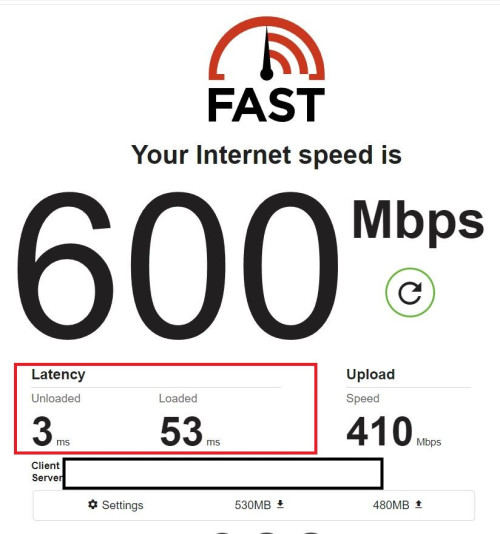 QUOTE(Omochao @ Jan 19 2024, 11:28 AM) Finally got in touch with one kind hearted person from TM , and passed me the file to update Fiberhome SR1041F router to RP0107. so updated to the newer firmware is a self-pwned?Though not much differences , but here is the minor changes; - No more attached devices shown under "status" tab - Cannot enable separate/multiple SSID when Bandsteering is turned on, previously I can turn on Bandsteering with 3 extra separate streams of 2.4ghz, and 2 more of 5Ghz, useful for people who wants to add another SSID for their specific devices like CCTV or that can only run on 2.4ghz , which I don't find it in any household routers unless on the enterprise grade ones. Seems like they found out about this and decide to lock it further. Though I have yet to turn all of it concurrently as I just need a separate 5Ghz for a PS5 device at home. - Can't select bandwidth Mhz anymore, is totally locked. With that said, RP0105 version is the best for now. This post has been edited by westlife: Jan 19 2024, 12:00 PM |
|
|
Jan 19 2024, 12:23 PM
Show posts by this member only | IPv6 | Post
#816
|
|
Junior Member
835 posts Joined: Nov 2007 From: Land of Forgotten
|
Sometimes is funny to read replies about people bragging how fast or how low their latency can be is when the motive of sharing is on another/about something else.
I can't even corelate the word "self pawned" with sharing on the updates features for a router firmware. Truly amusing day today. |
|
|
Jan 19 2024, 01:43 PM
|
|
Junior Member
112 posts Joined: Sep 2009
|
QUOTE(Omochao @ Jan 12 2024, 03:29 AM) How did you request ?through live chat or calling up 100? and how did they pushed the firmware? through tr069? or remote management? Now u know & answer ur own question, the reason I didn't reply u @Omochao bro. The answer why i said useless even the firmware hosted online.. the updating process. The last one is what the end user care about..what make u feel funny to read reply.any difference you feel about this fimware |
|
|
Jan 19 2024, 02:14 PM
|

Senior Member
2,570 posts Joined: Jun 2006
|
I guesss it’s time to call 100 and enquire when we are supposed to get out free speed upgrade in 2024. Been waiting since last year ….
|
|
|
Jan 19 2024, 02:19 PM
Show posts by this member only | IPv6 | Post
#819
|

Senior Member
2,096 posts Joined: Aug 2009 From: Shithole Klang
|
Had problem with Unifi and Disney+ on Apple TV where any show would take a while to reach 4k, and sometimes even downgrade mid show. This never happened with my another fiber line using Celcom.
After tweaking around, it come to conclusion that dns was the culprit. When using 1.1.1.1 or 8.8.8.8 the issue shows up, and is fixed when I switch to TM own dns (1.9.1.9/202.188.0.133). Weird stuff. Could it be that tm have sort of Disney version of Netflix OCA that only reachable via internal dns? but than again Celcom just doing fine with 1.1.1.1 and whichever 'public' cdn its pointing to. |
|
|
Jan 19 2024, 02:22 PM
Show posts by this member only | IPv6 | Post
#820
|

All Stars
11,458 posts Joined: Oct 2007 From: KL
|
QUOTE(Omochao @ Jan 19 2024, 05:31 AM) well, for my dual band thrash, i can still manage to get 350mbps out from the mesh node despite is a dual band wireless backhauled.40 feets away and with a concrete wall in between. How ar? Dual band wireless so far away, backhaul must be 2.4Ghz. How u get 350Mbp out of it? Apa secret trick?not bad I would still say This post has been edited by soonwai: Jan 19 2024, 02:27 PM |
|
Topic ClosedOptions
|
| Change to: |  0.0262sec 0.0262sec
 0.72 0.72
 6 queries 6 queries
 GZIP Disabled GZIP Disabled
Time is now: 15th December 2025 - 12:26 AM |
 Quote
Quote