Welcome Guest ( Log In | Register )

Bump Topic Topic Closed RSS Feed
495 Pages « < 397 398 399 400 401 > » Bottom

Outline · [ Standard ] · Linear+

Unifi Official TM UniFi High Speed Broadband Thread V42, READ 1ST PAGE FOR RELEVANT WIFI INFO!

views
     
kwss
post Oct 24 2024, 01:40 PM

Regular
******
Senior Member
1,209 posts

Joined: Aug 2018
QUOTE(Cavino @ Oct 24 2024, 01:20 PM)
PON is PLOAM right, that one I got after seen post asking to record that down.
I guess if all else fail, I will try do hard reset later.

So if my router is 192.168.1.1, is the default DLink 192.168.0.1 ip ok.

Right now my Asus router can connect the DLink bridge directly, same as my Huawei.
*
Yes it is the same. If you tried it and it didn't work, you can still use your Huawei until you figure it out.
Actually the IP address didn't matter and won't conflict with your Asus.

The longer explanation:
The Asus will do PPPoE with VLAN 500 and hence it will not care about what IP address is on the bridge.
Even if you untag VLAN 500, the router will still perform PPPoE on the WAN port and don't take any IP address via DHCP. All Internet traffic will be PPP encapsulated and it shouldn't trigger any forwarding rule by the bridge device.

Say you use 192.168.1.1 on your Asus and 192.168.0.1 on D-Link, they still won't be able to communicate.
Asus will forward packet to D-Link due to default route. However it is PPP encapsulated and won't be processed.

Both Asus and D-Link need to have a static route to tell them which port these 2 subnet should go.

Alternatively, you must configure a static IP on the Asus facing the bridge port and NAT it.

I am not aware of any home router that allows this kind of configuration. But then I don't know home router much.
PRSXFENG
post Oct 24 2024, 01:55 PM

Look at all my stars!!
*******
Senior Member
2,616 posts

Joined: Nov 2020


QUOTE(kwss @ Oct 24 2024, 01:40 PM)
Yes it is the same. If you tried it and it didn't work, you can still use your Huawei until you figure it out.
Actually the IP address didn't matter and won't conflict with your Asus.

The longer explanation:
The Asus will do PPPoE with VLAN 500 and hence it will not care about what IP address is on the bridge.
Even if you untag VLAN 500, the router will still perform PPPoE on the WAN port and don't take any IP address via DHCP. All Internet traffic will be PPP encapsulated and it shouldn't trigger any forwarding rule by the bridge device.

Say you use 192.168.1.1 on your Asus and 192.168.0.1 on D-Link, they still won't be able to communicate.
Asus will forward packet to D-Link due to default route. However it is PPP encapsulated and won't be processed.

Both Asus and D-Link need to have a static route to tell them which port these 2 subnet should go.

Alternatively, you must configure a static IP on the Asus facing the bridge port and NAT it.

I am not aware of any home router that allows this kind of configuration. But then I don't know home router much.
*
Not sure of any home routers that support this, but OpenWRT Firmware does and will allow you to do this
So, that is one option
norhisham
post Oct 24 2024, 03:38 PM

New Member
*
Junior Member
27 posts

Joined: Jul 2009
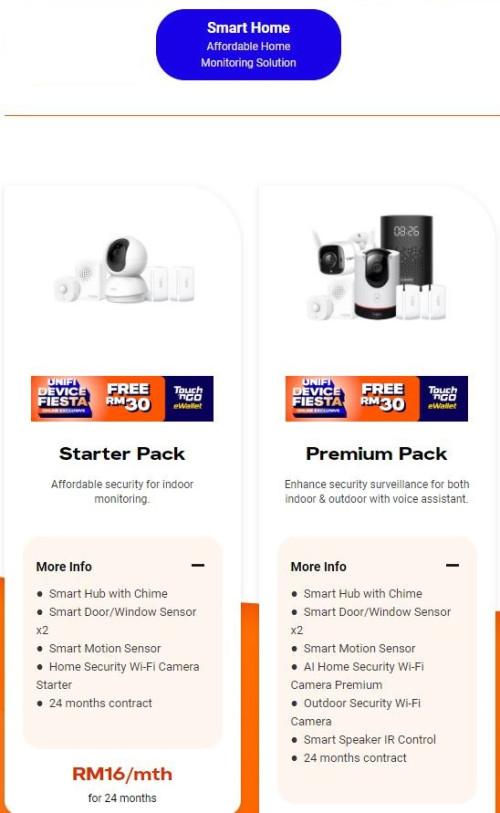
Hi guys, any one using unifi smart home?
Need some review pro and cons.

user posted image
outdoorxplorer
post Oct 24 2024, 03:56 PM

~Money Only Bring Pleasures When You Spent It WISELY!~
*******
Senior Member
2,028 posts

Joined: Jan 2003
From: Kuala Lumpur, MYS


QUOTE(kwss @ Oct 24 2024, 01:40 PM)
Yes it is the same. If you tried it and it didn't work, you can still use your Huawei until you figure it out.
Actually the IP address didn't matter and won't conflict with your Asus.

The longer explanation:
The Asus will do PPPoE with VLAN 500 and hence it will not care about what IP address is on the bridge.
Even if you untag VLAN 500, the router will still perform PPPoE on the WAN port and don't take any IP address via DHCP. All Internet traffic will be PPP encapsulated and it shouldn't trigger any forwarding rule by the bridge device.

Say you use 192.168.1.1 on your Asus and 192.168.0.1 on D-Link, they still won't be able to communicate.
Asus will forward packet to D-Link due to default route. However it is PPP encapsulated and won't be processed.

Both Asus and D-Link need to have a static route to tell them which port these 2 subnet should go.

Alternatively, you must configure a static IP on the Asus facing the bridge port and NAT it.

I am not aware of any home router that allows this kind of configuration. But then I don't know home router much.
*
LAN 4 and not LAN 1ya. http://dlinkrouter.local works too.
ssslayerrr
post Oct 24 2024, 04:17 PM

Enthusiast
*****
Senior Member
805 posts

Joined: Dec 2004


QUOTE(MarcoFromTropoja @ Oct 19 2024, 10:27 PM)
user posted image

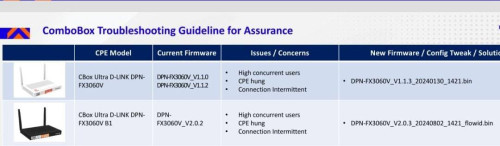
it will only update the firmware, all your current setting wont change. for safety purposes, make a backup
for me its worth it. fix my problem
*
Thanks for the firmware man

By any chance, could you ask the technician for the White dlink ONR updated firmware?

ie: DPN-FX3060V_1.1.3_20240130_1421.bin

Thanks
ssslayerrr
post Oct 24 2024, 04:19 PM

Enthusiast
*****
Senior Member
805 posts

Joined: Dec 2004


QUOTE(kwss @ Oct 18 2024, 11:57 AM)
Firmware v2.0.3 for black D-Link ONR.
Thanks to MarcoFromTropoja

Download link:
https://www.mediafire.com/file/4s9bfvbco0hw...flowid.bin/file

SHA-256 sum:
e91b8b93b3bf93a5836631179f8404443abccb328369a34f90f8ea47c0dba81a
*
Thank you for this.
QuantumEdge
post Oct 24 2024, 05:18 PM

Regular
******
Senior Member
1,603 posts

Joined: Jan 2016


QUOTE(emilyngsc @ Oct 24 2024, 11:40 AM)
refer back 195 pages posted by blacktubi & thanks to him.
*
Thanks, I ended up reusing ZTE F620 instead of the combo unit
Plug and play, not reconfiguration required
eugenecctan
post Oct 24 2024, 09:21 PM

Wee Wang Wang
******
Senior Member
1,058 posts

Joined: Nov 2009


QUOTE(tng55 @ Oct 24 2024, 11:13 AM)
me to
i also paying for RM119 For 500mb Won't renew for higher price unless speed upgrade

waiting higher speed
*
Ya wei, I saw someone mentioned upgraded to 800mb. Not sure real or not.
shdin271
post Oct 24 2024, 09:39 PM

Casual
***
Junior Member
365 posts

Joined: May 2011
From: gotham city


Hi guys need advice. Recently subscribed unifi 300mbps landed house. Tm gave the fiberhome router.

Issue is im getting bad signal at 2nd floor. I have wired backhaul to family area up stairs which ive hooked up dlink dir 850l from my old house.

Even so, my phone isnt auto roaming to the dlink.. i need to forget & rejoin the ssid.

Any advise on what to do? Should i get a mesh or AP?
Im expecting seamless autoroaming & good wifi speed (im getting 260mbps when connected to dlink - which im satisfied)

This post has been edited by shdin271: Oct 24 2024, 09:40 PM
blacktubi
post Oct 24 2024, 10:50 PM

-
Group Icon
Elite
8,430 posts

Joined: Jul 2008

QUOTE(shdin271 @ Oct 24 2024, 09:39 PM)
Hi guys need advice. Recently subscribed unifi 300mbps landed house. Tm gave the fiberhome router.

Issue is im getting bad signal at 2nd floor. I have wired backhaul to family area up stairs which ive hooked up dlink dir 850l from my old house.

Even so, my phone isnt auto roaming to the dlink.. i need to forget & rejoin the ssid.

Any advise on what to do? Should i get a mesh or AP?
Im expecting seamless autoroaming & good wifi speed (im getting 260mbps when connected to dlink - which im satisfied)
*
For roaming to work properly, usually you need to buy something that at least comes with 802.11k/v

TP-Link Deco series
TP-Link Archer with EasyMesh
ASUS AiMesh
tng55
post Oct 24 2024, 11:44 PM

Regular
******
Senior Member
1,459 posts

Joined: Sep 2021


QUOTE(eugenecctan @ Oct 24 2024, 09:21 PM)
Ya wei, I saw someone mentioned upgraded to 800mb. Not sure real or not.
*
i know someone got free 800mbps RM119
mine still 500Mbps RM119 i don't get any upgrade free 800Mbps sad.gif
Khan92
post Oct 25 2024, 02:49 AM

To live is to die
****
Junior Member
558 posts

Joined: Aug 2017


QUOTE(tng55 @ Oct 24 2024, 11:44 PM)
i know someone got free 800mbps RM119
mine still 500Mbps RM119 i don't get any upgrade free 800Mbps  sad.gif
*
Can ask he/she What package using, got tv or not
shdin271
post Oct 25 2024, 07:27 AM

Casual
***
Junior Member
365 posts

Joined: May 2011
From: gotham city


QUOTE(blacktubi @ Oct 24 2024, 10:50 PM)
For roaming to work properly, usually you need to buy something that at least comes with 802.11k/v

TP-Link Deco series
TP-Link Archer with EasyMesh
ASUS AiMesh
*
Can i still use the fiberhome router or do i need a router & mesh?
Cavino
post Oct 25 2024, 08:41 AM

Enthusiast
*****
Senior Member
842 posts

Joined: May 2009


QUOTE(outdoorxplorer @ Oct 24 2024, 03:56 PM)
LAN 4 and not LAN 1ya. http://dlinkrouter.local works too.
*
LAN Port 4....This is the ONE I missed. Hahaha. I tried port 1 to 3 but never tried port 4 coz by default port 4 I assume reserved for hppetv, so never cross my mind to use port 4.

I managed to access it now, the IP is correct. Port 4 is the key.....thank you thank you. Such a simple solution that is there all the time, somehow I just skipped port 4 automatically without thinking.

This post has been edited by Cavino: Oct 25 2024, 11:49 AM
BenYeeHua
post Oct 25 2024, 09:50 AM

Regular
******
Senior Member
1,873 posts

Joined: Nov 2010


QUOTE(norhisham @ Oct 24 2024, 03:38 PM)
Hi guys, any one using unifi smart home?
Need some review pro and cons.

user posted image
*
Better get yourself Mi one, MiPush + MiHome is battery friendly to your smartphone, they will push ASAP when detect any movement, unless you are not using XiaoMi/Hyper OS ROM smartphone la.

It is very good when you going outstation. thumbsup.gif

For other brand smartphone and CCTV, they need to run at background for notification push, but if you tech enough, sure you can seek those standard protocal and make a Telegram or Discord bot push to your phone via GMS, and the data sure process on your local only.


And well, as nowadays latest phone is 6000MaH battery with 45W+ quick charge, so it is really not a battery life issues anymore lol. tongue.gif
blacktubi
post Oct 25 2024, 10:09 AM

-
Group Icon
Elite
8,430 posts

Joined: Jul 2008

QUOTE(BenYeeHua @ Oct 25 2024, 09:50 AM)
Better get yourself Mi one, MiPush + MiHome is battery friendly to your smartphone, they will push ASAP when detect any movement, unless you are not using XiaoMi/Hyper OS ROM smartphone la.

It is very good when you going outstation. thumbsup.gif

For other brand smartphone and CCTV, they need to run at background for notification push, but if you tech enough, sure you can seek those standard protocal and make a Telegram or Discord bot push to your phone via GMS, and the data sure process on your local only.
And well, as nowadays latest phone is 6000MaH battery with 45W+ quick charge, so it is really not a battery life issues anymore lol. tongue.gif
*
Tapo uses GMS and camera stream loads faster than Xiaomi. Stream delay is lesser as well. laugh.gif

Another fun fact, Tapo is currently hosted in Amazon AWS. And, it uses SG region for users here.

The last time I checked, Xiaomi is hosted in China. If your ISP have messed up routing to China then you gonna face issues with Xiaomi smart home ecosystem mainly on delay in actions.
tng55
post Oct 25 2024, 11:58 AM

Regular
******
Senior Member
1,459 posts

Joined: Sep 2021


QUOTE(Khan92 @ Oct 25 2024, 02:49 AM)
Can ask he/she What package using, got tv or not
*
sorry i wont take TV its 3 Year contract not worth lah
safety 2 year contract easy to get more higher speed with lower price like that explain how can get cheap RM119 = 500Mbps lol now days really can't get RM119 500Mbps so nowdays RM139 500Mbps lol crazy high price lol
mine is SWU 3.0 RM119 500Mbps + 6 month free bill + 2x mesh router lol
YoungMan
post Oct 25 2024, 02:41 PM

Look at all my stars!!
*******
Senior Member
6,839 posts

Joined: Oct 2008
From: Kuala Lumpur


QUOTE(tng55 @ Oct 25 2024, 11:58 AM)
sorry i wont take TV its 3 Year contract not worth lah
safety 2 year contract easy to get more higher speed with lower price like that explain how can get cheap RM119 = 500Mbps lol now days really can't get RM119 500Mbps so nowdays RM139 500Mbps lol crazy high price lol
mine is SWU 3.0 RM119 500Mbps + 6 month free bill + 2x mesh router lol
*
Yours already cheap still tak bersyukur ke? Since you are staying with Unifi and not switch provider, it is worth to take the TV.
megahertz
post Oct 25 2024, 03:32 PM

i always smiling, problem?
******
Senior Member
1,846 posts

Joined: Apr 2008
QUOTE(vapanel @ Oct 16 2024, 11:04 AM)
I think nobody will believe you unless you use cable to test

WiFi is unreliable
*
this same answer giving by the CS and i tiaw her kaw2. i hv my degree in network for nothing and working in IT for more than decades
if dont believe, then check their own system, from their system able to check my speed test done via wifi previously that i able to get 300mbps.
from the speed graph also can see, the consistent at 200mbps. if due to my wifi issue, the speed graph wont be like that. and if lan, normally will cap at 100mbps due to cable type, but im using cat6, all ports is 1gps.

but i retest via lan just to make her satisfied and also speed at 200mbps. now all keep quiet after i ask someone competent /technical attend my issue.
QUOTE(PJng @ Oct 16 2024, 11:49 AM)
300mbps below all private IP
*
sorry , mine able to get public after i request to change it, so dont asnwer if dont know , else u are giving wrong fact
megahertz
post Oct 25 2024, 03:35 PM

i always smiling, problem?
******
Senior Member
1,846 posts

Joined: Apr 2008
QUOTE(blacktubi @ Oct 25 2024, 10:09 AM)
Tapo uses GMS and camera stream loads faster than Xiaomi. Stream delay is lesser as well. laugh.gif

Another fun fact, Tapo is currently hosted in Amazon AWS. And, it uses SG region for users here.

The last time I checked, Xiaomi is hosted in China. If your ISP have messed up routing to China then you gonna face issues with Xiaomi smart home ecosystem mainly on delay in actions.
*
im not sure for IPTV, but my xiaomi phone now route to SG cloud . i believe same thing for IPTV since my iptv also quite fast, and my iptv is global version, not china version.
my friend also reported his iptv cant work now , because he bought the china version.

495 Pages « < 397 398 399 400 401 > » Top
Topic ClosedOptions
 

Change to:
| Lo-Fi Version
0.0289sec    1.64    6 queries    GZIP Disabled
Time is now: 24th December 2025 - 05:14 PM