

800 Mbps upgraded to 1Gbps yesterday with black HW. Today speed dropped to 300Mbps. Looks like gotta move back to white HW.
Unifi Official TM UniFi High Speed Broadband Thread V42, READ 1ST PAGE FOR RELEVANT WIFI INFO!
Unifi Official TM UniFi High Speed Broadband Thread V42, READ 1ST PAGE FOR RELEVANT WIFI INFO!
|
|
 Aug 27 2024, 04:56 PM Aug 27 2024, 04:56 PM
Return to original view | IPv6 | Post
#1
|
 
Senior Member
2,028 posts Joined: Jan 2003 From: Kuala Lumpur, MYS  
|
800 Mbps upgraded to 1Gbps yesterday with black HW. Today speed dropped to 300Mbps. Looks like gotta move back to white HW.
|
|
|
|
|
|
Oct 24 2024, 03:56 PM
Return to original view | IPv6 | Post
#2
|
|
Senior Member
2,028 posts Joined: Jan 2003 From: Kuala Lumpur, MYS
|
QUOTE(kwss @ Oct 24 2024, 01:40 PM) Yes it is the same. If you tried it and it didn't work, you can still use your Huawei until you figure it out. LAN 4 and not LAN 1ya. http://dlinkrouter.local works too.Actually the IP address didn't matter and won't conflict with your Asus. The longer explanation: The Asus will do PPPoE with VLAN 500 and hence it will not care about what IP address is on the bridge. Even if you untag VLAN 500, the router will still perform PPPoE on the WAN port and don't take any IP address via DHCP. All Internet traffic will be PPP encapsulated and it shouldn't trigger any forwarding rule by the bridge device. Say you use 192.168.1.1 on your Asus and 192.168.0.1 on D-Link, they still won't be able to communicate. Asus will forward packet to D-Link due to default route. However it is PPP encapsulated and won't be processed. Both Asus and D-Link need to have a static route to tell them which port these 2 subnet should go. Alternatively, you must configure a static IP on the Asus facing the bridge port and NAT it. I am not aware of any home router that allows this kind of configuration. But then I don't know home router much.  Cavino liked this post
|
|
|
Jan 17 2025, 07:25 PM
Return to original view | IPv6 | Post
#3
|
|
Senior Member
2,028 posts Joined: Jan 2003 From: Kuala Lumpur, MYS
|
Please share the latest VERSION 2.0.6 firmware. TIA
QUOTE(MarcoFromTropoja @ Jan 17 2025, 06:11 PM) so as for today 17jan, the progress is around 80% speed already back to normal getting around 1060-1080mbps the main culprit is the cabinet (huawei infra) that handle this area they change the network card or port im not sure the terms based on the tech report not yet closed, since they are trying to lower down the fibre reading. current is -24 getting the new firmware for onu dlink dpn-fx3060v black : VERSION 2.0.6[U].. most user using 2.0.2 / 2.0.3 wireless speed at 5ghz improve drastically, getting more than 800mbps at distance around 10meter from onu ( previous 550-700mbps only) will update again once they fixed the fibre reading and after report closed  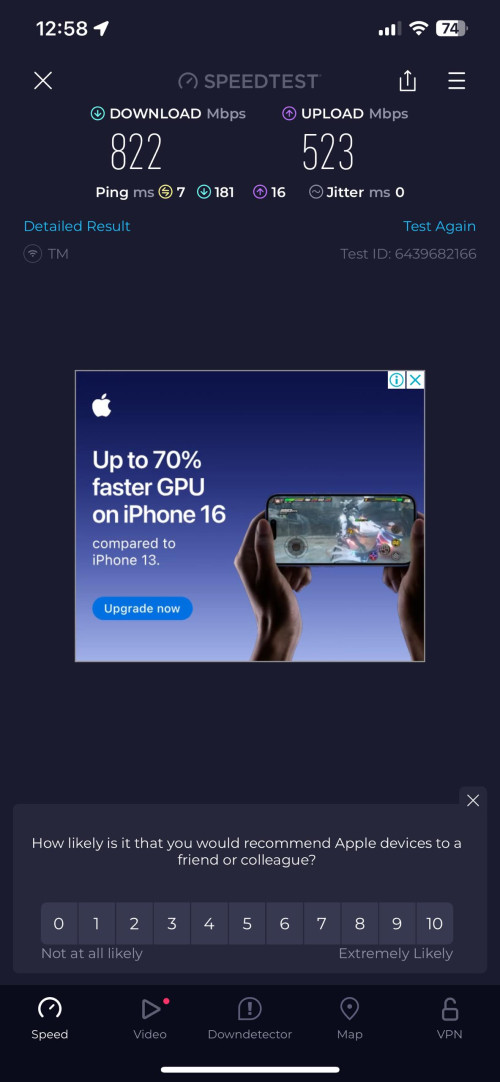 |
|
|
Feb 4 2025, 12:40 PM
Return to original view | IPv6 | Post
#4
|
|
Senior Member
2,028 posts Joined: Jan 2003 From: Kuala Lumpur, MYS
|
QUOTE(MarcoFromTropoja @ Feb 2 2025, 11:50 PM) ill send u link for 2.0.7 next week share the link with everyone please! |
|
Topic ClosedOptions
|
| Change to: |  0.2559sec 0.2559sec
 1.10 1.10
 7 queries 7 queries
 GZIP Disabled GZIP Disabled
Time is now: 11th December 2025 - 09:17 AM |
 Quote
Quote