Welcome Guest ( Log In | Register )

Bump Topic Topic Closed RSS Feed
495 Pages « < 329 330 331 332 333 > » Bottom

Outline · [ Standard ] · Linear+

Unifi Official TM UniFi High Speed Broadband Thread V42, READ 1ST PAGE FOR RELEVANT WIFI INFO!

views
     
PRSXFENG
post Sep 10 2024, 09:09 PM

Look at all my stars!!
*******
Senior Member
2,611 posts

Joined: Nov 2020


QUOTE(ivantks @ Sep 10 2024, 09:09 PM)
Does anybody know if the ip redirection is still in place?  When I do ipconfig /all.. the DNS still points to 2001:e68:542f:2d04::1.  The DNS in my router is set to 1.1.1.1
*
that's your IPv6 DNS

Please check IPv6 settings on the router
BenYeeHua
post Sep 10 2024, 09:14 PM

Regular
******
Senior Member
1,873 posts

Joined: Nov 2010


QUOTE(Oltromen Ripot @ Sep 10 2024, 09:07 PM)
baaah, i don't have capacity or patience if having to pry open and pin here and there.
no time and no conducive working@home enviroment that can support such enthusiastic endeavour.

but it is such a waste that i have 2 more V1 and V2 lying idle in store room.
would have been good if there's app that can do the pony tricks i want, but it will be tricky if needing to relaunch apps again and again, especially when i am away.

(i have a 2nd V2 being used for Android gaming purpose in kids' bedroom.)
*
If the link is for your model, seem easy, just might time wasted lol.
blackbox14
post Sep 10 2024, 09:19 PM

Casual
***
Junior Member
349 posts

Joined: Jul 2012
QUOTE(yenchenje @ Sep 10 2024, 08:30 PM)
As someone that's running Unifi full stack for my network, it's like a drug to me personally, once I get one thing I want more, that might also applies to you

Considering you are quite technical from your conversation, Mikrotik might be your bread and butter, or even better, use OPNSense as your main and the rest just mix and match and DIY yourself  thumbsup.gif

Also from what I can gather, PPPoE on Ubiquiti is not as fast as maybe even the Archer C9, Unifi isn't that optimized to use PPPoE protocol and it's more suitable for using like iPoE, if you ever want to push more speed, that might also be a limiting factor. Currently my UDM SE can only pull around 850-870, max I've seen is 910-920 on my 1Gbps, but that might just be an OLT limitation on my side and might again DIFFER from you
*
I'm actually more of a set and forget kind of person. tongue.gif I did consider getting into Mikrotik once, then decided against it since I need something that is easier to configure/re-configure in the event of emergencies. Also have a spare old Optiplex that I considered setting up OPNsense on, but it isn't practical to use it with my family members not knowing that much about tech. It might cause them problems serving its role.

The main goal right now is just to get a router that can handle Wireguard and is simple to use and configure if the DNS block returns and affects DoT and DoH again.

The ASUS routers that support Wireguard seem to come with a feature that can separate VPN connection from non VPN connection (VPN Fusion), so I might be looking into those more.

PRSXFENG
post Sep 10 2024, 09:23 PM

Look at all my stars!!
*******
Senior Member
2,611 posts

Joined: Nov 2020


QUOTE(blackbox14 @ Sep 10 2024, 09:19 PM)
The ASUS routers that support Wireguard seem to come with a feature that can separate VPN connection from non VPN connection (VPN Fusion), so I might be looking into those more.
*
Just looked into it, interesting

GL-iNet has more simpler options, you can set it for example so some MAC Addresses bypass it
https://docs.gl-inet.com/router/en/4/interf.../vpn_dashboard/

but no "multiple vpn connections for multiple different devices"
hazairi
post Sep 10 2024, 09:23 PM

Look at all my stars!!
*******
Senior Member
2,694 posts

Joined: Feb 2007
From: KL


QUOTE(yenchenje @ Sep 10 2024, 08:51 PM)
Depends on your area OLT, 10G/2.5G equipment on my side rarely can pull over 900 nowadays but back at my old parents place in Ulu Tiram with Alcatel Lucent can pull 1040Mbps even when network is not completely quiet

You will never notice that extra ~60Mbps bandwidth most of the time, TM won't bother to help you get the extra as they're trained to just approve anything beyond like 90% of the advertised speed. If you want to spend the extra money to chase the bandwidth down, be ready to spend money as 10G equipment is cheaper than 2.5G equipment, and you might or might not get screwed over by the OLT that your fiber ONT is connected to
*
yup agreed. Not worth to upgrade equipment just to get that extra 50-60Mbps. Plus, for me it's already considered overkill dy. But SWU package there's no 800Mbps (my old package that I was using). But OK la, at least this package can get 500Mbps upload which is useful for me, as I do alot of uploads to cloud
tng55
post Sep 10 2024, 09:25 PM

Regular
******
Senior Member
1,445 posts

Joined: Sep 2021


QUOTE(hazairi @ Sep 10 2024, 02:11 PM)
I already put it on 2.5Gbps port

My router is TP-LINK AX6600.

I think the limitation is my PC's network card.
*
TP-LINK AX6600 that router 1GBPS Lan port hahaha
2.5GBPS = WAN PORT but LAN PORT ALL ARE 1GBPS no there LAN PORT 2.5GBPS
hazairi
post Sep 10 2024, 09:27 PM

Look at all my stars!!
*******
Senior Member
2,694 posts

Joined: Feb 2007
From: KL


QUOTE(tng55 @ Sep 10 2024, 09:25 PM)
TP-LINK AX6600 that router 1GBPS Lan port hahaha
2.5GBPS = WAN PORT but LAN PORT ALL ARE 1GBPS no there LAN PORT 2.5GBPS
*
yeah correct, someone already highlighted that to me.
tng55
post Sep 10 2024, 09:31 PM

Regular
******
Senior Member
1,445 posts

Joined: Sep 2021


QUOTE(hazairi @ Sep 10 2024, 03:25 PM)
you noob ???
1× 2.5 Gbps WAN/LAN Port
1× 1 Gbps WAN/LAN Port
3× 1 Gbps LAN Ports

1x 2.5GBPS WAN Port = ONR/MODEM only
3x 1GBPS LAN Ports = PC you won't get 2.5Gbps
if you buy PCIE CARD 2.5Gbps but you router is 1GBPS Port lan

1 Gbps Lan Ports = PC 2.5GBPS = you get 940Mbps wont go over 1GBPS understand
blackbox14
post Sep 10 2024, 09:35 PM

Casual
***
Junior Member
349 posts

Joined: Jul 2012
QUOTE(PRSXFENG @ Sep 10 2024, 09:23 PM)
Just looked into it, interesting

GL-iNet has more simpler options, you can set it for example so some MAC Addresses bypass it
https://docs.gl-inet.com/router/en/4/interf.../vpn_dashboard/

but no "multiple vpn connections for multiple different devices"
*
I do like the Flint 2 more as a package, but my main issue with it is that the Shopee seller is overseas and not a Shopee Mall certified store.

Mikrotik, Ubiquiti and ASUS are all available locally, making warranty claims much easier in the event of DoA or any other issues.
hazairi
post Sep 10 2024, 09:36 PM

Look at all my stars!!
*******
Senior Member
2,694 posts

Joined: Feb 2007
From: KL


QUOTE(tng55 @ Sep 10 2024, 09:31 PM)
you noob ???
1× 2.5 Gbps WAN/LAN Port
1× 1 Gbps WAN/LAN Port
3× 1 Gbps LAN Ports

1x 2.5GBPS WAN Port = ONR/MODEM only
3x 1GBPS LAN Ports = PC you won't get 2.5Gbps
if you buy PCIE CARD 2.5Gbps but you router is 1GBPS Port lan

1 Gbps Lan Ports = PC 2.5GBPS = you get 940Mbps wont go over 1GBPS understand
*
yup, yup. someone already highlighted it just now
dev/numb
post Sep 10 2024, 09:36 PM

On my way
****
Junior Member
691 posts

Joined: Nov 2021
QUOTE(blackbox14 @ Sep 10 2024, 07:34 PM)
Kind of off-topic, but after the recent DNS incident, I'm trying to find a router that can run a VPN.

So far looking at Ubiquiti Ultra Cloud Gateway. Will probably use my old Archer C9 as a wireless AP. Would that be ok?

I'm guessing no issues running it with TM Unifi?
*
By “can run a VPN” do you mean server or client? I assume it’s the latter (meaning act a client for a VPN service you’ve subscribed to) since you mentioned the DNS shithousery. Do note that most Ubiquiti gateways don’t have WireGuard client functionality listed in their specs, only WireGuard server. I asked for confirmation in the Ubiquiti thread here, but have yet to get a reply. If true, your VPN provider will need to offer OpenVPN (most do) or IPSec protocols (some don’t).

There’s also the matter of hardware acceleration for various protocols to consider. I’ve not dug deep enough yet. I know Mikrotik routers have IPSec acceleration built in. Mediatek processors in GL.iNet and Asus routers support multi-threaded hardware acceleration for WireGuard. The Broadcom chips in higher end Asus (the models compatible with Merlin firmware) have WireGuard acceleration capped to a single core, from what I’ve read on SNB forums.

Edit: if you’re set on using the old router an a wireless AP, you could also look at repurposing some old desktop/nuc with a network card and putting OpenWrt on it.

This post has been edited by dev/numb: Sep 10 2024, 09:50 PM
yenchenje
post Sep 10 2024, 09:39 PM

Enthusiast
*****
Junior Member
932 posts

Joined: Dec 2019
QUOTE(blackbox14 @ Sep 10 2024, 09:19 PM)
I'm actually more of a set and forget kind of person.  tongue.gif  I did consider getting into Mikrotik once, then decided against it since I need something that is easier to configure/re-configure in the event of emergencies. Also have a spare old Optiplex that I considered setting up OPNsense on, but it isn't practical to use it with my family members not knowing that much about tech. It might cause them problems serving its role.

The main goal right now is just to get a router that can handle Wireguard and is simple to use and configure if the DNS block returns and affects DoT and DoH again.

The ASUS routers that support Wireguard seem to come with a feature that can separate VPN connection from non VPN connection (VPN Fusion), so I might be looking into those more.
*
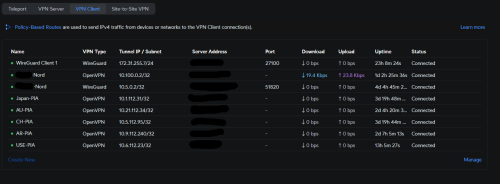
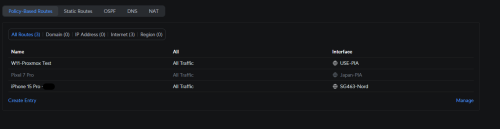
Then you can consider using Unifi. currently I have 8 VPN connected on my UDM SE and just using routing policy to route specific devices through certain VPN (Sometimes I route my own devices through VPN on router level to bypass TM's horrible routing), but UCG-Ultra probably can't handle that much OVPN/WG session at once, I'd say maybe 2-3 sessions at once and use policy to route

user posted image
user posted image
Oltromen Ripot
post Sep 10 2024, 09:39 PM

👍 999999 person Likes this member
*******
Senior Member
4,034 posts

Joined: Dec 2019
is BiliBili tv app working?

No change at all to my router config. But this is 1st time i launched since TM fooled around with DNS.
eugenecctan
post Sep 10 2024, 09:45 PM

Wee Wang Wang
******
Senior Member
1,058 posts

Joined: Nov 2009


QUOTE(TongCN @ Sep 10 2024, 08:35 AM)
The guy say permanent
03 7964 7000
Gonna walk in for better communication, the phone call one very hard to understand cause that guy like keep read from script.

____________________________________________________________________________________
Man, that's good deal for 1Gbps offer and 300mbps
Gonna walk in and ask for it then.

Thanks!
*
So conclusion, new plan as below,
300mb rm99
500mb rm139 free upgrade to 800mb with 3 months waiver
1gb RM159 6 months waiver + Disney

Correct?

This post has been edited by eugenecctan: Sep 10 2024, 09:51 PM
syahpian
post Sep 10 2024, 09:46 PM

Enthusiast
*****
Junior Member
813 posts

Joined: Jul 2008
From: Kota Kinabalu <-> Kuala Lumpur


QUOTE(eugenecctan @ Sep 10 2024, 09:45 PM)
So conclusion, new plan as below,
300mb rm99
500mb rm139 free upgrade to 800mb with 3 months waiver
1Tb RM159 6 months waiver + Disney

Correct?
*
1Tbps? that so cheap hmm.gif

or you mean 1Gbps? sweat.gif

This post has been edited by syahpian: Sep 10 2024, 09:47 PM
blackbox14
post Sep 10 2024, 09:46 PM

Casual
***
Junior Member
349 posts

Joined: Jul 2012
QUOTE(dev/numb @ Sep 10 2024, 09:36 PM)
By “can run a VPN” do you mean server or client? I assume it’s the latter (meaning act a client for a VPN service you’ve subscribed to) since you mentioned the DNS shithousery. Do note that most Ubiquiti gateways don’t have WireGuard client functionality listed in their specs, only WireGuard server. I asked for confirmation in the Ubiquiti thread here, but have yet to get a reply. If true, your VPN provider will need to offer OpenVPN (most do) or IPSec protocols (some don’t).

There’s also the matter of hardware acceleration for various protocols to consider. I’ve not dug deep enough yet. I know Mikrotik routers have IPSec acceleration built in. Mediatek processors in GL.iNet and Asus routers support multi-threaded hardware acceleration for WireGuard. The Broadcom chips in higher end Asus (the models compatible with Merlin firmware) have WireGuard acceleration capped to a single core, from what I’ve read on SNB forums. Hope this helps.
*
Yup meant VPN Client not server.

That info helps a lot, thanks. I can narrow down the choices based on that and my budget now.

QUOTE(yenchenje @ Sep 10 2024, 09:39 PM)
Then you can consider using Unifi. currently I have 8 VPN connected on my UDM SE and just using routing policy to route specific devices through certain VPN (Sometimes I route my own devices through VPN on router level to bypass TM's horrible routing), but UCG-Ultra probably can't handle that much OVPN/WG session at once, I'd say maybe 2-3 sessions at once and use policy to route

user posted image
user posted image
*
UDM-SE is way over my budget, haha.

Now as per what dev/numb said I need to make sure UCG-Ultra can even act as a Wireguard client. Otherwise it's ASUS for me.
yenchenje
post Sep 10 2024, 09:48 PM

Enthusiast
*****
Junior Member
932 posts

Joined: Dec 2019
QUOTE(blackbox14 @ Sep 10 2024, 09:46 PM)
Yup meant VPN Client not server.

That info helps a lot, thanks. I can narrow down the choices based on that and my budget now.
UDM-SE is way over my budget, haha.

Now as per what dev/numb said I need to make sure UCG-Ultra can even act as a Wireguard client. Otherwise it's ASUS for me.
*
https://www.reddit.com/r/Ubiquiti/comments/...reguard_client/

No sane home user should buy the UDM SE and I'm not advocating it, I'm not sane tongue.gif

From the reddit thread you can get some reference
anip94
post Sep 10 2024, 09:48 PM

Getting Started
**
Junior Member
101 posts

Joined: Nov 2008
From: KL
from 5mbps to 30mbps to 100mbps and now 300mbps plan. twitch streaming experience is still dogshit. it will randomly buffering and needed to pause and play to get it working again. is TM actively throttling twitch server?
eugenecctan
post Sep 10 2024, 09:51 PM

Wee Wang Wang
******
Senior Member
1,058 posts

Joined: Nov 2009


QUOTE(syahpian @ Sep 10 2024, 09:46 PM)
1Tbps? that so cheap  hmm.gif

or you mean 1Gbps?  sweat.gif
*
Corrected. Sorry. smile.gif
yenchenje
post Sep 10 2024, 09:52 PM

Enthusiast
*****
Junior Member
932 posts

Joined: Dec 2019
QUOTE(anip94 @ Sep 10 2024, 09:48 PM)
from 5mbps to 30mbps to 100mbps and now 300mbps plan. twitch streaming experience is still dogshit. it will randomly buffering and needed to pause and play to get it working again. is TM actively throttling twitch server?
*
Never had much of an issue on 1Gbps here, usage around 10Mbps..? Suspect might be your CGNAT gateway fucking up

495 Pages « < 329 330 331 332 333 > » Top
Topic ClosedOptions
 

Change to:
| Lo-Fi Version
0.0196sec    0.83    6 queries    GZIP Disabled
Time is now: 16th December 2025 - 01:32 PM