Welcome Guest ( Log In | Register )

Bump Topic Topic Closed RSS Feed
495 Pages « < 225 226 227 228 229 > » Bottom

Outline · [ Standard ] · Linear+

Unifi Official TM UniFi High Speed Broadband Thread V42, READ 1ST PAGE FOR RELEVANT WIFI INFO!

views
     
Voldfusion
post Aug 18 2024, 11:56 AM

New Member
*
Newbie
3 posts

Joined: Jan 2009
Hello. Does anyone have the firmware for tenda ac18 V15.03.3.11_multi? I accidentally updated the firmware and couldnt find it online to restore the firmware
aniq8676
post Aug 18 2024, 12:19 PM

Regular
******
Senior Member
1,524 posts

Joined: Dec 2020
From: Perak


QUOTE(tzxsean @ Aug 17 2024, 08:31 PM)
received notification that I got the free upgrade from 300mbps to 500 mbps (previous SWU campaign customer)
*
Plan name change to "Pro Upgrade"
hyperwavedrift
post Aug 18 2024, 09:31 PM

Getting Started
**
Junior Member
89 posts

Joined: Mar 2017
QUOTE(Jeffreynsx @ Aug 17 2024, 11:07 PM)
Yes. I found out a solution. Try to clear your browser history and cache. The surfing speed will restore back to normal.
*
Anybody tried this? Do you have to clear everything?
olivur
post Aug 18 2024, 10:41 PM

ollie ollie oxen free
******
Senior Member
1,282 posts

Joined: Jul 2011
anyone else in pj area crawling rn?
kwss
post Aug 18 2024, 10:47 PM

Regular
******
Senior Member
1,208 posts

Joined: Aug 2018
QUOTE(olivur @ Aug 18 2024, 10:41 PM)
anyone else in pj area crawling rn?
*
Not only PJ. Everything is broken right now.
TM is really penipu speedtest.
Ookla Speedtest: 831 Mbps
Cloudflare Speedtest: 14.4 Mbps
olivur
post Aug 18 2024, 10:56 PM

ollie ollie oxen free
******
Senior Member
1,282 posts

Joined: Jul 2011
QUOTE(kwss @ Aug 18 2024, 10:47 PM)
Not only PJ. Everything is broken right now.
TM is really penipu speedtest.
Ookla Speedtest: 831 Mbps
Cloudflare Speedtest: 14.4 Mbps
*
even loading the site to reply to this takes forever lmao

what a time to be alive
zellleonhart
post Aug 18 2024, 10:58 PM

Stars stars stars
*******
Senior Member
5,075 posts

Joined: Oct 2008


user posted image
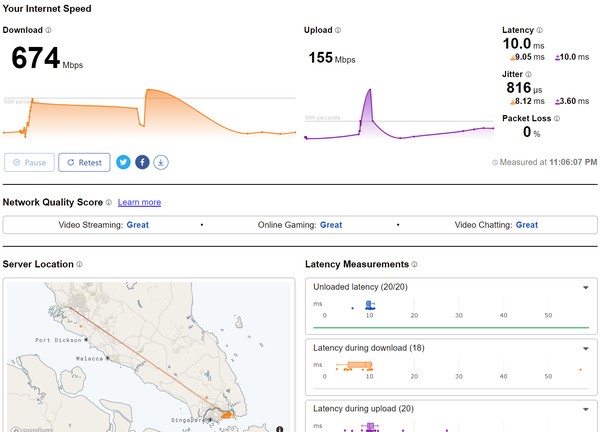
Super slow.. I am on 800mbps somemore. Fast.com and tm speedtest still very fast.
hasmidzul_jojo
post Aug 18 2024, 11:03 PM

Getting Started
**
Junior Member
203 posts

Joined: Feb 2008
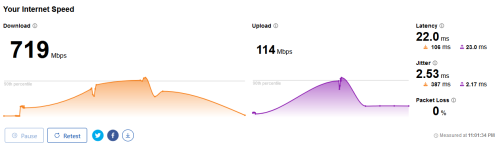
These were mine, 500mbps unifi package

user posted image
PRSXFENG
post Aug 18 2024, 11:04 PM

Look at all my stars!!
*******
Senior Member
2,614 posts

Joined: Nov 2020


QUOTE(kwss @ Aug 18 2024, 10:47 PM)
Not only PJ. Everything is broken right now.
TM is really penipu speedtest.
Ookla Speedtest: 831 Mbps
Cloudflare Speedtest: 14.4 Mbps
*
Speed test is really just a test between you and their servers
Or, other servers if you pick so
But usually it defaults to ISP server

Fast.com is to test connection to netflix servers

Cloudflare speed test is more unique, it's downloading a bunch of slowly increasing in size files to gauge it, it's not the most accurate thing but it does reflect the real world experience of you actually trying to load stuff
countingcrows
post Aug 18 2024, 11:10 PM

Getting Started
**
Junior Member
259 posts

Joined: Feb 2023
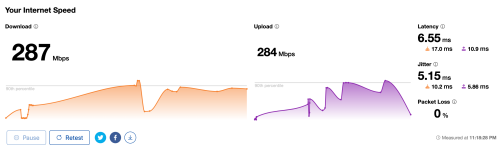
user posted image

user posted image

This post has been edited by countingcrows: Aug 18 2024, 11:18 PM
kwss
post Aug 18 2024, 11:12 PM

Regular
******
Senior Member
1,208 posts

Joined: Aug 2018
QUOTE(hasmidzul_jojo @ Aug 18 2024, 11:03 PM)
These were mine, 500mbps unifi package
user posted image
*
Your location please...


QUOTE(PRSXFENG @ Aug 18 2024, 11:04 PM)
Speed test is really just a test between you and their servers
Or, other servers if you pick so
But usually it defaults to ISP server

Fast.com is to test connection to netflix servers

Cloudflare speed test is more unique, it's downloading a bunch of slowly increasing in size files to gauge it, it's not the most accurate thing but it does reflect the real world experience of you actually trying to load stuff
*
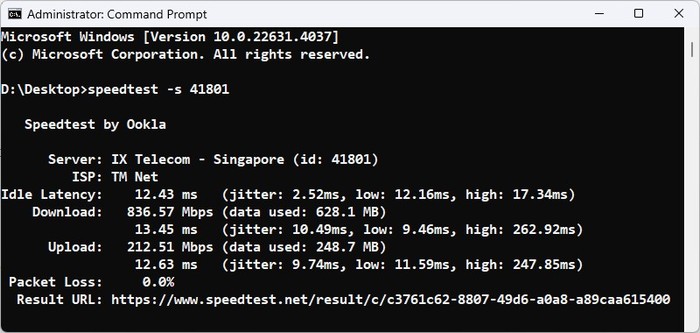
Normally when TM cheat speedtest, test with SG server still works well. Not today.
I still consider Cloudflare Speedtest the gold standard. Ookla speedtest is purely dick measurement.
CODE

âžœ  speedtest ./speedtest -s 31293

  Speedtest by Ookla

     Server: Pacific Internet (S) - Singapore (id: 31293)
        ISP: TM Net
Idle Latency:    20.88 ms   (jitter: 1.19ms, low: 19.84ms, high: 22.19ms)
   Download:   164.57 Mbps (data used: 196.5 MB)                                                  
                21.18 ms   (jitter: 6.27ms, low: 11.02ms, high: 241.84ms)
     Upload:   202.78 Mbps (data used: 248.5 MB)                                                  
                61.00 ms   (jitter: 8.35ms, low: 19.50ms, high: 133.68ms)
Packet Loss: Not available.
 Result URL: https://www.speedtest.net/result/c/4a1f220b-3589-4367-ad82-483c62925c87
âžœ  speedtest ./speedtest -s 5935

  Speedtest by Ookla

     Server: MyRepublic Singapore - Singapore (id: 5935)
        ISP: TM Net
Idle Latency:    84.96 ms   (jitter: 6.62ms, low: 69.75ms, high: 91.98ms)
   Download:     6.87 Mbps (data used: 12.2 MB)                                                  
               194.37 ms   (jitter: 58.27ms, low: 88.37ms, high: 934.92ms)
     Upload:   203.10 Mbps (data used: 351.8 MB)                                                  
              1062.24 ms   (jitter: 87.13ms, low: 167.62ms, high: 4698.69ms)
Packet Loss:     0.0%
 Result URL: https://www.speedtest.net/result/c/a0b2531e-cd45-4477-a331-23c8344fe71e
âžœ  speedtest ./speedtest -s 46304

  Speedtest by Ookla

     Server: IDCloudHost Singapore - Singapore (id: 46304)
        ISP: TM Net
Idle Latency:    69.89 ms   (jitter: 1.60ms, low: 66.48ms, high: 71.36ms)
   Download:     1.05 Mbps (data used: 1.7 MB)                                                  
               120.15 ms   (jitter: 37.62ms, low: 63.77ms, high: 284.88ms)
     Upload:   209.88 Mbps (data used: 294.8 MB)                                                  
               389.54 ms   (jitter: 75.45ms, low: 100.62ms, high: 1535.48ms)
Packet Loss:     0.0%
 Result URL: https://www.speedtest.net/result/c/789db87a-4950-4876-8f7c-23e49c9f0704
âžœ  speedtest ./speedtest -s 41801

  Speedtest by Ookla

     Server: IX Telecom - Singapore (id: 41801)
        ISP: TM Net
Idle Latency:    19.63 ms   (jitter: 0.28ms, low: 19.38ms, high: 19.85ms)
   Download:   242.26 Mbps (data used: 392.6 MB)                                                  
                17.01 ms   (jitter: 4.15ms, low: 11.62ms, high: 237.01ms)
     Upload:   203.21 Mbps (data used: 245.9 MB)                                                  
                26.84 ms   (jitter: 1.89ms, low: 8.99ms, high: 40.00ms)
Packet Loss:     0.0%
 Result URL: https://www.speedtest.net/result/c/e1711d06-bae9-4880-a28d-680a6cda6b26

olivur
post Aug 18 2024, 11:20 PM

ollie ollie oxen free
******
Senior Member
1,282 posts

Joined: Jul 2011
user posted image

🫠
PJng
post Aug 18 2024, 11:28 PM

10k Club
********
All Stars
12,055 posts

Joined: Oct 2017


QUOTE(olivur @ Aug 18 2024, 10:41 PM)
anyone else in pj area crawling rn?
*
just come here to check in, on PJ, same issue, normally lyn very fast to load, but now...
kwss
post Aug 18 2024, 11:42 PM

Regular
******
Senior Member
1,208 posts

Joined: Aug 2018
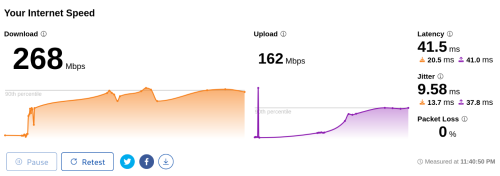
Getting better for me too...
user posted image
go626201
post Aug 18 2024, 11:47 PM

Regular
******
Senior Member
1,882 posts

Joined: Sep 2017
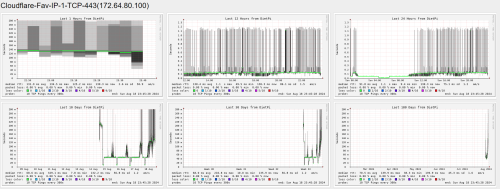
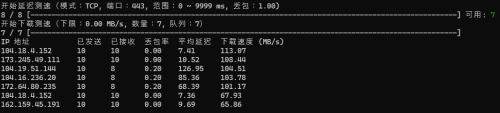
Started from this week some unifi ipv4 block to specific Cloudflare network having issue especially heavy at night.(TCP protocol)
And If you try to "ICMP" ping the same ip,it will show low ping/latency.

user posted image

So the easily mitigate way is enable IPv6 for cloudflare usage.

Edited:
Packet Lost and High Latency.
user posted image

This post has been edited by go626201: Aug 18 2024, 11:55 PM
hasmidzul_jojo
post Aug 19 2024, 06:57 AM

Getting Started
**
Junior Member
203 posts

Joined: Feb 2008
QUOTE(kwss @ Aug 18 2024, 11:12 PM)
Your location please...
kuching
petrofsky77
post Aug 19 2024, 09:10 AM

Temet nosce
******
Senior Member
1,692 posts

Joined: Jan 2006
From: Neither here nor there


So I take it that the speed throttle for Unifi Ultra plan is still happening regardless white or black D-Link box, as long as it's on Bridge mode. Anyone actually reported this to MCMC? I'm thinking of reporting it to MCMC already, since this issue is heavily impacting my office users.
blacktubi
post Aug 19 2024, 09:46 AM

-
Group Icon
Elite
8,421 posts

Joined: Jul 2008

QUOTE(petrofsky77 @ Aug 19 2024, 09:10 AM)
So I take it that the speed throttle for Unifi Ultra plan is still happening regardless white or black D-Link box, as long as it's on Bridge mode. Anyone actually reported this to MCMC? I'm thinking of reporting it to MCMC already, since this issue is heavily impacting my office users.
*
There's not really a solution for this. You can try to use your old ONU but that unit doesn't support 2Gbps.

You can try to contact Anime4000 for a custom 2.5G ONU which should be much better
petrofsky77
post Aug 19 2024, 10:06 AM

Temet nosce
******
Senior Member
1,692 posts

Joined: Jan 2006
From: Neither here nor there


QUOTE(blacktubi @ Aug 19 2024, 09:46 AM)
There's not really a solution for this. You can try to use your old ONU but that unit doesn't support 2Gbps.

You can try to contact Anime4000 for a custom 2.5G ONU which should be much better
*
So if I plug in back my old ONU (white Fibrehome), it will revert back to 800MBps? Since that was the package my office was using before the free upgrade.
zhihao4456
post Aug 19 2024, 10:27 AM

On my way
****
Senior Member
559 posts

Joined: Apr 2008
QUOTE(Verblassen @ Aug 15 2024, 04:53 PM)
Thanks for this! Is yours the same issue like mine? 2gbps on black box but less than that when in bridge mode? Once in a very blue moon we can get 2gbps? Haha.
*
ya we are the same~ in bridge mode i get 2gbps but after X number of hours it will randomly drop speed to 200-300mbps.

495 Pages « < 225 226 227 228 229 > » Top
Topic ClosedOptions
 

Change to:
| Lo-Fi Version
0.0264sec    1.43    6 queries    GZIP Disabled
Time is now: 19th December 2025 - 09:59 PM