Outline ·
[ Standard ] ·
Linear+
Unifi Official TM UniFi High Speed Broadband Thread V42, READ 1ST PAGE FOR RELEVANT WIFI INFO!
|
sHawTY
|
 Aug 5 2024, 08:43 PM Aug 5 2024, 08:43 PM
|

|
QUOTE(hazairi @ Aug 5 2024, 05:34 PM) i already got my free speed upgrade last year. from 500mbps to 800mbps Ahh, okay QUOTE(soonwai @ Aug 5 2024, 05:40 PM) May no longer be indicative since this was during the start of MCO in 2020. Deco M4 order took 16 days. Understood. I already received the email and SMS with the tracking number on 31 July but it's still untraceable until today Guess I just have to wait a little longer My previous Smart Device was the 60" Sharp TV and it was delivered within 3 working days. They shipped using Line Clear Express This time I ordered the ROG Ally, and the SMS from TM mentioned that it's shipped using Line Clear Express too |
|
|
|
|
|
bugipunch
|
Aug 5 2024, 10:26 PM
|
Getting Started

|
today start from 3pm internet become laggy.
|
|
|
|
|
|
zhenfeng91
|
Aug 5 2024, 10:39 PM
|
Getting Started
|
QUOTE(bugipunch @ Aug 5 2024, 10:26 PM) today start from 3pm internet become laggy. Right now is super laggy and slow, from 800mbps down to 1 mbps and 1000ping wtf is happening |
|
|
|
|
|
cyclone2
|
Aug 6 2024, 02:05 AM
|
|
|
I just now use LIVE chat talk to customer service, the lady told me no more free upgrade in 2024.
I just complaint to MCMC, let's see what's happen later.
|
|
|
|
|
|
RViN
|
Aug 6 2024, 12:00 PM
|
|
|
QUOTE(jiaen0509 @ Aug 5 2024, 12:11 PM) Is your black ONR firmware version DPN-FX3060V_V2.0.2? I just did a quick speed test and noticed that my speed dropped to 300 Mbps, the first time this has happened since I got the black ONR in early June. I’m not sure if this is due to my recent router firmware update or the black ONR. I’ll need a few days to minitor it. I am aware that my router firmware has issues with Wi-Fi disabling, but reverting to the old firmware will no longer have issue. Hopefully, it’s a router firmware issue and not something Unifi is doing behind the scenes. I've been having that speed drop issue since the beginning. There's a few others in here that have reported it as well. In general you dont notice the slowdown so doing speed tests is the only way you see. Though if you leave it for longer I realised the speed then drops down to 100mbps and at that point you can definitely notice it. My "solution" is to restart the ONR on a schedule at least once a day. I've been using it in bridge mode since the start, I'm not sure if it also happens if you use the ONR as a router, but I doubt anyone on a 1gbps plan will be using a shitty ISP provided router so we might not have a datapoint on that. |
|
|
|
|
|
Johnslow
|
Aug 6 2024, 12:29 PM
|
Getting Started
|
QUOTE(zhenfeng91 @ Aug 5 2024, 10:39 PM) Right now is super laggy and slow, from 800mbps down to 1 mbps and 1000ping wtf is happening I experienced the same thing last night Keep getting disconnected from game server and can't get game cause poor connectivity. |
|
|
|
|
|
jiaen0509
|
Aug 6 2024, 12:30 PM
|
|
|
QUOTE(RViN @ Aug 6 2024, 12:00 PM) I've been having that speed drop issue since the beginning. There's a few others in here that have reported it as well. In general you dont notice the slowdown so doing speed tests is the only way you see. Though if you leave it for longer I realised the speed then drops down to 100mbps and at that point you can definitely notice it. My "solution" is to restart the ONR on a schedule at least once a day. I've been using it in bridge mode since the start, I'm not sure if it also happens if you use the ONR as a router, but I doubt anyone on a 1gbps plan will be using a shitty ISP provided router so we might not have a datapoint on that. My ONR as bridge mode. No speed drop issue since the beginning (early June). So far only happened once with LAN speed 100+ and wifi speed 300+ on yesterday. After restarted, and now more than 24 hours no speed drops. 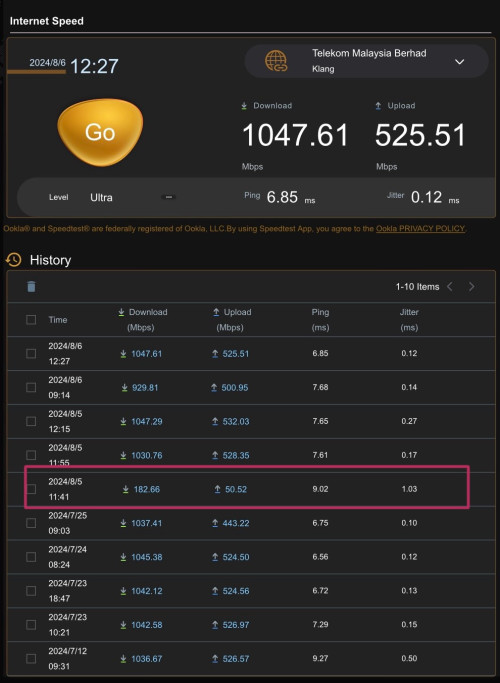 But I will monitor from time to time. |
|
|
|
|
|
Verblassen
|
Aug 6 2024, 12:57 PM
|
Getting Started
|
QUOTE(jiaen0509 @ Aug 6 2024, 12:30 PM) My ONR as bridge mode. No speed drop issue since the beginning (early June). So far only happened once with LAN speed 100+ and wifi speed 300+ on yesterday. After restarted, and now more than 24 hours no speed drops. But I will monitor from time to time. Haih jelly with your speeds bro. Still ding donging with TM + MCMC. 😮💨 RE: 940mbps cap issue. |
|
|
|
|
|
neekun
|
Aug 6 2024, 01:43 PM
|
|
|
QUOTE(jiaen0509 @ Aug 6 2024, 12:30 PM) My ONR as bridge mode. No speed drop issue since the beginning (early June). So far only happened once with LAN speed 100+ and wifi speed 300+ on yesterday. After restarted, and now more than 24 hours no speed drops. But I will monitor from time to time. So far my connection speed is consistent and no speed drop detected. But maybe it happened and I was out of the house also cannot tell la. |
|
|
|
|
|
hazairi
|
Aug 6 2024, 02:05 PM
|
|
|
QUOTE(sHawTY @ Aug 5 2024, 08:43 PM) Ahh, okay Understood. I already received the email and SMS with the tracking number on 31 July but it's still untraceable until today Guess I just have to wait a little longer My previous Smart Device was the 60" Sharp TV and it was delivered within 3 working days. They shipped using Line Clear Express This time I ordered the ROG Ally, and the SMS from TM mentioned that it's shipped using Line Clear Express too so, back to my question, which one seems more worth? Currently my package is 800Mbps download / 200Mbps upload with basic unifi TV, RM189 per month. The SWU offered: 1. 500Mbps / 100Mbps (no unifi tv) is averagely RM112 per month (after i deduct the free 6 months usage) or 2. Stick with my current plan, and I will get 3 months free usage (equivalent to RM165 per month) This post has been edited by hazairi: Aug 6 2024, 02:06 PM |
|
|
|
|
|
blacktubi
|
Aug 6 2024, 02:07 PM
|
-

|
QUOTE(Verblassen @ Aug 6 2024, 12:57 PM) Haih jelly with your speeds bro. Still ding donging with TM + MCMC. 😮💨 RE: 940mbps cap issue. On the bright side you will be blessed with no speedrop issue. |
|
|
|
|
|
OKLY
|
Aug 6 2024, 02:07 PM
|
The Penguin Vader

|
Contacted live chat regarding free speed upgrade from 800mbps to 1gbps, as expected they just gave the standard reply of it will be done in phases.
Asked for a report ID, created a case with MCMC with it.
Let’s see how it goes.
|
|
|
|
|
|
sHawTY
|
Aug 6 2024, 02:33 PM
|
|
|
QUOTE(hazairi @ Aug 6 2024, 02:05 PM) so, back to my question, which one seems more worth? To be honest, your SWU offering is not really that enticing Have you tried submitting a termination request to TM? This might get you a better deal with lower monthly charges. For instance, someone on the forum got a 1Gb/s plan for RM159 with six months free billing. You can check out the details here: https://forum.lowyat.net/topic/5424552/+3569This post has been edited by sHawTY: Aug 6 2024, 02:37 PM |
|
|
|
|
|
Verblassen
|
Aug 6 2024, 02:35 PM
|
Getting Started
|
QUOTE(blacktubi @ Aug 6 2024, 02:07 PM) On the bright side you will be blessed with no speedrop issue. I kena the speed drop issue a few weeks ago haha. Unfortunately during the technician's visit. Half his time was used to troubleshoot the issue. 😅😅 Happened once only though, touchwood. |
|
|
|
|
|
zhihao4456
|
Aug 6 2024, 02:57 PM
|
|
|
Hi everyone currently I am using the Dlink DPN-FX3060V_V2.0.2 ONU and running bridge mode to my TP-Link BE85. In the initial setup I was able to get 2Gbps download and 1Gbps upload.
After roughly 12hours, the speed drops to 300mbps download and 150mbps upload. My plan has 2 unit of the ONU so I tried setup with another ONU and same thing happen again.
Anyone has solution for this? Is it because of the settings or the firmware issue? Previously was using the Huawei white ONU was very stable no problem but was limited to 1Gbps only.
|
|
|
|
|
|
Verblassen
|
Aug 6 2024, 03:06 PM
|
Getting Started
|
QUOTE(zhihao4456 @ Aug 6 2024, 02:57 PM) Hi everyone currently I am using the Dlink DPN-FX3060V_V2.0.2 ONU and running bridge mode to my TP-Link BE85. In the initial setup I was able to get 2Gbps download and 1Gbps upload. After roughly 12hours, the speed drops to 300mbps download and 150mbps upload. My plan has 2 unit of the ONU so I tried setup with another ONU and same thing happen again. Anyone has solution for this? Is it because of the settings or the firmware issue? Previously was using the Huawei white ONU was very stable no problem but was limited to 1Gbps only. This is a common issue for us with the wretched black box. Have you tried restarting your router and the D Link? If that doesn't work you may have to reset the D Link and undertake bridge mode again - I personally had to do this. So far I've only encountered this once. |
|
|
|
|
|
zhihao4456
|
Aug 6 2024, 03:14 PM
|
|
|
QUOTE(Verblassen @ Aug 6 2024, 03:06 PM) This is a common issue for us with the wretched black box. Have you tried restarting your router and the D Link? If that doesn't work you may have to reset the D Link and undertake bridge mode again - I personally had to do this. So far I've only encountered this once. Tried restart the ONU and Router, immediately I started off with the slow speed. Once I reset the D-Link ONU, then it will back to normal again. I can't be doing this all the time which quite a hassle. Which means now no solution at the moment right? Btw, which bridging method you using? You using "GPON bridge" from the WAN Mode selection page or you change from "PPOE" to "Bridged" at the PON WAN page? |
|
|
|
|
|
Verblassen
|
Aug 6 2024, 03:23 PM
|
Getting Started
|
QUOTE(zhihao4456 @ Aug 6 2024, 03:14 PM) Tried restart the ONU and Router, immediately I started off with the slow speed. Once I reset the D-Link ONU, then it will back to normal again. I can't be doing this all the time which quite a hassle. Which means now no solution at the moment right? Btw, which bridging method you using? You using "GPON bridge" from the WAN Mode selection page or you change from "PPOE" to "Bridged" at the PON WAN page? Unfortunately bro, no solution for now. We have to wait it out. Nevertheless, congrats on hitting 2gbps and 1gbps dl ul.  Offhand I can't remember. I think it was from the setup wizard page. You just click GPON bridge and call it a day. |
|
|
|
|
|
zhihao4456
|
Aug 6 2024, 03:30 PM
|
|
|
QUOTE(Verblassen @ Aug 6 2024, 03:23 PM) Unfortunately bro, no solution for now. We have to wait it out. Nevertheless, congrats on hitting 2gbps and 1gbps dl ul. Offhand I can't remember. I think it was from the setup wizard page. You just click GPON bridge and call it a day. hahahahaa, thanks but hitting it not for long and it drops~ I am thinking if anyone has older firmware V1.0.6 for the ONU will it work better and have a copy of the firmware to share with us otherwise I guess I will have to revert back to the old Huawei ONU at the moment oh the GPON bridge from setup wizard page, I got you... lucky you that speed drop only happen to you once |
|
|
|
|
|
CyberKewl
|
Aug 6 2024, 04:10 PM
|
|
|
I just went through with Unifi calling me if i want the 3 months free upgrade, now I got an SMS stating:
"Yr UNIFI Modify Order#: XXXXXXXX has been successfully created. Install date: 08/08/2024. TQ."
Did anyone get this previously when they sub the 3 months free upgrade (with 2 years contract)? I wonder what on earth they need to install since it's just a renew of contract?
|
|
|
|
|



 Quote
Quote









 0.0212sec
 0.89
0.89
 6 queries
 GZIP Disabled