Outline ·
[ Standard ] ·
Linear+
Unifi Official TM UniFi High Speed Broadband Thread V42, READ 1ST PAGE FOR RELEVANT WIFI INFO!
|
CyberKewl
|
 Aug 6 2024, 04:35 PM Aug 6 2024, 04:35 PM
|

|
QUOTE(dannychen @ Aug 6 2024, 04:29 PM) They will come to install Unifi Combo Box beside free 3 months to tied you into 24 months contract. har? I dont need that actually and i'm not available on the date - I assume they willl call me before they come and arrange for availability? I already have my own wifi6 router  This post has been edited by CyberKewl: Aug 6 2024, 04:37 PM This post has been edited by CyberKewl: Aug 6 2024, 04:37 PM |
|
|
|
|
|
RViN
|
Aug 6 2024, 04:38 PM
|
|
|
QUOTE(Verblassen @ Aug 6 2024, 12:57 PM) Haih jelly with your speeds bro. Still ding donging with TM + MCMC. 😮💨 RE: 940mbps cap issue. Seems like its either 940mbps stable all the time (if yours is stable) Or 1gbps but every X hours have to restart ONR otherwise drop to 300  |
|
|
|
|
|
kwss
|
Aug 6 2024, 04:45 PM
|
|
|
QUOTE(RViN @ Aug 6 2024, 04:38 PM) Seems like its either 940mbps stable all the time (if yours is stable) Or 1gbps but every X hours have to restart ONR otherwise drop to 300 Just out of curiosity can you help me check your current firmware version? |
|
|
|
|
|
dannychen
|
Aug 6 2024, 04:47 PM
|
|
|
QUOTE(CyberKewl @ Aug 6 2024, 04:35 PM) har? I dont need that actually and i'm not available on the date - I assume they willl call me before they come and arrange for availability? I already have my own wifi6 router go to myunifi app, under support, my orders, then you can reschedule your appointment there. even on weekends they can come. |
|
|
|
|
|
CyberKewl
|
Aug 6 2024, 04:56 PM
|
|
|
QUOTE(dannychen @ Aug 6 2024, 04:47 PM) go to myunifi app, under support, my orders, then you can reschedule your appointment there. even on weekends they can come. thanks will do that |
|
|
|
|
|
Raymond T.
|
Aug 6 2024, 06:06 PM
|
|
|
QUOTE(dannychen @ Aug 6 2024, 04:29 PM) They will come to install Unifi Combo Box beside free 3 months to tied you into 24 months contract. I received a call this morning finally free upgrade from 800Mbps to 1Gbps with new router replacement. However, remain contract free  This post has been edited by Raymond T.: Aug 6 2024, 06:08 PM This post has been edited by Raymond T.: Aug 6 2024, 06:08 PM |
|
|
|
|
|
Azusa_San
|
Aug 6 2024, 06:55 PM
|
|
|
https://imap.sinarproject.org/news/internet...lic-dns-serversQUOTE Internet Censorship Update: Transparent DNS Proxy Implemented by Malaysian ISPs on Cloudflare and Google Public DNS Servers
Transparent DNS Proxy Implemented by Malaysian ISPs on Cloudflare and Google Public DNS Servers
6th August 2024, Transparent DNS proxy redirecting DNS queries to Google and Cloudflare public DNS has been implemented by two Malaysian ISPs Maxis and Time, leading to users now unable to access websites officially blocked by MCMC through alternative DNS servers. This post has been edited by Azusa_San: Aug 6 2024, 06:56 PM
|
|
|
|
|
|
issac99289928
|
Aug 6 2024, 07:05 PM
|
Getting Started

|
QUOTE(Azusa_San @ Aug 6 2024, 06:55 PM) use other DNS servers . so many to choose from. |
|
|
|
|
|
PRSXFENG
|
Aug 6 2024, 07:09 PM
|
|
|
QUOTE(issac99289928 @ Aug 6 2024, 07:05 PM) use other DNS servers . so many to choose from. So far yes, other severs are not affected But it might not last for long Better solution is to move to encrypted DNS, like DNS Over HTTPS, DNS Over TLS, or DNSCrypt |
|
|
|
|
|
yongtjunkit
|
Aug 6 2024, 08:27 PM
|
|
|
QUOTE(PRSXFENG @ Aug 6 2024, 07:09 PM) So far yes, other severs are not affected But it might not last for long Better solution is to move to encrypted DNS, like DNS Over HTTPS, DNS Over TLS, or DNSCrypt  would using DNSSEC help?  I’m using pihole (which doesn’t seem to support DOH/DOT out of the box) This post has been edited by yongtjunkit: Aug 6 2024, 08:36 PM |
|
|
|
|
|
blacktubi
|
Aug 6 2024, 08:37 PM
|
-

|
QUOTE(issac99289928 @ Aug 6 2024, 07:05 PM) use other DNS servers . so many to choose from. They can just apply this to all DNS eventually Easiest way is to enable secure DNS in chrome settings, there's something similar on every major browsers Alternatively, get a router that support DNS over TLS. This will apply to all devices Or, just use a VPN |
|
|
|
|
|
Kadaj
|
Aug 6 2024, 08:47 PM
|
|
|
QUOTE(yongtjunkit @ Aug 6 2024, 08:27 PM) would using DNSSEC help? I’m using pihole (which doesn’t seem to support DOH/DOT out of the box) You can install cloudflared DoH client and point your pihole to it as upstream. https://docs.pi-hole.net/guides/dns/cloudflared/https://developers.cloudflare.com/1.1.1.1/e...r-https-client/Another option is DNSCrypt-Proxy. You can also change to third party DoH like Quad9 and etc in both clients. This post has been edited by Kadaj: Aug 6 2024, 08:48 PM |
|
|
|
|
|
cklove96
|
Aug 6 2024, 10:17 PM
|
|
|
QUOTE(hazairi @ Aug 6 2024, 03:05 PM) so, back to my question, which one seems more worth? Currently my package is 800Mbps download / 200Mbps upload with basic unifi TV, RM189 per month. The SWU offered: 1. 500Mbps / 100Mbps (no unifi tv) is averagely RM112 per month (after i deduct the free 6 months usage) or 2. Stick with my current plan, and I will get 3 months free usage (equivalent to RM165 per month) 1. more worth for me |
|
|
|
|
|
PJng
|
Aug 6 2024, 11:30 PM
|
|
|
QUOTE(PRSXFENG @ Aug 6 2024, 07:09 PM) So far yes, other severs are not affected But it might not last for long Better solution is to move to encrypted DNS, like DNS Over HTTPS, DNS Over TLS, or DNSCrypt 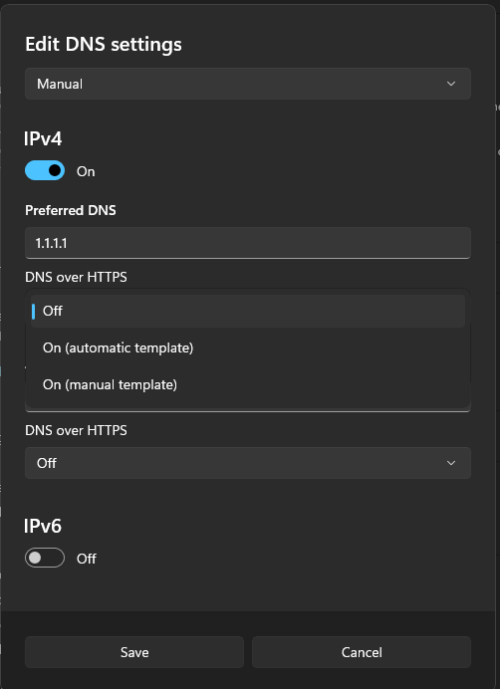 windows 11 got DNS over HTTPS, is same thing like browser? |
|
|
|
|
|
zellleonhart
|
Aug 6 2024, 11:40 PM
|
|
|
Good thing I have set up Adguard Home with Unbound so it's fully DoH / DoT on all my devices and not relying on any upstream DNS like cloudflare or google DNS.
|
|
|
|
|
|
PRSXFENG
|
Aug 6 2024, 11:46 PM
|
|
|
QUOTE(yongtjunkit @ Aug 6 2024, 08:27 PM) would using DNSSEC help? I’m using pihole (which doesn’t seem to support DOH/DOT out of the box) no, it doesnt really, you need DoH/DoT/DNSCrypt However, past posts here suggest they are looking into DoH hijacking as well you can use dnscrypt-proxy, there's a guide on their github for setup with pihole i setup mine with quad9 dnscrypt This post has been edited by PRSXFENG: Aug 6 2024, 11:47 PM |
|
|
|
|
|
Kadaj
|
Aug 6 2024, 11:56 PM
|
|
|
QUOTE(PJng @ Aug 6 2024, 11:30 PM) windows 11 got DNS over HTTPS, is same thing like browser? Yes, you need to select DNS over HTTPS: On (automatic template) then save. You can verify it by: https://one.one.one.one/help/ |
|
|
|
|
|
kwss
|
Aug 7 2024, 12:00 AM
|
|
|
The last time TM did this, both DoH and DoT were blocked too.
DNS is actually the easiest to block. Just listen to all connection to port 53 or 853, add those endpoint to DNS blocklist.
I assure you within a week all open resolver will be permanently banned.
|
|
|
|
|
|
zellleonhart
|
Aug 7 2024, 12:07 AM
|
|
|
QUOTE(kwss @ Aug 7 2024, 12:00 AM) The last time TM did this, both DoH and DoT were blocked too. DNS is actually the easiest to block. Just listen to all connection to port 53 or 853, add those endpoint to DNS blocklist. I assure you within a week all open resolver will be permanently banned. if I use my own private DoH server, can TM detect and ban it too? or just the public DoH servers? Also, could be an ignorant question - can ISP actually block port outgoing traffic for port 443 since we need to browse normal websites in https? or DoH uses incoming traffic? This post has been edited by zellleonhart: Aug 7 2024, 12:20 AM |
|
|
|
|
|
PJng
|
Aug 7 2024, 12:10 AM
|
|
|
QUOTE(Kadaj @ Aug 6 2024, 11:56 PM) Yes, you need to select DNS over HTTPS: On (automatic template) then save. You can verify it by: https://one.one.one.one/help/after i save, open the link |
|
|
|
|



 Quote
Quote


 0.0184sec
 0.83
0.83
 6 queries
 GZIP Disabled