Welcome Guest ( Log In | Register )

Bump Topic Topic Closed RSS Feed

Outline · [ Standard ] · Linear+

Unifi Official TM UniFi High Speed Broadband Thread V42, READ 1ST PAGE FOR RELEVANT WIFI INFO!

views
     
ycktech
post Jul 18 2024, 06:06 AM

Getting Started
**
Junior Member
210 posts

Joined: Nov 2006
QUOTE(isr25 @ Jul 17 2024, 11:59 AM)
It’s similar to Mobile Number Portability. In my case, I applied at Celcom, wait for SMS from Celcom to confirm my request, wait for Unifi to call to confirm my request to port out to Celcom. They called to offer me a few packages to stay with them. If I accept their offer, nothing else is needed on my end coz interrupted by Unifi. If I don’t accept Unifi’s offer, I would be ported out to Celcom.
*
Oh. tq
ssslayerrr
post Jul 18 2024, 06:47 AM

Enthusiast
*****
Senior Member
805 posts

Joined: Dec 2004


QUOTE(RViN @ Jun 4 2024, 08:32 PM)
Seems like you have the same experience as me.

Only one ONU can work at a time, seems like they bind our account to the device :/
*
You're not the only one bro.

I have 2 sites.

Site 1:
1. Using unifi biz, 1gbps, white ONU. Exact same problem as yours. Speed goes down after 24 hours, down to 300/100. I'm not sure how long this has been going on.
2. I randomly did a speed test last week and found this out.
3. Like yourself, restarting the modem solves the problem.
4. Not just restarting the modem solves it. If enable the modem to connect using pppoe, then switch back to bridge, this solves the problem also, temporarily.
5. Usually tahan slighly less than 24 hours, but yesterday, after 2 hours the speed went down.
6. Right now, there might be a possible solution. I am using a mikrotik router, and have enabled multi-queue-ethernet-default (thanks to Anime4000's post) on the hardware interface I used to connect. Speed hasn't dropped yet.
7. I will monitor and let you know if this solves the problem.
8. I believe this issue might be widespread, ppl won't realize just by watching youtube/netflix, they need do a speedtest.

Site 2:
1. Different problem, I can enable bridge mode, but connecting with my Mikrotik router is a hit and miss proposition in terms of speed.
2. This site was recently upgraded to 2gbps, Black ONU here.
3. Currently, I am connecting using a Mikrotik router with sfp+ interface->Mikrotik sfp+RJ45 module->Black ONU.
4. I am able to put the black ONU in bridge mode.
5. Speed between the router and ONU is 2.5 gbps.
6. When I first configured the router from pppoe to bridge mode, I instantly got 2gbps speed.
7. It lasted more than a day, very nice, smooth.
8. I wanted to see if this survived a reboot and i rebooted the router.
9. When the connection came up, it was 300/100!. Remained that way for a few hours
10. I bounced the connection several times, and the weird thing is, it seem to be capped at different predictable profiles, ie. 300/100, 100/50, 1000/500.
11. By luck, I managed to get 2gbps again, adn it stayed that way.
12. Of course, it didnt survice a reboot. So I used the black onu to connect using pppoe, then switched it back to bridge again and connected with the mikrotik, now it's back to 2 gbps.
12. This problem seems to be different from site 1, here, I get lower speed profiles right from the start of the connection, even though the link is clearly capable of 2gbps.
13. I had an ODI stick that I used sometime ago, have sent to Anime4000 to configure/flash

This post has been edited by ssslayerrr: Jul 18 2024, 06:57 AM

dannielshazmeer
post Jul 18 2024, 08:13 AM

On my way
****
Senior Member
628 posts

Joined: Apr 2016
network down
isr25
post Jul 18 2024, 09:34 AM

Regular
******
Senior Member
1,263 posts

Joined: Nov 2009
From: Johor Bahru


QUOTE(dannielshazmeer @ Jul 18 2024, 08:13 AM)
network down
*
Which area? It’s fine for me in JB + cloudflare DNS
dannielshazmeer
post Jul 18 2024, 11:06 AM

On my way
****
Senior Member
628 posts

Joined: Apr 2016
Shah Alam hicom
Verblassen
post Jul 18 2024, 11:29 AM

Getting Started
**
Junior Member
87 posts

Joined: Feb 2013
From: Wilayah Persekutuan, KL


RM0 Unifi: Hi. The restoration for 1-95188695035 is between 18/07/2024 10:30:00 until 18/07/2024 11:29:00. For more info on restoration charging, go to i.unifi.my/oss. Thank you


Dumb question... are these guys ever on time? 😒 purposely chose to work from home today to be here when they come.

This is after their "second level" intervened regarding my 1gbps speed capped at 940Mbps issue.

*edit they responded while I was typing and mentioned they will be here in 30mins* 🤭🤭🤭 hadoi TM at its finest.

Hopefully they can help I will post an update once they are done.
RViN
post Jul 18 2024, 11:45 AM

There Is Only One United
*******
Senior Member
5,827 posts

Joined: Jan 2003
From: Selayang, Selangor


QUOTE(ssslayerrr @ Jul 18 2024, 06:47 AM)
You're not the only one bro.

6. Right now, there might be a possible solution. I am using a mikrotik router, and have enabled multi-queue-ethernet-default (thanks to Anime4000's post) on the hardware interface I used to connect. Speed hasn't dropped yet.
*
Ah there doesnt seem to be a similar option for Asus routers that I can see from doing a quick google search.

But nice to know I'm not the only one, though in your case its even happening with the white ONU that only has 1GbE ports, I sort of assumed it was an issue only with the Black 2.5GbE ONR.
izhamsatria
post Jul 18 2024, 01:05 PM

Getting Started
**
Junior Member
124 posts

Joined: Mar 2012


QUOTE(Verblassen @ Jul 18 2024, 11:29 AM)
RM0 Unifi: Hi. The restoration for 1-95188695035 is between 18/07/2024 10:30:00 until 18/07/2024 11:29:00. For more info on restoration charging, go to i.unifi.my/oss. Thank you
Dumb question... are these guys ever on time? 😒 purposely chose to work from home today to be here when they come.

This is after their "second level" intervened regarding my 1gbps speed capped at 940Mbps issue.

*edit they responded while I was typing and mentioned they will be here in 30mins* 🤭🤭🤭 hadoi TM at its finest.

Hopefully they can help I will post an update once they are done.
*
You're wasting their time and your money

Nowadays, they do not cap at OLT/ONU. Only cap at pppoe profile.

Regarding fast.com result, its not accurate

This post has been edited by izhamsatria: Jul 18 2024, 01:12 PM
blacktubi
post Jul 18 2024, 06:09 PM

-
Group Icon
Elite
8,423 posts

Joined: Jul 2008

QUOTE(izhamsatria @ Jul 18 2024, 01:05 PM)
You're wasting their time and your money

Nowadays, they do not cap at OLT/ONU. Only cap at pppoe profile.

Regarding fast.com result, its not accurate
*
Actually, there's an OLT level cap and it's known as DBA. The DBA profile can be misconfigured at some OLT.

Huawei OLT is really strict on DBA profile. It wouldn't let you to allocate more bandwidth than the available bandwidth.

I will give you an example how it can be misconfigured. Huawei OLT will round down the DBA bandwidth into a multiple of 64. If the DBA profile is set to 1000, it will round down to 960Mbps (64*15).

However, I agree that it's wasting time cause only very senior engineer can understand this and it really can't be fixed easily.

I have the exact same issue on Maxis-TM infra.
user posted image
failed.hashcheck
post Jul 18 2024, 08:08 PM

Neighborhood plant pathologist
*******
Senior Member
2,096 posts

Joined: Aug 2009
From: Shithole Klang
QUOTE(blacktubi @ Jul 18 2024, 06:09 PM)
Actually, there's an OLT level cap and it's known as DBA. The DBA profile can be misconfigured at some OLT.

Huawei OLT is really strict on DBA profile. It wouldn't let you to allocate more bandwidth than the available bandwidth.

I will give you an example how it can be misconfigured. Huawei OLT will round down the DBA bandwidth into a multiple of 64. If the DBA profile is set to 1000, it will round down to 960Mbps (64*15).

However, I agree that it's wasting time cause only very senior engineer can understand this and it really can't be fixed easily.

I have the exact same issue on Maxis-TM infra.
user posted image
*
If im using ZTE ONU, thats a good indicator that im on ZTE OLT as well right?
Or these thing could work with whatever pairing?
sadlyfalways
post Jul 18 2024, 08:13 PM

Regular
******
Senior Member
1,185 posts

Joined: Nov 2020
QUOTE(yenchenje @ Jul 16 2024, 08:17 PM)
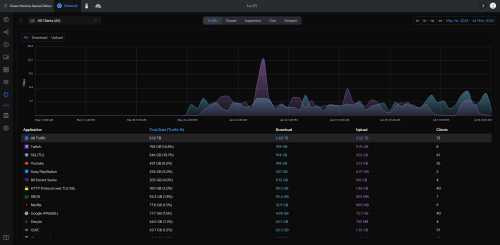
My traffic actually got hella dwarfed when compared tongue.gif

user posted image
*
Do you actually watch the gaming people or are you in the just chatting section hahaha
sadlyfalways
post Jul 18 2024, 08:15 PM

Regular
******
Senior Member
1,185 posts

Joined: Nov 2020
QUOTE(isr25 @ Jul 16 2024, 03:58 PM)
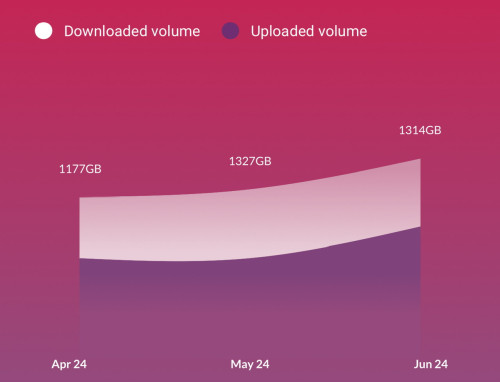
Ok laaa. Tally a bit with my router’s numbers

user posted image
user posted image
*
Lucky you don’t live in western country bro second month itself they would have blocked your service and forced you to pay 10x for an enterprise account

But Jesus that is a lot of data 😂😂
syahpian
post Jul 18 2024, 08:52 PM

Enthusiast
*****
Junior Member
818 posts

Joined: Jul 2008
From: Kota Kinabalu <-> Kuala Lumpur


QUOTE(isr25 @ Jul 16 2024, 03:58 PM)
Ok laaa. Tally a bit with my router’s numbers

user posted image
user posted image
*
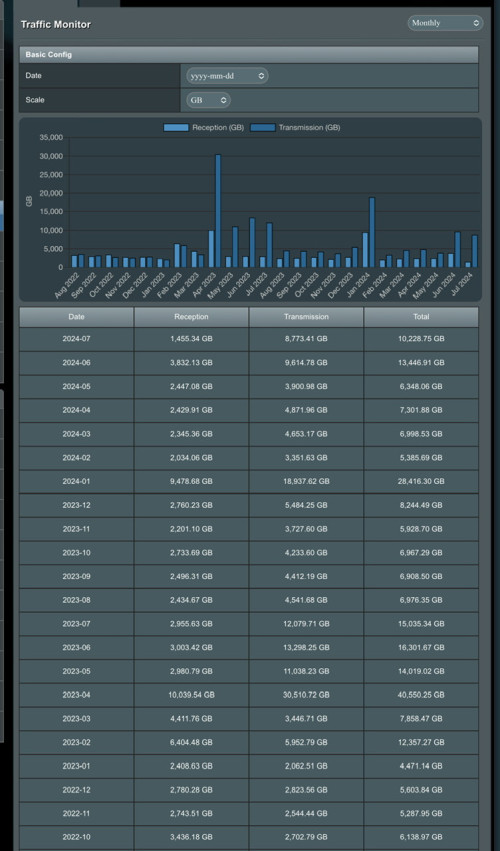
almost 2 TB here, not sure accuarte or not biggrin.gif

user posted image
isr25
post Jul 18 2024, 08:55 PM

Regular
******
Senior Member
1,263 posts

Joined: Nov 2009
From: Johor Bahru


Just checking if anyone also has faced this - iCloud Private Relay is no longer working on UniFi Networks. It still works on mobile broadband, but enabling it on UniFi network, it would immediately fail
blacktubi
post Jul 18 2024, 09:50 PM

-
Group Icon
Elite
8,423 posts

Joined: Jul 2008

QUOTE(failed.hashcheck @ Jul 18 2024, 08:08 PM)
If im using ZTE ONU, thats a good indicator that im on ZTE OLT as well right?
Or these thing could work with whatever pairing?
*
More likely to be ZTE but not 100% sure. Could be Huawei as well.
Anime4000
post Jul 18 2024, 09:59 PM

Look at all my stars!!
*******
Senior Member
2,400 posts

Joined: Jul 2009
From: /dev/null


QUOTE(tng55 @ Jul 18 2024, 01:03 AM)
nice work too many thing game sever you own free and you use vpn friend japan hmm

yah i know GPON Shared tm need upgrade XGPON get 100% upload high
tm need Capacity upgrade to get balance
*
well, even TM has fully upgraded to 10G Fiber, TM can add more split ratio to get more customer with same fiber 😁

QUOTE(ssslayerrr @ Jul 18 2024, 06:47 AM)
You're not the only one bro.

I have 2 sites.

Site 1:
» Click to show Spoiler - click again to hide... «


Site 2:
» Click to show Spoiler - click again to hide... «

13. I had an ODI stick that I used sometime ago, have sent to Anime4000 to configure/flash
*
Many TM tech tell me the D-Link has many bug and not play well many OLT. Asking me if I could fix the issue which is I can't due to I on Nokia OLT and solve a lot of issue with Fiberhome
Hacking hardware and debugging take years, even for me take 2 to 4 years to understand PON, OMCI Stack and Proprietary crap

Your PON stick has been upgraded thumbup.gif now can support Maxis NGBB, TIME, Allo or any ISP using Huawei Proprietary OMCI (locked ecosystem)
Run very well on my RB5009 and no issue on testing

In other news

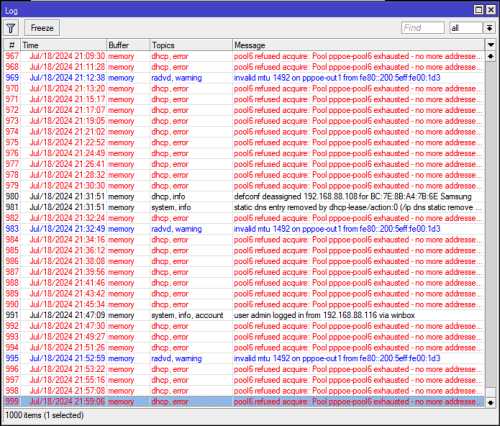
I trying to solve IPv6 pool exhaustion.
user posted image

pool6 refused acquire: Pool pppoe-pool6 exhausted - no more addresses left! (14)
user posted image

I know TM refuse to give /56 to end users, but RFC 6177 recommend give least /56 which is allow user to create another LAN Subnet for isolating security risk like IoT/SmartHome/CCTV Device, HomeLab and Family Network

at least allow Ultra customer to request /60 (16 subnet) which is good enough to create 16 different network.

if we going truly using IPv6, do this.

yesterday respond, for the first time HBC is very rude towards technician and customer
user posted image

report template: https://www.hitoha.moe/email-to-unifi-for-56-ipv6-prefix/

of-course I use AI to improve my bad English, haha


This post has been edited by Anime4000: Jul 18 2024, 10:01 PM
blacktubi
post Jul 18 2024, 10:28 PM

-
Group Icon
Elite
8,423 posts

Joined: Jul 2008

For those who got the Skyworth GN630V combo router, it's super easy to turn that thing into bridge mode and still use PPPOE at your own router.

You should definitely do that as any decent third party router should have a much faster CPU than the GN630V.

My settings below:
user posted image

Note: VLAN tagging / IPTV Profile / VLAN profile not needed on your router with this configuration!

Remember to switch off the WiFi function once that's done.
yenchenje
post Jul 18 2024, 10:41 PM

Enthusiast
*****
Junior Member
932 posts

Joined: Dec 2019
QUOTE(sadlyfalways @ Jul 18 2024, 08:13 PM)
Do you actually watch the gaming people or are you in the just chatting section hahaha
*
I actually watch, but quite some time is just me putting it on to keep my PC from sleeping lol
NagaK
post Jul 19 2024, 12:11 AM

Regular
******
Senior Member
1,196 posts

Joined: Sep 2018


QUOTE(blacktubi @ Jul 18 2024, 10:28 PM)
For those who got the Skyworth GN630V combo router, it's super easy to turn that thing into bridge mode and still use PPPOE at your own router.

You should definitely do that as any decent third party router should have a much faster CPU than the GN630V.

My settings below:
user posted image

Note: VLAN tagging / IPTV Profile / VLAN profile not needed on your router with this configuration!

Remember to switch off the WiFi function once that's done.
*
Thanks for tip. For 1Gbps user Asus AX6000 Tuf gaming is good ? I'm eyeing for goof Asus router since lot of functions compared to my trustworthy TP Link routers
xCryptik
post Jul 19 2024, 12:29 AM

On my way
****
Junior Member
584 posts

Joined: May 2013
Why so many people queue up for TM Live chat until queue number is 132 at this time. 😭
Give me chance please.

Topic ClosedOptions
 

Change to:
| Lo-Fi Version
0.0200sec    0.61    6 queries    GZIP Disabled
Time is now: 22nd December 2025 - 08:14 PM