Welcome Guest ( Log In | Register )

Bump Topic Topic Closed RSS Feed
495 Pages « < 149 150 151 152 153 > » Bottom

Outline · [ Standard ] · Linear+

Unifi Official TM UniFi High Speed Broadband Thread V42, READ 1ST PAGE FOR RELEVANT WIFI INFO!

views
     
Mazda9
post Jun 9 2024, 11:59 PM

On my way
****
Junior Member
535 posts

Joined: Mar 2009
QUOTE(jiaen0509 @ Jun 9 2024, 05:51 PM)
1. Let TM fully configure and set up the Combo Box. Ensure the;
• Internet is up
• VoIP is working
2. Thank the technician, belanja a air tin/kotak, and goodbye.
3. Connect a LAN cable from the LAN 1 port on the D-Link Combo Box to the WAN port on my Asus Router.
4. Access the D-Link WebUI via 192.168.0.1.
5. Go to the “Wizard” and change the [WAN Mode] to “GPON Mode,” then apply the changes. See reference below;
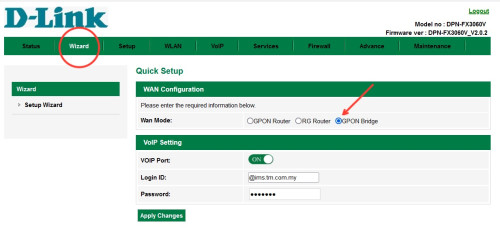
user posted image
6. Wait a few seconds, and the internet on my Asus Router will be up.

Disclaimer: The steps and information provided here are based on my personal experience. Results may vary and attempts these changes are at your own risk; this information does not constitute legal or professional advice of any kind and cannot be used as the basis for any legal proceedings.​​​​​​​​​​​​​​​​

Note: My PPPoE information was already configured on my Asus Router before the Combo Box was installed, so the above steps do not involve setting up or configuring PPPoE. Once “Bridge Mode” on Combo Box is set. It will take some time to up the internet.

I am aware of a previously reported issue where the internet speed drops after a certain number of hours, requiring a restart of the Combo Box to resolve. For my case, after more than five days of monitoring, I haven’t encountered any speed drop issues.
*
Lan cable is connected to 2.5gb port (lan1) and the other side to my Asus router wan port. Any idea why I’m unable to access 192.168.0.1?

It says can’t reach this page hmmmm

jiaen0509
post Jun 10 2024, 12:04 AM

Look at all my stars!!
*******
Senior Member
3,305 posts

Joined: Dec 2012
QUOTE(Mazda9 @ Jun 9 2024, 11:59 PM)
Lan cable is connected to 2.5gb port (lan1) and the other side to my Asus router wan port. Any idea why I’m unable to access 192.168.0.1?

It says can’t reach this page hmmmm
*
Let’s try to enable the WiFi by pressing the WiFi physical button on the combo box and access from there. Beside WPS

This post has been edited by jiaen0509: Jun 10 2024, 12:07 AM
aniq8676
post Jun 10 2024, 12:10 AM

Regular
******
Senior Member
1,524 posts

Joined: Dec 2020
From: Perak


QUOTE(Skylines93 @ Jun 9 2024, 11:56 PM)
technican also cant figure out why only LAN 1 getting that capped speed. Even reset the onu same thing. (tested with 2 different onu , old (zte + own router) and new "Combo box").
They think its my own router issue so we configure the new combo box and still getting that capped speed on LAN1 (2,3 - no issue reaching 500mbps+)

during bridge mode to own router again , still getting that capped speed since only LAN 1 is usable as you mentioned.
*
Maybe you got a faulty unit
Skylines93
post Jun 10 2024, 12:12 AM

New Member
*
Newbie
46 posts

Joined: Oct 2017
QUOTE(aniq8676 @ Jun 10 2024, 12:10 AM)
Maybe you got a faulty unit
*
2 faulty unit back to back? hmmm
Ashren
post Jun 10 2024, 12:16 AM

Getting Started
**
Junior Member
156 posts

Joined: Dec 2010
QUOTE(Skylines93 @ Jun 9 2024, 11:56 PM)
technican also cant figure out why only LAN 1 getting that capped speed. Even reset the onu same thing. (tested with 2 different onu , old (zte + own router) and new "Combo box").
They think its my own router issue so we configure the new combo box and still getting that capped speed on LAN1 (2,3 - no issue reaching 500mbps+)

during bridge mode to own router again , still getting that capped speed since only LAN 1 is usable as you mentioned.
*
Likely OLT server side issue. Somehow your ME171 profile is messed up. They can fix it you just gotta let them know you're getting that capped speed on LAN1 no matter what equipment you use. TM use different brands of OLT in different areas some have configuration issues, read Anime first post here.

https://forum.lowyat.net/topic/4925452

Just call them up and let them know. They'll fix it on their end. Nothing wrong on your side.

This post has been edited by Ashren: Jun 10 2024, 12:31 AM
Ashren
post Jun 10 2024, 12:20 AM

Getting Started
**
Junior Member
156 posts

Joined: Dec 2010
QUOTE(Mazda9 @ Jun 9 2024, 11:59 PM)
Lan cable is connected to 2.5gb port (lan1) and the other side to my Asus router wan port. Any idea why I’m unable to access 192.168.0.1?

It says can’t reach this page hmmmm
*
With bridge mode cannot access the ONR. Have to unplug LAN1 from router and connect it directly to your PC and access it from there. If I'm not mistaken have to unplug the fiber also just like the previous BTU.

Try enabling the wifi like jiaen0509 suggest and enter the webUI through there see if it works.

This post has been edited by Ashren: Jun 10 2024, 12:33 AM
NagaK
post Jun 10 2024, 01:03 AM

Regular
******
Senior Member
1,194 posts

Joined: Sep 2018


QUOTE(jiaen0509 @ Jun 9 2024, 04:46 PM)
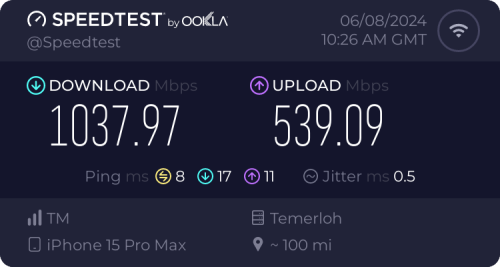
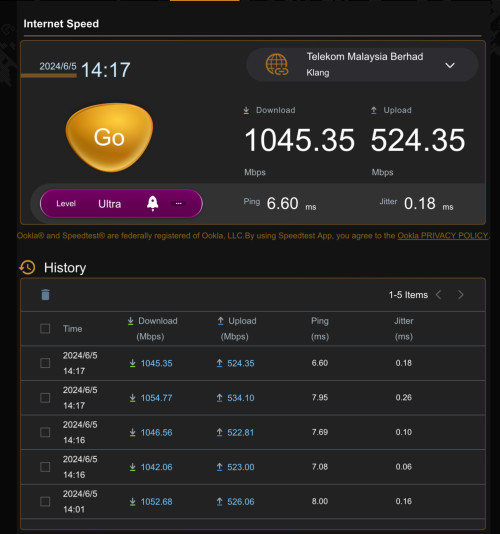
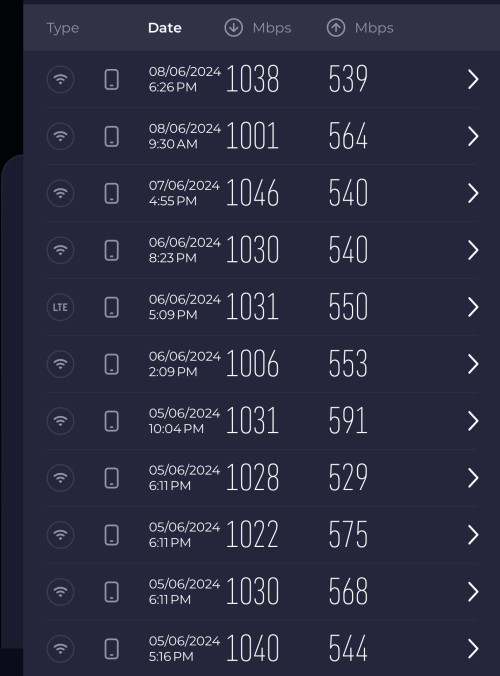
I consistently achieve download speeds of 1000 Mbps and upload speeds of 500 Mbps on both 5GHz Wi-Fi with iPhone 15 Pro Max device used and LAN when using the Black ONR in Bridge Mode and dialing PPPoE on the Asus Router.

user posted image

user posted image

user posted image
*
Wow great which model? Mine TP LINK AX73 Wifi speed top was 950mbps on wifi
blacktubi
post Jun 10 2024, 09:34 AM

-
Group Icon
Elite
8,415 posts

Joined: Jul 2008

QUOTE(NagaK @ Jun 10 2024, 01:03 AM)
Wow great which model? Mine TP LINK AX73 Wifi speed top was 950mbps on wifi
*
Any routers with Gigabit WAN port will peak at 940Mbps

You need routers with 2.5G WAN port
trix
post Jun 10 2024, 10:17 AM

Enthusiast
*****
Senior Member
848 posts

Joined: Feb 2005
From: everywhere, yet nowhere.


QUOTE(Skylines93 @ Jun 10 2024, 12:12 AM)
2 faulty unit back to back? hmmm
*
then that means that the problem is not on the fiberhome but on your equipment
try with different cable connecting fiberhome to your asus router

or test connect your pc direct to wan port of your asus router, see what speed it negotiated
abemin
post Jun 10 2024, 11:31 AM

New Member
*
Junior Member
44 posts

Joined: Aug 2012
QUOTE(jiaen0509 @ Jun 9 2024, 05:51 PM)
1. Let TM fully configure and set up the Combo Box. Ensure the;
• Internet is up
• VoIP is working
2. Thank the technician, belanja a air tin/kotak, and goodbye.
3. Connect a LAN cable from the LAN 1 port on the D-Link Combo Box to the WAN port on my Asus Router.
4. Access the D-Link WebUI via 192.168.0.1.
5. Go to the “Wizard” and change the [WAN Mode] to “GPON Mode,” then apply the changes. See reference below;
user posted image
6. Wait a few seconds, and the internet on my Asus Router will be up.

Disclaimer: The steps and information provided here are based on my personal experience. Results may vary and attempts these changes are at your own risk; this information does not constitute legal or professional advice of any kind and cannot be used as the basis for any legal proceedings.​​​​​​​​​​​​​​​​

Note: My PPPoE information was already configured on my Asus Router before the Combo Box was installed, so the above steps do not involve setting up or configuring PPPoE. Once “Bridge Mode” on Combo Box is set. It will take some time to up the internet.

I am aware of a previously reported issue where the internet speed drops after a certain number of hours, requiring a restart of the Combo Box to resolve. For my case, after more than five days of monitoring, I haven’t encountered any speed drop issues.
*
Do you mind sharing your router specs? is it 2.5Gb WAN port?
Mine peak at 930Mbps.
I have tested both :
- direct connect to combo box 2.5Gb port peak at 930Mbps
- direct connect using old devices (modem+router-tplink-ax73) peak at 930Mbps
Both using cat6 cable.

Should i try the bridge mode or confirm this is on TM end so i need to inform them.

I saw the technician speedtest can get 1Gbps. However after they left, my speedtest won’t go near 1Gbps.
blacktubi
post Jun 10 2024, 11:38 AM

-
Group Icon
Elite
8,415 posts

Joined: Jul 2008

QUOTE(abemin @ Jun 10 2024, 11:31 AM)
Do you mind sharing your router specs? is it 2.5Gb WAN port?
Mine peak at 930Mbps.
I have tested both :
- direct connect to combo box 2.5Gb port peak at 930Mbps
- direct connect using old devices (modem+router-tplink-ax73) peak at 930Mbps
Both using cat6 cable.

Should i try the bridge mode or confirm this is on TM end so i need to inform them.

I saw the technician speedtest can get 1Gbps. However after they left, my speedtest won’t go near 1Gbps.
*
Your AX73 will peak at 940Mbps as it only comes with Gigabit Ethernet

You need to use Unifi combo box with the 2.5GE port and you need to make sure your computer comes with a 2.5GE port as well

Any Gigabit LAN port is limited at 940Mbps
a-ei-a
post Jun 10 2024, 11:51 AM

Casual
***
Junior Member
382 posts

Joined: Dec 2009


Hi all,
Just change ownership at TM Point, now I keep received new password (SMS/email) - do I need to change password at Modem Router login?
Now still able to surf net using old ID/password.
jiaen0509
post Jun 10 2024, 12:06 PM

Look at all my stars!!
*******
Senior Member
3,305 posts

Joined: Dec 2012
QUOTE(abemin @ Jun 10 2024, 11:31 AM)
Do you mind sharing your router specs? is it 2.5Gb WAN port?
Mine peak at 930Mbps.
I have tested both :
- direct connect to combo box 2.5Gb port peak at 930Mbps
- direct connect using old devices (modem+router-tplink-ax73) peak at 930Mbps
Both using cat6 cable.

Should i try the bridge mode or confirm this is on TM end so i need to inform them.

I saw the technician speedtest can get 1Gbps. However after they left, my speedtest won’t go near 1Gbps.
*
I'm using a Unifi Combo Box with a 2.5GE port connected to my ASUS router TUF BE6500 (China Vers), which has a 2.5G WAN port and LAN port. I link the Combo Box LAN 1 (2.5GE) to my ASUS router WAN port using a CAT7 cable. I've tested my speeds with my iPad 10th Generation, which maxes out at 960Mbps. But iPhone 15 Pro Max can maxed at 1000mbps pluss. One thing to note is that I have enabled 160MHz on my router, though I'm not sure if this affects achieving over 1gbps speed.

This post has been edited by jiaen0509: Jun 10 2024, 01:21 PM
NoobHacker
post Jun 10 2024, 12:36 PM

Regular
******
Senior Member
1,753 posts

Joined: Dec 2010
How soon should stay with unifi take effect? I went on 16th May, changing from 300mbps to 300mbps.

They say will send new router on that Saturday also didn’t come.. got my old bill on 4th of Jun.

Need to revisit again if this is unusual

This post has been edited by NoobHacker: Jun 10 2024, 12:50 PM
neekun
post Jun 10 2024, 12:55 PM

I'm a Mac
*******
Senior Member
2,570 posts

Joined: Jun 2006


QUOTE(blacktubi @ Jun 10 2024, 09:34 AM)
Any routers with Gigabit WAN port will peak at 940Mbps

You need routers with 2.5G WAN port
*
My Asus ax11000 router internal Speedtest is broken one since long ago. Never managed to get full speed. With 1gbps package I am getting 500mbps download speed on my Asus router Speedtest. I lazy to reset router and reconfigure. Let it be la. tongue.gif
neekun
post Jun 10 2024, 12:57 PM

I'm a Mac
*******
Senior Member
2,570 posts

Joined: Jun 2006


QUOTE(jiaen0509 @ Jun 10 2024, 12:06 PM)
I'm using a Unifi Combo Box with a 2.5GE port connected to my ASUS router, which has a 2.5G WAN port and LAN port. I link the Combo Box LAN 1 (2.5GE) to my ASUS router WAN port using a CAT7 cable. I've tested my speeds with my iPad 10th Generation, which maxes out at 960Mbps. But iPhone 15 Pro Max can maxed at 1000mbps pluss. One thing to note is that I have enabled 160MHz on my router, though I'm not sure if this affects achieving over 1gbps speed.
*
Your Asus router apa model ya? Thanks.
jiaen0509
post Jun 10 2024, 01:23 PM

Look at all my stars!!
*******
Senior Member
3,305 posts

Joined: Dec 2012
QUOTE(NoobHacker @ Jun 10 2024, 12:36 PM)
How soon should stay with unifi take effect? I went on 16th May, changing from 300mbps to 300mbps.

They say will send new router on that Saturday also didn’t come.. got my old bill on 4th of Jun.

Need to revisit again if this is unusual
*
Check your MyUnifi or Unifi portal and see there is any order created. All your order status such as appointment date will appear there. Usually will take few days for the order to be created after the call or confirmation.


QUOTE(neekun @ Jun 10 2024, 12:55 PM)
My Asus ax11000 router internal Speedtest is broken one since long ago. Never managed to get full speed. With 1gbps package I am getting 500mbps download speed on my Asus router Speedtest. I lazy to reset router and reconfigure. Let it be la.  tongue.gif
*
My previous AX82U also has the similar issue with speed tests via Router. But wifi all working fine.

QUOTE(neekun @ Jun 10 2024, 12:57 PM)
Your Asus router apa model ya? Thanks.
*
Updated the original post. It is ASUS TUF-BE6500 that I bought from China.
Oltromen Ripot
post Jun 10 2024, 01:34 PM

👍 999999 person Likes this member
*******
Senior Member
4,034 posts

Joined: Dec 2019
TM should gift black ONR to 2Gbps account pre-existing before FSU2023 as "a token of appreciation".

don't just leave us with half-baked white ONR.
abemin
post Jun 10 2024, 02:42 PM

New Member
*
Junior Member
44 posts

Joined: Aug 2012
QUOTE(blacktubi @ Jun 10 2024, 11:38 AM)
Your AX73 will peak at 940Mbps as it only comes with Gigabit Ethernet

You need to use Unifi combo box with the 2.5GE port and you need to make sure your computer comes with a 2.5GE port as well

Any Gigabit LAN port is limited at 940Mbps
*
Yea. The computer part just came to mind. I tested using thunderbolt to Ethernet adapter on my macbook. I think the adapter is limited like you said. Going to buy 2.5GE adapter for my Macbook and looking at TP-LINK AX55 Pro for the router.
YoungMan
post Jun 10 2024, 02:51 PM

Look at all my stars!!
*******
Senior Member
6,812 posts

Joined: Oct 2008
From: Kuala Lumpur


QUOTE(abemin @ Jun 10 2024, 11:31 AM)
Do you mind sharing your router specs? is it 2.5Gb WAN port?
Mine peak at 930Mbps.
I have tested both :
- direct connect to combo box 2.5Gb port peak at 930Mbps
- direct connect using old devices (modem+router-tplink-ax73) peak at 930Mbps
Both using cat6 cable.

Should i try the bridge mode or confirm this is on TM end so i need to inform them.

I saw the technician speedtest can get 1Gbps. However after they left, my speedtest won’t go near 1Gbps.
*
Have you ensure your PC lan port is gigabit speed? That could be the problem as well.

495 Pages « < 149 150 151 152 153 > » Top
Topic ClosedOptions
 

Change to:
| Lo-Fi Version
0.0194sec    0.88    6 queries    GZIP Disabled
Time is now: 12th December 2025 - 12:53 PM