

I'm the curious, which one of the LAN ports on black ONR is 2.5 Gbps?
Unifi Official TM UniFi High Speed Broadband Thread V42, READ 1ST PAGE FOR RELEVANT WIFI INFO!
Unifi Official TM UniFi High Speed Broadband Thread V42, READ 1ST PAGE FOR RELEVANT WIFI INFO!
|
|
 Jun 9 2024, 06:02 PM Jun 9 2024, 06:02 PM
Show posts by this member only | IPv6 | Post
#2981
|
 
Junior Member
338 posts Joined: Mar 2010 From: Shah Alam  
|
I'm the curious, which one of the LAN ports on black ONR is 2.5 Gbps?
|
|
|
|
|
|
Jun 9 2024, 06:07 PM
Show posts by this member only | IPv6 | Post
#2982
|

Senior Member
3,305 posts Joined: Dec 2012
|
QUOTE(NagaK @ May 10 2024, 03:50 PM) New Router as per technician from this week they start getting this new unit. Sadly I'm stick with my old Fiberhome ONU and Tp link router so I can't test the performance of it 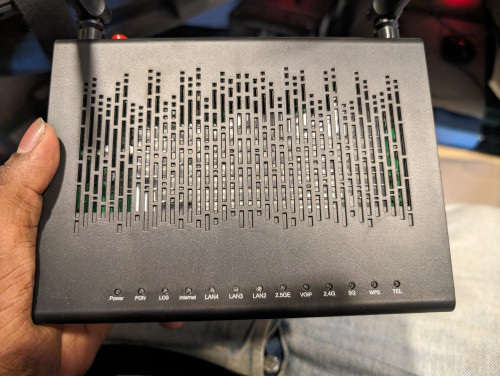 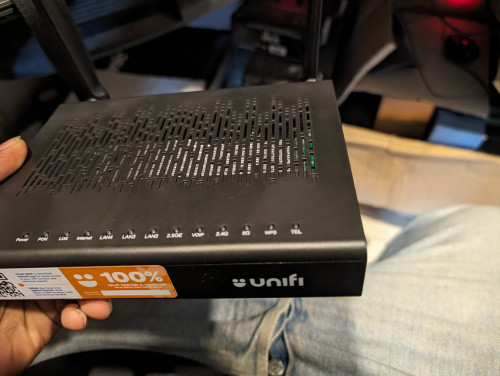 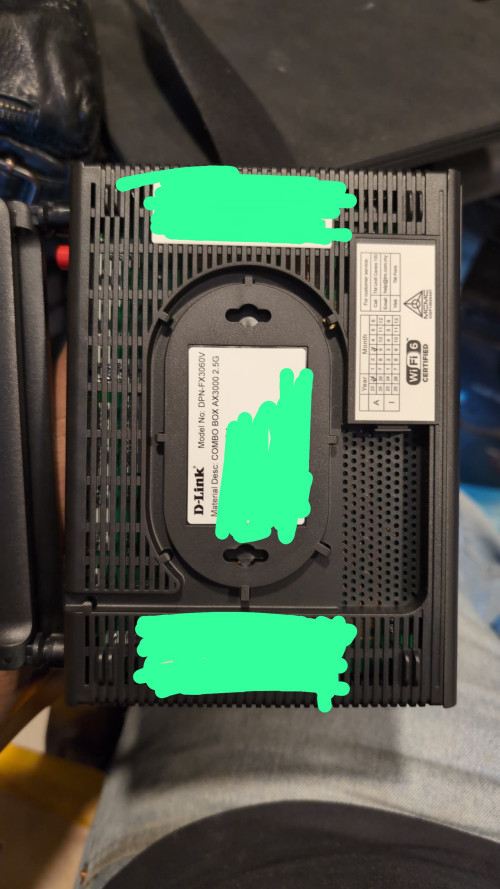 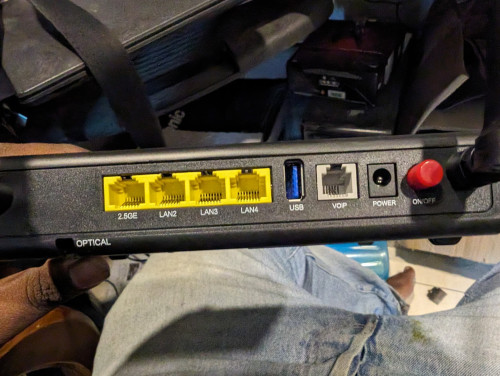  QUOTE(Epic_winner091 @ Jun 9 2024, 06:02 PM) I'm the curious, which one of the LAN ports on black ONR is 2.5 Gbps? LAN 1 as named as 2.5GEThis post has been edited by jiaen0509: Jun 9 2024, 06:07 PM Epic_winner091 liked this post
|
|
|
Jun 9 2024, 06:37 PM
Show posts by this member only | IPv6 | Post
#2983
|

Senior Member
2,012 posts Joined: Dec 2007 From: Malaysia 
|
QUOTE(jiaen0509 @ Jun 9 2024, 05:51 PM) 1. Let TM fully configure and set up the Combo Box. Ensure the; I have lost my internet connection after doing this? And I can't connect to 192.168.0.1 to go in and change it back.. What did I do?• Internet is up • VoIP is working 2. Thank the technician, belanja a air tin/kotak, and goodbye. 3. Connect a LAN cable from the LAN 1 port on the D-Link Combo Box to the WAN port on my Asus Router. 4. Access the D-Link WebUI via 192.168.0.1. 5. Go to the “Wizard” and change the [WAN Mode] to “GPON Mode,” then apply the changes. See reference below; 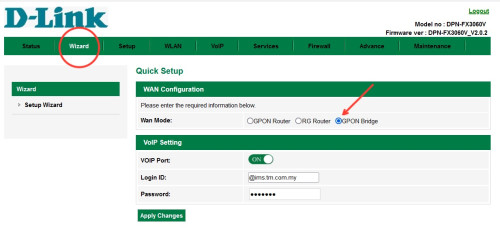 6. Wait a few seconds, and the internet on my Asus Router will be up. Note: My PPPoE information was already configured on my Asus Router before the Combo Box was installed, so the above steps do not involve setting up or configuring PPPoE. Once “Bridge Mode” on Combo Box is set. It will take some time to up the internet. I am aware of a previously reported issue where the internet speed drops after a certain number of hours, requiring a restart of the Combo Box to resolve. For my case, after more than five days of monitoring, I haven’t encountered any speed drop issues. |
|
|
Jun 9 2024, 06:38 PM
Show posts by this member only | IPv6 | Post
#2984
|
|
Senior Member
2,012 posts Joined: Dec 2007 From: Malaysia
|
I try connect modem to my laptop but can't get ethernet to work
|
|
|
Jun 9 2024, 06:45 PM
Show posts by this member only | IPv6 | Post
#2985
|
|
Senior Member
2,012 posts Joined: Dec 2007 From: Malaysia
|
Please help
|
|
|
Jun 9 2024, 06:46 PM
Show posts by this member only | IPv6 | Post
#2986
|
|
Senior Member
3,305 posts Joined: Dec 2012
|
QUOTE(hussain @ Jun 9 2024, 06:37 PM) I have lost my internet connection after doing this? And I can't connect to 192.168.0.1 to go in and change it back.. What did I do? QUOTE(hussain @ Jun 9 2024, 06:38 PM) I try connect modem to my laptop but can't get ethernet to work There is a WiFi button on the left/right side. Try press it or long press and see does the Wifi work? But once you on Bridge mode, you can use your own router already. |
|
|
|
|
|
Jun 9 2024, 06:53 PM
Show posts by this member only | IPv6 | Post
#2987
|
|
Senior Member
2,012 posts Joined: Dec 2007 From: Malaysia
|
I did that.. I got the wifi to select but no internet. The tm guy did set mine to bridge mode before he left.. How now?
|
|
|
Jun 9 2024, 06:57 PM
Show posts by this member only | IPv6 | Post
#2988
|
|
Senior Member
3,305 posts Joined: Dec 2012
|
QUOTE(hussain @ Jun 9 2024, 06:53 PM) I did that.. I got the wifi to select but no internet. The tm guy did set mine to bridge mode before he left.. How now? Did you ever change your PPPoE password by requesting a new one from TM before? The installer only has access to the default (first) password in their system. In my case, the installer reset my PPPoE password without informing me, until I ask him only he told me he did reset the PPPoE password.But since your bridge mode is working. Why change the settings 😂 This post has been edited by jiaen0509: Jun 9 2024, 06:58 PM |
|
|
Jun 9 2024, 07:59 PM
|

Senior Member
6,817 posts Joined: Oct 2008 From: Kuala Lumpur 
|
QUOTE(blackankh @ Jun 9 2024, 04:09 PM) Hi i am currently using Unifi 500mbps Super Value YEP 2019 (actual speed test is 800Mbps in speedtest after free upgrade) [RM129.00] + Aneka (RM30). SWU is for people who need internet only. If you need TV package your currentplan is good enough. My contract has ended. When i went to TMpoint previously they told me SWU package is more expensive than my current package if i want to include tv package as no promotion. Anyone get cheaper SWU with tv package? QUOTE(Skylines93 @ Jun 9 2024, 05:07 PM) For me , Other port usually reserve for providers renting TM infra. Aside from lan1 capped at 100mbps, how is wifi performance?Weird things , even on "Combo Mode" , LAN 1 port still capped at around 100mbps. LAN 2 - 4 gets full speed (500mbps+) When doing the bridge things to my TP-Link router only LAN 1 works (speed still capped at 100mbps) other port not working. |
|
|
Jun 9 2024, 08:53 PM
Show posts by this member only | IPv6 | Post
#2990
|
|
Senior Member
2,012 posts Joined: Dec 2007 From: Malaysia
|
QUOTE(jiaen0509 @ Jun 9 2024, 06:57 PM) Did you ever change your PPPoE password by requesting a new one from TM before? The installer only has access to the default (first) password in their system. In my case, the installer reset my PPPoE password without informing me, until I ask him only he told me he did reset the PPPoE password. Totally messed up.. No internet 😭😭😭But since your bridge mode is working. Why change the settings 😂 |
|
|
Jun 9 2024, 09:31 PM
Show posts by this member only | IPv6 | Post
#2991
|
|
Senior Member
3,305 posts Joined: Dec 2012
|
QUOTE(hussain @ Jun 9 2024, 08:53 PM) Totally messed up.. No internet 😭😭😭 Oh man. Not sure is it due to your PPPoE password…. I should put a disclaimer on my sharing. |
|
|
Jun 9 2024, 09:54 PM
Show posts by this member only | IPv6 | Post
#2992
|
|
Senior Member
2,012 posts Joined: Dec 2007 From: Malaysia
|
QUOTE(jiaen0509 @ Jun 9 2024, 09:31 PM) Oh man. Not sure is it due to your PPPoE password…. I should put a disclaimer on my sharing. It's OK bro.. Sorted.. Sorry for the trouble Ashren liked this post
|
|
|
Jun 9 2024, 09:59 PM
|

Senior Member
1,031 posts Joined: Jun 2011 From: #KajangTop
|
QUOTE(hussain @ Jun 9 2024, 09:54 PM) It's OK bro.. Sorted.. Sorry for the trouble What and where did it get wrong? Kindly share if possible so others might be aware of it |
|
|
|
|
|
Jun 9 2024, 10:21 PM
Show posts by this member only | IPv6 | Post
#2994
|
|
Senior Member
2,012 posts Joined: Dec 2007 From: Malaysia
|
QUOTE(cHiLdHo0drEaMz @ Jun 9 2024, 09:59 PM) What and where did it get wrong? Kindly share if possible so others might be aware of it Not sure.. When. I switched back to Gpon router it worked.. Gpon bridge messed it up for me.. My tm guy did set my router in bridge mode already... I misunderstood your post in that by setting it to gpon bridge it could improve my speed but it was a wrong move for me.. Anyways.. All. Is well now.. Cheers |
|
|
Jun 9 2024, 11:28 PM
|
|
Junior Member
156 posts Joined: Dec 2010
|
QUOTE(jiaen0509 @ Jun 9 2024, 04:46 PM) I consistently achieve download speeds of 1000 Mbps and upload speeds of 500 Mbps on both 5GHz Wi-Fi with iPhone 15 Pro Max device used and LAN when using the Black ONR in Bridge Mode and dialing PPPoE on the Asus Router. Nice results. Asus Tuf router ah?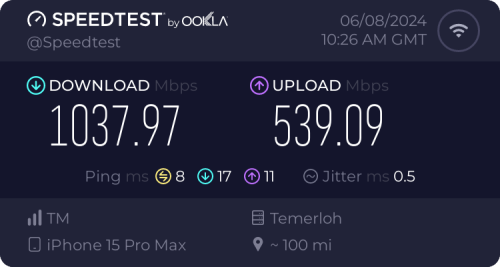 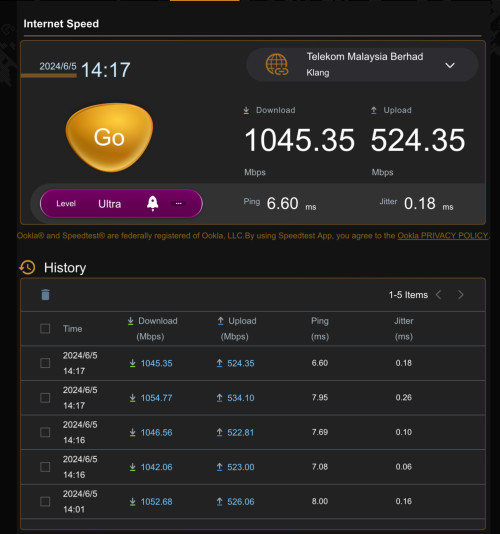 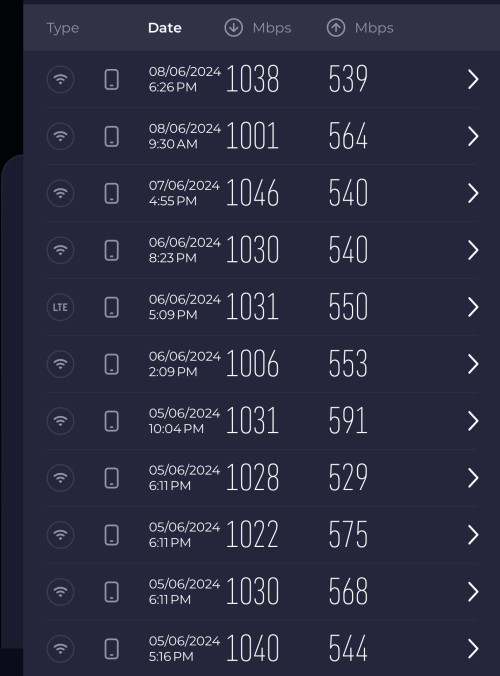 |
|
|
Jun 9 2024, 11:31 PM
|
|
Junior Member
156 posts Joined: Dec 2010
|
QUOTE(Skylines93 @ Jun 9 2024, 05:07 PM) For me , Didnt the technician do speedtest during installation? Call tm tell them the issue you should not be getting that capped speed. Bridge mode will disable all LAN except LAN1 it's an expected behavior.Weird things , even on "Combo Mode" , LAN 1 port still capped at around 100mbps. LAN 2 - 4 gets full speed (500mbps+) When doing the bridge things to my TP-Link router only LAN 1 works (speed still capped at 100mbps) other port not working. This post has been edited by Ashren: Jun 9 2024, 11:33 PM |
|
|
Jun 9 2024, 11:35 PM
|
|
Junior Member
156 posts Joined: Dec 2010
|
QUOTE(jiaen0509 @ Jun 9 2024, 05:51 PM) 1. Let TM fully configure and set up the Combo Box. Ensure the; Without that disclaimer if it doesnt work I'll sue you 😂• Internet is up • VoIP is working 2. Thank the technician, belanja a air tin/kotak, and goodbye. 3. Connect a LAN cable from the LAN 1 port on the D-Link Combo Box to the WAN port on my Asus Router. 4. Access the D-Link WebUI via 192.168.0.1. 5. Go to the “Wizard” and change the [WAN Mode] to “GPON Mode,” then apply the changes. See reference below; 6. Wait a few seconds, and the internet on my Asus Router will be up. Disclaimer: The steps and information provided here are based on my personal experience. Results may vary and attempts these changes at your own risk. Note: My PPPoE information was already configured on my Asus Router before the Combo Box was installed, so the above steps do not involve setting up or configuring PPPoE. Once “Bridge Mode” on Combo Box is set. It will take some time to up the internet. I am aware of a previously reported issue where the internet speed drops after a certain number of hours, requiring a restart of the Combo Box to resolve. For my case, after more than five days of monitoring, I haven’t encountered any speed drop issues. |
|
|
Jun 9 2024, 11:36 PM
|
|
Junior Member
156 posts Joined: Dec 2010
|
QUOTE(hussain @ Jun 9 2024, 10:21 PM) Not sure.. When. I switched back to Gpon router it worked.. Gpon bridge messed it up for me.. My tm guy did set my router in bridge mode already... I misunderstood your post in that by setting it to gpon bridge it could improve my speed but it was a wrong move for me.. Anyways.. All. Is well now.. Cheers Glad you got it sorted out 👍 |
|
|
Jun 9 2024, 11:53 PM
Show posts by this member only | IPv6 | Post
#2999
|
|
Senior Member
3,305 posts Joined: Dec 2012
|
QUOTE(Ashren @ Jun 9 2024, 11:28 PM) Nice results. Asus Tuf router ah? Yes. TUF routerQUOTE(Ashren @ Jun 9 2024, 11:35 PM) Without that disclaimer if it doesnt work I'll sue you 😂 🤣🤣🤣 I’ve updated the disclaimer to avoid any you sue me LOL. By the way, these are my settings, and they work well for me. I hope more people will share their settings and help verify which methods are best for the majority. Ashren liked this post
|
|
|
Jun 9 2024, 11:56 PM
Show posts by this member only | IPv6 | Post
#3000
|
|
Newbie
46 posts Joined: Oct 2017
|
QUOTE(Ashren @ Jun 9 2024, 11:31 PM) Didnt the technician do speedtest during installation? Call tm tell them the issue you should not be getting that capped speed. Bridge mode will disable all LAN except LAN1 it's an expected behavior. technican also cant figure out why only LAN 1 getting that capped speed. Even reset the onu same thing. (tested with 2 different onu , old (zte + own router) and new "Combo box"). They think its my own router issue so we configure the new combo box and still getting that capped speed on LAN1 (2,3 - no issue reaching 500mbps+) during bridge mode to own router again , still getting that capped speed since only LAN 1 is usable as you mentioned. |
|
Topic ClosedOptions
|
| Change to: |  0.0297sec 0.0297sec
 0.71 0.71
 7 queries 7 queries
 GZIP Disabled GZIP Disabled
Time is now: 14th December 2025 - 01:38 AM |
 Quote
Quote