


QUOTE
There is an outage in your area. Our unifi Care Crew is currently resolving the outage and is estimated to be resolved by 09/06/2024 15:40:00
This post has been edited by Doraku: Jun 8 2024, 04:15 PM
Unifi Official TM UniFi High Speed Broadband Thread V42, READ 1ST PAGE FOR RELEVANT WIFI INFO!
|
|
 Jun 8 2024, 04:13 PM Jun 8 2024, 04:13 PM
Show posts by this member only | IPv6 | Post
#2961
|
 
Senior Member
1,155 posts Joined: Apr 2016  
|
my internet service has been down since 6AM
QUOTE There is an outage in your area. Our unifi Care Crew is currently resolving the outage and is estimated to be resolved by 09/06/2024 15:40:00 This post has been edited by Doraku: Jun 8 2024, 04:15 PM |
|
|
|
|
|
Jun 8 2024, 08:04 PM
|

Senior Member
1,573 posts Joined: Oct 2015
|
 Got this email offer. Says the only catch is the contract is reset to 24months. Should I take it? Currently I am on 2019 offer promo + Ultimate plan. Any catch I should be ware of? |
|
|
Jun 8 2024, 08:47 PM
|
|
Senior Member
2,284 posts Joined: Jun 2008
|
QUOTE(watabakiu @ Jun 8 2024, 08:04 PM) Got this email offer. Says the only catch is the contract is reset to 24months. Should I take it? Currently I am on 2019 offer promo + Ultimate plan. Any catch I should be ware of?  |
|
|
Jun 8 2024, 08:54 PM
Show posts by this member only | IPv6 | Post
#2964
|
|
Newbie
46 posts Joined: Oct 2017
|
QUOTE(sitescope @ Jun 8 2024, 03:39 PM) Disable dhcp in fbhome edit..got it..thanksChg WAN to bridge mode in fbhome Connect LAN cable frm tplink lan port to fbhome wan port This post has been edited by Skylines93: Jun 8 2024, 09:14 PM |
|
|
Jun 8 2024, 09:29 PM
|
|
Senior Member
1,573 posts Joined: Oct 2015
|
QUOTE(rifles @ Jun 8 2024, 08:47 PM) better go tm point. u may get 6 month free Sure bo? dun think the chap at the counter can give such offer |
|
|
Jun 8 2024, 09:38 PM
|
|
Senior Member
6,818 posts Joined: Oct 2008 From: Kuala Lumpur 
|
QUOTE(watabakiu @ Jun 8 2024, 08:04 PM) Got this email offer. Says the only catch is the contract is reset to 24months. Should I take it? Currently I am on 2019 offer promo + Ultimate plan. Any catch I should be ware of? What speed and how much are you paying now? |
|
|
|
|
|
Jun 8 2024, 10:37 PM
|
|
Senior Member
1,573 posts Joined: Oct 2015
|
QUOTE(YoungMan @ Jun 8 2024, 09:38 PM) If you don't need the ultimate TV pack, can go Tmpoint and ask for SWU 4.0 plan. Can get 6 months free somemore. Now on Unifi 500mbps Super Value YEP 2019 [RM119.00] + Ultimate Pack [RM60.00]What speed and how much are you paying now? |
|
|
Jun 9 2024, 11:01 AM
|
|
Senior Member
6,818 posts Joined: Oct 2008 From: Kuala Lumpur
|
QUOTE(watabakiu @ Jun 8 2024, 10:37 PM) Now on Unifi 500mbps Super Value YEP 2019 [RM119.00] + Ultimate Pack [RM60.00] Wow your plan as good as SWU plan already. Just that not sure if Tmpoint able to offer more than 3 months free. |
|
|
Jun 9 2024, 02:48 PM
Show posts by this member only | IPv6 | Post
#2969
|

Junior Member
9 posts Joined: Oct 2022
|
Internet plan was upgraded to 1GB that comes with the D-Link combo box white unit. My existing setup is Huawei ONT EchoLife HG8240H5 + AX86U. My question is should I swapped out the old ones and replace it with the Combo box? Any advantage to WiFi speed using the D-Link model? cHiLdHo0drEaMz liked this post
|
|
|
Jun 9 2024, 02:58 PM
|
|
Newbie
46 posts Joined: Oct 2017
|
Hi Sifus
I'm only getting around 100mbps after bridge'ing the FibreHome Combo box to my TP-Link router (LAN 1 -> WAN port on router) . Tried on LAN 2 , LAN 3, LAN4 no internet. Any setting i should check? |
|
|
Jun 9 2024, 03:38 PM
Show posts by this member only | IPv6 | Post
#2971
|

Senior Member
3,305 posts Joined: Dec 2012
|
QUOTE(DMiller @ Jun 9 2024, 02:48 PM) Internet plan was upgraded to 1GB that comes with the D-Link combo box white unit. My existing setup is Huawei ONT EchoLife HG8240H5 + AX86U. The setup depends entirely on your requirements. If you are satisfied with the current Combo Box, you can continue using it. However, if you need additional functions on your Asus router, such as AiMesh, you may want to set it to bridge mode.My question is should I swapped out the old ones and replace it with the Combo box? Any advantage to WiFi speed using the D-Link model? I encountered an issue with the White Combo Box in Bridge Mode with my Asus Router. While I can achieve a download speed of 940 Mbps, the upload speed ranges between 50-200 Mbps. It seems the combined upload and download speeds do not exceed 1024 Mbps in total. However, the Black Combo Box resolves this issue. QUOTE(Skylines93 @ Jun 9 2024, 02:58 PM) Hi Sifus What is your speed package? Combo box model?I'm only getting around 100mbps after bridge'ing the FibreHome Combo box to my TP-Link router (LAN 1 -> WAN port on router) . Tried on LAN 2 , LAN 3, LAN4 no internet. Any setting i should check? cHiLdHo0drEaMz and DMiller liked this post
|
|
|
Jun 9 2024, 03:45 PM
|

Senior Member
1,704 posts Joined: Jan 2003 From: Hogoh Pahang Hogoh 
|
QUOTE(hussain @ Jun 8 2024, 02:13 PM) all sorted. Black onr + bridge mode with my router.. Sorted dload speed got over 1Gbps ?thanks all for advice and help.. cheers |
|
|
Jun 9 2024, 03:48 PM
Show posts by this member only | IPv6 | Post
#2973
|
|
Newbie
46 posts Joined: Oct 2017
|
QUOTE(jiaen0509 @ Jun 9 2024, 03:38 PM) The setup depends entirely on your requirements. If you are satisfied with the current Combo Box, you can continue using it. However, if you need additional functions on your Asus router, such as AiMesh, you may want to set it to bridge mode. 500mbps , FibreHome AX3000 Combo box (White)I encountered an issue with the White Combo Box in Bridge Mode with my Asus Router. While I can achieve a download speed of 940 Mbps, the upload speed ranges between 50-200 Mbps. It seems the combined upload and download speeds do not exceed 1024 Mbps in total. However, the Black Combo Box resolves this issue. What is your speed package? Combo box model? This post has been edited by Skylines93: Jun 9 2024, 03:49 PM |
|
|
|
|
|
Jun 9 2024, 04:09 PM
|
|
Junior Member
165 posts Joined: Nov 2006
|
Hi i am currently using Unifi 500mbps Super Value YEP 2019 (actual speed test is 800Mbps in speedtest after free upgrade) [RM129.00] + Aneka (RM30).
My contract has ended. When i went to TMpoint previously they told me SWU package is more expensive than my current package if i want to include tv package as no promotion. Anyone get cheaper SWU with tv package? |
|
|
Jun 9 2024, 04:18 PM
Show posts by this member only | IPv6 | Post
#2975
|

Senior Member
2,012 posts Joined: Dec 2007 From: Malaysia
|
QUOTE(zeronehza @ Jun 9 2024, 03:45 PM) dload speed got over 1Gbps ? On Lan cable yes.. Wifi 700 to 800 mbps |
|
|
Jun 9 2024, 04:46 PM
Show posts by this member only | IPv6 | Post
#2976
|
|
Senior Member
3,305 posts Joined: Dec 2012
|
QUOTE(zeronehza @ Jun 9 2024, 03:45 PM) dload speed got over 1Gbps ? QUOTE(hussain @ Jun 9 2024, 04:18 PM) On Lan cable yes.. Wifi 700 to 800 mbps I consistently achieve download speeds of 1000 Mbps and upload speeds of 500 Mbps on both 5GHz Wi-Fi with iPhone 15 Pro Max device used and LAN when using the Black ONR in Bridge Mode and dialing PPPoE on the Asus Router.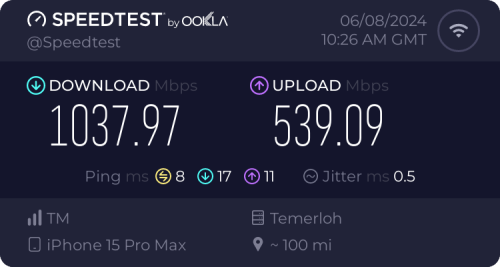 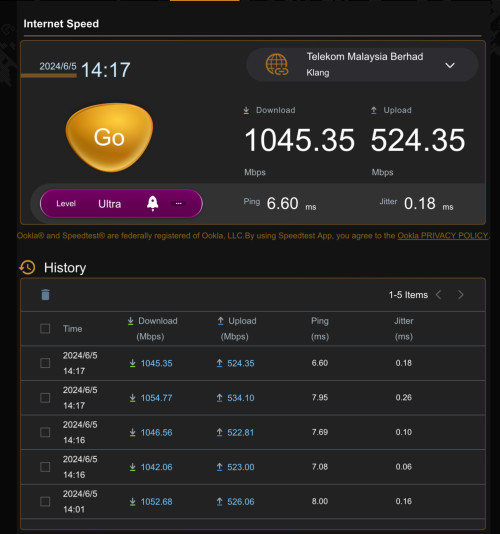 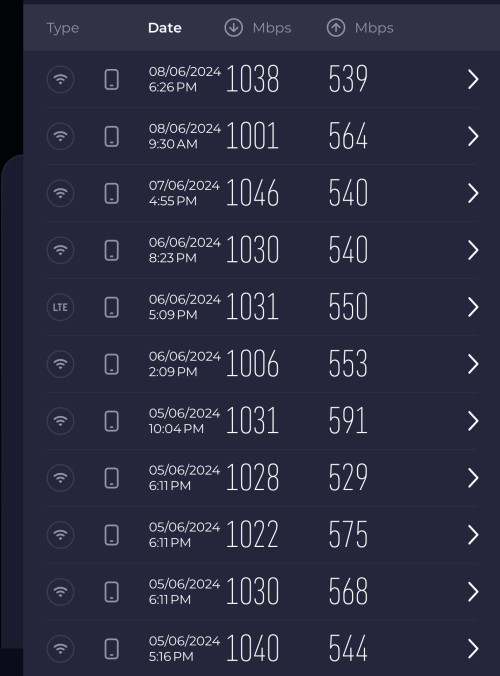 This post has been edited by jiaen0509: Jun 9 2024, 04:47 PM cHiLdHo0drEaMz liked this post
|
|
|
Jun 9 2024, 05:07 PM
Show posts by this member only | IPv6 | Post
#2977
|
|
Newbie
46 posts Joined: Oct 2017
|
QUOTE(jiaen0509 @ Jun 9 2024, 04:46 PM) I consistently achieve download speeds of 1000 Mbps and upload speeds of 500 Mbps on both 5GHz Wi-Fi with iPhone 15 Pro Max device used and LAN when using the Black ONR in Bridge Mode and dialing PPPoE on the Asus Router. For me , Weird things , even on "Combo Mode" , LAN 1 port still capped at around 100mbps. LAN 2 - 4 gets full speed (500mbps+) When doing the bridge things to my TP-Link router only LAN 1 works (speed still capped at 100mbps) other port not working. This post has been edited by Skylines93: Jun 9 2024, 05:07 PM |
|
|
Jun 9 2024, 05:28 PM
Show posts by this member only | IPv6 | Post
#2978
|
|
Senior Member
2,012 posts Joined: Dec 2007 From: Malaysia
|
QUOTE(jiaen0509 @ Jun 9 2024, 04:46 PM) I consistently achieve download speeds of 1000 Mbps and upload speeds of 500 Mbps on both 5GHz Wi-Fi with iPhone 15 Pro Max device used and LAN when using the Black ONR in Bridge Mode and dialing PPPoE on the Asus Router. Is there something that my setup is doing wrong? Did u set it up differently from how tm service guys set it... Plesse share.. Thanks.. BTW I'm using s23 ultra |
|
|
Jun 9 2024, 05:41 PM
Show posts by this member only | IPv6 | Post
#2979
|

Junior Member
612 posts Joined: Apr 2005 From: http://127.0.0.1:80/announce 
|
QUOTE(blackankh @ Jun 9 2024, 04:09 PM) Hi i am currently using Unifi 500mbps Super Value YEP 2019 (actual speed test is 800Mbps in speedtest after free upgrade) [RM129.00] + Aneka (RM30). SWU will be cheaper without tv pack because their target is for customer only need Internet. This is what tm titiwangsa officer told me when i have some chitchat there last December when i tried to get the SWUMy contract has ended. When i went to TMpoint previously they told me SWU package is more expensive than my current package if i want to include tv package as no promotion. Anyone get cheaper SWU with tv package? My current package 800mbps (turbo upgrade 2018) + Ultimate Pack (tv) paying RM189.75 (incl. tax). This post has been edited by ahlong: Jun 9 2024, 05:44 PM blackankh liked this post
|
|
|
Jun 9 2024, 05:51 PM
Show posts by this member only | IPv6 | Post
#2980
|
|
Senior Member
3,305 posts Joined: Dec 2012
|
QUOTE(hussain @ Jun 9 2024, 05:28 PM) Is there something that my setup is doing wrong? Did u set it up differently from how tm service guys set it... Plesse share.. Thanks.. BTW I'm using s23 ultra 1. Let TM fully configure and set up the Combo Box. Ensure the;• Internet is up • VoIP is working 2. Thank the technician, belanja a air tin/kotak, and goodbye. 3. Connect a LAN cable from the LAN 1 port on the D-Link Combo Box to the WAN port on my Asus Router. 4. Access the D-Link WebUI via 192.168.0.1. 5. Go to the “Wizard” and change the [WAN Mode] to “GPON Mode,” then apply the changes. See reference below; 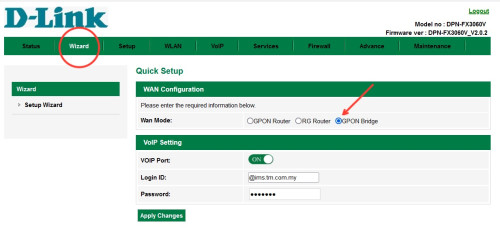 6. Wait a few seconds, and the internet on my Asus Router will be up. Disclaimer: The steps and information provided here are based on my personal experience. Results may vary and attempts these changes are at your own risk; this information does not constitute legal or professional advice of any kind and cannot be used as the basis for any legal proceedings. Note: My PPPoE information was already configured on my Asus Router before the Combo Box was installed, so the above steps do not involve setting up or configuring PPPoE. Once “Bridge Mode” on Combo Box is set. It will take some time to up the internet. I am aware of a previously reported issue where the internet speed drops after a certain number of hours, requiring a restart of the Combo Box to resolve. For my case, after more than five days of monitoring, I haven’t encountered any speed drop issues. This post has been edited by jiaen0509: Jun 9 2024, 11:50 PM |
|
Topic ClosedOptions
|
| Change to: |  0.0202sec 0.0202sec
 0.22 0.22
 6 queries 6 queries
 GZIP Disabled GZIP Disabled
Time is now: 15th December 2025 - 04:37 AM |
 Quote
Quote