

800mbps (TURBO UPGRADE) free upgrade to 1GBPS.
IF wanna upgrade to 2 gbps, what would the offer price be? Any info guys…
Unifi Official TM UniFi High Speed Broadband Thread V42, READ 1ST PAGE FOR RELEVANT WIFI INFO!
Unifi Official TM UniFi High Speed Broadband Thread V42, READ 1ST PAGE FOR RELEVANT WIFI INFO!
|
|
 Feb 14 2024, 09:40 PM Feb 14 2024, 09:40 PM
Return to original view | IPv6 | Post
#1
|
 
Junior Member
535 posts Joined: Mar 2009 
|
800mbps (TURBO UPGRADE) free upgrade to 1GBPS.
IF wanna upgrade to 2 gbps, what would the offer price be? Any info guys… |
|
|
|
|
|
Mar 28 2024, 12:32 PM
Return to original view | Post
#2
|
|
Junior Member
535 posts Joined: Mar 2009
|
QUOTE(zeronehza @ Mar 28 2024, 12:14 PM) get ready to have answer, you already on the best plan offer, no speed upgrade will be implemented I’m currently on 800mbps + ultimate pack + 600 free mins of call at RM150. maybe yes maybe not..   Received confirmation from TM that the upgrade is now Prioritising for those on 800mbps plan paying RM239 and above. Those whom are paying lesser, the upgrade will surely be given but timeline has been given or specified when it will be done. 
|
|
|
May 13 2024, 05:27 PM
Return to original view | Post
#3
|
|
Junior Member
535 posts Joined: Mar 2009
|
800MBPS user here + ultimate pack + free 600 minutes Voice call for RM159 schedule to be upgraded to Unifi Home 1GBPS - Pro Upgrade tomorrow at 2pm.
Finally the day came after waiting for months. I’m planning to use my own router Asus RT-AC5300. Anyone have done the bridging using this router? This post has been edited by Mazda9: May 13 2024, 05:27 PM |
|
|
May 14 2024, 11:04 AM
Return to original view | Post
#4
|
|
Junior Member
535 posts Joined: Mar 2009
|
QUOTE(Mazda9 @ May 13 2024, 05:27 PM) 800MBPS user here + ultimate pack + free 600 minutes Voice call for RM159 schedule to be upgraded to Unifi Home 1GBPS - Pro Upgrade tomorrow at 2pm. Finally connection was upgraded to 1GBPS plan this morning. Received the white colour combo box and the Instalaltion care crew showed me the WhatsApp group message from TM that the black box will only be officially available mid of June onwards and currently 500 black boxes are out in the market with users for testing phase purpose.Finally the day came after waiting for months. I’m planning to use my own router Asus RT-AC5300. Anyone have done the bridging using this router? 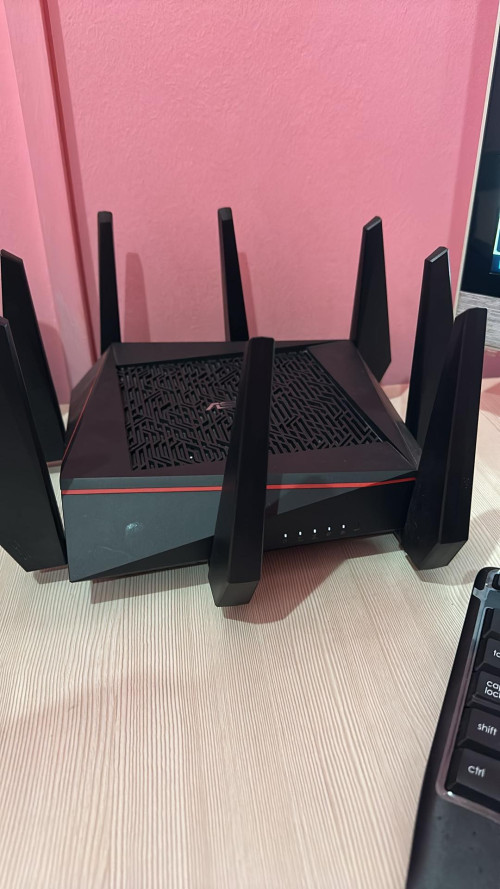  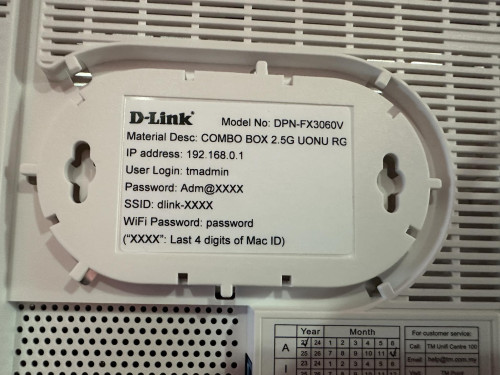 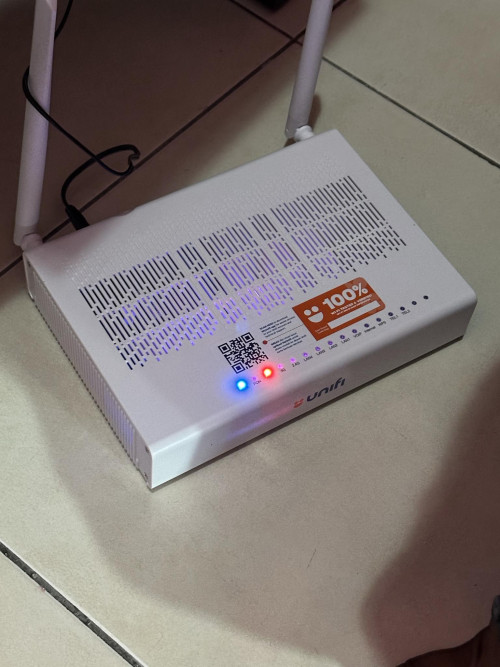 |
|
|
May 14 2024, 11:50 AM
Return to original view | Post
#5
|
|
Junior Member
535 posts Joined: Mar 2009
|
QUOTE(zeronehza @ May 14 2024, 11:45 AM) lan port 1 1gb ? Yes |
|
|
May 14 2024, 01:15 PM
Return to original view | IPv6 | Post
#6
|
|
Junior Member
535 posts Joined: Mar 2009
|
QUOTE(zeronehza @ May 14 2024, 01:08 PM) thats mean old stock, hope truly new fw update will enable port bw to 2.5 I have confirmed with TM flying squad that firmware update is not possible for this type of device. cHiLdHo0drEaMz liked this post
|
|
|
|
|
|
May 14 2024, 01:28 PM
Return to original view | IPv6 | Post
#7
|
|
Junior Member
535 posts Joined: Mar 2009
|
QUOTE(yenchenje @ May 14 2024, 01:18 PM) Not surprising considering what the appearance of the main board and stuff looks like Even the black is having drawbacks as the bridging is not stable and some other connectivity drop issues. That’s why TM only roll out few hundreds for trial only and it will be officially released by mid June.Black removed one POTS and changed port to 2.5G with shifting of some LED locations around  It reminds me those days when TM did the same mistake back then by deploying Nokia BTU and after many complaints they decided to withdraw it from the market. Not surprised if the black one is I’ll have the same faith soon. According to flying squad, the current white one is not perfect but still it’s the most stable one so far. cHiLdHo0drEaMz liked this post
|
|
|
May 14 2024, 07:17 PM
Return to original view | IPv6 | Post
#8
|
|
Junior Member
535 posts Joined: Mar 2009
|
QUOTE(zeronehza @ May 14 2024, 02:53 PM) so we (existing user) can demand to replace to new one (black) Nopedamn rat lab  You you cant. Box is provided by TM on stock allocation basis. You can’t request it… |
|
|
May 15 2024, 03:13 PM
Return to original view | IPv6 | Post
#9
|
|
Junior Member
535 posts Joined: Mar 2009
|
QUOTE(tng55 @ May 15 2024, 03:02 PM) guys this unifi how possible cheap look 1gbps and 2gbps Can you share the link where you got this? |
|
|
May 15 2024, 07:19 PM
Return to original view | Post
#10
|
|
Junior Member
535 posts Joined: Mar 2009
|
Stay tuned for upcoming offer for 1gbos and 2gbos plan. TM sales on 1gbps and 2gbps plan is extremely poor. Won’t be surprise cheaper pricing for this 2 category soon.
|
|
|
Jun 9 2024, 11:59 PM
Return to original view | Post
#11
|
|
Junior Member
535 posts Joined: Mar 2009
|
QUOTE(jiaen0509 @ Jun 9 2024, 05:51 PM) 1. Let TM fully configure and set up the Combo Box. Ensure the; Lan cable is connected to 2.5gb port (lan1) and the other side to my Asus router wan port. Any idea why I’m unable to access 192.168.0.1?• Internet is up • VoIP is working 2. Thank the technician, belanja a air tin/kotak, and goodbye. 3. Connect a LAN cable from the LAN 1 port on the D-Link Combo Box to the WAN port on my Asus Router. 4. Access the D-Link WebUI via 192.168.0.1. 5. Go to the “Wizard” and change the [WAN Mode] to “GPON Mode,” then apply the changes. See reference below; 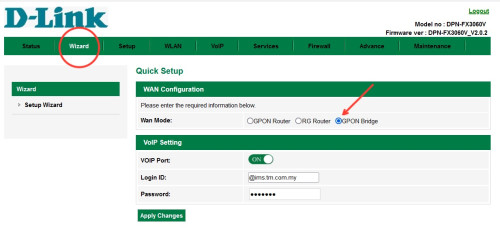 6. Wait a few seconds, and the internet on my Asus Router will be up. Disclaimer: The steps and information provided here are based on my personal experience. Results may vary and attempts these changes are at your own risk; this information does not constitute legal or professional advice of any kind and cannot be used as the basis for any legal proceedings. Note: My PPPoE information was already configured on my Asus Router before the Combo Box was installed, so the above steps do not involve setting up or configuring PPPoE. Once “Bridge Mode” on Combo Box is set. It will take some time to up the internet. I am aware of a previously reported issue where the internet speed drops after a certain number of hours, requiring a restart of the Combo Box to resolve. For my case, after more than five days of monitoring, I haven’t encountered any speed drop issues. It says can’t reach this page hmmmm |
|
|
Jun 19 2024, 10:33 PM
Return to original view | IPv6 | Post
#12
|
|
Junior Member
535 posts Joined: Mar 2009
|
Looks like Unifi is desperate to bind their customers without contract to 24 months contract again by giving them 3 months free subscription.
Just received this message 
Source:- https://shop.unifi.com.my/slof/register-int...=3months_waiver |
|
|
Jun 22 2024, 11:47 AM
Return to original view | IPv6 | Post
#13
|
|
Junior Member
535 posts Joined: Mar 2009
|
Guys,
Need some advise here? What’s the best router for 2gbps plan? TP-link 800 vs TP-link 805 VE TP-Link GE800 (gaming router) in terms of widest coverage and stability? |
|
|
|
|
|
Jun 22 2024, 01:28 PM
Return to original view | IPv6 | Post
#14
|
|
Junior Member
535 posts Joined: Mar 2009
|
QUOTE(enduser @ Jun 22 2024, 12:30 PM) Blacktubi both gove tubi rating of 9.3 Thanks bro for the heads up. Just contacted TP-LINk support, they recommended GE800 gaming router as the hardware spec and coverage wise is slight better than 805https://www.blacktubi.com/review/archer-ge800/ https://www.blacktubi.com/review/tp-link-archer-be805/ But me more like the be805, the design suit for home Imho both are capable router. blacktubi |
|
|
Jul 11 2024, 07:32 PM
Return to original view | IPv6 | Post
#15
|
|
Junior Member
535 posts Joined: Mar 2009
|
Hi,
I’m on 1Gbps Unifi plan. The issue is when I’m using the 2.5gb Unifi black combo box paired with my Asus rtac5300 router or with my tp-link ge800 router as bridge, my download speed will drop after few days from 950mbps to 300-450mbps after few days. I’ll call Unifi technical support, they will eventually reset the port and the issue will be solved for few days then back to square one again. TM engineer came to give me spare fiberhome white box to test and see but surprisingly the issue doesn’t happen with white fiberhome ONU box. Any idea what’s wrong? |
|
|
Nov 13 2024, 08:17 PM
Return to original view | Post
#16
|
|
Junior Member
535 posts Joined: Mar 2009
|
Can anyone suggest best dns to use with tp link ge800 router?
I’m using google dns with 800mbos but lately it’s buffering often. |
|
Topic ClosedOptions
|
| Change to: |  0.2399sec 0.2399sec
 0.67 0.67
 7 queries 7 queries
 GZIP Disabled GZIP Disabled
Time is now: 2nd December 2025 - 11:51 PM |
 Quote
Quote