Welcome Guest ( Log In | Register )

Bump Topic Topic Closed RSS Feed

Outline · [ Standard ] · Linear+

Unifi Official TM UniFi High Speed Broadband Thread V42, READ 1ST PAGE FOR RELEVANT WIFI INFO!

views
     
sHawTY
post May 20 2024, 11:24 AM

Frequent Reporter
********
All Stars
14,909 posts

Joined: Jul 2005

QUOTE(doodlearki @ May 20 2024, 10:46 AM)
Is Unifi customer service just understaffed, or are they actually incompetent? Account still shown suspended, but I overpaid for one month. Last month, their staff claimed that from their side, my account was active. Recently want to change pack, sales dept. said my account suspended.... So they were lying? Long wait time, even hung up on me when I was holding. No good assistance at all.

Anyone had similar experience?
Raise a ticket to MCMC
Ashren
post May 20 2024, 11:29 AM

Getting Started
**
Junior Member
156 posts

Joined: Dec 2010
QUOTE(Jjuggler @ May 20 2024, 11:22 AM)
Whether its top tier or mid tier, we are subscribers. We are paying on monthly basis for the service. They have to provide fw support and change the hw for free every 2 or 3 years without contract.  nod.gif
*
Agree.
RViN
post May 20 2024, 12:16 PM

There Is Only One United
*******
Senior Member
5,827 posts

Joined: Jan 2003
From: Selayang, Selangor


QUOTE(jiaen0509 @ May 17 2024, 01:03 PM)
Any update sharing bro?
*
QUOTE(Ashren @ May 17 2024, 02:50 PM)
Isn't ploam pass tied to the gpon serial? Or is it a one pass for multiple devices?
*
QUOTE(zeronehza @ May 17 2024, 03:00 PM)
not bind, if bind old onu cannot use with user own router (for user 1Gbps and above)
*
QUOTE(Ashren @ May 17 2024, 03:09 PM)
I think RViN is binded because they replace his old alcatel with fiberhome during the black dlink upgrade installation and he can't switch back to use his old alcatel, didnt even change anything on his alcatel settings. He use the fiberhome ploam pass on his black dlink also cannot connect, the dlink wasnt configured fresh out of the box. Only his white fiberhome can connect, hmm.
*
Sorry took so long to update, the issue dragged on for so many days. bangwall.gif

Can confirm the ONU was bound to my account, that's why I couldn't setup the black DLINK ONR myself - it would refuse to connect. No misconfigurtion on my side.

Technician came over and he couldn't connect also. Problem was to call the NOC he had to create a ticket, and once ticket created its auto assigned he couldn't pick it up. Twice some other team picked it up and auto-closed it without even calling me or coming over (despite the status saying they came over and checked and resolved the issue, funny thing is the updates happen over hours like they're faking a realistic timeline).

Anyway on the third time he managed to find out which team was assigned the ticket and insisted they come over to the house with him, and then he got them to see that the ONR wouldn't connect but the ONU would and got the NOC to bind it to the black ONR. The backend team wouldn't allow to just unbind dry.gif

Anyway long story short, now I can get actual 1Gbps speeds through the 2.5Gbe port to my router. Before this speedtests were caped to 930Mbps, now they pass 1020Mbps.

ONR is set to bridge mode (through the wizard) and router is dialling PPOE.

BUT I've noticed that after about a day or so, when I try to do a speedtest the speed drops down to 300Mbps. Redialing/rebooting the router makes no difference. I have to reboot the ONR and then the speeds go back to 1Gbps. Anyone else having similar issues with the black Dlink ONR FX3060v? Firmware version is 2.0.2 This has happened twice now, got the ONR set up on Friday and on Saturday and Sunday evening noticed the same behaviour. Fully expecting the same to happen this evening or tomorrow morning, since I only just rebooted the ONR today and couldn't be bothered to last night.

This post has been edited by RViN: May 20 2024, 12:21 PM
jiaen0509
post May 20 2024, 12:40 PM

Look at all my stars!!
*******
Senior Member
3,307 posts

Joined: Dec 2012
QUOTE(RViN @ May 20 2024, 12:16 PM)
Sorry took so long to update, the issue dragged on for so many days.  bangwall.gif

Can confirm the ONU was bound to my account, that's why I couldn't setup the black DLINK ONR myself - it would refuse to connect. No misconfigurtion on my side.

Technician came over and he couldn't connect also. Problem was to call the NOC he had to create a ticket, and once ticket created its auto assigned he couldn't pick it up. Twice some other team picked it up and auto-closed it without even calling me or coming over (despite the status saying they came over and checked and resolved the issue, funny thing is the updates happen over hours like they're faking a realistic timeline).

Anyway on the third time he managed to find out which team was assigned the ticket and insisted they come over to the house with him, and then he got them to see that the ONR wouldn't connect but the ONU would and got the NOC to bind it to the black ONR. The backend team wouldn't allow to just unbind  dry.gif

Anyway long story short, now I can get actual 1Gbps speeds through the 2.5Gbe port to my router. Before this speedtests were caped to 930Mbps, now they pass 1020Mbps.

ONR is set to bridge mode (through the wizard) and router is dialling PPOE.

BUT I've noticed that after about a day or so, when I try to do a speedtest the speed drops down to 300Mbps. Redialing/rebooting the router makes no difference. I have to reboot the ONR and then the speeds go back to 1Gbps. Anyone else having similar issues with the black Dlink ONR FX3060v? Firmware version is 2.0.2 This has happened twice now, got the ONR set up on Friday and on Saturday and Sunday evening noticed the same behaviour. Fully expecting the same to happen this evening or tomorrow morning, since I only just rebooted the ONR today and couldn't be bothered to last night.
*
I was able to use both the old ZTE Modem and the D-Link ONR. It seems that TM didn’t bind my account to specific devices. If you switch back to the old devices, are you able to connect?

Your sharing is great, as you can bridge to your own router. Just the speeds down to 300mbps and have to reboot ONR. However, according to Anime4000, he could not bridge at all… ermmmm

This post has been edited by jiaen0509: May 20 2024, 12:41 PM
Ashren
post May 20 2024, 12:43 PM

Getting Started
**
Junior Member
156 posts

Joined: Dec 2010
QUOTE(RViN @ May 20 2024, 12:16 PM)
Sorry took so long to update, the issue dragged on for so many days.  bangwall.gif

Can confirm the ONU was bound to my account, that's why I couldn't setup the black DLINK ONR myself - it would refuse to connect. No misconfigurtion on my side.

Technician came over and he couldn't connect also. Problem was to call the NOC he had to create a ticket, and once ticket created its auto assigned he couldn't pick it up. Twice some other team picked it up and auto-closed it without even calling me or coming over (despite the status saying they came over and checked and resolved the issue, funny thing is the updates happen over hours like they're faking a realistic timeline).

Anyway on the third time he managed to find out which team was assigned the ticket and insisted they come over to the house with him, and then he got them to see that the ONR wouldn't connect but the ONU would and got the NOC to bind it to the black ONR. The backend team wouldn't allow to just unbind  dry.gif

Anyway long story short, now I can get actual 1Gbps speeds through the 2.5Gbe port to my router. Before this speedtests were caped to 930Mbps, now they pass 1020Mbps.

ONR is set to bridge mode (through the wizard) and router is dialling PPOE.

BUT I've noticed that after about a day or so, when I try to do a speedtest the speed drops down to 300Mbps. Redialing/rebooting the router makes no difference. I have to reboot the ONR and then the speeds go back to 1Gbps. Anyone else having similar issues with the black Dlink ONR FX3060v? Firmware version is 2.0.2 This has happened twice now, got the ONR set up on Friday and on Saturday and Sunday evening noticed the same behaviour. Fully expecting the same to happen this evening or tomorrow morning, since I only just rebooted the ONR today and couldn't be bothered to last night.
*
Glad to hear you finally got it to work bro! So now we know the black ONR can be bridged but why the speed drop after sometime though? Maybe QoS? Maybe smol processor? RAM buildup?

cHiLdHo0drEaMz
post May 20 2024, 01:51 PM

#DBAP
******
Senior Member
1,031 posts

Joined: Jun 2011
From: #KajangTop


QUOTE(RViN @ May 20 2024, 12:16 PM)
Sorry took so long to update, the issue dragged on for so many days.  bangwall.gif

Can confirm the ONU was bound to my account, that's why I couldn't setup the black DLINK ONR myself - it would refuse to connect. No misconfigurtion on my side.

Technician came over and he couldn't connect also. Problem was to call the NOC he had to create a ticket, and once ticket created its auto assigned he couldn't pick it up. Twice some other team picked it up and auto-closed it without even calling me or coming over (despite the status saying they came over and checked and resolved the issue, funny thing is the updates happen over hours like they're faking a realistic timeline).

Anyway on the third time he managed to find out which team was assigned the ticket and insisted they come over to the house with him, and then he got them to see that the ONR wouldn't connect but the ONU would and got the NOC to bind it to the black ONR. The backend team wouldn't allow to just unbind  dry.gif

Anyway long story short, now I can get actual 1Gbps speeds through the 2.5Gbe port to my router. Before this speedtests were caped to 930Mbps, now they pass 1020Mbps.

ONR is set to bridge mode (through the wizard) and router is dialling PPOE.

BUT I've noticed that after about a day or so, when I try to do a speedtest the speed drops down to 300Mbps. Redialing/rebooting the router makes no difference. I have to reboot the ONR and then the speeds go back to 1Gbps. Anyone else having similar issues with the black Dlink ONR FX3060v? Firmware version is 2.0.2 This has happened twice now, got the ONR set up on Friday and on Saturday and Sunday evening noticed the same behaviour. Fully expecting the same to happen this evening or tomorrow morning, since I only just rebooted the ONR today and couldn't be bothered to last night.
*
Do you mind sharing further information on the bridging. Like a detailed steps that needed to be followed. Thanks in advance 🙏
jiaen0509
post May 20 2024, 01:59 PM

Look at all my stars!!
*******
Senior Member
3,307 posts

Joined: Dec 2012
QUOTE(cHiLdHo0drEaMz @ May 20 2024, 01:51 PM)
Do you mind sharing further information on the bridging. Like a detailed steps that needed to be followed. Thanks in advance 🙏
*
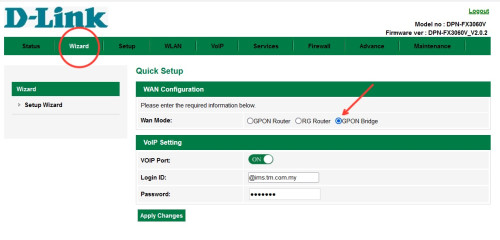
He did mentioned “ONR is set to bridge mode (through the wizard) and router is dialling PPOE.”.

This is what I did before (with the white variant) and no other settings done to do the bridge.

user posted image
cHiLdHo0drEaMz
post May 20 2024, 02:19 PM

#DBAP
******
Senior Member
1,031 posts

Joined: Jun 2011
From: #KajangTop


QUOTE(jiaen0509 @ May 20 2024, 01:59 PM)
He did mentioned “ONR is set to bridge mode (through the wizard) and router is dialling PPOE.”.

This is what I did before (with the white variant) and no other settings done to do the bridge.

user posted image
*
Thanks for update 🙏

Anime4000
post May 20 2024, 03:51 PM

Look at all my stars!!
*******
Senior Member
2,400 posts

Joined: Jul 2009
From: /dev/null


QUOTE(RViN @ May 20 2024, 12:16 PM)
BUT I've noticed that after about a day or so, when I try to do a speedtest the speed drops down to 300Mbps. Redialing/rebooting the router makes no difference. I have to reboot the ONR and then the speeds go back to 1Gbps. Anyone else having similar issues with the black Dlink ONR FX3060v? Firmware version is 2.0.2 This has happened twice now, got the ONR set up on Friday and on Saturday and Sunday evening noticed the same behaviour. Fully expecting the same to happen this evening or tomorrow morning, since I only just rebooted the ONR today and couldn't be bothered to last night.
*
QUOTE(jiaen0509 @ May 20 2024, 12:40 PM)
Your sharing is great, as you can bridge to your own router. Just the speeds down to 300mbps and have to reboot ONR. However, according to Anime4000, he could not bridge at all… ermmmm
*
That's normal issue for 2.5GbE at GPON, we actively trying to solve speed drop when using 2.5G ONU.
This happen because GPON not meant for 2.5G, when packet collision (drop) happen because Ethernet (Symmetrical) to GPON (Asymmetrical):
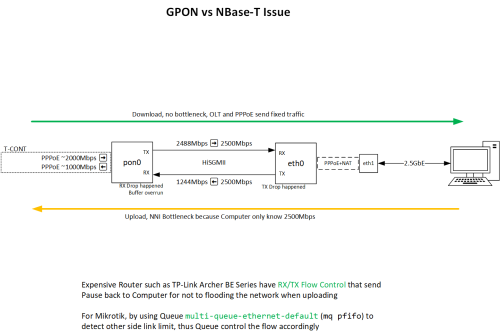
user posted image

By default, D-Link kind of wrong use Flow Control, when packet wait filled the RAM and speed dropped,
computer also doesn't know the gateway only 1Gbps Upload,

Who under Nokia OLT with correct OMCI (can bridge) and DSCP (proper QoS), no issue.
but, not all under Nokia OLT, mostly Fiberhome and some cheap brand OLT that not meant for 2Gbps plan.

TM should use XGSPON for 2Gbps laugh.gif

Also I notice D-Link DPN-FX3060V A1 and B1 has three PON Mode:
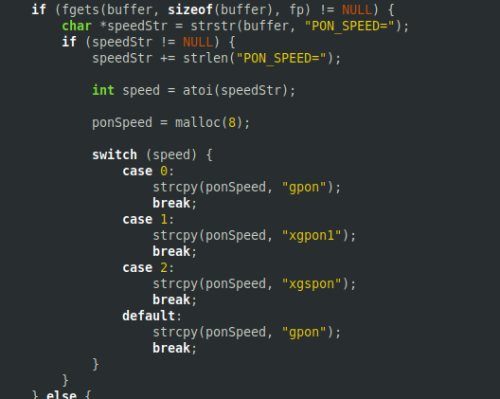
user posted image
0 = GPON (2488M/1244M)
1 = XGPON (10G/2.5G)
2 = XGSPON (10G/10G)

Could be TM future is 10Gbps due to TM no longer allow to expand, the fiber budget has given to Allo/Maxis

Another theory why B1 hardware cannot bridge because of 2.5G Switch Chip connected to SoC are not MePoint 0x101 (ME 171)
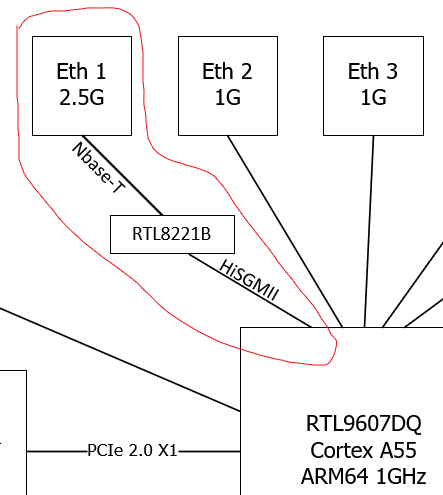
user posted image

The MePoint might wrong and Firmware set to wrong exit:
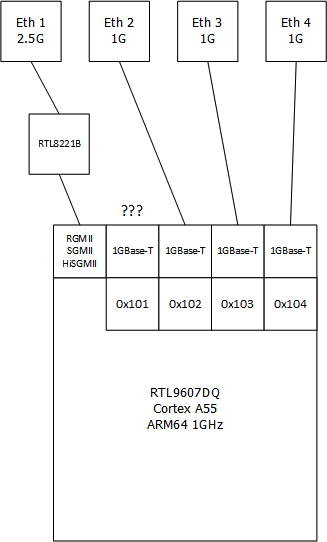
user posted image

There are two possible fix:
1. D-Link need a patch or hack ME 171
2. OLT need properly set correct ME 171 (because different place has different ME 171 even same subscriber)

my 2Gbps account was activated using PON Stick, and I ask to reactivate again using latest my modded PON Firmware and I can set D-Link ONR B1 to bridge mode, but WebGUI is killed by Nokia OLT (ME 171 tell to disable):
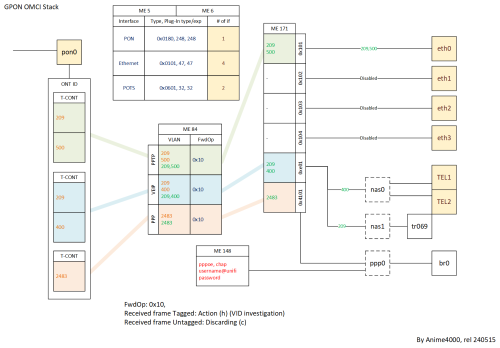
user posted image

This post has been edited by Anime4000: May 20 2024, 03:52 PM

Ashren
post May 20 2024, 04:22 PM

Getting Started
**
Junior Member
156 posts

Joined: Dec 2010
QUOTE(Anime4000 @ May 20 2024, 03:51 PM)
That's normal issue for 2.5GbE at GPON, we actively trying to solve speed drop when using 2.5G ONU.
This happen because GPON not meant for 2.5G, when packet collision (drop) happen because Ethernet (Symmetrical) to GPON (Asymmetrical):
user posted image

By default, D-Link kind of wrong use Flow Control, when packet wait filled the RAM and speed dropped,
computer also doesn't know the gateway only 1Gbps Upload,

Who under Nokia OLT with correct OMCI (can bridge) and DSCP (proper QoS), no issue.
but, not all under Nokia OLT, mostly Fiberhome and some cheap brand OLT that not meant for 2Gbps plan.

TM should use XGSPON for 2Gbps laugh.gif

Also I notice D-Link DPN-FX3060V A1 and B1 has three PON Mode:
user posted image
0 = GPON (2488M/1244M)
1 = XGPON (10G/2.5G)
2 = XGSPON (10G/10G)

Could be TM future is 10Gbps due to TM no longer allow to expand, the fiber budget has given to Allo/Maxis

Another theory why B1 hardware cannot bridge because of 2.5G Switch Chip connected to SoC are not MePoint 0x101 (ME 171)
user posted image

The MePoint might wrong and Firmware set to wrong exit:
user posted image

There are two possible fix:
1. D-Link need a patch or hack ME 171
2. OLT need properly set correct ME 171 (because different place has different ME 171 even same subscriber)

my 2Gbps account was activated using PON Stick, and I ask to reactivate again using latest my modded PON Firmware and I can set D-Link ONR B1 to bridge mode, but WebGUI is killed by Nokia OLT (ME 171 tell to disable):
user posted image
*
That's it hold my beer im calling tm to hire you.
RViN
post May 20 2024, 04:39 PM

There Is Only One United
*******
Senior Member
5,827 posts

Joined: Jan 2003
From: Selayang, Selangor


QUOTE(jiaen0509 @ May 20 2024, 12:40 PM)
I was able to use both the old ZTE Modem and the D-Link ONR. It seems that TM didn’t bind my account to specific devices. If you switch back to the old devices, are you able to connect?

Your sharing is great, as you can bridge to your own router. Just the speeds down to 300mbps and have to reboot ONR. However, according to Anime4000, he could not bridge at all… ermmmm
*
Nope, old device same issue. Link is there but can't dial. For the old Alcatel ONU the behaviour is the link light stable, but auth light will just slow blink forever.

QUOTE(Ashren @ May 20 2024, 12:43 PM)
Glad to hear you finally got it to work bro! So now we know the black ONR can be bridged but why the speed drop after sometime though? Maybe QoS? Maybe smol processor? RAM buildup?
*
I did go into the GUI before I restarted this morning to see if there was some issue with any resource utilisation or something but RAM was just 39% used, wasn't sure what else to see.

QUOTE(cHiLdHo0drEaMz @ May 20 2024, 01:51 PM)
Do you mind sharing further information on the bridging. Like a detailed steps that needed to be followed. Thanks in advance 🙏
*
I have mine set up exactly like what jiaen0509 set below

QUOTE(jiaen0509 @ May 20 2024, 01:59 PM)
He did mentioned “ONR is set to bridge mode (through the wizard) and router is dialling PPOE.”.

This is what I did before (with the white variant) and no other settings done to do the bridge.

user posted image
*
Yup exactly this.

RViN
post May 20 2024, 04:46 PM

There Is Only One United
*******
Senior Member
5,827 posts

Joined: Jan 2003
From: Selayang, Selangor


QUOTE(Anime4000 @ May 20 2024, 03:51 PM)
That's normal issue for 2.5GbE at GPON, we actively trying to solve speed drop when using 2.5G ONU.


By default, D-Link kind of wrong use Flow Control, when packet wait filled the RAM and speed dropped,
computer also doesn't know the gateway only 1Gbps Upload,

Who under Nokia OLT with correct OMCI (can bridge) and DSCP (proper QoS), no issue.
but, not all under Nokia OLT, mostly Fiberhome and some cheap brand OLT that not meant for 2Gbps plan.

*
So since mine can bridge I'm connected to a Nokia OLT? Any way I can check? Bridge for sure working and has worked over multiple power cycles, as everytime this speed throttle thing happens I turn off the power from plug to restart.

I mean if there's anything I can help share here that would be useful to others then can let me know. I know my way around CLIs though networking isn't my forte.

Anyway I'm guessing nothing I can do to resolve this 24 hours 300mbps limit thing on my end right?

What I'm planning to do now is hook it up to a smart switch and have it power cycle every 24 hours, like at 4am. Though not sure what effect this is going to have on its longevity.

Qt first I thought maybe it was overheating because the ONR is very warm in comparison to the old ONU so I put a fan on it but that didn't resolve anything.
Anime4000
post May 20 2024, 04:51 PM

Look at all my stars!!
*******
Senior Member
2,400 posts

Joined: Jul 2009
From: /dev/null


QUOTE(RViN @ May 20 2024, 04:46 PM)
So since mine can bridge I'm connected to a Nokia OLT? Any way I can check? Bridge for sure working and has worked over multiple power cycles, as everytime this speed throttle thing happens I turn off the power from plug to restart.

I mean if there's anything I can help share here that would be useful to others then can let me know. I know my way around CLIs though networking isn't my forte.

Anyway I'm guessing nothing I can do to resolve this 24 hours 300mbps limit thing on my end right?

What I'm planning to do now is hook it up to a smart switch and have it power cycle every 24 hours, like at 4am. Though not sure what effect this is going to have on its longevity.

Qt first I thought maybe it was overheating because the ONR is very warm in comparison to the old ONU so I put a fan on it but that didn't resolve anything.
*
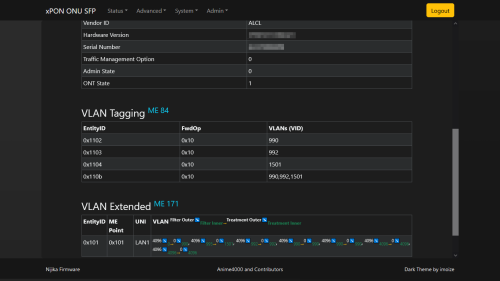
Perhaps you can wait, I porting my PON Stick OLT Status into this D-Link, so we can see what ME 84, 171 being push, also get to know what OLT are you under
it should look like this:
user posted image
Allo Fiber on PON Stick, the Internet VLAN 990 (PPPoE) and 992 (DHCP)

This post has been edited by Anime4000: May 20 2024, 04:54 PM
Ashren
post May 20 2024, 05:50 PM

Getting Started
**
Junior Member
156 posts

Joined: Dec 2010
QUOTE(RViN @ May 20 2024, 04:39 PM)
Nope, old device same issue. Link is there but can't dial. For the old Alcatel ONU the behaviour is the link light stable, but auth light will just slow blink forever.
I did go into the GUI before I restarted this morning to see if there was some issue with any resource utilisation or something but RAM was just 39% used, wasn't sure what else to see.
I have mine set up exactly like what jiaen0509 set below
Yup exactly this.
*
Its binded since you cant use your alcatel and fiberhome back. Did the ploam pass the same like before or did they generate a new one from the black onr serial for you? On the speed drop after sometime thing maybe its because of the additional 2.5gbe controller chip introduced with that black onr like Anime said since your ram utilization barely even hit 50% so thats likely not the issue. Never see ppl complain about the white one. Firmware update really needed to fix the 2.5gbe port stability if tm were to move forward with this model which i think they pretty much are by now.

This post has been edited by Ashren: May 20 2024, 05:51 PM
RViN
post May 20 2024, 07:25 PM

There Is Only One United
*******
Senior Member
5,827 posts

Joined: Jan 2003
From: Selayang, Selangor


QUOTE(Ashren @ May 20 2024, 05:50 PM)
Its binded since you cant use your alcatel and fiberhome back. Did the ploam pass the same like before or did they generate a new one from the black onr serial for you? On the speed drop after sometime thing maybe its because of the additional 2.5gbe controller chip introduced with that black onr like Anime said since your ram utilization barely even hit 50% so thats likely not the issue. Never see ppl complain about the white one. Firmware update really needed to fix the 2.5gbe port stability if tm were to move forward with this model which i think they pretty much are by now.
*
I haven't logged in to check on the dlink ONR but I don't think the ploam changed, because it didn't change previously when the technician moved from the alcatel to fiberhome ONU. I'll check and confirm.
Anime4000
post May 20 2024, 07:47 PM

Look at all my stars!!
*******
Senior Member
2,400 posts

Joined: Jul 2009
From: /dev/null


Modding in progress...

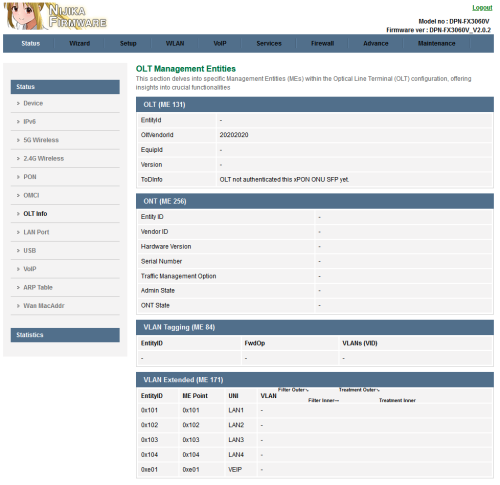
I porting my PON Stick OLT Status into D-Link, this show tell what OLT are you on, what kind of VLAN is being set, how VLAN is set, how VLAN is tag
user posted image
*fiber not connected yet

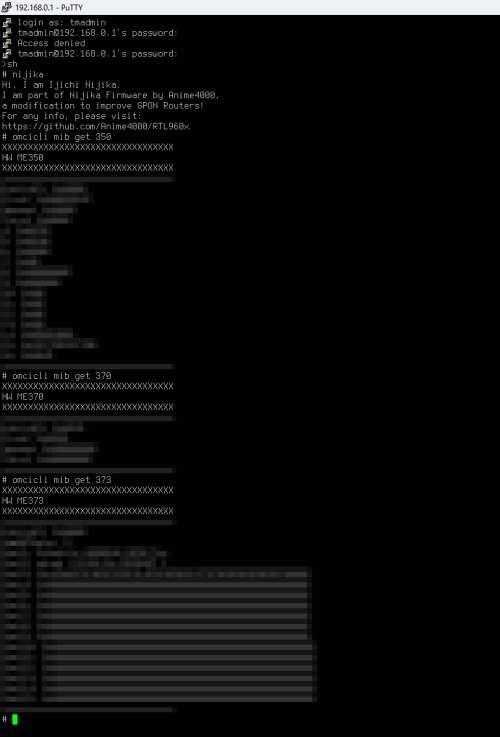
I managed to inject Huawei Proprietary OMCI into D-Link rclxms.gif
user posted image

This post has been edited by Anime4000: May 20 2024, 08:21 PM
failed.hashcheck
post May 21 2024, 02:51 AM

Neighborhood plant pathologist
*******
Senior Member
2,096 posts

Joined: Aug 2009
From: Shithole Klang
Why my May bill still not out? usually my bill cycle is on 19th.

In my dashboard its still showing Apr bill still unpaid although it was already cleared last month.
TongCN
post May 21 2024, 10:05 AM

Look ma, I have lots stars :D
*******
Senior Member
6,716 posts

Joined: Aug 2008
From: Malaysia


QUOTE(failed.hashcheck @ May 21 2024, 02:51 AM)
Why my May bill still not out? usually my bill cycle is on 19th.

In my dashboard its still showing Apr bill still unpaid although it was already cleared last month.
*
Buggy app after revamp

I paid extra last week (sms also notified) also showing my old excess payment since last month sweat.gif


Jjuggler
post May 21 2024, 12:56 PM

Narcissistic Genius
******
Senior Member
1,343 posts

Joined: Dec 2016
QUOTE(TongCN @ May 21 2024, 10:05 AM)
Buggy app after revamp

I paid extra last week (sms also notified) also showing my old excess payment since last month  sweat.gif
*
Agree. My user experience with Unifi app is troublesome. I prefer the design flow architecture of Celcom app. I used their Celcom Home Wireless 300GB before. They unify everything into one single app. I am not sure about maxis. But I love celcom for that. I hate when I need to use two separate app to pay Unifi Air 5G and fibre. So, I used jompay, but now i shift to autopay.
TongCN
post May 21 2024, 01:00 PM

Look ma, I have lots stars :D
*******
Senior Member
6,716 posts

Joined: Aug 2008
From: Malaysia


QUOTE(Jjuggler @ May 21 2024, 12:56 PM)
Agree. My user experience with Unifi app is troublesome. I prefer the design flow architecture of Celcom app. I used their Celcom Home Wireless 300GB before. They unify everything into one single app. I am not sure about maxis. But I love celcom for that. I hate when I need to use two separate app to pay Unifi Air 5G and fibre. So, I used jompay, but now i shift to autopay.
*
I used shopee or other platform, haha

Unifi app basically for me to download statement only

Topic ClosedOptions
 

Change to:
| Lo-Fi Version
0.0222sec    0.47    6 queries    GZIP Disabled
Time is now: 21st December 2025 - 01:57 AM